
HP Chromebook 13 (G1)
Updated on

Note: This product has been discontinued and reached its Chrome OS Auto Update Expiration date in June 2023. It no longer receives security updates. The specifications and review findings below describe the machine as it shipped.
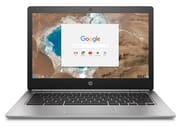
HP launched the Chromebook 13 G1 in May 2016 with a brushed aluminum chassis, a QHD+ display, and fanless cooling, at list prices running from $499 to $1,029. Those materials made it “the closest thing we’ve seen to a Pixel since Google first introduced it,” as NotebookCheck’s Steve Schardein noted in his review. Four processor tiers ran from the Pentium 4405Y to the Core m7-6Y75 inside the same 2.69-pound shell, paired with 4GB, 8GB, or 16GB of RAM.
Pros and Cons
| Pros | Cons |
|---|---|
| Brushed aluminum shell with chamfered edges | Security updates ended in June 2023 |
| 3200×1800 display measured at delta E 3.75 | Glossy finish throws reflections in bright light |
| Fanless in every configuration | 6 to 8.75 hours in reviewer testing against an 11.5-hour rating |
| 2.69 lbs and 0.5 inches thick | Every port on one side of the chassis |
| Two USB-C ports plus USB-A and microSD | 32GB eMMC storage, soldered and not upgradeable |
| Six-stage backlit keyboard | No touchscreen despite Android app support |
Related Videos
HP Chromebook 13 (G1) Comparison Chart
 HP Chromebook 13 (G1) | HP Chromebook 13 (G1) | HP Chromebook 13 (G1) | HP Chromebook 13 (G1) | |
| Price | List Price: $599.00 Amazon Prices: | List Price: $499.00 Amazon Prices: | List Price: $1029.00 Amazon Prices: | List Price: $819.00 Amazon Prices: |
| Model number | W0T00UT#ABA | W0S99UT#ABA | W0T02UT#ABA | W0T01UT#ABA |
| Performance Rating | 3.2 | 2.6 | 5.7 | 4.8 |
| Chromebook Plus | No | No | No | No |
| Processor | Dual-core 0.90 Ghz (max 2.20 Ghz) Intel Core m3-6Y30 Processor | Dual-core 1.50 Ghz Intel Pentium Processor 4405Y | Dual-core 1.20 Ghz (max 3.10 Ghz) Intel Core m7-6Y75 Processor | Dual-core 1.10 Ghz (max 2.80 Ghz) Intel Core m5-6Y57 Processor |
| RAM | 4 GB | 4 GB | 16 GB | 8 GB |
| Internal Storage | 32 GB eMMC | 32 GB eMMC | 32 GB eMMC | 32 GB eMMC |
| Screen Size | 13.3" | 13.3" | 13.3" | 13.3" |
| Screen Resolution | 3200x1800 | 3200x1800 | 3200x1800 | 3200x1800 |
| Screen Type | WLED eDP BrightView | WLED eDP BrightView | WLED eDP BrightView | WLED eDP BrightView |
| Touch Screen | No | No | No | No |
| Stylus / Pen | No Stylus Support | No Stylus Support | No Stylus Support | No Stylus Support |
| Dimensions width x length x thickness | 12.59 x 8.64 x 0.5 inches (319.79 x 219.46 x 12.7 mm) | 12.59 x 8.64 x 0.5 inches (319.79 x 219.46 x 12.7 mm) | 12.59 x 8.64 x 0.5 inches (319.79 x 219.46 x 12.7 mm) | 12.59 x 8.64 x 0.5 inches (319.79 x 219.46 x 12.7 mm) |
| Weight | 2.69 lbs (1.22 kg) | 2.69 lbs (1.22 kg) | 2.69 lbs (1.22 kg) | 2.69 lbs (1.22 kg) |
| Backlit Keyboard | Yes | Yes | Yes | Yes |
| Webcam | TrueVision HD | TrueVision HD | TrueVision HD | TrueVision HD |
| WiFi | Intel Dual Band Wireless-AC 7265 802.11 a/b/g/n/ac (2x2) | Intel Dual Band Wireless-AC 7265 802.11 a/b/g/n/ac (2x2) | Intel Dual Band Wireless-AC 7265 802.11 a/b/g/n/ac (2x2) | Intel Dual Band Wireless-AC 7265 802.11 a/b/g/n/ac (2x2) |
| Bluetooth | Bluetooth 4.2 | Bluetooth 4.2 | Bluetooth 4.2 | Bluetooth 4.2 |
| Ethernet | No | No | No | No |
| Cellular Modem | No | No | No | No |
| HDMI | No HDMI | No HDMI | No HDMI | No HDMI |
| USB Ports | 1 USB 3, 2 USB-C | 1 USB 3, 2 USB-C | 1 USB 3, 2 USB-C | 1 USB 3, 2 USB-C |
| Thunderbolt Ports | No | No | No | No |
| Card Reader | microSD Card Reader | microSD Card Reader | microSD Card Reader | microSD Card Reader |
| Battery | 3 cell, 45 WHr, Lithium-ion | 3 cell, 45 WHr, Lithium-ion | 3 cell, 45 WHr, Lithium-ion | 3 cell, 45 WHr, Lithium-ion |
| Battery Life | 11.5 hours | 11.5 hours | 11.5 hours | 11.5 hours |
| Fanless | Yes | Yes | Yes | Yes |
| Auto Update Expiration Date | June, 2023 | June, 2023 | June, 2023 | June, 2023 |
Related Chromebooks
-
 HP Chromebook 14 G7The HP Chromebook 14 G7 packs a 14-inch anti-glare WLED screen, Wi-Fi 6, a 720p HD webcam, and…
 -
 HP Chromebook 14a (14a-nf series)The HP Chromebook 14a (14a-nf series) spans two tiers of the same chassis: an Amazon-exclusive…
 -
 ASUS Chromebook C403The ASUS Chromebook C403 is a fanless 14-inch education Chromebook with an anti-glare 1366x768…
 -
 ASUS Chromebook CX1 (CX1400)The ASUS Chromebook CX1 (CX1400) is a fanless 14-inch 1920x1080 ChromeOS laptop sold on Celeron…
 -
 Lenovo Flex 5 ChromebookThe Lenovo Flex 5 Chromebook is a 2020 convertible with a 13.3-inch FHD IPS touchscreen, Intel Core…
 -
 Acer Chromebook 314The Acer Chromebook 314 (CB314) is a fanless 14-inch laptop with an Intel Celeron N4000, sold in…
Brushed aluminum that flexes under light pressure
HP went the other way, machining this one from brushed aluminum with diamond-cut chamfered edges, and 9to5Google’s Abner Li observed that “the brushed aluminum and slanted edges contribute to a very sleek look usually not afforded to Chrome OS devices.”
The machine is 0.5 inches thick, weighs 2.69 pounds, and uses a one-finger lid opening. Chrome Unboxed’s Robby Payne noted that despite the aluminum construction, “the chassis is bendable under light pressure.”
A 3200×1800 panel Chrome OS scales back to 1600×900
NotebookCheck measured the 13.3-inch IPS panel at 355.5 cd/m² with a color accuracy delta E of 3.75. Viewing angles held up well enough for presentations and shared viewing, and the pixel density kept text and images sharp. Chrome OS scaling meant the effective working resolution usually settled at 1600×900.
Users who preferred the native resolution found text “comically small,” as Li noted. The glossy finish deepened colors and threw reflections that made outdoor use difficult. No configuration carries a touchscreen.
Four 6th generation chips spanning $499 to $1,029
The Pentium 4405Y build at $499 covered basic tasks. The Core m3-6Y30 at $599 sat in the middle of the range, and the Core m5-6Y57 ($819) and Core m7-6Y75 ($1,029) topped it out. RAM tracked the chip tier: 4GB with the Pentium and the m3, 8GB with the m5, 16GB with the m7, and 32GB of eMMC storage in every build.
In Octane 2.0 testing, 9to5Google measured the Pentium at 1.6x the speed of previous-generation Chromebooks and the Core m5 at 3.0x. Chrome Unboxed measured the Core m5 variant reaching 27,000-29,000 points in Octane, approximately 1,000 points higher than the original Chromebook Pixel LS. The fanless design meant every chip ran silent, though the Core m5 and m7 generated noticeable heat under sustained loads.
Battery results came in hours under HP’s rating
HP rated the machine at 11.5 hours. 9to5Google achieved 8.75 hours with the QHD+ display at 50% brightness, leaving 20% remaining. Chrome Unboxed reported approximately 6 hours, roughly half the endurance of competing models like the Dell Chromebook 13 and Chromebook Pixel LS.
9to5Google noted that Core m5 and m7 models “run noticeably hot,” requiring desk usage or a barrier when used on laps. The Pentium and Core m3 variants stayed cooler.
Two USB-C ports and no HDMI, all on one side
A single USB 3.0 Type-A port covers older peripherals, and the microSD card reader hit 51 MB/s in NotebookCheck’s testing. The two USB 3.1 Gen 1 Type-C ports handle both charging and data.
Every connection sits on one side of the chassis, which limits how cables can be routed around a desk. There is no HDMI output, so an external display needs an adapter or a dock, and HP sold the Elite USB-C Docking Station for that. A wired network connection runs through a USB Ethernet adapter on the USB-A port or through a USB-C dock.
Six-stage keyboard backlighting and an undersized trackpad
Robby Payne praised the “good travel and tactile feedback,” while Li found the keys “mushy with soft click and thin feel.” The keys are full width, and the backlight steps through six brightness stages, which helps in a dim room.
Chrome Unboxed noted “excessive click travel, creating a flimsy feel,” and the surface is small relative to the size of the deck.
Reviewer Insights
NotebookCheck: the sub-$600 builds were the shortlist picks
NotebookCheck awarded the Chromebook 13 G1 Core m5 an 85% rating, praising its combination of “premium materials, meticulous design, a high-res screen, and great performance.” Schardein’s measurements covered display color accuracy, thermal management, and build quality.
The review concluded that “at its $819 price point, it sort of falls into that ‘great, for a Chromebook’ category.” Schardein pointed to the $600-and-below Core m3 and Pentium configurations, which he called “game-changers” that should be on any shortlist. At $819 the machine shared a price band with Windows ultrabooks and the MacBook Air.
Chrome Unboxed put the Core m5 above the Pixel LS
Chrome Unboxed’s review emphasized how HP “set a bit of a new standard for creativity and quality in a Chromebook.” Payne’s Octane numbers put the Core m5 ahead of the original Chromebook Pixel LS with no fan in the chassis. His unit was the $819 configuration.
Payne’s complaints landed on battery life and trackpad quality. He concluded that “though not perfect, the sexy look and feel can almost make you overlook the flaws.”
9to5Google weighed the daily gains against the starting price
Li wrote after living with the machine that “My computing experience has been thoroughly improved, and that speaks to an unaddressed higher-end segment.” He was less certain about what it cost to get there. The “higher starting price definitely changes the ownership calculus,” he wrote, and he questioned whether premium pricing fit Chrome OS’s traditional appeal.
The June 2023 update cutoff rules out daily use
Chrome OS was picking up Android app support around the time this machine shipped, which is why the missing touchscreen came up in reviews. The hardware still runs, but Google stopped issuing security patches in June 2023, so work involving accounts or payments belongs on a supported Chromebook.
For what current models offer against each other, our Chromebook Comparison Chart covers the full range.
Frequently Asked Questions
Is the HP Chromebook 13 G1 still receiving updates?
Updates ended in June 2023, when the machine reached its Chrome OS Auto Update Expiration (AUE) date. Google no longer issues security patches or new features for it, so it is not suited to work where security is a priority.
What processors were available in the Chromebook 13 G1?
HP sold four 6th generation Intel options: the Pentium 4405Y ($499), Core m3-6Y30 ($599), Core m5-6Y57 ($819), and Core m7-6Y75 ($1,029). All four are fanless, and RAM runs 4GB with the Pentium and the m3, 8GB with the m5, and 16GB with the m7.
Does the Chromebook 13 G1 have a touchscreen?
None of the configurations ship with a touchscreen. That stood out because Android app support was announced for Chrome OS shortly after the device launched.
How long does the battery last in real use?
Reviewer results ran between 6 and 8.75 hours against HP’s 11.5-hour rating. Chrome Unboxed reported approximately 6 hours, and 9to5Google reached 8.75 hours with the QHD+ display at 50% brightness.
Can I upgrade the storage or RAM in the HP Chromebook 13 G1?
Neither one is upgradeable. The 32GB eMMC storage and the RAM (4GB, 8GB, or 16GB depending on configuration) are soldered to the motherboard, and a microSD card slot is the only way to add space.
Is the Chromebook 13 G1 fanless?
Every configuration is fanless, so the machine runs silent under any load. 9to5Google noted that the Core m5 and m7 models run noticeably hot under sustained workloads.
What made the Chromebook 13 G1 stand out in 2016?
It paired a brushed aluminum shell, a 3200×1800 display, and Core m processors when most Chromebooks shipped in plastic with lower-resolution screens. NotebookCheck’s Steve Schardein called it the closest thing to a Pixel since Google’s original.