
HP Chromebook 14 (G4)
Updated on

Note: This Chromebook has been discontinued and is no longer available for purchase new. Its Auto Update Expiration date was September 2021, meaning it no longer receives security updates from Google. The information below is preserved for historical reference only.
The HP Chromebook 14 (G4) arrived in late 2015 as an affordable entry point into the Chrome OS ecosystem. Built around Intel’s dual-core Celeron N2840 processor, it offered a 14-inch display and up to 9 hours of battery life at prices ranging from $249 to $279. HP positioned the G4 as a capable machine for web browsing, document editing, and media consumption without the premium pricing of business-focused alternatives. While reviewers praised its lightweight construction and comfortable keyboard, the budget-oriented display drew consistent criticism for washed-out colors and limited brightness.
| Pros | Cons |
|---|---|
| Lightweight design at 1.69kg (3.7 lbs) with 17.8mm profile | Lackluster display with poor contrast ratio (291:1) |
| Comfortable keyboard with good key travel | Limited color accuracy (64.6% sRGB coverage) |
| Long battery life reaching 9+ hours | Performance degrades with many browser tabs |
| Fanless operation for completely silent use | Non-backlit keyboard difficult to use in dim lighting |
| Reliable touchpad with multitouch gesture support | 1366x768 resolution limiting for productivity tasks |
| Affordable pricing under $280 at launch | No USB-C ports, relying on older USB-A connectivity |
HP Chromebook 14 (G4) Comparison Chart
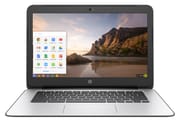 HP Chromebook 14 (G4) | HP Chromebook 14 (G4) | HP Chromebook 14 (G4) | HP Chromebook 14 (G4) | |
| Price | List Price: $249.99 Amazon Prices: | List Price: $279.99 Amazon Prices: | List Price: $249.99 Amazon Prices: | List Price: $279.99 Amazon Prices: |
| Model number | 14-ak010nr | 14-ak050nr | 14-ak040nr | 14-ak060nr |
| Performance Rating | 1.9 | 3.0 | 2.4 | 3.0 |
| Chromebook Plus | No | No | No | No |
| Processor | Dual-core 2.16 Ghz (max 2.58 Ghz) Intel Celeron N2840 | Quad-core 1.83 Ghz (max 2.25 Ghz) Intel Celeron Processor N2940 | Dual-core 2.16 Ghz (max 2.58 Ghz) Intel Celeron N2840 | Quad-core 1.83 Ghz (max 2.25 Ghz) Intel Celeron Processor N2940 |
| RAM | 2 GB | 4 GB | 4 GB | 4 GB |
| Internal Storage | 16 GB eMMC | 16 GB eMMC | 16 GB eMMC | 16 GB eMMC |
| Screen Size | 14" | 14" | 14" | 14" |
| Screen Resolution | 1366x768 | 1366x768 | 1366x768 | 1366x768 |
| Screen Type | LED-backlit | LED-backlit | LED-backlit | LED-backlit |
| Touch Screen | No | No | No | No |
| Stylus / Pen | No Stylus Support | No Stylus Support | No Stylus Support | No Stylus Support |
| Dimensions width x length x thickness | 13.54 x 9.45 x 0.7 inches (343.92 x 240.03 x 17.78 mm) | 13.54 x 9.45 x 0.7 inches (343.92 x 240.03 x 17.78 mm) | 13.54 x 9.45 x 0.7 inches (343.92 x 240.03 x 17.78 mm) | 13.54 x 9.45 x 0.7 inches (343.92 x 240.03 x 17.78 mm) |
| Weight | 3.7 lbs (1.68 kg) | 3.7 lbs (1.68 kg) | 3.7 lbs (1.68 kg) | 3.7 lbs (1.68 kg) |
| Backlit Keyboard | No | No | No | No |
| Webcam | TrueVision HD | TrueVision HD | TrueVision HD | TrueVision HD |
| WiFi | 802.11 a/b/g/n/ac (2x2) | 802.11 a/b/g/n/ac (2x2) | 802.11 a/b/g/n/ac (2x2) | 802.11 a/b/g/n/ac (2x2) |
| Bluetooth | Bluetooth 4.0 | Bluetooth 4.0 | Bluetooth 4.0 | Bluetooth 4.0 |
| Ethernet | No | No | No | No |
| Cellular Modem | No | No | No | No |
| HDMI | Full-Size HDMI | Full-Size HDMI | Full-Size HDMI | Full-Size HDMI |
| USB Ports | 2 USB 2.0, 1 USB 3 | 2 USB 2.0, 1 USB 3 | 2 USB 2.0, 1 USB 3 | 2 USB 2.0, 1 USB 3 |
| Thunderbolt Ports | No | No | No | No |
| Card Reader | microSD Card Reader | microSD Card Reader | microSD Card Reader | microSD Card Reader |
| Battery | 3 cell, 37 WHr, Lithium-ion | 3 cell, 37 WHr, Lithium-ion | 3 cell, 37 WHr, Lithium-ion | 3 cell, 37 WHr, Lithium-ion |
| Battery Life | 9.0 hours | 9.0 hours | 9.0 hours | 9.0 hours |
| Fanless | Yes | Yes | Yes | Yes |
| Auto Update Expiration Date | September, 2021 | September, 2021 | September, 2021 | September, 2021 |
Related Chromebooks
-
 HP Chromebook 14 (AMD)The HP Chromebook 14 (AMD) is a fanless 14-inch Chromebook built on the AMD A4-9120C APU with…
 -
 HP Chromebook 14 G6The HP Chromebook 14 G6 is an education and business model with a Celeron N4020, 4GB or 8GB of RAM,…
 -
 ASUS Chromebook C423The ASUS Chromebook C423 pairs a 14-inch 1366x768 display with a dual-core Celeron N3350, 4GB of…
 -
 ASUS Chromebook C403The ASUS Chromebook C403 is a fanless 14-inch education Chromebook with an anti-glare 1366x768…
 -
 Acer Chromebook 514The Acer Chromebook 514 (CB514-1H and 1HT) is a fanless 14-inch ChromeOS laptop sold with Celeron…
 -
 Acer Gateway Chromebook 314The Acer Gateway Chromebook 314 is a 14-inch ChromeOS laptop on Acer's Chromebook 314 chassis with…
Design and Build Quality
The HP Chromebook 14 G4 measured 13.54 x 9.45 x 0.7 inches and weighed 3.7 pounds, making it reasonably portable for a 14-inch device. The plastic chassis kept costs down while maintaining sufficient rigidity for everyday use. Expert Reviews noted the G4 felt “well-constructed despite the plastic build,” though the material choice clearly communicated its budget positioning.
HP included its TrueVision HD webcam above the display, providing adequate quality for video calls during an era when Chrome OS devices frequently compromised on camera hardware. The webcam’s placement centered above the screen delivered natural eye contact angles during video conferencing. The matte display finish helped reduce reflections in various lighting conditions, a practical choice for classroom and office environments.
The fanless design represented one of the G4’s genuine advantages over competitors with active cooling. With no moving parts for cooling, the system operated in complete silence regardless of workload. This made the Chromebook suitable for quiet environments like libraries and testing centers where fan noise would prove distracting. The passively cooled Celeron N2840 processor ran within thermal limits without requiring airflow management.
Keyboard and Trackpad
Keyboard quality emerged as a strength across reviews despite the budget positioning. Expert Reviews described “surprisingly comfortable typing” with adequate key travel for extended writing sessions. The keys delivered satisfying tactile feedback that belied the entry-level pricing, making document creation and email composition pleasant tasks.
However, the lack of keyboard backlighting limited usability in dim environments. Unlike premium Chromebooks that offered illuminated keys, the G4 required ambient lighting for comfortable typing. The thin Enter key also drew criticism, with reviewers noting it could “be tricky at speed” when touch typing. These compromises reflected the sub-$300 price point rather than design oversights.
The trackpad handled Chrome OS gestures reliably, supporting two-finger scrolling and multitouch navigation without issue. Expert Reviews praised its “good multitouch support” though noted cursor tracking occasionally exhibited slight imprecision during rapid movements.
Display Quality
The 14.1-inch LED-backlit display delivered 1366x768 resolution, standard for budget Chromebooks of its era. Expert Reviews conducted detailed testing that revealed significant limitations: a contrast ratio of just 291:1, washed-out blacks measuring 0.82cd/m², and color gamut coverage of only 64.6% sRGB.
These specifications translated to a viewing experience adequate for web browsing and document work but unsuitable for photo editing or color-sensitive tasks. The matte coating did help with glare reduction, making outdoor use somewhat practical when brightness permitted. For users primarily focused on productivity applications, email, and web browsing, the display proved functional if unexciting.
The higher-end 14-ak050nr variant offered a 1920x1080 IPS panel with 178-degree viewing angles, representing a substantial upgrade for users willing to spend approximately $30 more. This configuration addressed the display concerns while maintaining the same processor and memory specifications.
Performance
The Intel Celeron N2840 processor delivered processing power appropriate for Chrome OS’s lightweight requirements. Expert Reviews found “web browsing feels responsive and reasonably quick,” with the dual-core chip handling typical workflows without visible lag. The processor’s base clock of 2.16GHz could boost to 2.58GHz when thermal headroom permitted, providing brief performance increases for bursty workloads.
However, limitations became apparent under heavier loads. Expert Reviews noted “performance degrades when opening numerous tabs,” a common constraint for entry-level Chromebooks of this generation. Users who maintained disciplined tab management experienced smooth performance, while those inclined to keep dozens of pages open encountered slowdowns.
The 14-ak050nr variant featured an Intel Celeron N2940 quad-core processor instead, boosting multitasking capability. Testing showed Passmark scores around 1,784, and performance exceeded contemporary Intel Atom processors. The quad-core chip handled simultaneous Netflix, YouTube, and web browsing more gracefully than the dual-core alternative.
Memory configurations ranged from 2GB to 4GB DDR3L, with the 4GB variants strongly recommended for Chrome OS’s memory-hungry nature. The 16GB eMMC storage provided modest local capacity supplemented by Google’s 100GB cloud storage offering included for two years.
Battery Life and Connectivity
Battery performance aligned closely with HP’s advertised 9-hour rating. Expert Reviews measured 9 hours 14 minutes of runtime under typical mixed usage, confirming the G4 could handle full school or work days without requiring charging. The 37 WHr lithium-ion battery paired with the efficient Celeron processor and 1366x768 display to deliver consistent all-day endurance.
Connectivity options reflected the pre-USB-C era: one USB 3.0 port for faster data transfer, two USB 2.0 ports for peripherals, full-size HDMI output for external displays, and a microSD card reader for storage expansion. There was no built-in Ethernet port, though the USB 3.0 port could accommodate a USB Ethernet adapter for wired networking. 802.11ac Wi-Fi with 2x2 antenna configuration provided solid wireless performance for its time, while Bluetooth 4.0 enabled wireless peripheral connections.
The absence of USB-C meant no single-cable docking solutions or universal charging compatibility. Users needed the included proprietary power adapter rather than a phone charger for power delivery. This limitation, common for 2015-era devices, became increasingly inconvenient as USB-C emerged as the standard for modern Chromebooks.
Reviewer Insights
Expert Reviews
Richard Easton’s 2016 review awarded the G4 four out of five stars, calling it “great value for what you’re getting in terms of build quality and general performance, particularly the battery life.” The detailed technical testing revealed specific display shortcomings while acknowledging the keyboard and trackpad exceeded expectations for the price point. Expert Reviews concluded it was “definitely one of the best 14in Chromebooks” available at the time.
Electronics Critique
The December 2015 review of the 14-ak050nr variant highlighted the quad-core N2940’s smooth streaming performance with Netflix, Hulu, and YouTube. The reviewer praised the “fast Chrome OS performance without complex setup” and fanless operation for quiet environments. Criticism focused on the reliance on cloud storage given the limited 16GB local capacity and the absence of Skype support in favor of Google Hangouts.
Who Should Consider This Chromebook
With its Auto Update Expiration date having passed in September 2021, the HP Chromebook 14 G4 should only be considered by users with specific legacy requirements or those seeking inexpensive hardware for offline-capable tasks that don’t require current security updates. Schools and organizations previously using G4 units have largely migrated to newer devices with extended support windows.
For users seeking a similar form factor with current Chrome OS support, HP’s modern Chromebook 14 lineup offers updated processors, USB-C connectivity, and longer update timelines. The HP Chromebook 14a represents a spiritual successor with contemporary specifications and support extending well into the future.
Collectors or enthusiasts interested in Chrome OS history may find value in examining the G4’s design language and hardware choices that characterized the mid-2010s transition toward mainstream Chromebook adoption. The device represented HP’s effort to balance affordability with usability during a formative period for the Chrome OS ecosystem.
For anyone comparing current options side by side, our Chromebook Comparison Chart lets you filter and sort by specs, price, and AUE date to find the right fit.
Frequently Asked Questions
Q: Is the HP Chromebook 14 G4 still safe to use?
A: The HP Chromebook 14 G4 reached its Auto Update Expiration (AUE) date in September 2021 and no longer receives security updates from Google. Using it for sensitive activities like banking or storing personal data is not recommended. The device may still function for basic offline tasks, but connecting it to the internet poses increasing security risks.
Q: What is the difference between the N2840 and N2940 processor variants?
A: The Intel Celeron N2840 is a dual-core processor running at 2.16GHz (boosting to 2.58GHz), found in the base 14-ak010nr and 14-ak040nr models. The Celeron N2940 is a quad-core processor at 1.83GHz (boosting to 2.25GHz), available in the 14-ak050nr and 14-ak060nr variants. The quad-core option handles multitasking better but has a lower base clock speed.
Q: Can I upgrade the RAM or storage in the HP Chromebook 14 G4?
A: The HP Chromebook 14 G4 uses soldered RAM and eMMC storage that cannot be upgraded after purchase. Users should select the 4GB RAM configuration when possible, as the 2GB variant struggles with modern web browsing demands. The microSD card slot provides the only storage expansion option.
Q: Does the HP Chromebook 14 G4 have a touchscreen?
A: No, none of the HP Chromebook 14 G4 variants include touchscreen functionality. The device was designed for traditional laptop use with keyboard and trackpad input only.
Q: How long does the battery last on the HP Chromebook 14 G4?
A: Independent testing confirmed approximately 9 hours of battery life under mixed usage conditions, closely matching HP’s advertised claims. The 37 WHr battery combined with the efficient Celeron processor enabled genuine all-day runtime for students and professionals.
Q: What display options were available for the HP Chromebook 14 G4?
A: The base models featured a 14-inch 1366x768 LED-backlit display with limited color accuracy. The 14-ak050nr variant offered an upgraded 1920x1080 Full HD IPS panel with 178-degree viewing angles, representing a significant improvement for users prioritizing visual quality.