
Lenovo ThinkPad C13 Yoga Chromebook
Updated on

Note: The Lenovo ThinkPad C13 Yoga Chromebook is no longer sold new.
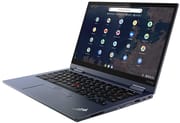
The ThinkPad C13 Yoga was an enterprise convertible that put ThinkPad hardware under Chrome OS. The AMD Ryzen 7 3700C at the top of the range runs four cores and eight threads behind a 13.3-inch touchscreen. The all-aluminum chassis carries MIL-SPEC 810G certification, and the 360-degree hinge moves the screen into tablet, tent, and laptop positions.
The garaged USI stylus stayed charged inside the chassis instead of needing its own pocket and charger. Security hardware ran to a fingerprint reader and a webcam privacy shutter. The keyboard and the TrackPoint pointing stick came straight from Lenovo’s business laptops, which gave longtime ThinkPad users a familiar way to type and steer the cursor without reaching for the touchpad. Prices sat at the premium end of the Chromebook market.
Related Videos
Lenovo ThinkPad C13 Yoga Chromebook Comparison Chart
 Lenovo ThinkPad C13 Yoga Chromebook | Lenovo ThinkPad C13 Yoga Chromebook | |
| Price | List Price: $949.00 Amazon Prices: | List Price: $819.00 Amazon Prices: |
| Model number | 20UX001TUS | 20UX001YUS |
| Performance Rating | 6.8 | 3.5 |
| Chromebook Plus | No | No |
| Processor | Quad-core 2.30 Ghz (max 4.00 Ghz) AMD Ryzen 7 3700C | Dual-core 2.60 Ghz (max 3.50 Ghz) AMD Ryzen 3 3250C Processor |
| RAM | 16 GB | 4 GB |
| Internal Storage | 256 GB SSD (upgradable) | 128 GB SSD (upgradable) |
| Screen Size | 13.3" | 13.3" |
| Screen Resolution | 1920x1080 | 1920x1080 |
| Screen Type | IPS | IPS |
| Touch Screen | Yes | Yes |
| Stylus / Pen | Supported | Supported |
| Dimensions width x length x thickness | 12.11 x 8.35 x 0.71 inches (307.59 x 212.09 x 18.03 mm) | 12.11 x 8.35 x 0.71 inches (307.59 x 212.09 x 18.03 mm) |
| Weight | 3.19 lbs (1.45 kg) | 3.19 lbs (1.45 kg) |
| Backlit Keyboard | Yes | Yes |
| Webcam | 720p HD, 5PM World-facing | 720p HD, 5PM World-facing |
| WiFi | 802.11AC (2 x 2) | 802.11AC (2 x 2) |
| Bluetooth | Bluetooth 5.0 | Bluetooth 5.0 |
| Ethernet | No | No |
| Cellular Modem | No | No |
| HDMI | Full-Size HDMI | Full-Size HDMI |
| USB Ports | 2 USB 3, 2 USB-C (with power delivery and DisplayPort) | 2 USB 3, 2 USB-C (with power delivery and DisplayPort) |
| Thunderbolt Ports | No | No |
| Card Reader | microSD Card Reader | microSD Card Reader |
| Battery | 4 cell, 51 WHr, Li-Pol | 4 cell, 51 WHr, Li-Pol |
| Battery Life | 10.0 hours | 10.0 hours |
| Fanless | No | No |
| Auto Update Expiration Date | June, 2031 | June, 2031 |
Related Chromebooks
-
 Lenovo IdeaPad Flex 5iThe Lenovo IdeaPad Flex 5i Chromebook is a 13.3-inch convertible with an 11th-gen Intel Core…
 -
 Lenovo Flex 5 ChromebookThe Lenovo Flex 5 Chromebook is a 2020 convertible with a 13.3-inch FHD IPS touchscreen, Intel Core…
 -
 Acer Chromebook Spin 713The Acer Chromebook Spin 713 boasts a vivid 13.5-inch 2256x1504 IPS touch display, versatile 2-in-1…
 -
 Acer Chromebook Spin 314The Acer Chromebook Spin 314 is a budget 14-inch convertible Chromebook with a 360-degree hinge, a…
 -
 ASUS Chromebook Flip CX5 (CX5400)The ASUS Chromebook Flip CX5 (CX5400) is a fanless 14-inch aluminum convertible sold with an Intel…
 -
 Samsung Galaxy Chromebook 2The Samsung Galaxy Chromebook 2 is a 13.3-inch 2-in-1 with a vivid 1080p QLED touchscreen, an…
Ryzen speed in a MIL-SPEC aluminum convertible
At 3.2 pounds and 0.71 inches thick, it was light enough to carry through a workday. The chassis is Abyss Blue aluminum with subtle chrome flecking. The MIL-SPEC 810G certification covers drops, vibration, and temperature extremes.
The 13.3-inch Full HD IPS touchscreen puts out 300 nits with accurate colors for productivity work. TechRadar noted the display was colorful enough for standard office tasks, though not up to creative work. Touch response is smooth with a fingertip or the included USI pen, and the 360-degree hinge holds the screen in tent mode for video calls or flat in tablet mode for note-taking with the stylus.
The Ryzen 5 3500C variant scored 37,916 in Octane 2.0 benchmarks and 1,060ms in Kraken JavaScript tests. The higher-end Ryzen 7 3700C configuration delivered better results again under demanding multitasking. Chrome Unboxed found the device handled heavy workloads with ease, maintaining smooth performance across multiple windows and tabs, including demanding tasks like music production through web-based DAWs. Digital Trends noted some slowdown when running 10-15 windows simultaneously across multiple virtual desks.
Two USB-C ports with Power Delivery and DisplayPort Alt Mode make single-cable docking possible, and two USB-A 3.0 ports take legacy peripherals without an adapter. The full-size HDMI port drives an external display directly, and the microSD card reader adds storage. Wireless duty falls to WiFi 5 (802.11ac) and Bluetooth 5.0. The upgradeable M.2 SSD is a rarity on a Chromebook and lets an owner add capacity after purchase.
The backlit keyboard uses full-size keys with the travel and tactile feedback ThinkPad users expect, which keeps long typing sessions comfortable. Large uppercase letters on the keycaps stay readable in dim rooms, a useful detail for anyone working in a badly lit room. The TrackPoint pointing stick sits between the G, H, and B keys and moves the cursor precisely without taking hands off the home row. Some reviewers called the touchpad small for a machine at this price, though its tracking and Chrome OS gesture support work reliably.
Lenovo advertised up to 12 hours of runtime, and real-world testing by multiple reviewers landed at 7-9 hours depending on usage patterns and display settings. TechRadar achieved 9 hours and 1 minute in their standardized tests, while Laptop Mag recorded 7.5 hours and Digital Trends measured 7.25 hours during web browsing. The 51 WHr battery fast-charges over either USB-C port, which softens the gap for anyone working near an outlet, though a long travel day still means packing the charger.
The speakers are tinny and thin on bass, adequate for video calls and system notifications and not much else. Anyone who planned to watch video or listen to music needed headphones or external speakers. The 3.5mm combo jack handles wired sets, and Bluetooth 5.0 covers wireless headphones and speakers.
The fingerprint reader unlocks the machine without a password, and the webcam privacy shutter physically blocks the camera. A Trusted Platform Module holds the encryption keys for Chrome OS secure boot. The enterprise variant added management capabilities for IT administrators, which met the requirements of organizations with strict compliance rules.
Reviewer Insights
TechRadar’s Perspective
TechRadar rated the ThinkPad C13 Yoga 4.5 out of 5 stars, calling it “pricey, but nearly perfect.” John Loeffler praised the AMD Ryzen processor’s capabilities, writing that “with the new AMD 3000C-series CPUs, the Lenovo ThinkPad C13 Yoga Chromebook is definitely as powerful a Chromebook as you’re going to find.” The review highlighted the integrated stylus storage as a practical feature that eliminated the common problem of lost or uncharged pens. Battery life fell short of Lenovo’s 12-hour claim, achieving 9 hours and 1 minute in testing.
Android Central’s Perspective
Android Central awarded the device 4.5 out of 5 stars with a verdict of “basically perfect.” Ara Wagoner praised the premium construction, noting that “this Chromebook feels substantial in hand. You certainly won’t feel out of place bringing this laptop to a professional meeting or engagement.” The review particularly highlighted the keyboard, calling it “the easiest to read Chromebook keyboard on the market” thanks to large uppercase letters that improved visibility in low-light conditions. The classic TrackPoint was appreciated for providing faster navigation through documents and spreadsheets.
Laptop Mag’s Perspective
Laptop Mag gave the ThinkPad C13 Yoga 4 out of 5 stars, describing it as “a sturdy but pricey enterprise notebook.” Mark Anthony Ramirez found the keyboard excellent with “just the right amount of travel” and noted that “keys are incredibly quiet as well, making this laptop an excellent office companion.” The review documented Geekbench 5 scores of 907 single-core and 2,739 multi-core with the Ryzen 5 Pro 3500C processor. Battery life testing showed 7.5 hours of real-world use, significantly less than the advertised 12 hours.
Chrome Unboxed’s Perspective
In a 12-minute video review, Chrome Unboxed criticized the speakers as poor quality and noted the trackpad felt small for the device’s premium positioning. Robby Payne still highlighted the extensive port selection as a major advantage for enterprise users who needed to connect various peripherals without dongles, and the garaged stylus design received particular praise as a thoughtful solution to pen storage. The channel recommended the device for business users willing to accept these tradeoffs.
Digital Trends’ Perspective
Digital Trends scored the device 7 out of 10, concluding it was “a solid Chromebook for work, but fails to pass the test for the average person.” Mark Coppock emphasized the performance, writing that “the biggest appeal of the ThinkPad C13 Yoga Chromebook is definitely in its performance. The new AMD Ryzen 5 3500C impressed during benchmark tests.” Battery life testing showed 7.25 hours in web browsing, which the reviewer noted was about 40 minutes less than competing enterprise Chromebooks like the Dell Latitude 7410 Chromebook.
Lon.TV’s Perspective
Lon Seidman tested the Ryzen 3 3250C build with 8GB of soldered RAM and a replaceable 128GB SSD, starting around $585. He got about eight or nine hours doing the basics, measured the 1080p panel at roughly 300 nits, and recorded a Speedometer 2.0 score of 88.5. He liked the ThinkPad keyboard with its single-color backlight, the TrackPoint, and the fingerprint reader, but called the speakers “very tinny.” The fan stays quiet, though it comes on whenever the chip is stressed, and Netflix played only in standard definition because of the Widevine L3 DRM level.
A durable work convertible with updates through June 2031
Lenovo shipped two configurations: a 16GB model with a 256GB SSD, and a 4GB model with 128GB. Storage is the one part an owner can change after the fact, through the M.2 slot. Anyone picking one up secondhand should plan on 7-9 hours away from a charger and budget for headphones or external speakers.
The MIL-SPEC certified aluminum chassis withstands the rigors of business travel, and the port selection minimizes the need for adapters. The fingerprint reader and the webcam privacy shutter cover the security side.
Our Chromebook Comparison Chart sorts and filters current models by specs and features. The Lenovo Chromebook Plus 2-in-1 14 offers a similar convertible form factor with modern Chromebook Plus features. Buyers who need the same durability and security hardware should look at current ThinkPad Chromebook offerings or HP Elite Chromebook Enterprise devices.
Official Chrome OS support runs until June 2031, so a unit bought during the production run keeps receiving security updates. The Ryzen processor and the upgradeable SSD mean a C13 Yoga still handles everyday web work as a daily driver.