
Samsung Galaxy Chromebook 2
Updated on

The Samsung Galaxy Chromebook 2 is a 13.3-inch 2-in-1 Chromebook with an aluminum build and much-improved battery life over its predecessor. It comes in two configurations, starting at $550, and fits among budget laptops and student Chromebooks. With ChromeOS support through June 2030, it has years of use ahead.
| Pros | Cons |
|---|---|
| First Chromebook with QLED display delivering 118% sRGB color gamut (Tom’s Guide testing) | Shallow keyboard travel may not suit heavy typists (Chrome Unboxed) |
| Fiesta Red and Mercury Grey aluminum design | No fingerprint reader or privacy shutter for webcam |
| Significantly improved battery life at 8-12 hours (Android Authority tested 12.8 hours) | eMMC storage slower than SSD alternatives |
| Lightweight at 2.7 pounds with premium feel | Base Celeron model has limited multitasking capability |
| Wi-Fi 6 and Bluetooth 5.0 for fast connectivity | No USB-A ports; USB-C only with adapters needed |
| USI stylus compatible for note-taking and drawing | Stylus not included despite predecessor having built-in S Pen |
Related Videos
Samsung Galaxy Chromebook 2 Comparison Chart
 Samsung Galaxy Chromebook 2 |  Samsung Galaxy Chromebook 2 | Samsung Galaxy Chromebook 2 | Samsung Galaxy Chromebook 2 | |
| Price | List Price: $699.99 Amazon Prices: Loading prices... | List Price: $549.00 Amazon Prices: | List Price: $699.00 Amazon Prices: | List Price: $549.00 Amazon Prices: |
| Model number | XE530QDA-KB1US | XE530QDA-KA2US | XE530QDA-KA1US | XE530QDA-KB2US |
| Performance Rating | 4.6 | 2.6 | 4.6 | 2.6 |
| Chromebook Plus | No | No | No | No |
| Processor | Dual-core 2.10 Ghz (max 4.10 Ghz) Intel Core i3-10110U Processor | Dual-core 1.90 Ghz Intel Celeron Processor 5205U | Dual-core 2.10 Ghz (max 4.10 Ghz) Intel Core i3-10110U Processor | Dual-core 1.90 Ghz Intel Celeron Processor 5205U |
| RAM | 8 GB | 4 GB | 8 GB | 4 GB |
| Internal Storage | 128 GB eMMC | 64 GB eMMC | 128 GB eMMC | 64 GB eMMC |
| Screen Size | 13.3" | 13.3" | 13.3" | 13.3" |
| Screen Resolution | 1920x1080 | 1920x1080 | 1920x1080 | 1920x1080 |
| Screen Type | FHD QLED | FHD QLED | FHD QLED | FHD QLED |
| Touch Screen | Yes | Yes | Yes | Yes |
| Stylus / Pen | Supported | Supported | Supported | Supported |
| Dimensions width x length x thickness | 12 x 8 x 0.55 inches (304.8 x 203.2 x 13.97 mm) | 12 x 8 x 0.55 inches (304.8 x 203.2 x 13.97 mm) | 12 x 8 x 0.55 inches (304.8 x 203.2 x 13.97 mm) | 12 x 8 x 0.55 inches (304.8 x 203.2 x 13.97 mm) |
| Weight | 2.71 lbs (1.23 kg) | 2.71 lbs (1.23 kg) | 2.71 lbs (1.23 kg) | 2.71 lbs (1.23 kg) |
| Backlit Keyboard | Yes | Yes | Yes | Yes |
| Webcam | 1MP | 1MP | 1MP | 1MP |
| WiFi | Wi-Fi 6 (Gig+), 802.11ax 2x2 | Wi-Fi 6 (Gig+), 802.11ax 2x2 | Wi-Fi 6 (Gig+), 802.11ax 2x2 | Wi-Fi 6 (Gig+), 802.11ax 2x2 |
| Bluetooth | Bluetooth 5.0 | Bluetooth 5.0 | Bluetooth 5.0 | Bluetooth 5.0 |
| Ethernet | No | No | No | No |
| Cellular Modem | No | No | No | No |
| HDMI | No HDMI | No HDMI | No HDMI | No HDMI |
| USB Ports | 2 USB-C (4K display out with optional adapter, charging) | 2 USB-C (4K display out with optional adapter, charging) | 2 USB-C (4K display out with optional adapter, charging) | 2 USB-C (4K display out with optional adapter, charging) |
| Thunderbolt Ports | No | No | No | No |
| Card Reader | microSD Card Reader | microSD Card Reader | microSD Card Reader | microSD Card Reader |
| Battery | 4 cell, 5920mAh, Lithium-ion | 4 cell, 5920mAh, Lithium-ion | 4 cell, 5920mAh, Lithium-ion | 4 cell, 5920mAh, Lithium-ion |
| Battery Life | 13.0 hours | 13.0 hours | 13.0 hours | 13.0 hours |
| Fanless | No | No | No | No |
| Auto Update Expiration Date | June, 2030 | June, 2030 | June, 2030 | June, 2030 |
Related Chromebooks
-
 Acer Chromebook Spin 513The Acer Chromebook Spin 513 is a fanless 13.3-inch convertible Chromebook with a Qualcomm…
 -
 Samsung Galaxy Chromebook Go 14"The Samsung Galaxy Chromebook Go 14 is a budget 14-inch Chromebook with an Intel Celeron N4500, a…
 -
 HP Chromebook x360 14aThe HP Chromebook x360 14a is a 14-inch convertible Chromebook with an Intel Celeron N4020, a…
 -
 HP Chromebook x360 14bThe HP Chromebook x360 14b is a 14-inch convertible Chromebook with an Intel Celeron N4000, 4GB of…
 -
 Samsung Chromebook 4The Samsung Chromebook 4 is an 11.6-inch Celeron N4000 or N4020 Chromebook with 4GB of RAM, a…
 -
 Lenovo IdeaPad Flex 5iThe Lenovo IdeaPad Flex 5i Chromebook is a 13.3-inch convertible with an 11th-gen Intel Core…
Detailed Insights into the Samsung Galaxy Chromebook 2

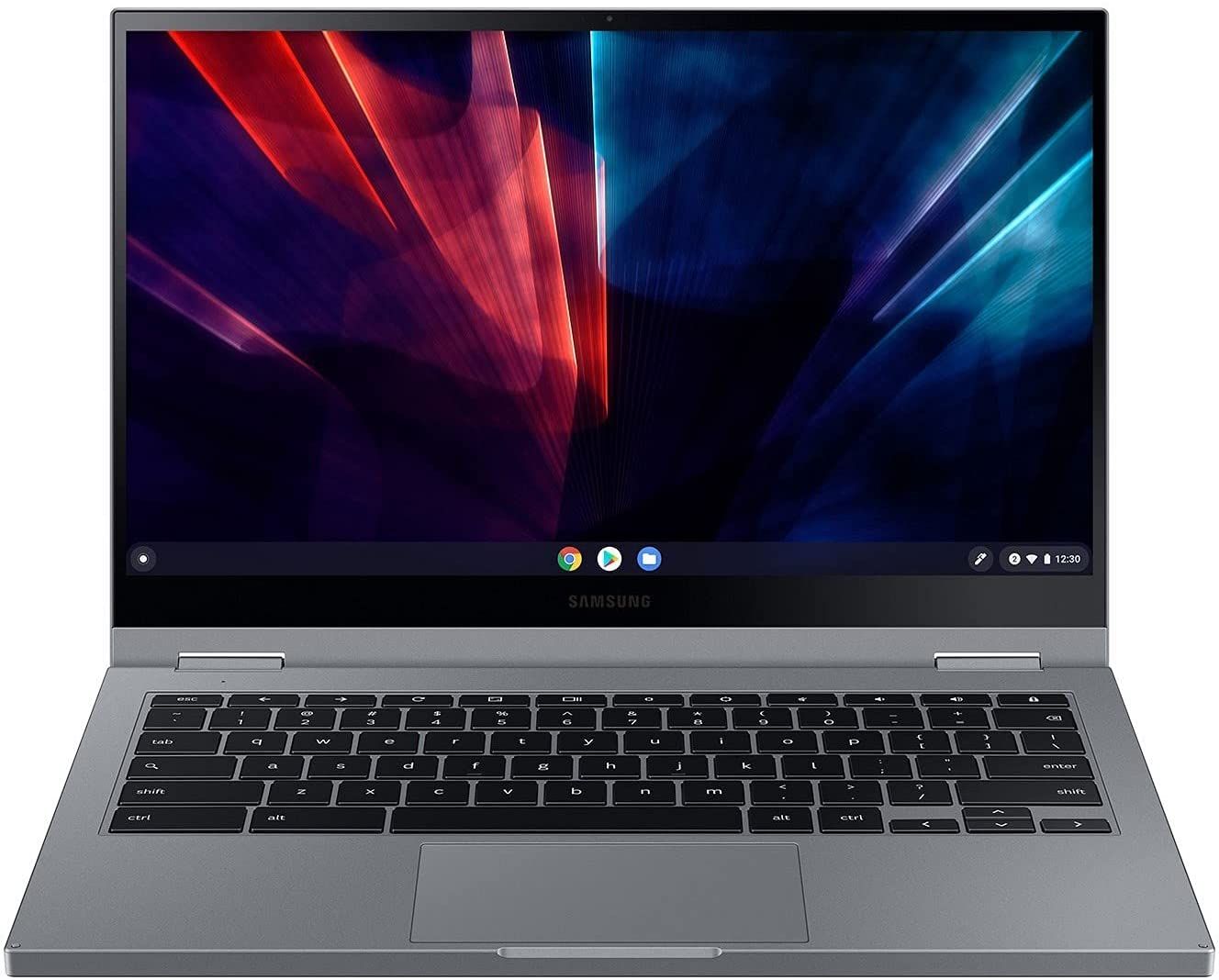
The Galaxy Chromebook 2 represents Samsung’s course correction after the original Galaxy Chromebook, which had premium specs but poor battery life. This sequel swaps the 4K AMOLED panel for a more efficient 1080p QLED display while keeping the strong visual appeal. The 13.3-inch touchscreen delivers rich, vibrant colors that outperform typical Chromebook displays, with Android Authority noting it “looks more high-end than it really is.”
Available in eye-catching Fiesta Red and understated Mercury Grey, the aluminum-clad chassis weighs just 2.7 pounds and measures 0.55 inches thin. The convertible hinge allows the device to be used in laptop, tent, stand, and tablet modes, though reviewers note it doesn’t fold completely flat like some 2-in-1 competitors. Build quality is generally praised, though Chrome Unboxed pointed out some chassis flex and a plastic palm rest that feels out of place on a $699 device.
Two configurations target different users: the base model with Intel Celeron 5205U, 4GB RAM, and 64GB eMMC suits light web browsing and document work, while the Core i3-10110U model with 8GB RAM and 128GB storage handles more demanding tasks. Performance benchmarks show Geekbench 5 scores of 1,003 single-core and 2,179 multi-core on the Core i3 variant. Both models include Wi-Fi 6 for fast wireless connectivity, Bluetooth 5.0, two USB-C ports (one on each side), a microSD card reader, and a headphone jack.
Reviewer Insights on the Samsung Galaxy Chromebook 2

Android Authority’s Perspective
Android Authority awarded the Galaxy Chromebook 2 an 8/10 score, praising how “Samsung managed to assemble an attractive Chromebook that exceeds expectations for this class.” Their testing revealed battery life averaging 12.8 hours over five days of real-world use. The review highlighted the QLED display’s visual appeal and the device’s solid performance for everyday computing needs. Their main critiques focused on the limited port selection and keyboard travel that may not suit everyone’s preferences. In their video review, Android Authority framed the Chromebook 2 as Samsung listening to feedback: it swapped the original’s battery-draining 4K OLED for a still-vivid QLED FHD panel and a lower price, at the cost of the built-in stylus and the secondary keyboard-deck camera.
Chrome Unboxed’s Perspective
Chrome Unboxed offered a more critical assessment, expressing disappointment with the price-to-value ratio. Reviewer Robby Payne noted, “For the $699 Samsung is asking for this Chromebook, I expect quite a bit.” While praising the 1080p QLED display (400 nits) and good thermal management, the review criticized the plastic palm rest, chassis flex, keyboard typing accuracy issues, and the removal of premium features from the original like the fingerprint scanner and included stylus. The verdict was “I really wanted to love this Chromebook and I just don’t.”
Tom’s Guide’s Perspective
Tom’s Guide gave the Galaxy Chromebook 2 a 4 out of 5 star rating as a meaningful step up from the original. Their color accuracy testing showed the screen delivers 118.4% of the sRGB color spectrum, surpassing the M1 MacBook Air (114.3%) and Pixelbook Go (108%). Average brightness measured at 390 nits, an improvement over the original’s 357 nits. Battery testing yielded 7 hours 50 minutes of web surfing, and the review praised the audio quality alongside the display.
Across these reviews, the QLED display and improved battery life are the consistent strengths, while the keyboard feel and the premium features dropped from the original divide opinion. The Core i3 model with 8GB RAM is consistently recommended over the base Celeron configuration for a better overall experience.
Customer Reviews of the Samsung Galaxy Chromebook 2
Across 44 ratings on Amazon, the Samsung Galaxy Chromebook 2 averages 4.3 stars, but that number hides a real split: 68% of raters gave it five stars while 15% landed at one or two stars. On the positive side, owners liked it as a compact daily machine. Carl Robert Coe, a verified buyer, wrote “It’s great so far” and was surprised by the camera: “I almost didn’t order because the specs indicate it doesn’t have a webcam. But it does, and it’s awesome.” A verified buyer named Jake used it for work and called it “Perfect for work or school,” with one caveat about picking your primary Google account carefully at setup, since he could not change it afterward.
The negative reviews cluster around durability and the learning curve of ChromeOS. Verified buyer Angela Hill reported hardware trouble within a year (“Bought this a year ago and already having issues, had to send it out for repair”), and a buyer named Antonio said it “Stopped working after 18 months. Won’t charge, won’t turn on.” A separate verified buyer found the interface confusing rather than the hardware faulty, describing it as “the most confounding confusing computer I have ever used” and struggling to locate basic settings. If you are new to ChromeOS or expecting years of trouble-free use, those reports are worth weighing before you buy. Read more owner reviews on Amazon.
Conclusion
The Samsung Galaxy Chromebook 2 successfully balances premium aesthetics with practical functionality for students, content consumers, and anyone who values a vivid display. The world’s first QLED Chromebook screen delivers strong color reproduction, and the much-improved battery life addresses the original’s biggest weakness. With ChromeOS support through June 2030, buyers get years of updates ahead. Only the Core i3 / 8GB / 128GB configuration was still showing as available on Amazon, with the Celeron models sold out.
The Core i3 configuration with 8GB RAM and 128GB storage is the clear recommendation, offering enough performance headroom for comfortable daily use. The base Celeron model works for very light browsing but struggles with multitasking. At current street prices well below the original $699 MSRP, the value has improved significantly. Those prioritizing display quality and portability over raw performance will find the Galaxy Chromebook 2 fits their needs in the mid-range Chromebook market.
To see how it stacks up against other models side by side, visit our Chromebook Comparison Chart.
Frequently Asked Questions
How long will the Samsung Galaxy Chromebook 2 receive Chrome OS updates?
The Samsung Galaxy Chromebook 2 has an Auto Update Expiration (AUE) date of June 2030. This means Google will continue providing Chrome OS updates, security patches, and new features until then.
Should I get the Celeron or Core i3 model of the Galaxy Chromebook 2?
The Core i3 model with 8GB RAM is strongly recommended by reviewers. While the Celeron model handles basic web browsing, it struggles with multiple tabs and light multitasking. Android Authority and Tom’s Guide both noted the Core i3 provides a noticeably snappier experience that’s worth the upgrade, especially at current discounted prices.
Can I use a stylus with the Samsung Galaxy Chromebook 2?
Yes, the Galaxy Chromebook 2 supports USI (Universal Stylus Initiative) pens for drawing and note-taking. However, unlike the original Galaxy Chromebook which included a built-in S Pen, no stylus is included with this model. You’ll need to purchase a compatible USI stylus separately, which typically costs $30-70.
What makes the QLED display special on this Chromebook?
The Galaxy Chromebook 2 was the first Chromebook to feature a QLED display. Tom’s Guide testing showed it delivers 118.4% of the sRGB color spectrum with 390 nits brightness, outperforming even the M1 MacBook Air in color reproduction. The vibrant, accurate colors suit streaming video, photo viewing, and general content consumption.
What ports does the Samsung Galaxy Chromebook 2 have?
The Galaxy Chromebook 2 has two USB-C ports (one on each side), a microSD card reader, and a 3.5mm headphone jack. There are no USB-A ports, so you’ll need adapters or a USB-C hub for older USB devices or a USB ethernet adapter for wired networking. The USB-C ports support charging and 4K display output with appropriate adapters.
How long does the battery last on the Galaxy Chromebook 2?
Battery life varies by usage and configuration. Android Authority measured 12.8 hours average over five days of mixed use, while Tom’s Guide’s web surfing test yielded 7 hours 50 minutes. Most users report 8-10 hours of light to moderate use. This is a significant improvement over the original Galaxy Chromebook, which only managed around 4 hours.