
Samsung Galaxy Chromebook
Updated on

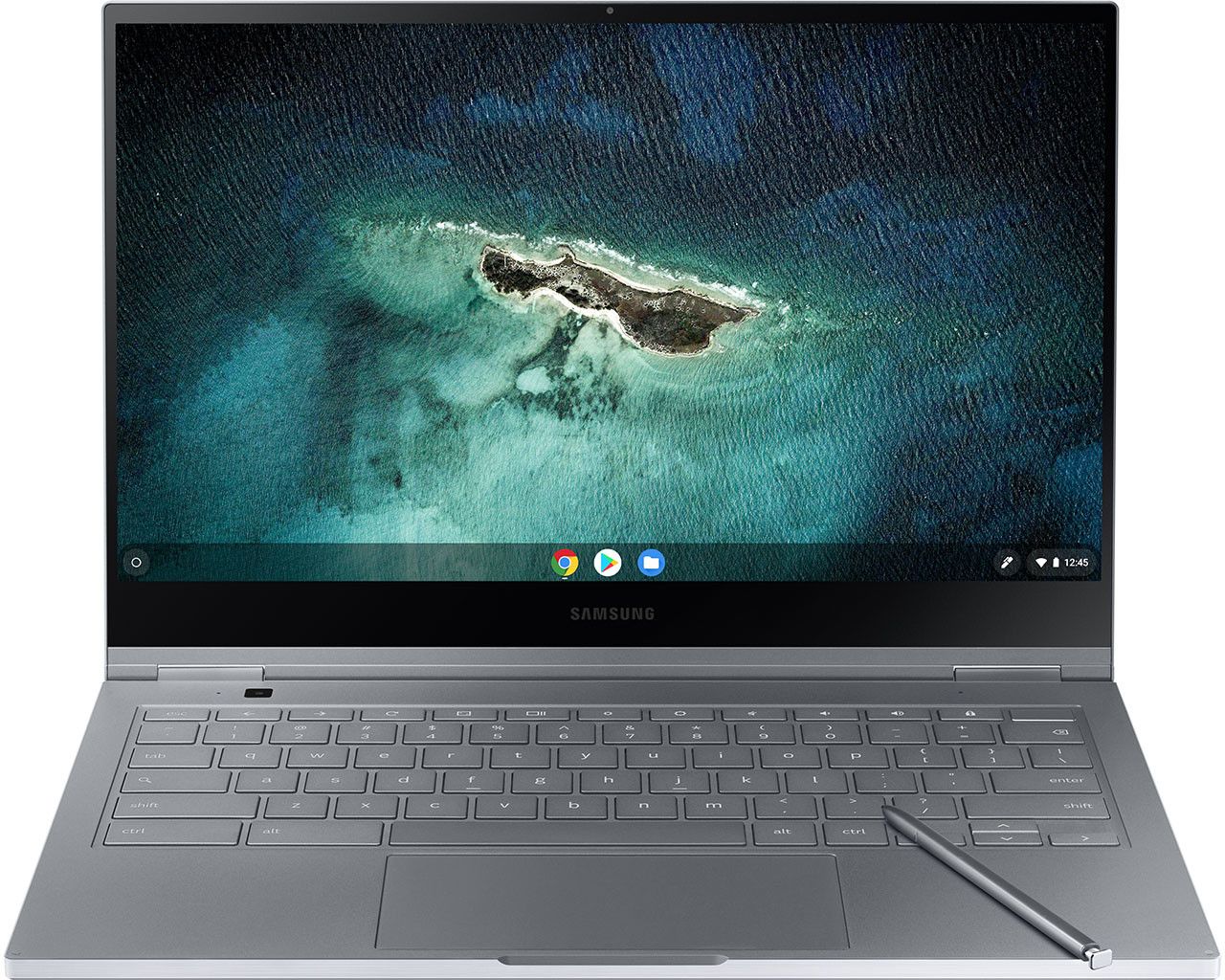
Samsung showed the Galaxy Chromebook at CES 2020 with the first 4K AMOLED display fitted to a Chromebook. The 13.3-inch 2-in-1 convertible measures 0.39 inches thick (9.9mm) and weighs 2.29 pounds. Inside sat a 10th-gen Intel Core i5-10210U with 8GB of RAM, enough for the Chrome OS workloads of that year. The screen and the thin chassis cost it battery life.
| Pros | Cons |
|---|---|
| 4K AMOLED display with 100% Adobe RGB and DCI-P3 color accuracy | Only 3-4 hours of battery in reviewer testing |
| Aluminum chassis 9.9mm thick with precise fit and finish | Falls well short of Samsung’s claimed 8-hour figure |
| Built-in S-Pen with 4096 pressure levels, no separate stylus to buy | Warms up under load because the fanless design has no active cooling |
| Light enough at 2.29 lbs to carry every day | Launched at $999, which cut against the Chromebook value argument |
| 10th-gen Core i5 keeps 20 or more Chrome tabs responsive | Front webcam resolution lags the rest of the hardware |
| 8MP world-facing camera on the keyboard deck for tablet-mode capture | Tom’s Guide wanted a stronger hinge |
Related Videos
Samsung Galaxy Chromebook Comparison Chart
 Samsung Galaxy Chromebook |  Samsung Galaxy Chromebook | Samsung Galaxy Chromebook | |
| Price | List Price: $1299.99 Amazon Prices: | List Price: $999.00 Amazon Prices: | List Price: $999.00 Amazon Prices: |
| Model number | XE931QCA-K01US | XE930QCA-K01US | XE930QCA-K02US |
| Performance Rating | 4.9 | 4.9 | 4.9 |
| Chromebook Plus | No | No | No |
| Processor | Quad-core 1.60 Ghz (max 4.20 Ghz) Intel Core i5-10210U Processor | Quad-core 1.60 Ghz (max 4.20 Ghz) Intel Core i5-10210U Processor | Quad-core 1.60 Ghz (max 4.20 Ghz) Intel Core i5-10210U Processor |
| RAM | 8 GB | 8 GB | 8 GB |
| Internal Storage | 256 GB SSD | 256 GB SSD | 256 GB SSD |
| Screen Size | 13.3" | 13.3" | 13.3" |
| Screen Resolution | 3840x2160 | 3840x2160 | 3840x2160 |
| Screen Type | UHD AMOLED | UHD AMOLED | UHD AMOLED |
| Touch Screen | Yes | Yes | Yes |
| Stylus / Pen | Supported | Supported | Supported |
| Dimensions width x length x thickness | 11.92 x 8 x 0.39 inches (302.77 x 203.2 x 9.91 mm) | 11.92 x 8 x 0.39 inches (302.77 x 203.2 x 9.91 mm) | 11.92 x 8 x 0.39 inches (302.77 x 203.2 x 9.91 mm) |
| Weight | 2.29 lbs (1.04 kg) | 2.29 lbs (1.04 kg) | 2.29 lbs (1.04 kg) |
| Backlit Keyboard | Yes | Yes | Yes |
| Webcam | front 1M, keyboard deck 8M | front 1M, keyboard deck 8M | front 1M, keyboard deck 8M |
| WiFi | Wi-Fi 6 (Gig+), 802.11 ax | Wi-Fi 6 (Gig+), 802.11 ax | Wi-Fi 6 (Gig+), 802.11 ax |
| Bluetooth | Bluetooth 5.0 | Bluetooth 5.0 | Bluetooth 5.0 |
| Ethernet | No | No | No |
| Cellular Modem | No | No | No |
| HDMI | No HDMI | No HDMI | No HDMI |
| USB Ports | 2 USB-C (4K display out with optional adapter, charging) | 2 USB-C (4K display out with optional adapter, charging) | 2 USB-C (4K display out with optional adapter, charging) |
| Thunderbolt Ports | No | No | No |
| Card Reader | UFS & microSD | UFS & microSD | UFS & microSD |
| Battery | 4 cell, 6390mAh, Lithium-ion | 4 cell, 6390mAh, Lithium-ion | 4 cell, 6390mAh, Lithium-ion |
| Battery Life | 8.0 hours | 8.0 hours | 8.0 hours |
| Fanless | Yes | Yes | Yes |
| Auto Update Expiration Date | June, 2030 | June, 2030 | June, 2030 |
Related Chromebooks
-
 Lenovo Flex 5 ChromebookThe Lenovo Flex 5 Chromebook is a 2020 convertible with a 13.3-inch FHD IPS touchscreen, Intel Core…
 -
 Samsung Galaxy Chromebook 2The Samsung Galaxy Chromebook 2 is a 13.3-inch 2-in-1 with a vivid 1080p QLED touchscreen, an…
 -
 Lenovo IdeaPad Flex 5iThe Lenovo IdeaPad Flex 5i Chromebook is a 13.3-inch convertible with an 11th-gen Intel Core…
 -
 Acer Chromebook Spin 713The Acer Chromebook Spin 713 boasts a vivid 13.5-inch 2256x1504 IPS touch display, versatile 2-in-1…
 -
 Acer Chromebook Spin 513The Acer Chromebook Spin 513 is a fanless 13.3-inch convertible Chromebook with a Qualcomm…
 -
 ASUS Chromebook Flip CX5 (CX5400)The ASUS Chromebook Flip CX5 (CX5400) is a fanless 14-inch aluminum convertible sold with an Intel…
A 4K AMOLED Panel in a 0.39-Inch Aluminum Convertible

Fiesta Red read slightly orange in bright light, a color that set it apart from typical gray and silver laptops. The chassis is all aluminum with precise fit and finish. A 360-degree hinge folds the screen back into tent and tablet modes.
The 4K AMOLED panel runs about 500 nits, covers 100% of both Adobe RGB and DCI-P3, and renders true blacks. Photo, video, and design work on Chrome OS gains directly from that color coverage. The Core i5 also opened up music production through web-based DAWs. The bundled S-Pen reads 4096 pressure levels and stows in the body, so it is always at hand.
The Core i5-10210U and 8GB of RAM stayed responsive across 20 or more Chrome tabs alongside several Android apps. A 256GB NVMe SSD handles local storage, and the UFS and microSD reader adds more. Wi-Fi 6 covers wireless, and the two USB-C ports carry charging, display output, and data. The fanless design has no active cooling, so sustained work warms the chassis.
Reviewers Praised the Screen and Faulted the Battery

Chrome Unboxed Traced the Short Runtime to a Deliberate Tradeoff
Chrome Unboxed described the Galaxy Chromebook as “one of the most attractive laptops I’ve ever seen or used.” They praised the premium build quality as comparable to a MacBook or Surface Laptop and highlighted the stylus as offering “the most fluid and lag-free inking experience on a Chromebook to date.” They were unequivocal about the battery: “At the end of the day, the Samsung Galaxy Chromebook has poor battery life. Period.” They explained this is a deliberate design choice, noting “you can’t have ultra sleek, ultra powerful, and long-lasting all in the same package.”
A 3.5 Out of 5 From Tom’s Guide, With the Hinge and Webcam Flagged
Tom’s Guide awarded the device 3.5 out of 5 stars, calling it “a gorgeous 2-in-1 laptop that needs longer battery life.” Their review praised the striking red design, thin and light chassis, and speedy performance. They noted concerns beyond battery life, including a hinge that “should be stronger” and a disappointingly low-resolution webcam for a device at this price point. They also flagged the warm operating temperatures during use.
Four Hours and 20 Minutes on The Verge’s Battery Test
Monica Chin wrote in her review for The Verge that “Samsung has taken a wrecking ball to what have traditionally been the two strongest arguments for buying a Chromebook”: affordability and long battery life. She got just four hours and 20 minutes of battery life in her testing, far short of Samsung’s 8-hour claim. She still credited Samsung for pushing boundaries: “I credit Samsung for making this beautiful and bold bet, but it’s a bold bet that’s not ready for its $999 price tag.”
A QLED Successor in 2021 and Updates Through June 2030
Samsung followed this machine with the Galaxy Chromebook 2 in 2021, swapping the AMOLED panel for QLED. Battery life improved and the price came down, which answered the two complaints reviewers raised here.
Chrome OS updates run through June 2030 on this model, so owners still have security patches and new features coming. If you are exploring current options, our Chromebook Comparison Chart lets you sort and filter today’s lineup side by side.
Frequently Asked Questions
Can I still buy a Samsung Galaxy Chromebook?
Not new from retailers. Samsung discontinued it after the Galaxy Chromebook 2 arrived in 2021. Used units turn up on secondary markets, though a current premium Chromebook will serve you better.
How long will my Samsung Galaxy Chromebook receive updates?
Chrome OS updates run until June 2030. After that Auto Update Expiration (AUE) date the device keeps working, but Google stops sending it security updates and new features.
How long did the Samsung Galaxy Chromebook battery last?
Reviewers averaged 3-4 hours at moderate brightness with typical web browsing, well under Samsung’s advertised 8-hour claim. The 4K AMOLED display draws most of that power, and the thin fanless design does the rest.
Can you upgrade the RAM or storage on the Samsung Galaxy Chromebook?
No. The RAM and storage are soldered to the motherboard, so the 8GB of RAM and 256GB NVMe SSD it shipped with are what it keeps. The UFS and microSD card slot is the only way to add space.
What replaced the Samsung Galaxy Chromebook?
Samsung released the Galaxy Chromebook 2 in early 2021 as a more practical successor. It swapped the 4K AMOLED display for a QLED panel, which improved battery life while keeping strong screen quality, and it came at a lower price point.
Was the display a true 4K AMOLED panel?
Yes. The 13.3-inch panel was a true 4K (3840x2160) AMOLED, the first of its kind on a Chromebook, with 100% Adobe RGB and DCI-P3 coverage and approximately 500 nits of brightness.