
Samsung Galaxy Chromebook
Updated on

Note: The Samsung Galaxy Chromebook is no longer available for purchase. This page is maintained for historical reference and to help owners of this device.
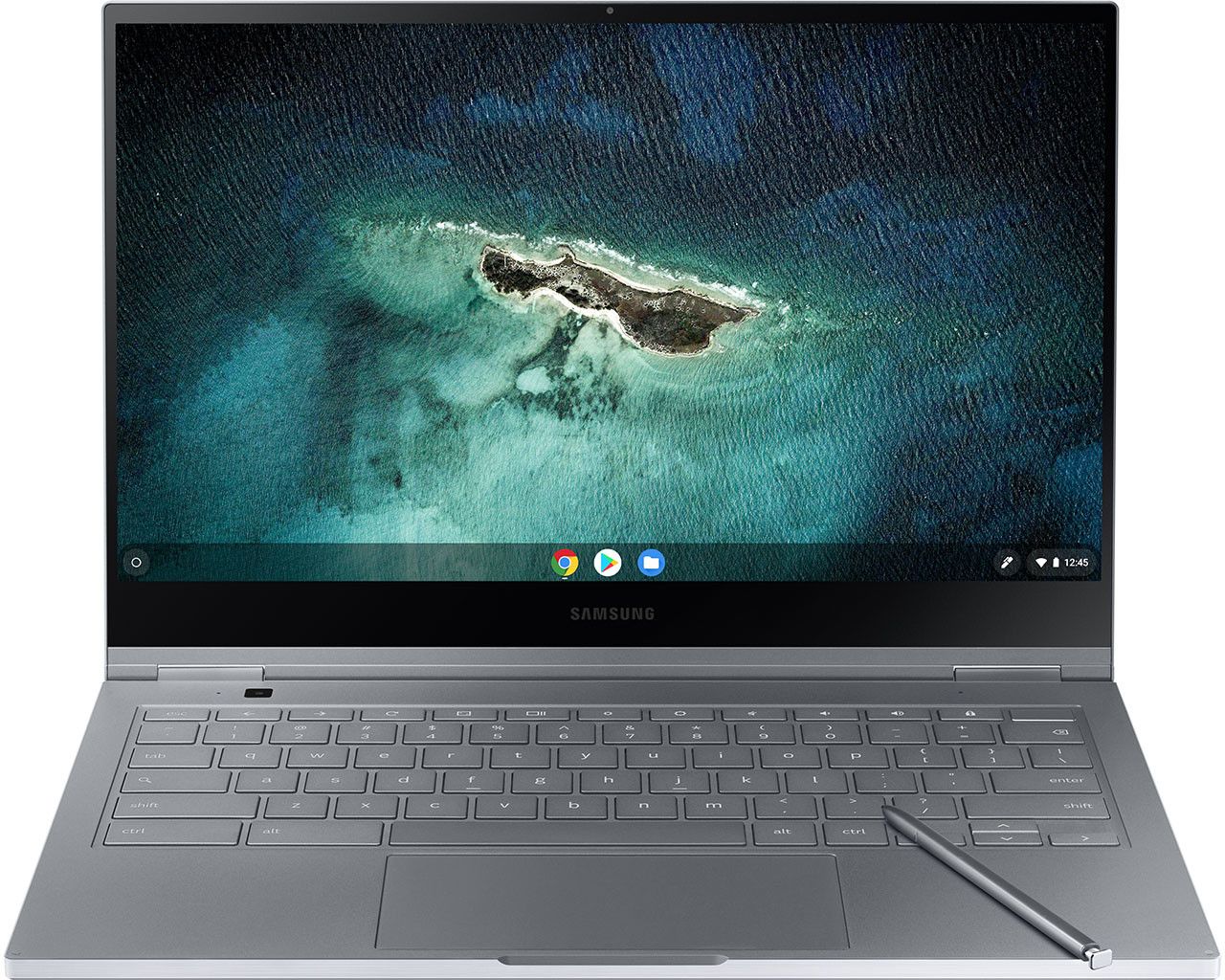
When Samsung unveiled the Galaxy Chromebook at CES 2020, it represented the most ambitious Chrome OS device ever attempted. Featuring the world's first 4K AMOLED display on a Chromebook, this 13.3-inch 2-in-1 convertible was unlike any Chromebook before it. At just 9.9mm thick and weighing only 2.29 pounds, it remains one of the thinnest Chromebooks ever made. The striking Fiesta Red color option immediately set it apart from typical gray and silver laptops. While its Intel Core i5-10210U processor and 8GB of RAM delivered capable performance for 2020, the Galaxy Chromebook became known for a significant tradeoff: its showcase display and ultra-thin design came at the cost of notably short battery life, a compromise that limited its appeal despite the groundbreaking screen technology.
| Pros | Cons |
|---|---|
| Stunning 4K AMOLED display with 100% Adobe RGB and DCI-P3 color accuracy | Poor battery life: only 3-4 hours in real-world testing |
| Thinnest Chromebook ever at 9.9mm with premium aluminum build | Significantly misses Samsung's claimed 8-hour battery life |
| Built-in S-Pen stylus with 4096 pressure levels (best on any Chromebook) | Gets notably warm under load due to fanless passive cooling |
| Lightweight at 2.29 lbs, highly portable for travel | High $999 launch price undermines traditional Chromebook value |
| Fast 10th-gen Intel Core i5 handles heavy multitasking smoothly | Low-resolution front webcam for a premium device |
| Unique 8MP world-facing camera on keyboard deck for tablet mode | Hinge durability concerns noted by reviewers |
Related Videos
Samsung Galaxy Chromebook Comparison Chart
 Samsung Galaxy Chromebook |  Samsung Galaxy Chromebook | Samsung Galaxy Chromebook | |
| Price | List Price: $1299.99 Amazon Prices: | List Price: $999.00 Amazon Prices: | List Price: $999.00 Amazon Prices: |
| Model number | XE931QCA-K01US | XE930QCA-K01US | XE930QCA-K02US |
| Performance Rating | 5.8 | 5.8 | 5.8 |
| Chromebook Plus | No | No | No |
| Processor | Quad-core 1.60 Ghz (max 4.20 Ghz) Intel Core i5-10210U Processor | Quad-core 1.60 Ghz (max 4.20 Ghz) Intel Core i5-10210U Processor | Quad-core 1.60 Ghz (max 4.20 Ghz) Intel Core i5-10210U Processor |
| RAM | 8 GB | 8 GB | 8 GB |
| Internal Storage | 256 GB SSD | 256 GB SSD | 256 GB SSD |
| Screen Size | 13.3" | 13.3" | 13.3" |
| Screen Resolution | 3840x2160 | 3840x2160 | 3840x2160 |
| Screen Type | UHD AMOLED | UHD AMOLED | UHD AMOLED |
| Touch Screen | Yes | Yes | Yes |
| Stylus / Pen | Supported | Supported | Supported |
| Dimensions width x length x thickness | 11.92 x 8 x 0.39 inches (302.77 x 203.2 x 9.91 mm) | 11.92 x 8 x 0.39 inches (302.77 x 203.2 x 9.91 mm) | 11.92 x 8 x 0.39 inches (302.77 x 203.2 x 9.91 mm) |
| Weight | 2.29 lbs (1.04 kg) | 2.29 lbs (1.04 kg) | 2.29 lbs (1.04 kg) |
| Backlit Keyboard | Yes | Yes | Yes |
| Webcam | front 1M, keyboard deck 8M | front 1M, keyboard deck 8M | front 1M, keyboard deck 8M |
| WiFi | Wi-Fi 6 (Gig+), 802.11 ax | Wi-Fi 6 (Gig+), 802.11 ax | Wi-Fi 6 (Gig+), 802.11 ax |
| Bluetooth | Bluetooth 5.0 | Bluetooth 5.0 | Bluetooth 5.0 |
| Ethernet | No | No | No |
| Cellular Modem | No | No | No |
| HDMI | No HDMI | No HDMI | No HDMI |
| USB Ports | 2 USB-C (4K display out with optional adapter, charging) | 2 USB-C (4K display out with optional adapter, charging) | 2 USB-C (4K display out with optional adapter, charging) |
| Thunderbolt Ports | No | No | No |
| Card Reader | UFS & microSD | UFS & microSD | UFS & microSD |
| Battery | 4 cell, 6390mAh, Lithium-ion | 4 cell, 6390mAh, Lithium-ion | 4 cell, 6390mAh, Lithium-ion |
| Battery Life | 8.0 hours | 8.0 hours | 8.0 hours |
| Fanless | Yes | Yes | Yes |
| Auto Update Expiration Date | June, 2030 | June, 2030 | June, 2030 |
Related Chromebooks
-
 Lenovo Flex 5 ChromebookThe Lenovo Flex 5 Chromebook is a 2020 convertible with a 13.3-inch FHD IPS touchscreen, Intel Core…
 -
 Samsung Galaxy Chromebook 2The Samsung Galaxy Chromebook 2 is a 13.3-inch 2-in-1 with a vivid 1080p QLED touchscreen, an…
 -
 Lenovo IdeaPad Flex 5iThe Lenovo IdeaPad Flex 5i Chromebook is a 13.3-inch convertible with an 11th-gen Intel Core…
 -
 Acer Chromebook Spin 713The Acer Chromebook Spin 713 boasts a vivid 13.5-inch 2256x1504 IPS touch display, versatile 2-in-1…
 -
 Acer Chromebook Spin 513The Acer Chromebook Spin 513 offers a versatile 13.3-inch Full HD IPS touchscreen display, backlit…
 -
 ASUS Chromebook Flip CX5 (CX5400)Maximize productivity with the ASUS Chromebook Flip CX5, boasting a versatile touchscreen, backlit…
A Look Back at the Samsung Galaxy Chromebook

The Samsung Galaxy Chromebook's design stood out, particularly in the bold Fiesta Red colorway that appeared slightly orange in bright light. Samsung positioned this device as a luxury item rather than a practical workhorse, and the build quality reflected that ambition. The all-aluminum chassis felt as premium as anything from Apple or Microsoft, with precise fit and finish throughout. The 360-degree hinge allowed the device to transform between laptop, tent, and tablet modes, useful for note-taking with the included S-Pen stylus.
The 13.3-inch 4K AMOLED display was the Galaxy Chromebook's centerpiece and holds up well even by today's standards. With approximately 500 nits of brightness, perfect blacks, and support for 100% of both Adobe RGB and DCI-P3 color gamuts, this screen outclassed the displays on far more expensive laptops. For creative professionals working with photos, videos, or design work on Chrome OS, this display offered accuracy and vibrancy unmatched by any other Chromebook of its era. The capable Core i5 processor also made it one of the few Chromebooks suited for music production through web-based DAWs. The included Samsung S-Pen with 4096 pressure levels provided the most fluid and lag-free inking experience in the Chrome OS ecosystem at that time.
Performance from the Intel Core i5-10210U processor paired with 8GB of RAM proved capable for Chrome OS workloads of its time. Reviewers found the device smoothly handled 20 or more Chrome tabs alongside multiple Android apps. The 256GB NVMe SSD provided ample storage for a Chromebook. Wi-Fi 6 support ensured fast wireless connectivity, and the two USB-C ports handled charging, display output, and data transfer. However, the fanless thermal design meant the device could get uncomfortably warm during sustained workloads, a necessary tradeoff for the thin, silent operation.
What Reviewers Said at Launch

Professional reviewers consistently praised the Galaxy Chromebook's display and design while raising significant reservations about its battery life. The pattern was clear: a striking device that made a bold statement about what a Chromebook could be, but not a practical choice for users who needed all-day battery life.
Chrome Unboxed's Perspective
Chrome Unboxed provided one of the most detailed reviews, describing the Galaxy Chromebook as "one of the most attractive laptops I've ever seen or used." They praised the premium build quality as comparable to a MacBook or Surface Laptop and highlighted the stylus as offering "the most fluid and lag-free inking experience on a Chromebook to date." However, they were unequivocal about the battery: "At the end of the day, the Samsung Galaxy Chromebook has poor battery life. Period." They explained this is a deliberate design choice, noting "you can't have ultra sleek, ultra powerful, and long-lasting all in the same package."
Tom's Guide's Perspective
Tom's Guide awarded the device 3.5 out of 5 stars, calling it "a gorgeous 2-in-1 laptop that needs longer battery life." Their review praised the striking red design, thin and light chassis, and speedy performance. However, they noted concerns beyond just battery life, including a hinge that "should be stronger" and a disappointingly low-resolution webcam for a device at this price point. The warm operating temperatures during use were also flagged as a minor annoyance.
The Verge's Perspective
Monica Chin's review for The Verge took a critical but fair view, stating "Samsung has taken a wrecking ball to what have traditionally been the two strongest arguments for buying a Chromebook": affordability and long battery life. She got just four hours and 20 minutes of battery life in her testing, far short of Samsung's 8-hour claim. Despite the criticism, she credited Samsung for pushing boundaries: "I credit Samsung for making this beautiful and bold bet, but it's a bold bet that's not ready for its $999 price tag."
Legacy and Impact
The Samsung Galaxy Chromebook remains one of the most visually distinctive laptops ever made, regardless of operating system. Its 4K AMOLED display, ultra-thin aluminum design, and built-in stylus represented the high-water mark of Chrome OS hardware ambition. While the 3-4 hour battery life limited its commercial success, the Galaxy Chromebook proved that Chrome OS could support truly premium hardware. Samsung learned from this device and released the more practical Galaxy Chromebook 2 in 2021, which addressed the battery concerns with a QLED display instead of AMOLED.
For current owners, Chrome OS updates are guaranteed through June 2030, meaning several years of software support remain. The Galaxy Chromebook stands as an important milestone in Chromebook history: a beautiful, bold experiment that showed what was possible, even if it wasn't practical for everyone. If you are exploring current options, our Chromebook Comparison Chart lets you sort and filter today's lineup side by side.
Frequently Asked Questions
Can I still buy a Samsung Galaxy Chromebook?
The Samsung Galaxy Chromebook is no longer available new from retailers. It was discontinued after Samsung released the Galaxy Chromebook 2 in 2021. You may occasionally find used units on secondary markets, but we recommend considering newer alternatives if you're looking for a premium Chromebook experience.
How long will my Samsung Galaxy Chromebook receive updates?
The Samsung Galaxy Chromebook will receive Chrome OS updates until June 2030. After this Auto Update Expiration (AUE) date, the device will continue to function but will no longer receive security updates or new features from Google.
How long did the Samsung Galaxy Chromebook battery last?
In real-world testing by multiple reviewers, the Samsung Galaxy Chromebook averaged 3-4 hours of battery life at moderate brightness with typical web browsing. This was significantly less than Samsung's advertised 8-hour claim. The short battery life was primarily due to the power-hungry 4K AMOLED display and thin fanless design.
Can you upgrade the RAM or storage on the Samsung Galaxy Chromebook?
No, the Samsung Galaxy Chromebook's RAM and storage are soldered to the motherboard and cannot be upgraded. The device comes with 8GB of RAM and 256GB of NVMe SSD storage. Users needing more storage can use the UFS/microSD card slot for expansion.
What replaced the Samsung Galaxy Chromebook?
Samsung released the Galaxy Chromebook 2 in early 2021 as a more practical successor. The Galaxy Chromebook 2 swapped the 4K AMOLED display for a QLED panel, significantly improving battery life while still offering excellent screen quality. It also came at a lower price point, addressing the original's value concerns.
Was the Samsung Galaxy Chromebook display really 4K AMOLED?
Yes, the 13.3-inch display was a true 4K (3840x2160) AMOLED panel, the first of its kind on a Chromebook. It supported 100% Adobe RGB and DCI-P3 color gamuts with approximately 500 nits of brightness. Reviewers consistently rated it as the best display ever put on a Chromebook at that time, with colors more vibrant than even high-end MacBook Pro screens.