
Toshiba Chromebook 2
Updated on

Note: This product has been discontinued. It is no longer available for purchase new. The information below is kept for historical reference.
The Toshiba Chromebook 2 arrived in late 2014 as a breakthrough device that finally brought high-quality displays to budget Chromebooks. At a time when most affordable Chromebooks featured dim, washed-out TN panels with limited viewing angles, Toshiba delivered a 13.3-inch Full HD IPS display that reviewers universally praised as the best screen available in its price class. Computerworld called it “the best display available on an affordable Chromebook,” noting the “night-and-day difference” compared to typical screens. Combined with Skullcandy-tuned speakers that Engadget described as “some of the best audio I’ve heard on any laptop,” the Chromebook 2 established Toshiba as a serious Chromebook manufacturer. Chrome OS support ended in September 2021, but the Toshiba Chromebook 2 remains a notable milestone in Chromebook history as the device that proved great displays could be affordable.
Related Videos
Toshiba Chromebook 2 Comparison Chart
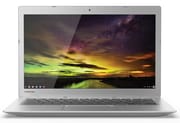 Toshiba Chromebook 2 | Toshiba Chromebook 2 | Toshiba Chromebook 2 | Toshiba Chromebook 2 | |
| Price | List Price: $249.99 Amazon Prices: | List Price: $299.99 Amazon Prices: | List Price: $329.99 Amazon Prices: | List Price: $429.99 Amazon Prices: |
| Model number | CB35-B3330 | CB35-B3340 | CB35-C3300 | CB35-C3350 |
| Performance Rating | 1.9 | 2.4 | 2.3 | 3.1 |
| Chromebook Plus | No | No | No | No |
| Processor | Dual-core 2.16 Ghz (max 2.58 Ghz) Intel Celeron N2840 | Dual-core 2.16 Ghz (max 2.58 Ghz) Intel Celeron N2840 | Dual-core 1.70 Ghz Intel Celeron 3215U | Dual-core 2.10 Ghz Intel Core i3-5015U |
| RAM | 2 GB | 4 GB | 4 GB | 4 GB |
| Internal Storage | 16 GB eMMC | 16 GB eMMC | 16 GB SSD (upgradable M.2 SATA) | 16 GB SSD (upgradable M.2 SATA) |
| Screen Size | 13.3" | 13.3" | 13.3" | 13.3" |
| Screen Resolution | 1366x768 | 1920x1080 | 1920x1080 | 1920x1080 |
| Screen Type | IPS | IPS | IPS | IPS |
| Touch Screen | No | No | No | No |
| Stylus / Pen | No Stylus Support | No Stylus Support | No Stylus Support | No Stylus Support |
| Dimensions width x length x thickness | 12.6 x 8.4 x 0.76 inches (320.04 x 213.36 x 19.3 mm) | 12.6 x 8.4 x 0.76 inches (320.04 x 213.36 x 19.3 mm) | 12.6 x 8.4 x 0.76 inches (320.04 x 213.36 x 19.3 mm) | 12.6 x 8.4 x 0.76 inches (320.04 x 213.36 x 19.3 mm) |
| Weight | 2.95 lbs (1.34 kg) | 2.95 lbs (1.34 kg) | 2.95 lbs (1.34 kg) | 2.95 lbs (1.34 kg) |
| Backlit Keyboard | No | No | Yes | Yes |
| Webcam | HD | HD | HD | HD |
| WiFi | 802.11 a/b/g/n/ac | 802.11 a/b/g/n/ac | 802.11 a/b/g/n/ac | 802.11 a/b/g/n/ac |
| Bluetooth | Bluetooth 4.0 | Bluetooth 4.0 | Bluetooth 4.0 | Bluetooth 4.0 |
| Ethernet | No | No | No | No |
| Cellular Modem | No | No | No | No |
| HDMI | Full-Size HDMI | Full-Size HDMI | Full-Size HDMI | Full-Size HDMI |
| USB Ports | 1 USB 2.0, 1 USB 3 | 1 USB 2.0, 1 USB 3 | 1 USB 2.0, 1 USB 3 | 1 USB 2.0, 1 USB 3 |
| Thunderbolt Ports | No | No | No | No |
| Card Reader | SD | SD | SD | SD |
| Battery | 3 cell, 44Wh, Lithium-ion | 3 cell, 44Wh, Lithium-ion | 3 cell, 44Wh, Lithium-ion | 3 cell, 44Wh, Lithium-ion |
| Battery Life | 9.0 hours | 9.0 hours | 9.0 hours | 9.0 hours |
| Fanless | Yes | Yes | No | No |
| Auto Update Expiration Date | September, 2021 | September, 2021 | June, 2021 | June, 2021 |
Related Chromebooks
-
 HP Chromebook 14 (AMD)The HP Chromebook 14 (AMD) is a fanless 14-inch Chromebook built on the AMD A4-9120C APU with…
 -
 ASUS Chromebook C423The ASUS Chromebook C423 pairs a 14-inch 1366x768 display with a dual-core Celeron N3350, 4GB of…
 -
 ASUS Chromebook C403The ASUS Chromebook C403 is a fanless 14-inch education Chromebook with an anti-glare 1366x768…
 -
 Acer Chromebook 315The Acer Chromebook 315 (CB315-4H) is a fanless 15.6-inch FHD IPS Chromebook with an Intel Celeron…
 -
 Acer Chromebook 15 CB315 (AMD)The Acer Chromebook 15 CB315 (AMD) is a 15.6-inch budget Chromebook built around AMD's 7th-gen…
 -
 Samsung Chromebook Plus v2The Samsung Chromebook Plus v2 is a fanless 12.2-inch convertible Chromebook with an Intel Celeron…
Detailed Insights into the Toshiba Chromebook 2
The Toshiba Chromebook 2’s design prioritized screen quality and audio performance over premium materials. The textured silver plastic chassis felt acceptable for the price point, though Engadget noted the “cheap-looking textured plastic construction” didn’t match the premium display inside. At 12.6 inches wide, 8.4 inches deep, and just 0.76 inches thick, the Chromebook 2 was portable at under 3 pounds, making it practical for students and commuters who needed a lightweight web browsing companion. NotebookCheck’s testing revealed some build quality concerns including “excessive gaps” between panels and susceptibility to denting, though the device remained functional and practical for its intended purpose.
The 13.3-inch 1920x1080 IPS display was the undisputed highlight of the Toshiba Chromebook 2. NotebookCheck measured brightness at 374.3 cd/m² average with a peak of 388 cd/m², delivering vibrant colors and excellent viewing angles that surpassed competitors costing significantly more. JR Raphael at Computerworld wrote that the display was “bright, crisp” with a “night-and-day difference” compared to typical budget Chromebook screens. For users who spent extended periods reading documents, watching videos, or working in Google Docs, the superior display quality made daily use more pleasant than competitors with inferior TN panels.
Audio quality was equally praised. The Skullcandy-tuned speakers delivered sound that Engadget praised as “some of the best audio I’ve heard on any laptop” at this price point. Computerworld described the audio as “simply spectacular and a significant notch above what any other system in this class provides,” noting sound that was “loud and clear and not in the least bit hollow or tinny.” For video calls, media consumption, or casual music production on a Chromebook, the Chromebook 2’s speakers eliminated the need for external speakers that plagued most budget laptops.
Performance and Battery Life
The original 2014 Toshiba Chromebook 2 models (CB35-B series) featured the Intel Celeron N2840 dual-core processor running at 2.16GHz with 2GB or 4GB of RAM. This Bay Trail-M processor delivered adequate performance for Chrome OS tasks, though it showed limitations with heavy multitasking. Computerworld found “noticeable lag and choppiness” when opening many browser tabs, concluding the device was “the best affordable Chromebook you can buy today” for users comfortable with performance trade-offs in exchange for superior display and audio.
NotebookCheck’s benchmark testing of the CB30-B model recorded competitive results for its class: SunSpider at 552ms, Octane v2 at 8442, Kraken at 3893ms, and WebXPRT 2015 at 120 points. These figures placed the Chromebook 2 solidly in the mid-range for budget Chromebooks, adequate for web browsing, document editing, and video streaming but not suited for demanding tasks or running many applications simultaneously.
Battery life consistently fell short of Toshiba’s advertised 9-hour claim in real-world testing. Engadget measured 6 hours and 34 minutes during Full HD video playback, while Computerworld reported 6.5-7 hours “under demanding conditions.” NotebookCheck’s WiFi browsing test at 150 cd/m² brightness yielded 7.4 hours. These results trailed competitors by 2-4 hours according to Engadget, making battery life one of the Chromebook 2’s weaker points despite the 44Wh capacity.
The fanless design ensured completely silent operation, a genuine advantage for library study sessions, quiet offices, or anywhere noise would be disruptive. NotebookCheck’s thermal testing found the device ran warm under sustained load, reaching up to 40.7°C on the surface, but this remained within acceptable limits for passive cooling. The trade-off between noise and temperature suited the Chromebook 2’s positioning as a productivity-focused device for web-based workflows.
Connectivity and Keyboard
The Toshiba Chromebook 2’s port selection was adequate for 2014, featuring one USB 2.0 port, one USB 3.0 port, full-size HDMI output, an SD card reader, and a combination headphone/microphone jack. The single USB 3.0 port was a limitation noted by NotebookCheck, though the full-size HDMI connector provided straightforward external display connectivity without adapters.
WiFi 802.11ac dual-band support with Bluetooth 4.0 handled wireless connectivity, delivering adequate performance for typical home and office networks. The HD webcam met basic videoconferencing needs for video calls.
The keyboard received mixed reviews. NotebookCheck criticized the “shallow keyboard with minimal feedback and spongy typing sensation,” finding the keys lacked the tactile response that typists prefer. Engadget’s Dana Wollman had stronger concerns, noting the “unresponsive keyboard with flat buttons” that required “slow, deliberate typing to register keystrokes” and mentioning she “often had to type my 12-digit Google password several times.” The touchpad also occasionally lost cursor control according to Engadget. These input device limitations contrasted with the excellent display and audio, representing areas where Toshiba compromised to hit the price point.
Reviewer Insights on the Toshiba Chromebook 2
NotebookCheck’s Technical Analysis
Nino Ricchizzi’s NotebookCheck review of the CB30-B model awarded an 80% “Good” rating based on thorough testing. The review highlighted the “Full HD IPS screen” as “the review’s standout feature,” praising brightness at 374.3 cd/m² and completely silent fanless operation. NotebookCheck concluded: “Although Toshiba has not reinvented the wheel, the CB30 will prove a good companion in browsing and office routine.” The main criticisms focused on build quality flaws, the shallow keyboard with minimal feedback, and battery life that “underperforms manufacturer’s 11-hour claim.” For users prioritizing display quality and silent operation, the positive factors outweighed the compromises.
Engadget’s Real-World Testing
Dana Wollman’s Engadget review came from using the Chromebook 2 “as my primary laptop for a week,” providing practical insights beyond benchmark numbers. She praised the “bright, sharp 1080p IPS display with vibrant colors and excellent viewing angles” and called the audio “some of the best audio I’ve heard on any laptop” at this price. However, the keyboard issues were significant: “I often had to type my 12-digit Google password several times” due to unregistered keystrokes. Her verdict acknowledged trade-offs: “Toshiba’s offering is at least pretty good” but “none of these big-name options are perfect on their own,” noting Samsung offered better build quality for $20 more while Acer delivered superior battery life at similar pricing.
Computerworld’s Practical Assessment
JR Raphael’s Computerworld review declared the Chromebook 2 “the best affordable Chromebook you can buy today” for users prioritizing display quality. After testing the device for several days, Raphael emphasized the display as “the best display available on an affordable Chromebook” with a “night-and-day difference” compared to competitors. The Skullcandy speakers were “simply spectacular” with sound that was “loud and clear.” Performance limitations were acknowledged: the Intel Bay Trail Celeron struggled with “heavy multitasking and many open tabs,” showing “noticeable lag and choppiness.” For casual users comfortable with those trade-offs, the superior display and audio experience justified the compromises.
Steve Paine
Steve “Chippy” Paine zeroed in on the Chromebook 2’s headline upgrade: a 13-inch Full HD IPS panel he called punchy, a clear step above the washed-out screens common on Chromebooks of its era. He was struck by how light it stays at 1.3kg for a 13-inch full-HD machine, putting it in Ultrabook territory for portability despite the plastic build. A good keyboard feel and a large touchpad rounded out a device he found surprisingly refined for the price.
2015 Model Updates (CB35-C Series)
Toshiba released an updated Chromebook 2 in 2015 with significant improvements. The CB35-C3300 and CB35-C3350 models featured Intel Celeron 3215U Broadwell processors, delivering improved performance over the original Bay Trail chips. These models also added backlit keyboards addressing criticism of the original’s typing experience, upgraded to SSD storage for faster boot times and application loading, and included a cooling fan to manage the higher-performance processor’s thermal output. The 2015 models maintained the excellent IPS display and Skullcandy speakers while addressing several limitations of the original release.
Limitations and Considerations
The Toshiba Chromebook 2 reached its Chrome OS end-of-life in September 2021, meaning it no longer receives security updates from Google. This makes the device unsuitable for sensitive activities like online banking or accessing personal accounts. The original models with 2GB RAM struggle with modern web applications that have grown significantly more demanding since 2014, while even the 4GB models show their age with contemporary websites.
For collectors or those curious about Chromebook history, the Toshiba Chromebook 2 came at a time when manufacturers began competing on display quality rather than just price. It demonstrated that affordable Chromebooks could include premium features like IPS panels and quality speakers, helping establish expectations that influenced the entire category’s evolution.
To see how the Toshiba Chromebook 2 stacks up against current models, our Chromebook Comparison Chart lets you sort and filter specs side by side.
Frequently Asked Questions
Is the Toshiba Chromebook 2 still supported by Google?
No, Chrome OS support for the Toshiba Chromebook 2 ended in September 2021 (Auto Update Expiration). The device no longer receives security updates from Google, making it unsuitable for sensitive tasks like banking or accessing personal accounts.
What made the Toshiba Chromebook 2’s display special?
The Toshiba Chromebook 2 featured a 13.3-inch Full HD (1920x1080) IPS panel with 374 cd/m² brightness, high for budget Chromebooks of its era. Most competitors used dim TN panels with inferior color reproduction and narrow viewing angles. Reviewers consistently praised it as “the best display available on an affordable Chromebook.”
How good were the Toshiba Chromebook 2’s speakers?
The Skullcandy-tuned speakers received praise from reviewers. Engadget called them “some of the best audio I’ve heard on any laptop” at this price point, while Computerworld described the sound as “simply spectacular.” The speakers were loud, clear, and avoided the hollow, tinny quality typical of budget laptops.
What’s the difference between the 2014 and 2015 Toshiba Chromebook 2 models?
The 2014 models (CB35-B series) used Intel Celeron N2840 processors and eMMC storage. The 2015 models (CB35-C series) upgraded to Intel Celeron 3215U Broadwell processors, added backlit keyboards, switched to faster SSD storage, and included a cooling fan. Both generations shared the same excellent IPS display and Skullcandy speakers.
How long did the Toshiba Chromebook 2’s battery last?
Real-world testing showed 6.5-7.4 hours depending on usage, falling short of Toshiba’s advertised 9-hour claim. Engadget measured 6 hours 34 minutes during video playback, while NotebookCheck achieved 7.4 hours with WiFi browsing at moderate brightness. Battery life was one of the Chromebook 2’s weaker points compared to competitors.
Can the Toshiba Chromebook 2 run Linux applications?
The Toshiba Chromebook 2’s Intel processors are technically compatible with Linux, but the device’s end-of-life status means it doesn’t support Chrome OS’s Crostini Linux container system through official channels. Combined with limited RAM (2-4GB) and storage (16GB), running Linux applications would be impractical even if possible.
Was the Toshiba Chromebook 2’s keyboard any good?
The keyboard received mixed to negative reviews. NotebookCheck criticized the “shallow keyboard with minimal feedback,” while Engadget reported frequently having to retype passwords due to unregistered keystrokes. The 2015 CB35-C models improved with backlit keyboards, though typing feel remained a compromise compared to premium Chromebooks.