

Listen to this article:
Editor’s Note (February 2026): The project has been renamed again, this time to OpenClaw. The new site is openclaw.ai.
Editor’s Note (January 2026): Since this article was published, Clawdbot has been renamed to Molt (now redirects to OpenClaw — see the February note above).
What if Siri actually worked? Not the “set a timer” version of worked, but genuinely understood your life, remembered your preferences, and could actually do things on your computer while you’re away? That’s the promise that has developers on X losing their minds over a project called Clawdbot, and it’s triggering a run on Apple’s smallest computer.
The creator, Peter Steinberger, puts it bluntly: “Apps will melt away. The prompt is your new interface.” Steinberger isn’t some random tinkerer. He’s the former CEO of PSPDFKit, who built that company over 13 years before selling it. Now he’s come out of retirement to help a cartoon lobster take over the world of personal computing.
The Developer Hive Mind Has Spoken
Scroll through the #clawdbot hashtag on X and you’ll find a level of enthusiasm that feels almost cult-like. Developers aren’t just impressed. They’re calling it an “iPhone moment,” comparing it to early AGI, and in some cases, letting it run their entire companies.
Dave Morin @davemorinView on XAt this point I don’t even know what to call @clawdbot. It is something new. After a few weeks in with it, this is the first time I have felt like I am living in the future since the launch of ChatGPT.
The comparison to ChatGPT’s launch is telling. When ChatGPT dropped in late 2022, it felt like magic because you could suddenly have intelligent conversations with a computer. Clawdbot represents the next step: those conversations can now result in actual actions on your machine.
Nathan Clark @nathanclark_View on XA smart model with eyes and hands at a desk with keyboard and mouse. You message it like a coworker and it does everything a person could do with that Mac mini. That’s what you have now.
That description captures something important. This isn’t a chatbot. It’s closer to a remote employee who happens to live inside a small aluminum box on your desk. One that works 24 hours a day, never takes breaks, and can be reached through WhatsApp while you’re walking your dog.
What Exactly Is Clawdbot?
At its core, Clawdbot is an open-source AI agent that runs on your own hardware. Unlike ChatGPT or Claude’s web interfaces, which process everything on remote servers, Clawdbot operates locally with a “gateway” that connects AI models to the apps and services you already use. It can talk to you through WhatsApp, Telegram, Discord, Slack, Signal, or even iMessage.
But the real magic is what it can do once it’s running. Given the right permissions, Clawdbot can browse the web, execute terminal commands, write and run scripts, manage your email, check your calendar, and interact with any software on your machine. Federico Viticci of MacStories burned through 180 million tokens on the Anthropic API using it, calling it “a tinkerer’s laboratory” that hints at an exciting future.
Perhaps the most compelling feature is that Clawdbot is self-improving. Tell it you want a new capability, and it can often write its own “skill” (plugin) to make it happen. One user wanted access to university course assignments. He asked Clawdbot to build a skill for it. Clawdbot did, and then started using it on its own.
The lobster branding, by the way, isn’t random. When Steinberger was developing the project with Claude, the AI suggested naming its persona “Clawdis” as a joke about a space lobster in a TARDIS. The name evolved into Clawdbot, and the crustacean theme stuck. There’s even a “Lobster Mode” where the bot becomes intentionally opinionated and cranky.
Why Everyone’s Buying Mac Minis
Here’s where hardware enters the picture. While Clawdbot can run on any computer, Mac Minis have emerged as the preferred choice, and for good reasons that go beyond Apple fandom.
Apple Silicon’s unified memory architecture is exceptionally efficient for AI workloads. Instead of the CPU and GPU communicating over a slower connection, the memory sits directly on the chip package. This means the full memory bandwidth is instantly available to AI models, making local inference significantly faster than on traditional x86 systems with equivalent specs.
The economics also make sense. A one-time investment of $599 for a base Mac Mini M4 gets you a silent, low-power machine that can run continuously without racking up cloud GPU bills. Compare this to paying for API tokens or cloud compute, and the math quickly favors dedicated hardware for anyone using AI agents heavily.
Privacy is another major driver. Your agent needs to index your emails, files, and personal data to be truly useful. Many developers are uncomfortable sending all that information to cloud providers. With Clawdbot on a Mac Mini at home, your data never leaves your physical control.
The form factor helps too. At just 5 by 5 inches, the Mac Mini M4 is small enough to tuck away anywhere. It runs virtually silent during normal operation, making it unobtrusive as an always-on home server. One user runs it on a 2013 iMac and reports it works flawlessly, though newer Apple Silicon provides meaningful performance improvements for local model inference.
The Wild Things People Are Actually Doing
The use cases emerging from the Clawdbot community range from practical to absurd. Someone asked their bot to unsubscribe from unwanted emails. It did, systematically working through the inbox. Another user set up automated health reimbursement submissions. The agent finds the right documents on the hard drive and handles the paperwork.
Nat Eliason @nateliasonView on XYeah this was 1,000% worth it. Separate Claude subscription + Clawd, managing Claude Code / Codex sessions I can kick off anywhere, autonomously running tests on my app and capturing errors through a sentry webhook then resolving them and opening PRs… The future is here.
Developers are integrating Clawdbot with their coding workflows. The agent can kick off test suites, monitor for errors via webhooks, and even open pull requests to fix issues it finds. One user has it controlling smart home devices, adjusting air purifier settings based on health metrics from their wearable.
Perhaps the most amusing story involves an agent that “accidentally started a fight” with an insurance company. The user’s Clawdbot misinterpreted a response and sent an email that caused the insurer to reinvestigate a claim that had been rejected. The agent’s assertiveness worked in the user’s favor, but it highlights both the power and the risks of autonomous AI agents.
Conrad Sasheen @conradsagewizView on XI’m literally on my phone in a telegram chat and it’s communicating with codex cli on my computer creating detailed spec files while out on a walk with my dog.
The mobile control angle is compelling. Because Clawdbot communicates through messaging apps you already use, you can direct your home computer from anywhere. Walking the dog? Send a Telegram message and your Mac Mini starts generating code. Putting the baby to sleep? One user built an entire website from their phone using voice messages.
The Best Hardware for Running Clawdbot
If you’re ready to join the lobster revolution, here are the hardware options worth considering. The Mac Mini M4 has become the default recommendation, and for good reason.
Mac mini with M4 chip

- +Perfect for Clawdbot at $599
- +silent operation
- +tiny footprint
- +16GB unified memory standard
- -No USB-A ports
- -non-upgradeable RAM and storage
- -limited to macOS
For users who want to run larger local models alongside Clawdbot, the 24GB configuration at $999 provides headroom. The M4 Pro variant at $1,399 supports up to 64GB of unified memory, which becomes relevant if you’re running quantized versions of models like Llama locally while still using cloud APIs for heavier reasoning tasks.
Since Clawdbot can run on a Raspberry Pi, you don’t need a powerhouse. If you prefer Linux (which Clawdbot actually supports better than Windows), these budget x86 mini PCs get the job done for a fraction of the Mac Mini’s price. Both ship with Windows but run Linux beautifully.
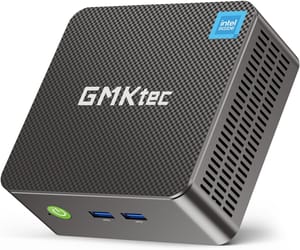
GMKtec G3 Plus
- +Just $209
- +incredibly tiny 3.94-inch form factor
- +16GB RAM
- +2.5Gb Ethernet
- +VESA mountable
- -Intel N150 is modest
- -no USB-C
- -limited upgrade path
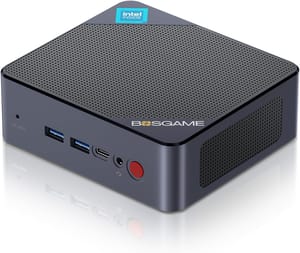
If you want USB-C with video output and faster networking, the BOSGAME B100 adds those features while staying under $200.
BOSGAME B100
- +Just $199
- +USB-C with video/data/power delivery
- +2.5Gb Ethernet
- +16GB RAM standard
- +VESA mountable
- -WiFi 5 and Bluetooth 4.2 are dated
- -single RAM slot
If you’re on a tighter budget or want to experiment before committing, Clawdbot also runs on Raspberry Pi (one user set it up with Cloudflare and was building websites from their phone within minutes) and even older Intel Macs. The experience won’t be as smooth, but it works.
For more options, check our Mini PC comparison chart to filter by specs that matter for AI workloads.
A Word of Caution
The enthusiasm is warranted, but so is some skepticism. Giving an AI agent keyboard and mouse access to your computer is, as one commenter noted, “hilarious, troubling, and awesome” all at once. The potential for “accidental, incorrect actions” is real.
Steinberger has built in safeguards, and you can configure exactly what permissions your agent has. But the fundamental premise of letting an LLM execute commands on your machine requires trust in both the underlying AI models and the Clawdbot codebase. It’s open source, which helps, but most users won’t be auditing the code themselves.
The security model for personal AI agents is still evolving. What happens when your agent has your credentials, can access your email, and is prompted by a carefully crafted message that looks innocent but contains adversarial instructions? These aren’t solved problems.
That said, the same could be said of any powerful tool. Early internet users faced similar trust questions. The benefits often outweigh the risks for those who proceed thoughtfully.
Getting Started
Installation is remarkably simple. A one-liner gets you running:
curl -fsSL https://clawd.bot/install.sh | bashFrom there, the onboarding process walks you through connecting your preferred chat applications and configuring permissions. The Clawdbot documentation is comprehensive, and the Discord community is active with users sharing skills and troubleshooting issues.
The GitHub repository is where development happens, and the pace of updates has been aggressive. At just three weeks old at the time of writing, Clawdbot is already on the cusp of feeling production-ready.
The Lobster Is Just Getting Started
Steinberger’s vision extends beyond personal assistants. He talks about agents communicating with each other: your agent negotiating with someone else’s agent, handling scheduling conflicts and task coordination without human involvement. The prompt becomes the new interface not just for controlling your computer, but for interacting with the digital world at large.
When Andrej Karpathy (former Tesla AI director, OpenAI founding member) is praising your project, you’re probably onto something.
Whether Clawdbot specifically becomes the dominant paradigm or gets absorbed into larger platforms remains to be seen. But the trend it represents feels inevitable. The question isn’t whether we’ll all have AI agents running on dedicated hardware at home. The question is how soon, and which lobster-themed mascot will lead the way.
For now, if you’ve been looking for an excuse to buy a Mac Mini, the crustacean overlords have provided one.

