
Flip-Screen Mini PCs Are Everywhere Now. Are They Actually Useful?
Published on by Jim Mendenhall

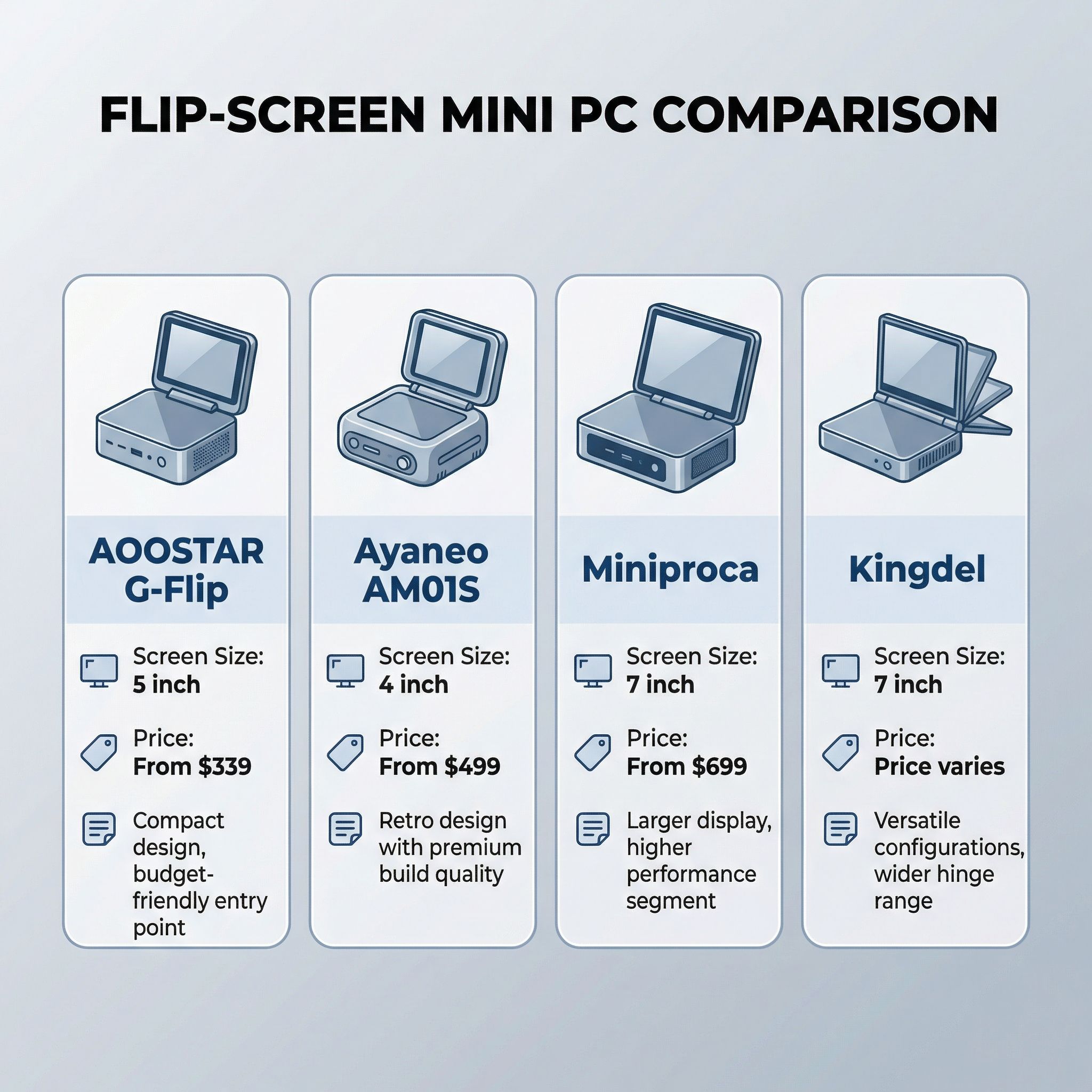
When AOOSTAR unveiled the G-Flip in 2025 with its 5-inch touchscreen hinged to the top of a compact PC chassis, it looked like a novelty. A year later, it no longer does. AYANEO launched the Retro Mini PC AM01S with a 4-inch flip display and retro Macintosh styling. Miniproca crowdfunded a Ryzen 9 unit with a 7-inch touchscreen. Kingdel shipped a model with the same screen size and a full 90-degree hinge. What started as one company’s experiment has become a genuine product category, with screens ranging from 4 to 7 inches and prices spanning $339 to $900. The question is no longer whether flip-screen mini PCs exist. It is whether anyone actually needs one.
The honest answer is that it depends entirely on how you plan to use the machine, and most of the marketing around these products is vague enough to obscure that reality. A built-in touchscreen makes a specific kind of sense for a specific kind of user. For everyone else, the same $50-$150 spent on a portable USB-C monitor will get you a bigger, sharper display that works with any computer you own. Understanding who falls into which camp requires looking past the spec sheets and into how people actually use mini PCs day to day.
The Lineup: What Is Actually Available
Before diving into whether these screens are useful, it helps to understand what is on the market right now and what is still a promise. The distinction matters because several of these products are crowdfunding campaigns, not shipping hardware, and the mini PC space has seen its share of projects that delivered late, delivered differently than advertised, or did not deliver at all.
The AOOSTAR G-Flip is the most established option and the one you can actually order today. The 2026 refresh added an AMD Ryzen 7 H255 alongside the existing Intel Core Ultra 5 125H and Core Ultra 7 155H options, dropping the barebones entry price to $339. Its 5-inch display runs at 1920x1080 and tilts from flat to about 65 degrees. The machine supports up to 128GB of DDR5 RAM, packs dual M.2 SSD slots, and includes both OCuLink and USB4 for connecting external GPUs. Those connectivity options transform it from a compact desktop into a potential workstation or gaming rig when paired with the right external hardware. AOOSTAR positions the screen as a secondary display for monitoring, notifications, or quick interactions, and the Full HD resolution makes it sharp enough for that purpose.
The AYANEO Retro Mini PC AM01S takes a different approach, wrapping its hardware in a retro Macintosh-inspired design that looks like it escaped from 1984. Its 4-inch touchscreen is the smallest in this category, sitting atop a chassis powered by up to an AMD Ryzen AI 9 HX 370 with 12 cores, 24 threads, and an NPU delivering 50 TOPS. AYANEO’s AYASpace software provides dedicated widgets for the tiny display: performance monitoring, mode switching, clock and weather, and basic touch controls. With dual USB4 ports, dual 2.5G Ethernet, and support for 65W sustained TDP through a dual-fan cooling system, the specs are serious. The catch is availability. The AM01S launched on Indiegogo with a $499 Early Bird price for the Ryzen 7 8745HS configuration, while the Ryzen AI 9 HX 370 model with memory starts at $839. While the campaign smashed its crowdfunding goals, AYANEO has not yet shipped units to backers. Anyone ordering today is making a bet on future delivery.
The Miniproca represents the most ambitious pitch in this space, promising a 7-inch flip-up touchscreen on a Ryzen 9 6900HX system. That screen resolves at 1024x600, which is worth noting since some marketing material refers to “4K,” a figure that actually describes the external display output, not the built-in panel. The aluminum chassis measures 175x137x55mm and weighs 855 grams, making it portable enough for travel. But the Ryzen 9 6900HX is a 2022 processor, and Kickstarter pricing starts at $699 for a barebones 8GB/512GB model with a purported retail price of $1,259. That pricing strains credibility for aging silicon, and as Tom’s Hardware noted, crowdfunding a mini PC carries real risk of delays, spec changes, and warranty headaches.
Kingdel rounds out the category with a 7-inch model offering a full 0-90 degree flip range, the widest tilt angle available. Less is publicly known about this model’s specs compared to its competitors, and Kingdel sells primarily through AliExpress, which means limited warranty support and longer shipping times for Western buyers. For adventurous shoppers comfortable with that tradeoff, it may represent decent value, but it is harder to recommend as confidently as the G-Flip.
What the Screens Are Actually Good For
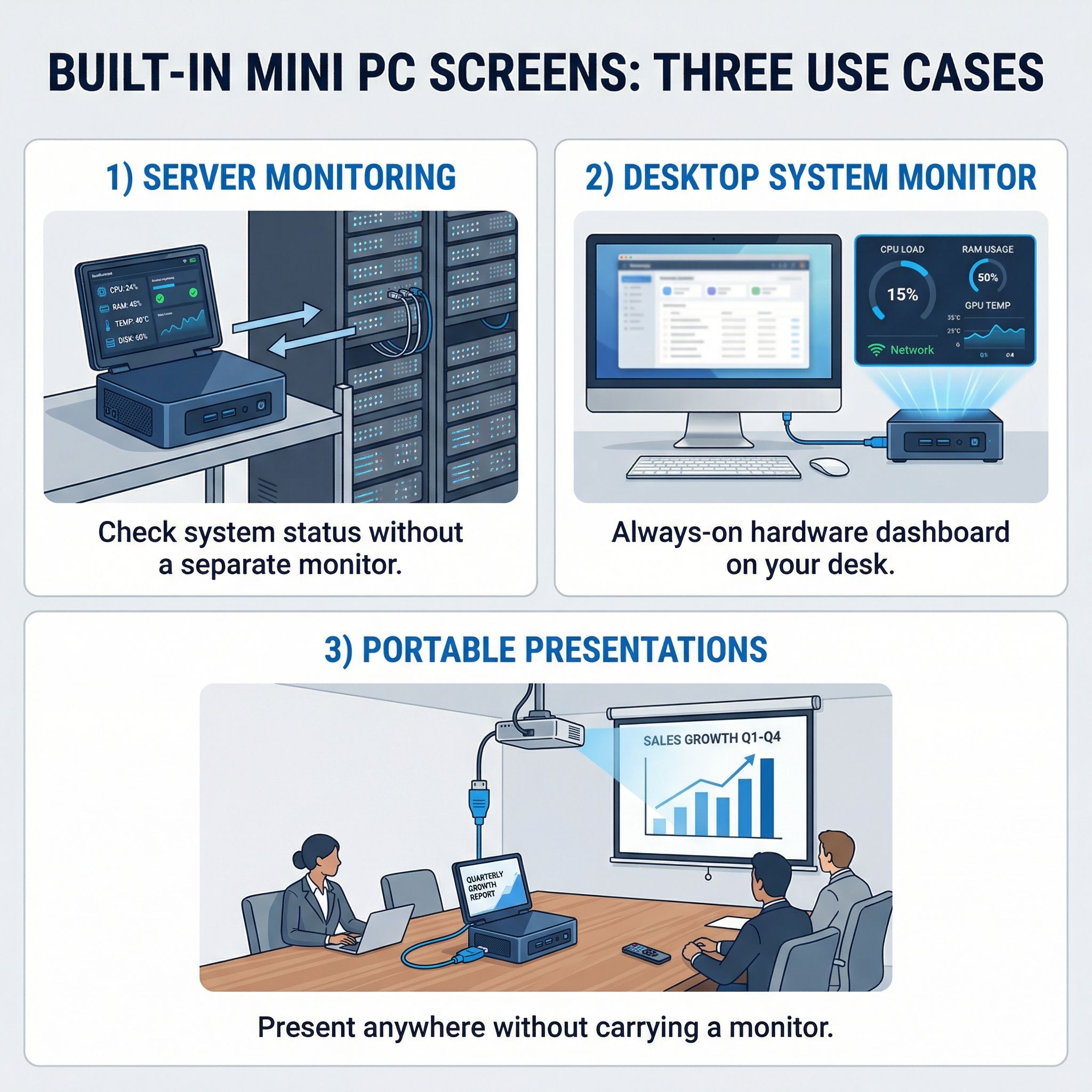
Strip away the marketing language and three genuine use cases emerge for a built-in mini PC screen. The first and strongest is headless server management. If you run a mini PC as a home server or self-hosting box, you know the annoyance of needing to find a spare monitor and keyboard when something goes wrong. A built-in screen lets you check system status, view IP addresses, or troubleshoot boot issues without dragging out extra hardware. For a machine tucked into a closet or mounted behind a TV, that convenience has real value, and it is the one scenario where the screen earns its keep every time you need it.
The second use case is as a persistent system monitor on your desk. Tools like AIDA64 on Windows or Conky on Linux can turn these small displays into always-on dashboards showing CPU temperature, RAM usage, network throughput, and storage health. If you are the kind of person who runs hardware monitoring software anyway, having it on a dedicated screen rather than a window hidden behind your browser is a genuine quality-of-life improvement. The 5-inch Full HD panel on the G-Flip is sharp enough to display detailed system graphs at a glance, though the AM01S’s 4-inch screen starts to feel cramped for anything beyond basic readouts.
The third use case is occasional portability, specifically for situations where you need a quick setup without an external monitor. Presentations at a client’s office, configuring a network device on-site, or running a demo at a trade show all become simpler when the computer carries its own display. This is the scenario Miniproca markets hardest, suggesting you can use it “from coffee shops to airplane seats,” though at 855 grams with no built-in keyboard or battery, calling it a laptop replacement stretches the truth.
Beyond these three scenarios, the built-in screen is mostly a novelty. Once a mini PC sits on your desk next to a 27-inch monitor, the flip screen will likely stay folded down after the first week. Casual use cases like “checking the weather at a glance” or “quick media controls” sound appealing in product listings but rarely justify dedicated hardware in practice. The manufacturers know this too, which is why so much of the marketing leans on the monitoring and portability angles rather than trying to sell the screen as something you will interact with constantly.
The Portable Monitor Question
Here is the comparison that none of the manufacturers want you to make: a 7-inch USB-C portable monitor costs $50-$80 on Amazon, runs at 1080p or higher, works with any computer or phone that supports USB-C DisplayPort output, and weighs about the same as a flip screen mechanism adds to a mini PC chassis. A 15.6-inch portable monitor costs $60-$120 and gives you a display large enough for actual work.
The flip screen’s advantage is integration. There is no extra cable, no separate device to carry, and no setup needed when you want that secondary display. It is always there. For the headless server scenario, this matters, since the whole point is that you should not have to go find a monitor when your server has a problem at midnight. For desk use, the convenience of a persistent small panel that takes no extra space and no extra USB port is meaningful.
But integration comes at a cost. The screen is permanently tied to one machine. If you upgrade your mini PC in two years, the screen does not come with you. If the screen breaks, you are looking at manufacturer repair rather than a $50 replacement. And the screens on these mini PCs are generally smaller and lower resolution than what you could buy separately for less money. The Miniproca’s 1024x600 panel in particular is notably inferior to any modern portable monitor at a fraction of the price.
The honest calculation is this: if you specifically need a secondary screen that is permanently and seamlessly attached to a compact PC, and the use case is monitoring or quick-reference rather than productivity work, a flip-screen mini PC saves you the hassle of an extra device and cable. For every other scenario, buying a good standard mini PC and a separate portable monitor gives you more flexibility, better display quality, and probably lower total cost. The G-Flip at $339 barebones is not dramatically more expensive than a comparable mini PC without a screen, which tilts the math in its favor, but the AM01S starting at $499 and the Miniproca at $699 start to look less compelling when a standalone portable monitor adds the same capability for $50-$80.
What We Wish We Knew
Several important questions remain unanswered by the marketing material and early reviews. Linux compatibility is the most glaring gap. The AYANEO AM01 runs Windows, and AOOSTAR ships with Windows 11 Pro, but many mini PC buyers run Linux for server or homelab use. Whether these built-in screens work out of the box on Ubuntu or Fedora, or whether they require proprietary drivers that only exist for Windows, is unclear. If the screen needs Windows-specific software to function as a secondary display, that significantly narrows the useful audience.
Long-term reliability of the hinge mechanisms is another unknown. These screens flip up and down repeatedly, and miniature hinges in consumer electronics have a mixed track record. None of these products have been on the market long enough to know whether the hinges hold up after a year of daily use. The AOOSTAR G-Flip limits its tilt to 65 degrees, which may be a durability-conscious design choice, while the Kingdel and Miniproca offer a full 90 degrees.
Thermal impact is the third open question. Adding a screen on top of a mini PC chassis, right above the components generating the most heat, raises obvious concerns about airflow and thermal throttling. The AYANEO AM01S addresses this with dual fans and heat pipes, but whether the screen position affects sustained performance under load is something only long-term reviews will reveal.
The Verdict: Useful for a Narrow Audience
Flip-screen mini PCs are not a gimmick in the dismissive sense. The engineering is real, the screens work, and the form factor solves a genuine problem for people who manage headless servers, want a persistent hardware monitor, or need an occasionally portable desktop with its own display. The AOOSTAR G-Flip in particular hits a compelling price point at $339 barebones with modern AMD and Intel processor options, real expandability through OCuLink and USB4, and a screen sharp enough to be genuinely useful.
But the market for these machines is narrower than the manufacturers suggest. If your mini PC lives on a desk next to a monitor, you do not need a built-in screen. If you want a portable computing solution, a laptop does the job better. If you want a big secondary display, a portable monitor costs less and does more. The flip screen earns its place specifically when you want a compact, self-contained computer that can show you what it is doing without needing anything else plugged in, and when the convenience of that integration matters more than display size or resolution.
The trend itself is worth watching. A year ago there was one flip-screen mini PC. Now there are at least four, with more likely on the way. As the designs mature, screens get sharper, hinge mechanisms prove their durability, and prices come down, the value proposition will only improve. For now, the AOOSTAR G-Flip is the safest bet: it ships today, the hardware is current, the price is reasonable, and the 5-inch Full HD screen is the best display in the category. Everyone else is either crowdfunding a promise or selling through channels that make returns difficult. The comparison chart can help you weigh the G-Flip against more traditional alternatives if you are still deciding whether the flip screen is worth the premium.

