
Lenovo's Yoga Mini i and the Race to Reinvent the Desktop PC Shape
Published on by Jim Mendenhall

The desktop PC has been a rectangle for forty years. Even as components shrank and efficiency improved, the basic shape remained: a box, sometimes smaller, sometimes thinner, but always recognizably box-shaped. Intel’s NUC established the 4x4-inch square as the mini PC standard in 2013, and hundreds of manufacturers have followed that template ever since. So when Lenovo walked into CES 2026 with a palm-sized aluminum cylinder instead of another rectangular slab, it felt like watching someone bring a round suitcase to the airport. The Yoga Mini i, at just 0.65 liters and 600 grams, doesn’t just shrink the desktop — it fundamentally rethinks what one should look like.
Lenovo isn’t the first to try this. Apple’s 2013 Mac Pro — the infamous “trash can” — attempted a cylindrical design at desktop scale and retreated to a tower after discovering that thermal constraints in a round chassis limited upgradeability. Qualcomm’s disc-shaped Snapdragon X2 reference designs at the same CES show looked more like drink coasters than computers, using solid-state cooling to eliminate fans entirely. Even the current Mac Mini M4, while still technically a square, shrank so dramatically that reviewers started comparing it to a hockey puck. The box is losing its grip on the desktop form factor, and the Yoga Mini i is Lenovo’s bet on what replaces it.
The Cylinder That Wants to Be Furniture
The Yoga Mini i measures 130mm in diameter and 48.6mm tall — roughly the footprint of a large coffee mug. Its aluminum shell comes in a “Seashell” finish that Lenovo clearly designed to sit on a desk rather than hide behind a monitor. Continuous ventilation holes ring the base, serving double duty as airflow paths and openings for a built-in 2W speaker. An ambient light around the bottom pulses to show notification alerts, and the whole thing wakes up automatically when you sit down thanks to WiFi-based presence detection. An integrated accelerometer responds to taps on the chassis, letting you trigger Copilot AI features by knocking on your computer like it’s a door.
These design choices reveal Lenovo’s real thesis: a desktop PC shouldn’t just be tolerated on your desk; it should be worth displaying there. The cylindrical shape means no ugly rear panel of ports facing visitors — the connections wrap around the back half of the curve, visually receding from the front. It’s the same design philosophy that drove Apple to hide the Mac Mini’s ports on the bottom edge, and it works. The Yoga Mini i looks more like a Bluetooth speaker or a smart home device than a Windows PC, which is arguably the point. If your computer is going to sit on your desk in plain sight, it might as well look like it belongs there.
But aesthetics mean nothing if the hardware inside can’t keep up. Lenovo configured the Yoga Mini i with Intel’s Core Ultra X7 358H as the top option — a Panther Lake chip with 16 CPU cores and the full 12-core Arc B390 integrated GPU. The same processor that’s enabling genuinely playable 1080p gaming in Panther Lake NUCs from ASUS and Khadas now sits inside a chassis barely bigger than a grapefruit. Up to 32GB of LPDDR5X-8533 memory and 2TB of PCIe Gen 4 NVMe storage round out a spec sheet that reads more like a premium ultrabook than a desktop accessory.
Connectivity That Punches Up
For a device this small, the Yoga Mini i’s port selection is surprisingly aggressive. Two Thunderbolt 4 ports handle high-bandwidth peripherals and external displays, while two additional USB-C 3.2 Gen 2 ports offer full-function data and power delivery. A USB-A port accommodates legacy peripherals, HDMI 2.1 (TMDS) provides a straightforward display connection, and a 2.5 Gigabit Ethernet jack handles wired networking. The system supports up to four simultaneous external displays — a spec that puts it ahead of the Mac Mini M4’s three-display maximum and matches what the ASUS NUC 14 Pro offers in a larger chassis.
WiFi 7 and Bluetooth 6.0 handle wireless duties, and the WiFi radio does more than just connect to the internet. Lenovo uses WiFi sensing — the same technology that TP-Link and ASUS have built into recent routers for motion detection — to determine when someone is nearby. Walk up to your desk and the Yoga Mini i wakes from sleep before you touch a key. Walk away and it locks itself. An integrated fingerprint sensor adds biometric authentication, so the wake-and-unlock sequence can happen without typing a password at all. It’s a small convenience that most people won’t notice after the first week, but it represents the kind of interaction design that only makes sense when a computer lives permanently on your desk surface rather than tucked under it.
The entire system runs off a 100W USB-C adapter, meaning a single cable can power the machine and connect to a Thunderbolt dock simultaneously. For a device that Lenovo positions as a Copilot+ PC — Microsoft’s branding for machines with on-device AI capabilities like real-time transcription and local summarization — the 100W power envelope suggests the Core Ultra X7 358H won’t be running at its full 45W sustained TDP for extended periods. That’s the physics tradeoff every sub-1L mini PC has to make, and it’s worth understanding before setting expectations.
The Sub-1L Volume War
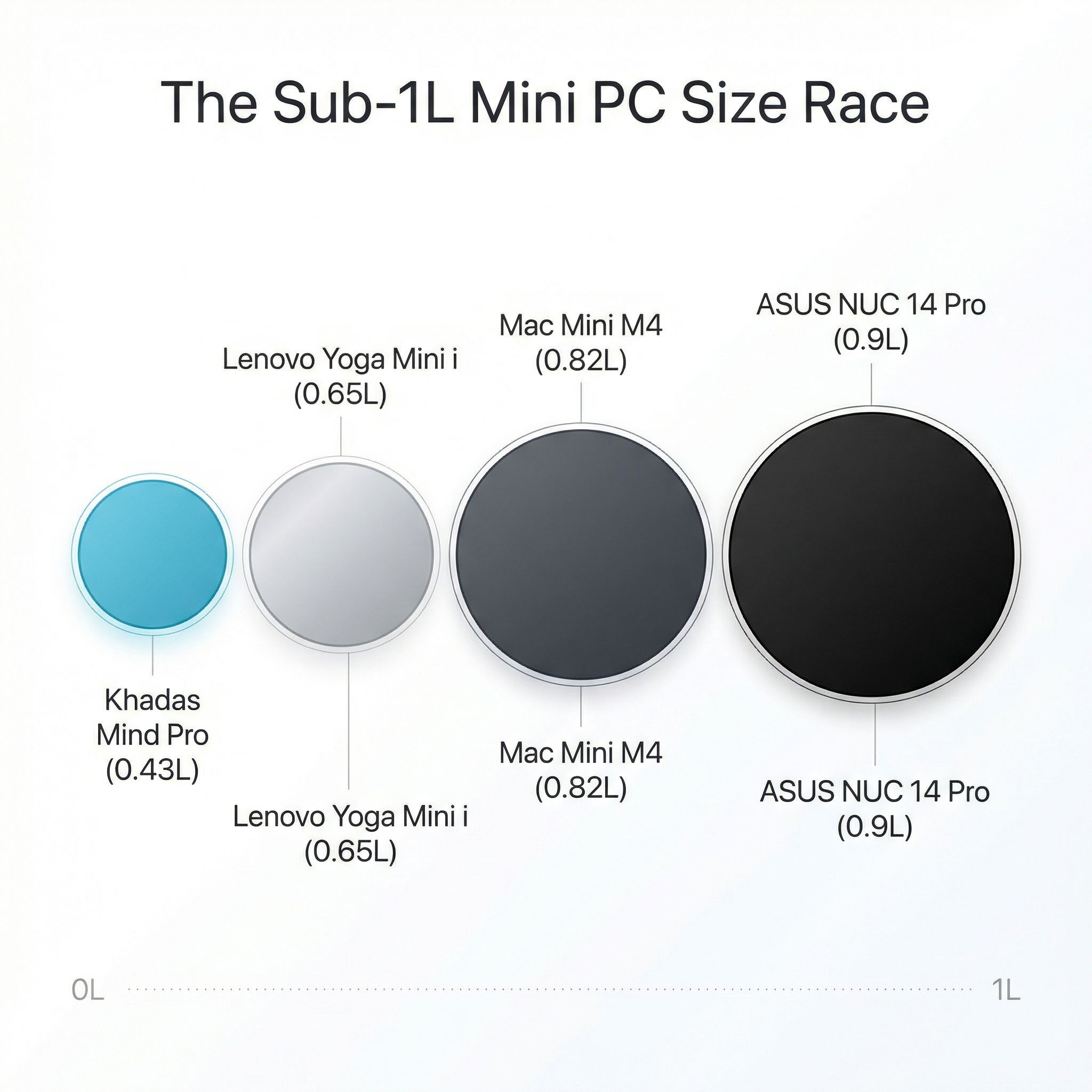
Volume measured in liters has become the mini PC industry’s equivalent of horsepower: a single number that buyers fixate on even though it doesn’t tell the whole story. The Khadas Mind Pro leads the pack at just 0.43 liters, followed by the Yoga Mini i at 0.65 liters, the Mac Mini M4 at approximately 0.82 liters, and the ASUS NUC 14 Pro at roughly 0.9 liters. On paper, the Khadas seems like the clear winner in the miniaturization race. In practice, shape changes the desk experience more than raw volume suggests.
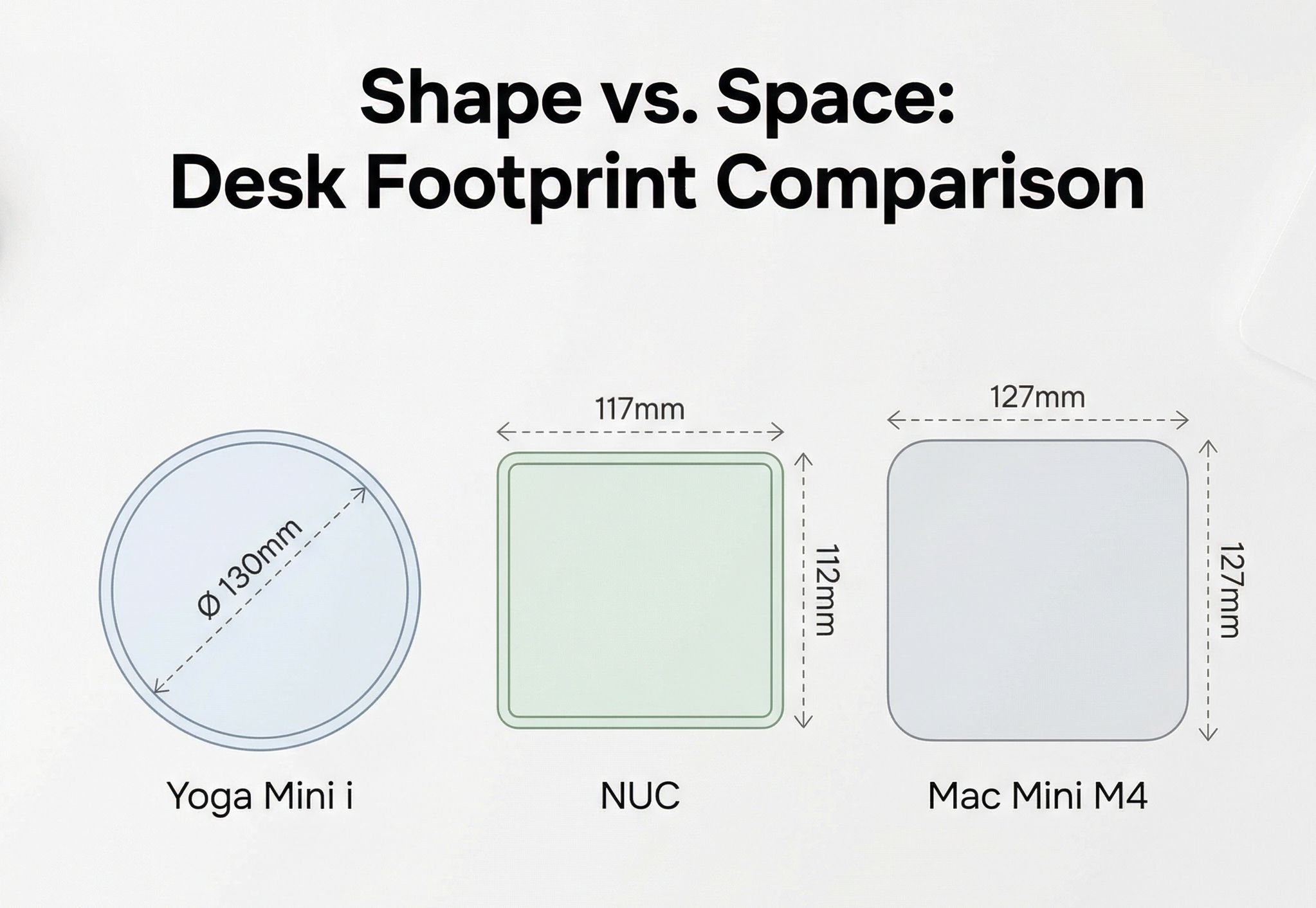
A 0.43-liter rectangle (the Khadas Mind Pro measures 146 x 105 x 28mm) sits flat and thin like an oversized coaster. A 0.65-liter cylinder with a 130mm diameter occupies a circular footprint that takes up less linear desk space in any direction but stands taller at 48.6mm. The Mac Mini M4’s square 127 x 127mm footprint feels visually larger than the Yoga Mini i even though the M4 is only slightly bigger in total volume, because squares and rectangles read as “bigger” to human perception than circles of equivalent area. These differences sound academic until you actually try to arrange a monitor, keyboard, and mini PC on a 120cm desk — at which point the shape of the PC suddenly matters as much as its size.
The deeper question isn’t which sub-1L mini PC is smallest, but what each manufacturer gave up to get there. The Khadas Mind Pro at 0.43 liters solders everything: 64GB LPDDR5X, 2TB NVMe, no room for expansion. Its brilliance lies in the modular dock system, including a Mind Graphics 2 enclosure with a desktop RTX 5060 Ti, that offloads expansion to external hardware. The Yoga Mini i takes a middle path: soldered LPDDR5X (max 32GB) but a user-accessible M.2 SSD slot for storage upgrades. The ASUS NUC 14 Pro, slightly larger, rewards buyers with socketed SO-DIMM RAM and room for a 2.5-inch drive in its tall configuration. Every liter you save costs you something in flexibility, and buyers who don’t understand that tradeoff will be disappointed.
The Physics of Cramming Power Into a Puck
No independent thermal testing exists for the Yoga Mini i yet — it doesn’t ship until June 2026, and Lenovo hasn’t disclosed the internal cooling architecture in detail. That absence is the single most important thing to know about this product right now. The Core Ultra X7 358H is a capable chip that can sustain 45W in well-cooled laptop chassis, but a 0.65-liter cylinder with ventilation holes and no visible heatpipe array is not a well-cooled laptop chassis. Early hands-on coverage from Tom’s Guide noted the fan remained quiet during basic use at CES, but “basic use at CES” tells you nothing about sustained rendering, compilation, or multi-hour gaming sessions.
The cylindrical shape does offer one genuine thermal advantage that rectangular chassis don’t: 360-degree radial airflow. Heat generated at the center of the cylinder can dissipate in every direction simultaneously, and the ring of ventilation holes around the base creates a natural chimney effect when the warm aluminum shell conducts heat outward. Whether Lenovo’s engineering team has exploited that geometry effectively or simply stuffed a standard laptop cooling module into a round case won’t be clear until reviewers get production units. The historical precedent — Apple’s cylindrical Mac Pro throttled under sustained GPU loads because heat pooled at the center with nowhere to go — suggests that cylindrical designs can work for intermittent workloads but struggle with continuous high-power output.
For buyers who need sustained multi-threaded performance, the honest advice is to wait for independent benchmarks. For everyone else — and that includes most people who use a desktop for web browsing, document editing, video calls, and occasional media consumption — the Yoga Mini i’s thermal ceiling probably won’t matter. The Copilot+ AI features that Lenovo is marketing require the NPU, not the CPU or GPU cores, and Intel’s NPU operates at a fraction of the power envelope. Daily productivity work won’t push this machine anywhere near its thermal limits, and that’s likely exactly the workload Lenovo designed it for.
Who This Is Actually For
At $699.99 when it launches in June 2026, the Yoga Mini i sits in an interesting pricing gap. Below it, the Mac Mini M4 starts at $599 with Apple’s more power-efficient silicon and a mature software ecosystem. Above it, the Khadas Mind Pro commands $1,799 for its pre-order early-bird price but delivers 64GB of RAM, a modular GPU expansion system, and the same Core Ultra X7 358H processor. The ASUS NUC 14 Pro starts at $394 for non-X models but uses the previous-generation Meteor Lake platform. The Yoga Mini i needs to justify its price against all of these, and the spec sheet alone doesn’t do it.
What the spec sheet doesn’t capture is the industrial design. The Yoga Mini i is the first Windows mini PC that feels like it was designed by someone who cares about how objects look on a desk. The tap controls, the ambient light, the presence detection, the speaker — these aren’t productivity features. They’re the kind of details you find in premium consumer electronics, where the experience of using a product matters as much as the benchmark scores. Lenovo is betting that there’s a meaningful audience of buyers who want a Windows desktop that doesn’t look like a Windows desktop, and who are willing to pay $100 more than a Mac Mini for the combination of Intel compatibility, Thunderbolt 4, four-display support, and a form factor that earns its place on the desk surface instead of hiding behind a monitor.
That bet might be right. The mini PC market has spent a decade optimizing for specs per dollar, producing hundreds of variations on the same rectangle that differ only in processor, RAM, and price. The result is a market where most buyers can’t distinguish between competing products without a spreadsheet. Lenovo’s Yoga Mini i is one of the first mini PCs from a tier-one manufacturer that’s genuinely differentiated by design rather than silicon, and that alone makes it worth watching — even if you should wait until June for the thermal benchmarks before actually buying one.

