
Bmax B3 Pro
Updated on

The Bmax B3 Pro represents an appealing entry point into the mini PC market, delivering a surprisingly capable computing experience for its sub-$200 price point. Powered by an Intel Celeron N5095 quad-core processor with turbo speeds up to 2.9GHz, this compact machine handles everyday tasks like web browsing, document editing, and media streaming without breaking a sweat. The dual HDMI 4K outputs make it particularly attractive for users who need a multi-monitor setup for productivity work, while the fanless design during light loads keeps your desk whisper-quiet. Whether you’re setting up a home office, building a digital signage solution, or need a compact HTPC for your living room, the B3 Pro checks a lot of boxes without demanding much from your wallet.
Pros and Cons of the Bmax B3 Pro
| Pros | Cons |
|---|---|
| Very affordable at around $160 | Weak single-core performance limits gaming |
| Dual HDMI with 4K @ 60Hz support | Only 1 Gigabit Ethernet port (B3 Plus had 2) |
| Low power consumption (11-24W typical) | 256GB storage fills up quickly |
| Tool-less lid design for easy upgrades | Occasional HDMI handshake issues reported |
| VESA mount included for monitor attachment | Plastic construction feels budget-oriented |
| Quiet operation with efficient thermal management | No USB 4 or Thunderbolt connectivity |
Related Videos
Bmax B3 Pro Comparison Chart
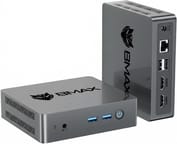 Bmax B3 Pro | |
| Price | List Price: $159.99 Amazon Prices: Loading prices... |
| Version | 8GB/256GB/Intel N5095 |
| Perfomance Rating | 4.1 |
| Operating System | Windows 11 Pro |
| Processor | Quad-core 2.00 Ghz (max 2.90 Ghz) Intel Celeron Processor N5095 |
| GPU | Integrated Intel UHD Graphics |
| RAM | 8 GB |
| Internal Storage | 256 GB |
| Dimensions width x length x thickness | 4.41 x 4.92 x 1.73 inches (112.01 x 124.97 x 43.94 mm) |
| Weight | 0.66 lbs (0.3 kg) |
| WiFi | Wi-Fi 5 (802.11ac) |
| Bluetooth | Bluetooth 5.0 |
| Ethernet | 1 Ethernet port at 1 Gbps |
| HDMI | 2 Full-Size HDMI Ports |
| DisplayPort | No DisplayPort |
| VGA | No VGA Ports |
| USB Ports | 4 USB 3, 1 USB-C |
| Thunderbolt Ports | No |
| Internal SATA Ports | No SATA ports |
| Card Reader | microSD Card Reader |
| Headphone Jack | combo |
| Fanless | No |
| VESA Mount | Yes |
| In the Box | Mini PC, power adapter, HDMI cable, VESA mounting bracket with screws, user manual |
| Expandability | RAM upgradable to 32GB via 2x DDR4 SO-DIMM slots, storage expandable via M.2 2280 SATA slot and internal 2.5-inch SATA bay |
Related Mini PCs
-
 Bmax B2 PowerThe Bmax B2 Power delivers budget-friendly computing in an ultra-compact package. With its Intel…
 -
 Bmax B3With the Bmax B3 Mini PC, multitask with ease using the Intel Celeron N5095, dual HDMI, and…
 -
 CyberGeek Nano J1Harness the power of compact computing with the CyberGeek Nano J1 Mini PC. Featuring Intel Celeron…
 -
 PELADN WI-4With Windows 11 Pro, a compact 4.88” x 4.4” build, and VESA mount compatibility, the PELADN WI-4…
 -
 Beelink Mini SThe Beelink Mini S Mini PC packs a punch with its Intel Celeron quad-core processor, dual 4K HDMI…
 -
 CHUWI HeroBox (2023)The CHUWI HeroBox Mini PC packs a punch with Windows 11, DDR5 RAM, WiFi 6, and Bluetooth 5.2. Ideal…
Detailed Insights into the Bmax B3 Pro

The B3 Pro ships in a compact plastic enclosure measuring just 4.92 x 4.41 x 1.73 inches and weighing a mere 0.66 pounds, making it easy to mount behind a monitor using the included VESA bracket or tuck away on a crowded desk. The build quality reflects its budget positioning with lightweight plastic construction, though the chassis design is thoughtfully laid out with ports distributed across multiple sides for cable management flexibility. The front panel houses the power button alongside USB 3.0 ports for easy access to peripherals, while the rear accommodates the dual HDMI outputs, additional USB ports, Gigabit Ethernet, and the barrel-style power connector.
Under the hood, the Intel Celeron N5095 processor delivers respectable performance for its class, with four cores running at a base clock of 2.0GHz and boosting to 2.9GHz when needed. According to AKGamerTech’s hands-on review, the system draws only about 24 watts under load and maintains CPU temperatures around 85 degrees Celsius during stress testing, indicating adequate thermal management for sustained workloads. The integrated Intel UHD Graphics handles 4K video playback smoothly, though don’t expect to run modern games at playable framerates. Light titles like Minecraft work fine, but anything more demanding like Fortnite proved unplayable in testing.
Connectivity is comprehensive for a budget mini PC, with four USB 3.0 Type-A ports providing plenty of bandwidth for peripherals, a USB-C port that supports video output via DisplayPort Alt Mode, and WiFi 5 (802.11ac) with Bluetooth 5.0 for wireless connections. The single Gigabit Ethernet port handles wired networking duties, representing a cost reduction from the B3 Plus variant which offered dual Ethernet ports. Storage expansion options include an M.2 2280 SATA slot and an internal 2.5-inch SATA bay connected via ZIF cable, allowing you to add a traditional hard drive or larger SSD as your needs grow.
Reviewer Insights on the Bmax B3 Pro

AKGamerTech’s Perspective
AKGamerTech provides a comprehensive hands-on look at the BMAX B3, starting with an unboxing that reveals some pleasant surprises including an HDMI cable and VESA mounting bracket in the box. During a detailed teardown, he demonstrates the dual RAM slots and M.2 storage, noting the presence of a 2.5-inch SATA expansion bay though criticizing the lack of dedicated mounting screws for it.
The reviewer spends significant time on real-world performance testing, concluding that while “the CPU is not a very powerful one,” it handles everyday tasks admirably. He notes some quirks with the pre-installed Windows 11 image and recommends a clean install, though he encountered HDMI handshake issues requiring manual refresh rate adjustments. Despite these minor frustrations, he summarizes that “it’s a good mini PC for its price” and praises its thermal efficiency, stating “it wouldn’t get hotter than 85 degrees Celsius… so it wouldn’t overheat.”
Jbird’s Tech Videos
Jbird’s Tech Videos focuses on the B3 Plus variant (with N5105) but provides valuable insights applicable to the B3 Pro family. He particularly appreciates the tool-less access design, noting “This Bmax has a easy way to get into the computer” via the slide-off lid. The reviewer demonstrates an interesting power delivery feature where the system can switch between barrel jack and USB-C power without interruption, useful for users with USB-C PD power strips.
While praising the multi-core performance for the price point, he notes that single-core speeds lag behind even older desktop processors. His verdict positions the B3 series as “a solid budget choice for tinkerers or light users” who value expandability over raw performance.
CNX Software’s Technical Analysis
According to CNX Software, the B3 Plus achieves remarkably quiet operation at just 31 dBA under load with average CPU temperatures of 63 degrees Celsius during stress testing. The technical review highlights that “simultaneous download speed of 943 Mbits/sec and a simultaneous upload speed of 949 Mbits/sec” confirms excellent network performance. They note the “unique and useful way of accessing the motherboard allows for ‘tool-less’ changing of the memory,” though caution that performance may be slightly limited as “the value of ‘PL 2’ being set at 25W rather than 30W.”
Customer Reviews of the Bmax B3 Pro
With a 4.6 out of 5 star rating from 58 Amazon reviews, the Bmax B3 Pro has earned positive marks from customers who understand its budget positioning. Many buyers praise the system’s value proposition, noting that it handles their daily computing needs smoothly whether that’s web browsing, video streaming, or basic office work. The compact form factor and VESA mounting capability receive frequent mentions from users who appreciate being able to hide the PC behind their monitors for a cleaner desk setup.
Common complaints center on the 256GB storage capacity filling up quickly, prompting many customers to add external drives or install a secondary SSD in the 2.5-inch bay. A few reviewers mention occasional issues with display connectivity, though most found these resolved after driver updates or HDMI cable replacements. Overall, customers seem satisfied with the trade-offs they’ve accepted at this price point, with the consensus being that the B3 Pro delivers solid everyday computing performance without unnecessary bells and whistles.
Conclusion
The Bmax B3 Pro earns its place in the budget mini PC market by delivering reliable everyday computing performance at a price that won’t stress your budget. It’s an excellent choice for home office setups where you need basic productivity capabilities, students who want a compact desktop for homework and streaming, or anyone building a digital signage or home theater PC where the dual 4K HDMI outputs provide real value. The upgrade-friendly design with tool-less access and multiple storage expansion options adds longevity to the purchase, though rising DRAM prices mean buying a higher RAM configuration upfront may be more cost-effective than upgrading later.
However, those expecting to run demanding applications, play modern games, or push the system with heavy multitasking should look elsewhere. The Celeron N5095 processor, while efficient and capable for basic tasks, lacks the horsepower for more demanding workloads. If your needs include content creation, software development, or gaming, consider stepping up to a higher-tier mini PC with a more powerful AMD Ryzen or Intel Core processor.
For those looking to compare options, Starry Hope’s Mini PC Comparison Chart provides a valuable resource for evaluating the B3 Pro against similar budget-friendly alternatives and finding the best fit for your specific needs.
Frequently Asked Questions
Can the Bmax B3 Pro run Windows 11?
Yes, the Bmax B3 Pro comes with Windows 11 pre-installed and is fully compatible with all Windows 11 features. The Intel Celeron N5095 processor meets Microsoft’s hardware requirements, and several reviewers have successfully performed clean Windows 11 installations for better performance.
How many monitors can the Bmax B3 Pro support?
The B3 Pro supports up to three displays simultaneously using its dual HDMI 2.0 ports and USB-C port with DisplayPort Alt Mode. All outputs support 4K resolution at 60Hz, making it suitable for multi-monitor productivity setups.
Can I upgrade the RAM and storage in the Bmax B3 Pro?
Yes, the B3 Pro features a tool-less sliding lid design that provides easy access to two DDR4 SO-DIMM slots supporting up to 32GB of RAM. Storage can be expanded via the M.2 2280 SATA slot and an internal 2.5-inch SATA bay, allowing for significant storage expansion.
Is the Bmax B3 Pro good for gaming?
The B3 Pro is not designed for gaming beyond very light titles. Reviewers found that Minecraft runs acceptably, but more demanding games like Fortnite are unplayable. The integrated Intel UHD Graphics lacks the power for modern 3D games. If gaming is a priority, consider a mini PC with a dedicated GPU or more powerful integrated graphics.
How loud is the Bmax B3 Pro during operation?
The B3 Pro operates very quietly, with technical reviews measuring noise levels at around 31 dBA under load. During light tasks like web browsing or office work, the fan often stays nearly silent. The system maintains good thermal management without creating distracting noise.
Can the Bmax B3 Pro be mounted behind a monitor?
Yes, the B3 Pro includes a VESA mounting bracket in the box that allows you to attach it to the back of any VESA-compatible monitor. This creates a clean, space-saving setup that’s popular for office environments and home theaters.
Does the Bmax B3 Pro support Linux?
Yes, the B3 Pro is compatible with popular Linux distributions including Ubuntu. The Intel Celeron N5095 processor has good Linux driver support, and the standard hardware components generally work out of the box with most modern distributions.
What is the power consumption of the Bmax B3 Pro?
The B3 Pro is very energy efficient, consuming approximately 11-13 watts at idle and around 24 watts under full load according to reviewer testing. This makes it an economical choice for systems that run continuously, such as digital signage or home servers.