
CyberGeek Nano J1
Updated on

The CyberGeek Nano J1 is a compact mini PC. Its Intel Celeron Processor N5095 runs a base frequency of 2.00 GHz and boosts to 2.90 GHz, with integrated Intel UHD Graphics that drives 4K resolution for home theater setups. The top configuration pairs 16 GB of DDR4 RAM with a 1 TB M.2 NVMe SSD, enough memory and storage for everyday multitasking. The case measures 4.88 x 4.39 x 1.67 inches and weighs 1.76 pounds, small enough to disappear behind a monitor. Networking covers dual-band Wi-Fi, Bluetooth 4.2, and a 2.5 Gbps Ethernet port.
| Pros | Cons |
|---|---|
| Compact and lightweight design | Not intended for gaming |
| 2.5 Gbps Ethernet, measured at 2500 Mbps | CPU pegs at 100 percent under light multitasking |
| Windows 11 Pro pre-installed | Factory Windows image ships on 21H2 with updates locked |
| Dual HDMI outputs for multi-monitor | Lacks support for 2.5-inch drive |
| Upgradeable RAM and storage | Limited internal airflow |
Related Videos
CyberGeek Nano J1 Comparison Chart
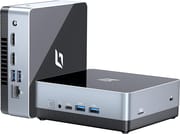 CyberGeek Nano J1 | CyberGeek Nano J1 | CyberGeek Nano J1 | |
| Price | List Price: $164.99 Amazon Prices: Loading prices... | List Price: $209.99 Amazon Prices: | List Price: $176.99 Amazon Prices: |
| Version | 8GB/512GB/Intel N5095A | 16GB/1TB/Intel N5095A | 16GB/256GB/Intel N5095A |
| Performance Rating | 4.1 | 4.8 | 4.8 |
| Operating System | Windows 11 Pro | Windows 11 Pro | Windows 11 Pro |
| Processor | Quad-core 2.00 Ghz (max 2.90 Ghz) Intel Celeron Processor N5095 | Quad-core 2.00 Ghz (max 2.90 Ghz) Intel Celeron Processor N5095 | Quad-core 2.00 Ghz (max 2.90 Ghz) Intel Celeron Processor N5095 |
| GPU | Integrated Intel UHD Graphics | Integrated Intel UHD Graphics | Integrated Intel UHD Graphics |
| RAM | 8 GB | 16 GB | 16 GB |
| Internal Storage | 512 GB | 1 TB | 256 GB |
| Dimensions width x length x thickness | 4.88 x 4.39 x 1.67 inches (123.95 x 111.51 x 42.42 mm) | 4.88 x 4.39 x 1.67 inches (123.95 x 111.51 x 42.42 mm) | 4.88 x 4.39 x 1.67 inches (123.95 x 111.51 x 42.42 mm) |
| Weight | 1.76 lbs (0.8 kg) | 1.76 lbs (0.8 kg) | 1.76 lbs (0.8 kg) |
| WiFi | Wi-Fi 5 (802.11ac) | Wi-Fi 5 (802.11ac) | Wi-Fi 5 (802.11ac) |
| Bluetooth | Bluetooth 4.2 | Bluetooth 4.2 | Bluetooth 4.2 |
| Ethernet | 1 Ethernet port at 2.5 Gbps | 1 Ethernet port at 2.5 Gbps | 1 Ethernet port at 2.5 Gbps |
| HDMI | 2 Full-Size HDMI Ports | 2 Full-Size HDMI Ports | 2 Full-Size HDMI Ports |
| DisplayPort | No DisplayPort | No DisplayPort | No DisplayPort |
| VGA | No VGA Ports | No VGA Ports | No VGA Ports |
| USB Ports | 4 USB 3, 1 USB-C | 4 USB 3, 1 USB-C | 4 USB 3, 1 USB-C |
| Thunderbolt Ports | No | No | No |
| OCuLink | No | No | No |
| Internal SATA Ports | No SATA ports | No SATA ports | No SATA ports |
| Card Reader | microSD Card Reader | microSD Card Reader | microSD Card Reader |
| Headphone Jack | combo | combo | combo |
| Fanless | No | No | No |
| VESA Mount | Yes | Yes | Yes |
| In the Box | Mini PC, power adapter, VESA mount, rubber feet, screws, quick start guide | Mini PC, power adapter, VESA mount, rubber feet, screws, quick start guide | Mini PC, power adapter, VESA mount, rubber feet, screws, quick start guide |
| Expandability | RAM and storage can be upgraded, Wi-Fi card replaceable, no support for 2.5-inch drive despite space in case | RAM and storage can be upgraded, Wi-Fi card replaceable, no support for 2.5-inch drive despite space in case | RAM and storage can be upgraded, Wi-Fi card replaceable, no support for 2.5-inch drive despite space in case |
Related Mini PCs
-
 CyberGeek Nano A1The CyberGeek Nano A1 is a compact Intel N100 mini PC with Windows 11 Pro, Wi-Fi 6, dual HDMI 4K…
 -
 Bmax B2 PowerThe Bmax B2 Power is a palm-sized mini PC with an Intel Celeron 5205U, 8GB of DDR4, a 256GB NVMe…
 -
 Bmax B3 ProThe Bmax B3 Pro is a budget mini PC with an Intel Celeron N5095, dual 4K HDMI outputs, WiFi 5, and…
 -
 ORIGIMAGIC C4 PlusThe ORIGIMAGIC C4 Plus puts a 15W Ryzen 5 3501U and two Gigabit Ethernet ports in a 5-inch box with…
 -
 PELADN WI-4The PELADN WI-4 is a 4.88 by 4.4-inch mini PC with an Intel Celeron N5095, Windows 11 Pro,…
 -
 AWOW AK10The AWOW AK10 is an Intel N100 mini PC with 8GB of soldered DDR5, a 256GB SSD in an M.2 slot that…
Front USB ports and a spare bay with no connector
The shell is a metal case with a plastic bottom and rubber feet. It is VESA mount compatible, so it can hang behind a monitor to clear desk space. The front panel carries a power button, an audio jack, a USB-C port, and two USB 3.0 ports. The side panel houses a micro SD card slot and a Kensington lock port, and the back panel adds the remaining USB ports and the HDMI outputs for a dual monitor setup.
The Intel Celeron N5095 is not fast silicon, but it is sufficient for everyday applications and can handle several open tasks without significant lag. The 16 GB of DDR4 RAM in the top build leaves plenty of headroom for browser tabs and background apps.
The RAM and storage can be swapped, and the Wi-Fi card is replaceable, so a buyer who starts on the 8GB build is not stuck there. There is space in the case for a 2.5-inch drive, but the necessary connector is not supplied, so that bay stays empty unless the owner sources one.
Reviewer Insights
The Nano J1 runs an Intel Celeron N5095A, an 11th-gen Jasper Lake quad-core (four cores, four threads, 4MB cache, 2.0 GHz base and 2.9 GHz boost). Its PassMark multi-thread score is about 4,106. For 2026 context, the chips that now anchor the budget mini PC shelf score higher: the Intel N100 lands near 5,643 and the newer N150 near 5,478, so both sit roughly a third ahead of the Jasper Lake part.
T is for Tech’s Perspective
Andrew at T is for Tech ran the synthetic CPU tests. On Geekbench he recorded a single-core score of 484 and a multi-core score of 1437, which he framed as “going to be on the lower end, you know, the budget PC range.” He also ran UserBenchmark, where the tool rated the machine’s gaming and workstation potential a “tree trunk” and its desktop potential a “yacht,” and he flagged a “very high background CPU use of 38” percent that he could not account for after killing the visible processes.
Under load “the fan did come on, but you know, it’s not that loud,” and he “didn’t really seem to think it was thermal throttling or anything.” He did watch the CPU spike “even some points getting to 100” percent just from clicking around and opening apps, his concrete illustration of the four-core ceiling. He said “the hard drive was performing below expectations” and that the Micron memory also read low, speculating he “might have to check the BIOS” for a dual-channel DDR config issue. He confirmed smooth 4K YouTube playback, called the anodized-feeling metal case “really nice,” and closed that the Nano J1 “does offer some pretty good value, depending on your use case,” explicitly not as a gaming rig but as a light desktop, media, or home-lab box.
CareyHolzman’s Analysis
Repair-channel veteran CareyHolzman ran CrystalDiskMark on the unit’s drive and hit a sequential read of 889.1 MB/s, which he reckoned was only about 50 percent faster than SATA (he pegged SATA at roughly 550 MB/s) and, more bluntly, “one of the slowest NVMe drives I’ve ever seen.” He identified the drive itself as a name-brand Western Digital PC SN530 NVMe, the RAM as Micron DDR4-3200 in two 4GB sticks running dual channel, the Wi-Fi as an Intel 802.11ac (Wi-Fi 5) card, Bluetooth as 4.2, and the wired networking as Realtek 2.5-gigabit Ethernet that he verified negotiating at 2500 Mbps (“I’m impressed, I did not expect that”). He pegged the N5095 as a “four core 15 watt processor” that boosts to 2.9 GHz.
He hit a Realtek driver fault that repeatedly connected and disconnected the Ethernet link, fixable by pulling the current driver from Realtek’s site. He found the shipped Windows 11 Pro image misconfigured: it arrived on the dated 21H2 build, fought him through the 22H2 upgrade, and left automatic updates locked behind a “your organization has chosen to control updates” policy, leading him to recommend a clean install. On cooling he noted the fan and vents sit only on the bottom with “no airflow whatsoever” over the storage and memory area, so a hotter aftermarket SSD “could potentially get too hot and start the throttle.” He also confirmed the case has space for a 2.5-inch drive but no connector to use it, and that the company runs a US (New Hampshire) LLC for support. His verdict was value-forward: at roughly $120, “it’d be hard pressed to complain about what you’re getting,” provided buyers treat it as the light-duty machine it is.
Customer Reviews
Across 26 ratings on Amazon, the CyberGeek Nano J1 averages 4.2 stars. Of those ratings, 72 percent are five stars, 13 percent are two stars, and 7 percent are one star. A verified buyer named owen wrote, “From the quick start-up, to how quiet it is, stays cool, and being space saving, it’s tremendous.”
Will, in a four-star review, titled his writeup around the fan and put it bluntly: “The fan on this little guy is NOISY!” He attributes the noise to an air intake on the underside that sits only a couple of millimeters off the desk, starving the fan for air. A one-star reviewer, Monica Potter, wrote, “The computer keeps crashing every time I try to use it.”
Read more owner reviews on Amazon.
Worth buying as a cheap media and light-desktop box
The dual 4K HDMI outputs make it workable as a home theater source or a two-monitor driver, and the RAM and storage options let a buyer size it to the job. Windows 11 Pro arrives pre-installed, though a clean install replaces the dated factory image.
Gaming and graphics-intensive work sit outside what a four-core Celeron will do. Buyers who want a small, cheap computer for browsing, media, and light productivity get their money’s worth; anyone with heavier demands needs faster silicon.
For a spec-by-spec look at how it lines up against other small computers, see Starry Hope’s Mini PC Comparison Chart.
Frequently Asked Questions
Can the CyberGeek Nano J1 handle 4K video playback?
Yes. Its Intel UHD Graphics supports 4K UHD resolution, and Andrew at T is for Tech confirmed smooth 4K YouTube playback on the machine.
What operating system comes pre-installed on the Nano J1?
Windows 11 Pro, on the dated 21H2 build, which is why CareyHolzman recommends a clean install.
Can I upgrade the RAM and storage on the Nano J1?
Both can be swapped. The DDR4 memory and the M.2 NVMe SSD come out, and the Wi-Fi card is replaceable too.
Does the Nano J1 support dual monitors?
Yes, through its two HDMI outputs, which let you extend the desktop across two screens.
What kind of wireless connectivity does the Nano J1 offer?
An Intel 802.11ac (Wi-Fi 5) card handles both 2.4 and 5 GHz networks, and Bluetooth 4.2 covers wireless peripherals.
Can I mount the Nano J1 behind a monitor?
Yes. A VESA mount ships in the box, and the case bolts to the back of a compatible monitor.
Is the Nano J1 suitable for gaming?
The Nano J1 is not designed for gaming, especially for modern, resource-intensive games. It is more suited for multimedia, browsing, office tasks, and light desktop use.
Does the Nano J1 come with any cooling system?
It is not fanless. A fan and vents sit on the bottom of the case, with no airflow over the storage and memory area.
Are there any known issues with the Ethernet connectivity on the Nano J1?
CareyHolzman hit a Realtek fault on the 2.5 gigabit Ethernet port that repeatedly connected and disconnected the link. Installing the current driver from Realtek’s website fixed it.
What is included in the box with the CyberGeek Nano J1?
The Mini PC itself, a power adapter, a VESA mount, rubber feet, screws for the mount, and a quick start guide.