
UGREEN NASync DH2300
Published on

The UGREEN NASync DH2300 is a 2-bay NAS for people who want their phone photos, family files, and computer backups at home instead of on a paid cloud plan. Setup runs through a phone app, and the built-in Photos app sorts pictures by face, place, and object on the device. UGREEN says it does not support virtual machines and has no official Docker support, so the purchase comes down to whether you plan to run Plex, Jellyfin, Home Assistant, or other self-hosted apps. If you do, this is the wrong NAS. It launched at a $209.99 list price, and UGREEN’s store now sells it for $239.99.
Pros and cons
| Pros | Cons |
|---|---|
| Tap-to-set-up NFC and a phone app that suit first-time owners | No official Docker support and no virtual machines |
| Photos app with on-device face, text, and object recognition | One 1GbE port caps transfers near 118 MB/s |
| About 9.5 W with two hard drives idle in one measured test | 4GB of RAM is soldered and cannot be upgraded |
| HDMI output plays video at 4K 60Hz from the phone app | Plastic body and thin plastic trays, with drives held by screws |
| A USB 2.5GbE adapter more than doubled throughput in testing | No M.2 slots, no RAID 5, and no route to TrueNAS or Unraid |
Related Videos
UGREEN NASync DH2300 Comparison Chart
 UGREEN NASync DH2300 | |
| Price | List Price: $239.99 Amazon Prices: Loading prices... UGREEN store: |
| Version | 4GB, diskless |
| Drive Bays | 2 x 3.5-inch SATA (2.5-inch compatible) Not hot-swap |
| M.2 Slots | None |
| Max Raw Capacity | 64 TB |
| Included Drives | None (diskless) |
| System Drive | 32GB eMMC |
| Processor | Octa-core 2.20 Ghz Rockchip RK3576 |
| Hardware Transcoding | No (Theater app uses the VPU; Jellyfin hardware encoding failed in one test) |
| RAM | 4 GB LPDDR4X Max 4 GB, soldered Soldered, not upgradeable |
| ECC Memory | No |
| Network Ports | 1 x 1GbE RJ45 |
| PCIe Slot | No |
| Expansion Unit | None |
| Operating System | UGOS |
| Third-Party OS | No (No documented install path on this ARM unit) |
| File Systems | Btrfs, ext4 |
| USB Ports | 2 USB 3, 1 USB-C Front: USB-C 5Gbps. Rear: 2x USB-A 5Gbps |
| Thunderbolt Ports | No |
| HDMI | 1 |
| WiFi | No |
| Idle Power | 9.5 W (Two 4TB Seagate IronWolf HDDs idle, CPU under 5%, NASCompares measurement) |
| Load Power | 13 W (About 12 to 13 W, two 4TB IronWolf HDDs, SMB reads and writes, NASCompares measurement) |
| Power Supply | 50W external (12V/4.2A) |
| Noise | 32 dB (About 31 to 32 dBA, two 4TB IronWolf HDDs idle, lowest fan speed, NASCompares measurement) |
| Dimensions width x length x thickness | 3.9 x 5.9 x 8.4 inches (99.06 x 149.86 x 213.36 mm) |
| Weight | 2.2 lbs (1 kg) |
| Released | October 2025 at $209.99 |
| In the Box | Main unit, 12V/4.2A adapter, Ethernet cable, drive screws, screwdriver, quick start guide. |
| Expandability | No RAM upgrade, M.2, or PCIe slot. A USB adapter can add 2.5GbE. |
Two SATA bays under a magnetic lid
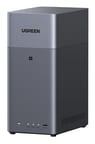
The DH2300 is a small tower, about 3.9 inches wide, 5.9 inches deep, and 8.4 inches tall, and it weighs about 2.2 pounds without drives. Its two bays sit under a magnetic top cover rather than behind a front door. Each plastic tray lifts out by hand and takes a 3.5-inch or 2.5-inch SATA drive, but the drive itself fastens with the included screws. UGREEN rates the unit for 64TB across two 32TB drives, and its RAID options are JBOD, Basic, RAID 0, and RAID 1. RAID 1 gives you the capacity of one drive and survives one drive failure, while JBOD combines capacity with no protection.
UGREEN does not list hot swap as a feature, so plan to power down to replace a drive. Mighty Gadget treated the unit as having no hot-swap support. NASCompares swapped a drive live and it worked, but the channel was reluctant to call that a feature without clear word from UGREEN. The operating system lives on 32GB of eMMC, so both bays stay free for data. There are no M.2 slots, though TechRadar used a SATA SSD in the second bay as a read cache for a single hard drive.
One 1GbE port, 4K HDMI, and low power draw

There is no Wi-Fi and no PCIe slot, so the single 1GbE RJ45 port is the only built-in network link. Reviewers measured transfers between 110 and 118 MB/s, which is the limit of the link rather than of the drives. The front has a 5Gbps USB-C port, and the rear has two 5Gbps USB-A ports. TechRadar plugged a USB 2.5GbE adapter into one of them and went from 118 MB/s to 296 MB/s reads and 286 MB/s writes with two hard drives in RAID 0. CPU use peaked at 15 percent during that transfer. The adapter only helps if the rest of your network runs at 2.5GbE.
The HDMI port outputs up to 4K at 60Hz, and you start playback from UGREEN’s phone app. UGREEN rates the unit at 13.72 W with a 2TB hard drive being accessed and 3.304 W with the drive hibernating. NASCompares, with two drives, saw 9.5 W with the drives idle and 12 to 13 W during reads and writes. Neowin saw 15.3 W in access and 10.3 W with its drives hibernating. Noise was about 31 to 32 dBA in the NASCompares test with the fan at its lowest and the drives idle, and 44 to 45 dBA with the fan at maximum during reads and writes.
Rockchip RK3576, UGOS, and no official Docker

The Rockchip RK3576 pairs four Cortex-A72 cores with four Cortex-A53 cores and a 6 TOPS NPU, which handles the photo recognition. Its PassMark score of about 3,800 sits below the Intel N100 in UGREEN’s own DXP2800, which scores about 5,300. The chip suits file serving, backups, and photo indexing. Memory is 4GB of soldered LPDDR4X with no ECC.
UGREEN’s product page says the DH2300 has no official Docker support, tells buyers not to choose it for Plex Server, Home Assistant, or most self-hosted apps, and warns that unofficial installs can affect stability. TechRadar and NASCompares described Docker as available, while AppleInsider, Mighty Gadget, TweakTown, and OCinside found it unsupported or absent from the App Center. Windows Central installed the DH4300 Plus Docker package on a DH2300, the Ex-IT guy channel installed a DH4300 package, and Mighty Gadget got Docker running over SSH after what it called extensive modifications. All of those are workarounds outside UGREEN’s support.
UGREEN’s Theater app and DLNA are the supported routes, and Ex-IT guy saw the chip’s video processor handle a transcode in Theater. Windows Central ran Jellyfin through the workaround and streamed files directly without trouble, but its hardware encoding attempts failed and CPU use spiked. Treat Plex or Jellyfin here as direct playback at best. NASCompares found no documented way to install a third-party system and ruled out TrueNAS and Unraid.
UGOS supports Btrfs and ext4 according to Profesional Review. TweakTown points out that most common file-sharing protocols are off by default, so you will need to turn on SMB yourself.
Reviewer Insights
Praise centers on easy setup and low cost for backups and photos, and the main complaints are the 1GbE port and the missing Docker support.
TechRadar
Mark Pickavance of TechRadar called the LAN port the one controversial port and tested the USB 2.5GbE adapter route described above. HDMI playback from the mobile app worked well in his testing, apart from washed-out HDR on a screen without HDR support. He described Docker as supported but limited by the memory, a description that UGREEN’s current page does not back. He gave it 4.5 out of 5 in November 2025 and wrote: “This is a terrific NAS that does most of what these things are bought for, without breaking the bank.”
AppleInsider
AppleInsider scored it 4 out of 5 in October 2025 and said the tap-to-configure setup suits less technical users. The review reported no Docker support on the unit and was blunt about speed: “It is not fast.” It concluded: “The Ugreen NASync DH2300 is an excellent starter network attached storage device that’s very friendly to Apple owners, but prosumers are better served with the rest of the company’s lineup.”
Mighty Gadget
With two 4TB IronWolf drives, James Smythe of Mighty Gadget measured 9 to 10 W at idle, 12 to 13 W under load, 110 to 115 MB/s sequential transfers, and 35 to 38 dBA at one meter in typical use, rising to 42 to 44 dBA under sustained load. He wrote that “The power efficiency is genuinely excellent” and scored it 80 percent. UGREEN told him by email that the DH2300 does not support Docker at the moment, which led to his main complaint: “My main criticism is that Ugreen appears to have hobbled this NAS with fewer software features than the DH4300 Plus.”
TweakTown
Speeds capped out at about 118 MB/s in the TweakTown test, which ran two 4TB IronWolf drives in RAID 1. The review scored it 81 percent and found UGREEN’s web discovery service unreliable: “At first, I simply could never see the UGREEN NASync DH2300 via the web finder, and while I did have some later success with seeing it once configured, it was never terribly reliable.” Its summary: “It’s not fancy or particularly fast, but it’s priced accordingly and could fit the bill nicely as long as your needs are modest.”
Windows Central
Ben Wilson of Windows Central, a NAS beginner, tested it as a Jellyfin media server in December 2025. An old WD Blue desktop drive worked fine, and browser setup was easy. He noted that the caddies need screws, which he put down to the price, and he had to find the Docker workaround himself: “It’s disappointing that UGREEN removed Docker from its App Center, leaving users to figure out the DH4300 Plus workaround, but it hasn’t soured my opinion on the DH2300.” Direct streaming of his H.264 Blu-ray backups worked across the house, and he listed a basic home media server as a reason to buy it: “I wanted to know if the simplest, entry-level NAS options could run a home media server without struggling with basic transcoding, and I’m satisfied that the DH2300 fits the bill.” He sticks to direct streams, because CPU use spiked with heavier streaming and his brief hardware encoding tests failed.
Digital Camera World
Paul Hatton of Digital Camera World reviewed it from a photographer’s view in June 2026 and gave it four stars. Setup took him under ten minutes, and he praised the Photos app as a private alternative to cloud subscriptions. He was careful with the thin trays and said of the plastic body: “It feels pretty cheap, but that’s no surprise given the price.” He would not use it to stream 4K footage for video editing, because the 1GbE port limits transfers to about 115 MB/s.
Cult of Mac
Cult of Mac writer Rajesh Pandey used it to back up family devices, reviewed it alongside the DH4300 Plus, and gave the pair four stars. He found setup easy, though he said facial recognition is less smooth than in Apple Photos. He sent anyone who wants a Plex or Jellyfin server to UGREEN’s higher-end models, and he chose the bigger unit: “If forced to choose between the DH2300 and 4300 Plus, I’d pick the latter.”
GameRevolution
After several weeks of use, Mack Ashworth of GameRevolution scored it 9 in December 2025, with automatic PC backups and phone photo sync working well. He wrote: “It just quietly works away, giving me peace of mind without the need to constantly check in with it.” The single 1GbE port and limited advanced features were his main drawbacks.
OCinside
OCinside measured 9 to 11 W at idle and about 1 W with the NAS powered off, and saw network throughput of about 112 MB/s. The review praised the build quality and guided setup, and it said the unit is quiet enough to sit next to a living-room TV. It also states that the DH2300 does not support Docker or virtual machines.
Profesional Review
Profesional Review measured about 113 MB/s in both directions in May 2026 and reported a 14 W maximum. It said Docker can be used with small containers even though it is listed as incompatible. The site scored it 79 percent, gave it a silver medal, and recommended it.
NASCompares
NASCompares tested two 4TB IronWolf drives and supplied the power and noise figures above, adding that temperatures were reasonable over a 24-hour run: “Overall, the temps and the thermals around weren’t too shabby.” The 1GbE port was the largest complaint: “And I’m just really disappointed by having 1 gig out of the gate.” It said hardware transcoding and virtual machines are not what this system is for. In a comparison with the UniFi UNAS 2, the channel preferred the DH2300’s processor and UGOS feature set while repeating the network complaint.
Ex-IT guy
The Ex-IT guy channel tested Basic, JBOD, and RAID pools, a simulated drive failure, and drive replacement. He warned that JBOD extended onto a second drive without asking: “That’s a pretty bad idea.” Over SMB he measured a little over 100 MB/s: “A tad over 100MB/s ain’t bad at all, given we’re using hard disks!” Power stayed a little below 10 W at idle and rose by about 1 W while transcoding a 4K file. UGREEN provided the unit.
Shane Craig
Shane Craig, new to NAS devices, used the DH2300 for photo backup and video streaming to replace paid subscriptions. Theater mislabeled some of his TV shows, but he said: “For most people, though, I think that just the built-in theater app is going to be fine.” He prefers Plex, which he set up from a tutorial and said was more complicated. On whether the Rockchip chip could hold up, he said: “This thing has not hitched. It has not stuttered.” He found object recognition in the Photos app weaker than Google Photos.
Should you buy it?
The DH2300 fits a household that wants phone photo backup, shared folders, and computer backups without a monthly cloud bill, and that will play video through UGREEN’s own apps, HDMI, or DLNA. The low power draw and simple setup suit a first NAS that sits in a living room or on a desk, as long as you accept a plastic build and a 1GbE link.
Skip it if you expect to run Plex, Jellyfin, Home Assistant, or anything else that depends on Docker, because UGREEN does not support that here and the RAM cannot be upgraded. The UGREEN DXP2800 adds an Intel chip with Quick Sync, a 2.5GbE port, two M.2 slots, and Docker. Our budget NAS guide covers other low-cost options, and the NAS comparison chart lines up every model.
Frequently Asked Questions
Does the UGREEN DH2300 support Docker?
Not officially. Reviewers got it running with a DH4300 Docker package or over SSH, but UGREEN does not support either route, and 4GB of RAM limits how many containers it can run.
Can the DH2300 run Plex or Jellyfin?
UGREEN tells buyers not to choose it for Plex Server. Reviewers have run Plex and Jellyfin through unsupported setups, and direct streaming worked, but Windows Central’s hardware encoding attempts failed. The supported video options are UGREEN’s Theater app, HDMI output at up to 4K 60Hz, and DLNA.
Can I upgrade the RAM in the DH2300?
No. The 4GB of LPDDR4X is soldered to the board, and there are no memory slots.
Can the DH2300 go faster than 1GbE?
Yes, with a USB 2.5GbE adapter, which took TechRadar to 296 MB/s reads with two hard drives in RAID 0. Your PC and network also need 2.5GbE to see that gain.
Can I install TrueNAS or Unraid on the DH2300?
Plan on no. This ARM unit has no documented install path for another system, so NASCompares advised against buying it for TrueNAS. UGREEN’s x86 models, such as the DXP2800, are the ones to look at for that.
How much power does the UGREEN DH2300 use?
With two hard drives, expect about 9.5 W idle and 12 to 13 W during reads and writes, going by the NASCompares test. Neowin measured more in access, at 15.3 W.
Can I use the DH2300 for Time Machine backups?
Yes. UGREEN says to enable SMB and Bonjour in UGOS, create a dedicated shared folder, and set it as the Time Machine destination on your Mac. A storage quota on that folder stops Time Machine from filling the drives.