

Listen to this article:
The rebellion started with headaches. Julie Frumin’s sixth-grader in Thousand Oaks, California, complained every time he used his school-issued Chromebook. Then an AI chatbot appeared unprompted in his Google Classroom, and Frumin had seen enough. She did something that, until recently, would have seemed quixotic: she asked the school to give her kids printed worksheets and actual books instead. Then she went further, performing her “Ten Tech Commandments” petition at the Conejo Valley Unified school board meeting, backed by 260-plus parent signatures. The video went viral among parent networks, and suddenly Frumin wasn’t a lone voice anymore.
She’s part of a growing organized movement of parents who are opting their children out of school-issued Chromebooks and iPads entirely, demanding a return to pen and paper. NBC News ran a national investigation in February 2026. Former teacher Emily Cherkin’s opt-out toolkit has been downloaded more than 3,000 times, providing email templates, suggested questions for administrators, and research on the efficacy of digital learning tools. Group chats with hundreds of parents now share approaches like, as Gadget Review put it, “digital resistance fighters.” In a country where nine in ten public middle and high schools now enforce 1:1 device policies, these parents are swimming against a very strong current.
This Isn’t Just About Screen Time Anymore
We’ve written extensively about the screen time debate and the research surrounding it. But what’s striking about the current opt-out wave is that screen time is only part of what’s driving parents to act. The concerns have expanded, and some of the newer ones deserve attention that they haven’t gotten.
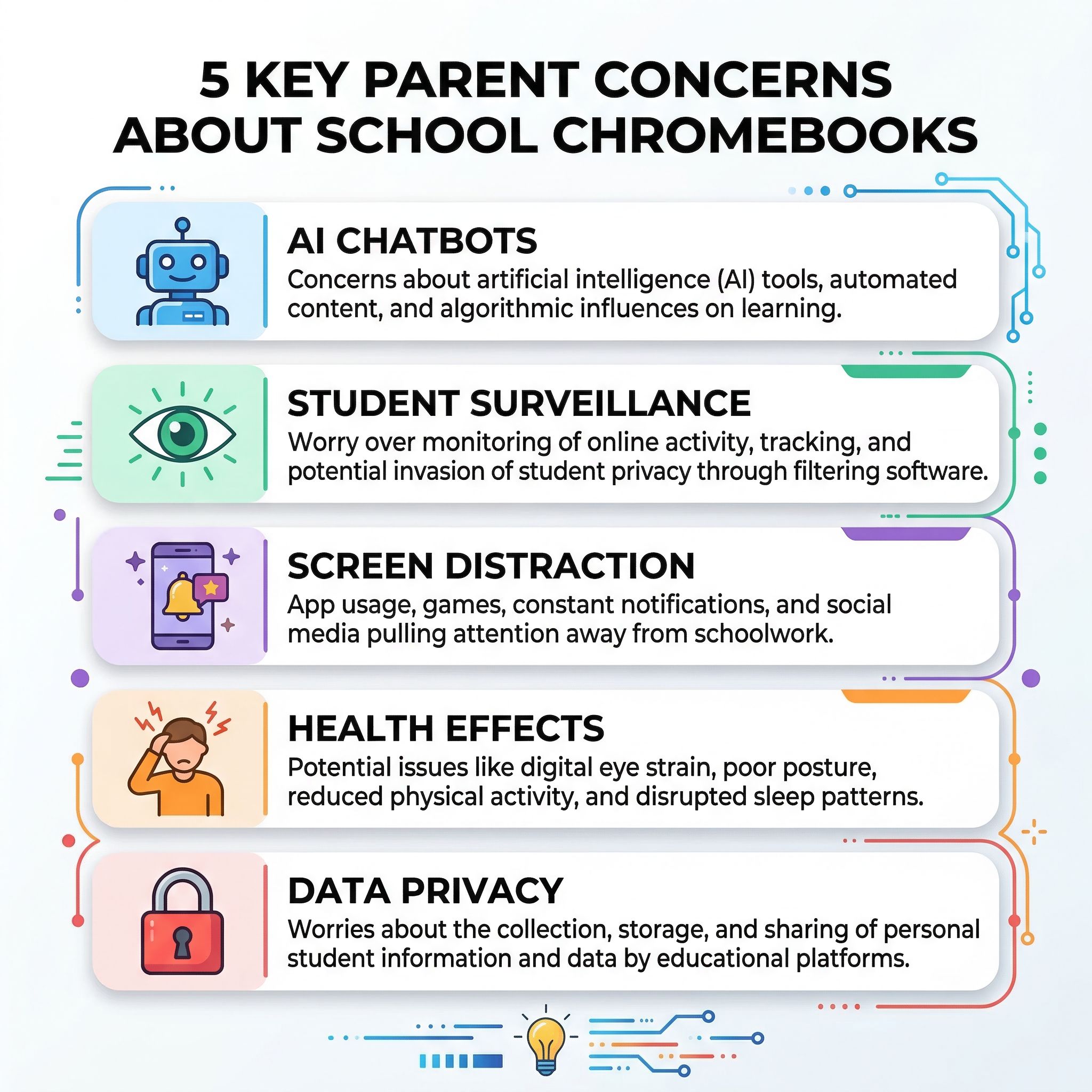
The AI question has become a flashpoint. Parents like Frumin aren’t just worried about how much time their kids spend staring at screens. They’re alarmed that AI chatbots are appearing in educational platforms without parental consent or clear policies about what data those tools collect. A Brookings Institution report from January 2026 raised concerns about cognitive atrophy from AI dependence in young learners, and incidents of AI tools generating inappropriate content in classroom settings have added fuel to the fire. “I want them to be taught through humans,” Frumin told NBC. That sentiment resonates differently in 2026 than it would have even two years ago.
Data privacy is another escalating concern. As we covered in our investigation into what schools can actually see on your kid’s Chromebook, monitoring software like GoGuardian tracks far more than website visits. EdTech contracts create data collection pipelines that most parents never agreed to and don’t fully understand. Some parents in the opt-out movement cite data privacy as their primary motivation, separate from any opinion about screens themselves.
Then there are the straightforward distraction and academic performance concerns. Teachers and parents report students gaming, shopping, watching videos, and accessing social media on school-issued devices during class time. Research suggests that students retain information better when reading from paper rather than screens, and handwriting appears to activate deeper cognitive processing than typing. These findings aren’t new, but they’ve gained traction as parents look for evidence to support what they’re observing at home: kids who seem less focused and more distracted after a day spent on school Chromebooks.
What Actually Happens When You Opt Out
Here’s where the conversation gets more practical than most coverage acknowledges. Opting out of a school Chromebook isn’t as simple as sending a note to the teacher. The experience varies dramatically depending on your school district, your state, and how much your child’s curriculum has been built around digital tools.
Some districts accommodate opt-out requests without much friction. Cherkin successfully opted her daughter out of devices at her Seattle middle school two years ago and reports that teachers adapted more easily than administrators initially suggested. She’s helped four additional families navigate the same process. Other districts push back hard. When one mother in City View Independent School District in Wichita Falls, Texas refused to sign the technology-use agreement, she was reportedly told her son would face in-school suspension. The superintendent denied the allegation, but the conflict illustrates how unprepared some districts are for parents who want alternatives.
The legal landscape is murky. Public school districts generally can’t force families to accept devices, but they also aren’t required to create entirely separate paper-based curricula for individual students. In practice, what parents often get is a compromise: their child uses printed worksheets while classmates use devices, with the teacher managing both workflows. This works better in elementary school, where assignments tend to be simpler, than in middle and high school, where collaborative platforms, research tools, and digital submissions are baked into the curriculum.
What Kids Lose When They Go Paper-Only
The opt-out movement deserves honest engagement with its concerns, and we think many of those concerns have merit. But a Chromebook-focused site would be doing readers a disservice if we didn’t also lay out what’s on the other side of the ledger.
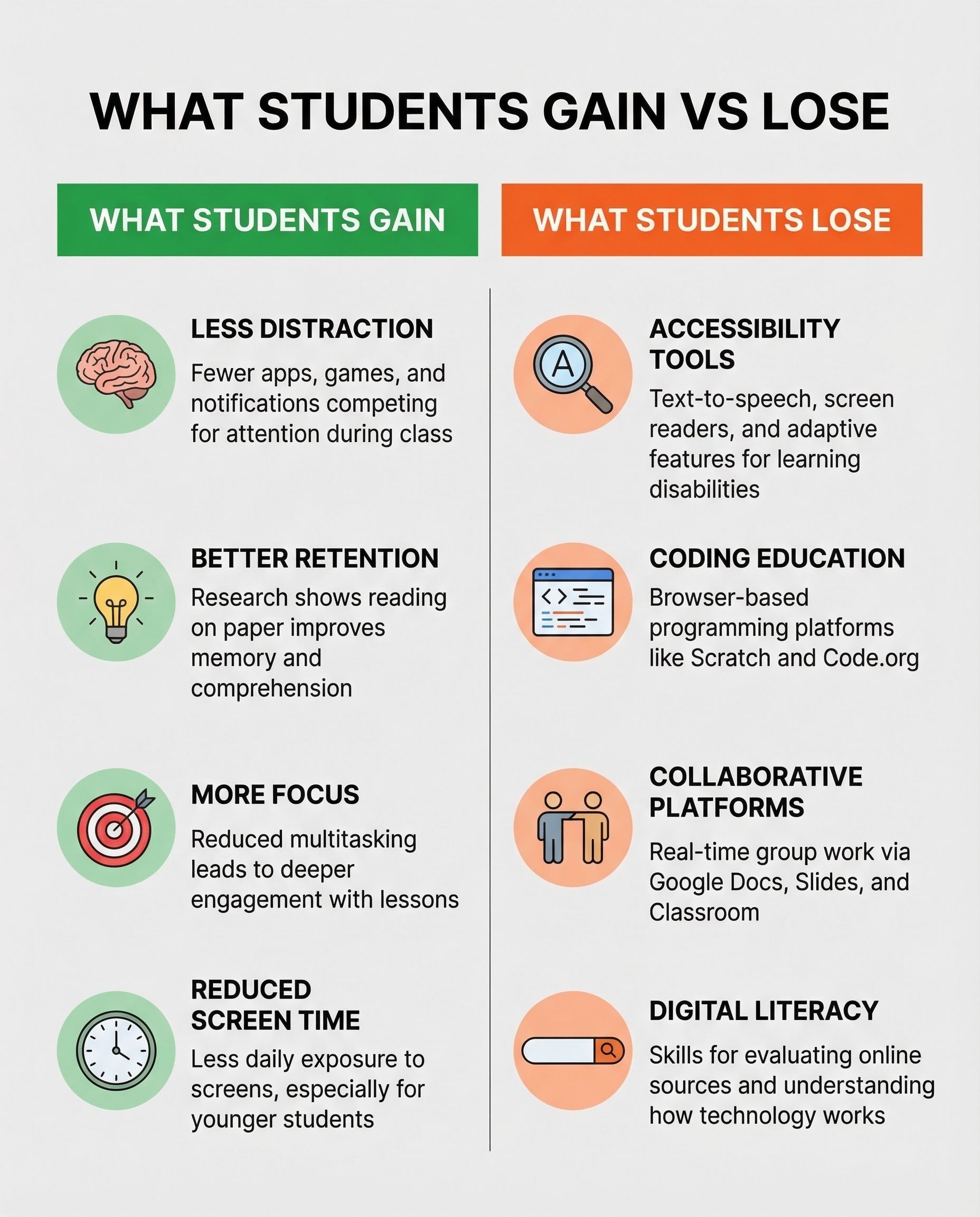
Accessibility tools are the most significant loss. Text-to-speech, speech-to-text, adjustable font sizes, screen readers, and adaptive interfaces help students with learning disabilities participate in ways that paper simply cannot replicate. For a student with dyslexia, a Chromebook with built-in accessibility features isn’t a distraction but a lifeline. Opting out of the device means opting out of these tools too, unless parents can provide equivalent technology at home.
Coding and computer science education is another casualty. Many schools deliver programming instruction through browser-based platforms like Scratch, Code.org, and Google’s CS First. A student without a school device either misses these lessons entirely or needs to complete them at home, creating equity issues for families without reliable home internet or personal computers. Digital literacy skills, from evaluating online sources to understanding how AI works, are increasingly part of the curriculum for good reason. Students who opt out may miss these lessons at exactly the age when the foundation matters most.
Collaborative tools also matter more than they might seem. Google Docs, Slides, and Classroom aren’t just digital versions of paper assignments. They enable real-time collaboration, teacher feedback loops, and peer review workflows that are genuinely difficult to replicate with physical materials. A student who’s opted out may find themselves excluded from group projects or unable to see teacher comments until they can access a computer elsewhere.
The Middle Ground That Nobody Talks About
The opt-out movement frames the choice as binary: screens or paper. But the most effective approaches we’ve seen from schools treat it as a dial, not a switch. Education experts recommend blended approaches that combine printed materials, face-to-face instruction, and limited, purposeful digital use. That distinction between purposeful and passive technology use is critical, and it’s one that gets lost in the broader debate.
Some districts are responding with smarter device policies rather than all-or-nothing mandates. Content filtering has improved significantly. Schools can restrict Chromebooks to specific educational applications during class hours and disable them entirely during certain periods. Wake County, North Carolina is reconsidering its 1:1 laptop policy entirely, partly due to cost and partly due to parent pressure. Others are moving toward a “Chromebook-free periods” model where devices are collected during certain subjects.
Meanwhile, Chromebook manufacturers are addressing some concerns from the hardware side. Lenovo’s newest education models feature repair-friendly CRU designs that address the e-waste concerns that have long plagued school device programs. Google’s 10-year update policy means devices last longer, which at least reduces the churn that made school Chromebook programs feel wasteful. These aren’t answers to the screen time or privacy questions, but they address related concerns that feed into the broader dissatisfaction.
Before You Opt Out: Questions to Ask
If you’re considering opting your child out of their school-issued Chromebook, here are the practical questions worth asking your district before you make the decision:
What monitoring software is installed, and what does it track? Schools should be able to tell you exactly what’s on the device. Our surveillance guide covers the major platforms and what they do. If the answer is vague, that’s a red flag worth pursuing regardless of whether you opt out.
What accessibility tools would my child lose? If your child uses text-to-speech, screen readers, or other adaptive tools, understand what alternatives exist before removing the device.
What is the district’s AI policy? Many districts are still developing policies around AI tools in the classroom. Ask specifically whether AI chatbots are embedded in any platforms your child uses and whether parents can opt out of AI features specifically without opting out of the device entirely.
Can the device be restricted to school hours? Some districts can configure Chromebooks to work only during school hours or only on campus. This addresses the “homework screen time” concern without removing the device from the classroom.
What does the opt-out process actually look like for teachers? The biggest practical barrier isn’t policy but logistics. A teacher managing 30 students, 28 on Chromebooks and two on paper, faces a real workflow challenge. Understanding what your child’s day will actually look like is important before committing to the change.
“Opting out is not the end goal,” Cherkin has said. “It’s the means to force a conversation.” That framing seems right to us. The parents driving this movement are raising legitimate questions about surveillance, AI, distraction, and whether schools have become too dependent on devices that were adopted hastily during a pandemic. Those questions deserve serious answers, not dismissal. But the answers should be nuanced enough to account for what students gain from thoughtful technology use, not just what they lose from careless technology deployment. The best outcome isn’t every kid on a Chromebook or no kids on Chromebooks. It’s schools that treat these devices as tools that need clear boundaries, not as substitutes for teaching.


