
Chromebook Auto Update Expiration (AUE): How to Check & What Happens After
Published on by Jim Mendenhall
If you’re shopping for a Chromebook or already own one, there’s an important date you should know about: the Auto Update Expiration date, or AUE for short. This isn’t just another tech spec to ignore. It determines how long your Chromebook will receive security updates and new features from Google, and it affects everything from your device’s resale value to whether you should even consider buying that discounted model you’ve been eyeing.
What is Auto Update Expiration (AUE)?
Short Answer:
AUE is the date when Google stops providing automatic software and security updates for your specific Chromebook model.
Long Answer:
Every Chromebook, Chromebox, and Chromebase has a predetermined end date for receiving ChromeOS updates. Google works with hardware manufacturers to guarantee each device gets updates for a set period from when the device’s platform was first released—not when you bought it. This is an important distinction that catches many buyers off guard, especially when purchasing older models on clearance.
The good news is that Google significantly extended this policy in 2024. Chromebooks released from 2021 onwards now receive a full ten years of automatic updates, which represents a major improvement from the original six to eight year policy. For context, a Chromebook released in 2024 will continue receiving updates until 2034, making it a genuinely long-term investment rather than a disposable device.
For older devices released before 2021, the situation varies. Many received extensions of two to three years beyond their original AUE dates, though some features and services may not be fully supported on these extended devices. If you’re using a pre-2021 Chromebook, it’s worth checking whether your specific model received an extension, as the answer might be more favorable than you expect.
Why Does the AUE Date Matter?
Short Answer:
After AUE, your Chromebook stops receiving security patches, bug fixes, and new features, making it less secure over time.
Long Answer:
The AUE date matters because ChromeOS updates aren’t just about getting the latest features—they’re fundamentally about security. Every ChromeOS update includes patches for newly discovered vulnerabilities, and without these updates, your Chromebook becomes increasingly exposed to threats over time. Chromebooks have built-in protections like verified boot and sandboxing that continue working regardless of update status, but these defenses work best when complemented by regular security patches.
The feature implications are more nuanced. New ChromeOS features and improvements simply won’t arrive on your device after the AUE date, which includes things like new Android app compatibility, interface improvements, and performance optimizations. For some users, this matters a great deal. For others who just need a web browsing machine, the features they already have might be perfectly adequate for years to come.
App support presents a longer-term concern. Most web applications will continue working indefinitely since they run in the browser, but you might eventually encounter compatibility issues with certain services that require newer browser versions. Enterprise and education users face additional complications: if your Chromebook is managed through Chrome Enterprise or Education Upgrade, policies may not work as intended after the final update, and official technical support ends entirely.
How Do I Check My Chromebook’s AUE Date?
Short Answer:
Go to Settings > About ChromeOS > Additional details, and look for the “Update schedule” section.
Long Answer:
Checking your Chromebook’s AUE date takes about thirty seconds once you know where to look. Start by clicking the time in the bottom-right corner of your screen, then click the Settings gear icon. In the left sidebar, scroll down and click “About ChromeOS,” then click “Additional details.” Look for the “Update schedule” section, which displays when your Chromebook will receive its last automatic update.
If you see a “Final software update” notification instead, your device has already reached or passed its AUE date. This doesn’t mean your Chromebook has stopped working—it just means the last security update has already been applied.
You can also look up any Chromebook model’s AUE date before you even own it by visiting Google’s official Auto Update policy page. This comprehensive list includes every ChromeOS device ever made, organized by manufacturer, and it’s an essential resource when shopping for new or used Chromebooks.
What Happens After My Chromebook’s AUE Date?
Short Answer:
Your Chromebook keeps working, but it stops receiving updates and becomes less secure over time.
Long Answer:
The day after your Chromebook’s AUE date arrives, you probably won’t notice anything different. Your device continues to function normally, your saved files remain accessible, and basic web browsing works just fine. The verified boot process still protects against tampering at startup, and sandboxing still isolates web pages and apps from each other. In many ways, the immediate experience is unchanged.
The changes are gradual and cumulative. Without security patches for new vulnerabilities, your device becomes increasingly exposed over time. Without browser updates, certain websites might eventually display warnings or refuse to load entirely. Some newer Android apps may stop working as they require more recent versions of the Android runtime. Managed device policies, if you’re using them, may become unreliable.
The reality is that an expired Chromebook doesn’t stop working overnight, and the level of acceptable risk depends entirely on how you use it. For casual browsing at home on a device that never touches sensitive data, you might reasonably continue using it for years. For anything involving banking, healthcare information, or work credentials, using an unsupported device is harder to justify.
Should I Buy a Used Chromebook?
Short Answer:
Check the AUE date first. Make sure there’s at least three to four years of updates remaining.
Long Answer:
Used Chromebooks can be excellent values, but the AUE date is the single most important factor to verify before purchasing. A seemingly great deal on a three-year-old Chromebook becomes much less attractive when you realize it only has one year of updates remaining.
Before committing to any used Chromebook purchase, look up the exact model on Google’s AUE list and calculate how many years of updates remain. As a general guideline, light personal use can get by with two to three years of remaining updates, while students should look for three to four years to last through their academic career. Work use or a first computer for kids really warrants four or more years of support.
The best deals on used Chromebooks are typically newer models from 2021 or later that benefit from the full ten-year update policy. A 2022 model purchased used in 2026 still has six or more years of updates remaining, making it a substantially better long-term investment than an older model at a similar price point. Chromebook Plus models are particularly good values since they’re guaranteed to have the full ten-year update window. Be particularly wary of sellers who can’t or won’t share the exact model number, and treat suspiciously low prices on seemingly new devices as a red flag—these often indicate AUE dates that are uncomfortably close.
How Do I Check AUE Before Buying a New Chromebook?
Short Answer:
Look up the model on Google’s Auto Update policy page before purchasing.
Long Answer:
When shopping for a new Chromebook, checking the AUE date should be part of your standard research process, right alongside comparing screen quality and keyboard feel. The exact model number is usually listed in the product specifications, and you can search for it directly on Google’s Auto Update policy page.
For devices released in 2021 or later, you should see an AUE date approximately ten years from the platform release. A Chromebook released in 2024 should have an AUE date around 2034, and if you see something significantly shorter, that’s worth investigating further before purchase.
A useful shortcut when shopping from major retailers is to search for the model name plus “AUE date” directly in your search engine. This often surfaces the answer quickly without requiring navigation through Google’s comprehensive but sometimes overwhelming device list.
What Are My Options After AUE?
Short Answer:
You can continue using it with accepted risks, install Chrome OS Flex or Linux, or recycle responsibly.
Long Answer:
When your Chromebook reaches its AUE date, you have several paths forward, each with different tradeoffs.
The simplest option is to keep using it while accepting the security implications. Your Chromebook doesn’t stop working after AUE, and for low-risk activities like watching videos, reading news, or simple productivity tasks, you might continue using it for years. Many of these tasks work fine even without internet. The key is being intentional about what you do and don’t use the device for—avoid logging into banking sites, email, or anything with sensitive credentials on an unsupported device.
For the technically inclined, Chrome OS Flex offers a fresh start. This free operating system from Google is designed for older hardware, and some expired Chromebooks can run it successfully. The result is a fresh, fully updated version of ChromeOS on hardware that Google no longer officially supports. Check the certified models list to see if your device qualifies. Be aware that installation requires some technical comfort and completely erases your device.
Linux represents another option for extending hardware life, particularly for those comfortable with alternative operating systems. Many Chromebooks can run full Linux distributions like Ubuntu or Fedora, which receive ongoing security updates from their respective communities. This approach requires more technical knowledge to set up and maintain, but it transforms your expired Chromebook into a general-purpose Linux machine.
If none of these options suit your needs or skills, recycling responsibly is the right choice. Many electronics retailers offer free e-waste recycling programs, and your old Chromebook contains materials that shouldn’t end up in a landfill.
The 10-Year Update Policy Explained
Short Answer:
Starting in 2024, Chromebooks from 2021 onwards receive 10 years of automatic updates from their platform release date.
Long Answer:
In September 2023, Google announced a major policy change: all Chromebooks released from 2021 onwards would receive a full ten years of automatic updates. This change rolled out to devices starting in 2024, and it fundamentally altered the value proposition of Chromebooks.
The practical implications are significant. A Chromebook released in 2024 gets updates until 2034. A Chromebook released in 2021 gets updates until 2031. Many older devices from before 2021 also received two to three year extensions beyond their original AUE dates, though the full ten-year policy doesn’t apply retroactively.
There are a few important caveats to understand. The ten-year clock starts from the platform release date, not your purchase date. A “platform” is a specific hardware configuration that manufacturers select, and multiple Chromebook models often share the same platform. This means a Chromebook released to market in late 2024 might use a platform that debuted in early 2024, giving you slightly less than a full ten years from purchase.
This policy change makes Chromebooks much more competitive with traditional laptops in terms of longevity. A Windows laptop typically receives about ten years of security updates too, so Chromebooks have essentially reached parity on this front while generally remaining more affordable and easier to manage.
Recommended Chromebooks with Long Update Life
If you’re shopping for a Chromebook and want to maximize your update runway, here are some current models with excellent AUE dates. All Chromebook Plus models are guaranteed at least ten years of updates from their platform release:
Acer Chromebook Plus 515
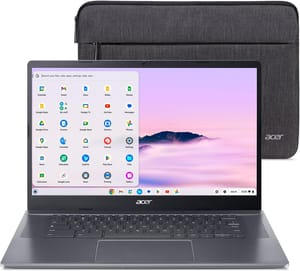
The Acer Chromebook Plus 515 offers a large 15.6-inch touchscreen, solid performance for productivity tasks, and the full ten-year update guarantee. It’s a great choice for students or anyone who wants a reliable machine that will last through the 2030s.
Lenovo IdeaPad Flex 5i Chromebook Plus
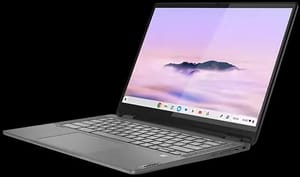
The Lenovo IdeaPad Flex 5i Chromebook Plus combines a convertible 2-in-1 design with Chromebook Plus specs, making it versatile for both laptop and tablet use while ensuring long-term software support.
HP Chromebook Plus 15a
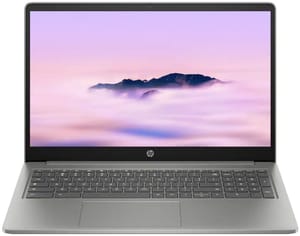
For budget-conscious buyers who still want the ten-year update guarantee, the HP Chromebook Plus 15a delivers solid value with a 15.6-inch display and full-size keyboard including a number pad.
Final Thoughts
The AUE date shouldn’t scare you away from Chromebooks—it’s simply information you should have before making a purchase decision. With the new ten-year policy for devices from 2021 onwards, most new Chromebooks purchased today will receive updates well into the 2030s, which outlasts how long most people keep any laptop.
The key takeaway is straightforward: always check the AUE date before buying, especially for used Chromebooks. Newer models with the full ten-year policy represent better long-term value than older models at similar prices. Post-AUE options exist for extending hardware life, but buying with sufficient update runway in the first place is the easier path. For most users, purchasing a Chromebook with at least five years of remaining updates represents the sweet spot between value and longevity.


