
If you’ve browsed Amazon, eBay, or government surplus auctions for Chromebooks, you’ve probably encountered devices labeled as “education” models selling for significantly less than their consumer counterparts. These machines designed for K-12 classrooms can seem like hidden bargains, but the “education” label carries implications that every buyer should understand before purchasing. The distinction goes beyond marketing terminology into fundamental differences in build quality, specifications, software management, and long-term usability.
What Makes a Chromebook an “Education” Model?
Short Answer:
Education Chromebooks prioritize durability, manageability, and affordability over performance and display quality, designed for the specific demands of classroom environments.
Long Answer:
The education Chromebook category exists because schools face unique challenges that consumer devices simply aren’t built to handle. The screen time debate in education has only intensified these discussions about how devices are deployed. A classroom Chromebook might be used by dozens of different students throughout a school year, stuffed into backpacks, dropped on floors, splashed with drinks, and generally subjected to treatment that would destroy a typical consumer laptop within months. Education Chromebooks address these realities through ruggedized construction, IT-friendly management features, and strategic trade-offs in specifications that keep prices low enough for district-wide deployments.
Major manufacturers including Lenovo, Acer, Dell, HP, and education specialist CTL have developed dedicated product lines for this market. Lenovo’s announcement at FETC 2026 highlighted new education models like the Chromebook 100e Gen 5 and 500e 2-in-1 Gen 5, emphasizing MIL-STD durability testing and customer-replaceable components for easier servicing. These devices are typically sold through education-focused resellers with volume pricing, though individual units frequently appear on the used market after schools refresh their fleets.
Hardware Differences: Built to Survive
Short Answer:
Many education Chromebooks feature reinforced chassis, spill-resistant keyboards, stronger hinges, and military-grade drop testing that consumer models lack, though specs vary widely by manufacturer and price point.
Long Answer:
The most visible distinction between education and consumer Chromebooks is build quality, though it manifests as durability rather than premium materials. Many mid-range and premium education Chromebooks undergo MIL-STD-810G or MIL-STD-810H testing, a U.S. Department of Defense standard that evaluates resistance to drops, vibration, temperature extremes, and humidity. The Acer Chromebook Spin 511, for example, can survive drops from approximately four feet onto hard surfaces, a specification that would be unusual for consumer devices at any price point. Budget education models may skip MIL-STD testing but still offer reinforced corners and sturdier construction than their consumer counterparts.
Spill-resistant keyboards are common in education models, though the level of protection varies. The Lenovo 300e Yoga Chromebook Gen 4 includes internal drainage channels that route liquid away from the motherboard, allowing the device to survive up to 360ml of spilled liquid, roughly the volume of a full soda can. Not every education Chromebook matches that spec, but even entry-level models tend to offer more liquid protection than consumer devices, where spill damage typically voids warranties regardless of how it occurs. Reinforced hinges address another common failure point, with many education devices using metal components rather than plastic where the display connects to the keyboard deck.
Some education Chromebooks include antimicrobial coatings on high-touch surfaces, a feature that became more prominent during the pandemic years when shared devices raised hygiene concerns. Screen protection often includes Gorilla Glass or similar reinforced panels that resist scratches and minor impacts. The overall aesthetic tends toward practical rather than premium, with textured plastic that hides scratches and fingerprints better than glossy consumer finishes.
However, these durability features come with trade-offs. Education Chromebooks typically feature lower-resolution displays, often 1366x768 on 11.6-inch panels rather than the 1080p or higher resolutions common in consumer devices. Brightness ratings tend to be modest, and color accuracy rarely matches what you’d find in devices intended for media consumption. The processors are usually entry-level chips like Intel Celeron or MediaTek Kompanio series, optimized for power efficiency and low cost rather than raw performance. RAM configurations commonly start at 4GB, which handles Chrome OS adequately but can feel limiting with many browser tabs open.
Software and Management Features
Short Answer:
Education Chromebooks integrate with Google Admin Console for fleet management, often include Chrome Education Upgrade licensing, and may be enterprise enrolled with restrictions on personal use.
Long Answer:
The software side of education Chromebooks is where things get complicated for personal buyers. Schools deploy these devices through Google’s Chrome Education Upgrade, a perpetual license that enables centralized management through the Google Admin Console. This allows IT administrators to push policies, monitor device usage, deploy apps, and remotely lock or wipe lost devices. Features like “Class tools” give teachers real-time control during instruction, including the ability to share content to student screens and lock devices during tests.
For personal buyers, none of this management infrastructure is relevant or accessible. You won’t need to purchase a Chrome Education Upgrade license for home use. The device functions as a normal Chromebook once removed from institutional management. The critical concern is whether the device is still enrolled in an organization’s management system when you acquire it.
Enterprise enrollment presents the most significant risk when buying used education Chromebooks. When an organization enrolls a Chromebook through its admin console, that enrollment is tied to the device’s serial number at a hardware level. According to iFixit’s investigation, this binding is intentionally difficult to remove, similar to Apple’s activation lock for iPhones. Performing a powerwash (factory reset) does not remove enterprise enrollment. Students sometimes attempt to bypass school Chromebook restrictions, but removing the write-protect screw and flashing the BIOS does not remove enterprise enrollment. Only the original administering organization can deprovision the device from their management console.
If you purchase a used education Chromebook that remains enterprise enrolled, you may find yourself locked out entirely, restricted to specific managed accounts, or unable to access certain features. Some devices display a splash screen with the organization’s name during boot, which provides an obvious warning. Others appear normal until you attempt to sign in with your personal Google account and encounter unexpected restrictions.
How to Check for Enterprise Enrollment
Short Answer:
Look for management screens during setup, check Chrome’s management status, and verify with the seller before purchasing.
Long Answer:
Before purchasing any used education Chromebook, ask the seller directly whether the device has been deprovisioned from its original organization. Reputable sellers on platforms like Amazon Renewed and BackMarket should provide this assurance, and their buyer protection policies typically cover situations where devices remain locked. Private sellers on eBay or Facebook Marketplace may not understand the issue, making verification before purchase more difficult.
If you already have the device in hand, several checks reveal enrollment status. During the initial setup process, an enterprise-enrolled Chromebook displays a screen indicating it’s managed by an organization, often showing the organization’s name. If you can sign in with your personal Google account, open Chrome and type chrome://management in the address bar. A message stating “Your browser is managed” indicates some level of organizational control, though this alone doesn’t confirm device-level enrollment versus browser-only management. Navigate to Settings, then About ChromeOS, then scroll to look for any management-related information.
For devices that boot to a screen requiring organizational credentials you don’t have, the situation is essentially unrecoverable without the original organization’s cooperation. Some buyers have successfully contacted schools or businesses whose names appear on the enrollment screen, explained they purchased the device legitimately, and requested deprovisioning. Success depends entirely on the organization’s willingness and ability to process such requests. If you purchased through a marketplace with buyer protection, initiating a return is often the simpler path.
Education Chromebooks vs. Consumer Models vs. Chromebook Plus
Short Answer:
Education models prioritize durability over specs, consumer models balance features and price, and Chromebook Plus delivers premium performance with AI features.
Long Answer:
Google’s Chromebook ecosystem now effectively operates across three tiers, and understanding where education models fit helps frame realistic expectations. Education Chromebooks occupy the durability-focused, budget-conscious segment designed for institutional deployment. Consumer Chromebooks span a broader range from budget to midrange, generally offering better displays and specifications than education models at similar prices but without the same ruggedization. Chromebook Plus, introduced in 2023, represents the premium tier with guaranteed specifications including faster processors, more RAM, better displays, and AI features like Gemini integration.
| Feature | Education Chromebook | Consumer Chromebook | Chromebook Plus |
|---|---|---|---|
| Build Quality | Often MIL-STD rugged, spill-resistant | Standard consumer construction | Premium materials |
| Display | HD (1366x768), modest brightness | Varies, often HD to Full HD | Full HD+ minimum, brighter |
| Processor | Entry-level Celeron/MediaTek | Entry to midrange | Intel Core or equivalent |
| RAM | Typically 4GB | 4-8GB common | 8GB minimum |
| AI Features | None | Limited | Gemini, enhanced editing |
| Price (New) | $200-350 | $200-600 | $350-700 |
| Typical Buyer | Schools, IT fleets | General consumers | Professionals, power users |
For a parent considering whether to buy a used education Chromebook for their child’s homework machine, the comparison that matters is between a used education device and a new budget consumer device at similar prices. A $150 used Lenovo 300e Yoga likely offers better durability than a new $200 consumer Chromebook, but the consumer device might have a sharper display and longer remaining Auto Update Expiration support. Neither competes with a Chromebook Plus on performance or features, but both serve basic web browsing and schoolwork adequately.
Should You Buy an Education Chromebook for Personal Use?
Short Answer:
Yes, if you prioritize durability and accept the spec limitations. No, if you want the best display and performance for your money.
Long Answer:
Education Chromebooks make sense for specific use cases. If you have young children who will inevitably drop, spill on, and generally abuse whatever device you give them, the ruggedized construction justifies accepting lower specifications. The spill-resistant keyboards alone can prevent costly accidents that would destroy consumer devices. Teachers who want a personal device that matches what their students use might appreciate the familiarity. Budget shoppers willing to compromise on display quality can find genuinely good deals on devices that will last through rough handling.
However, education Chromebooks don’t represent hidden bargains for everyone. The lower-resolution displays affect every browsing session, every video watched, every document edited. The entry-level processors handle basic tasks adequately but struggle with heavy tab loads or demanding Android apps. The 4GB RAM configurations common in education devices feel increasingly limited as web applications grow more resource-hungry. If your primary use involves streaming media, working with photos, or productivity tasks beyond basic document editing, a consumer Chromebook with better specifications will serve you better even if it’s less durable.
The used market introduces additional considerations beyond the enterprise enrollment issue. Check the Auto Update Expiration date before purchasing any used Chromebook. Many education devices entering the secondary market are several years into their update lifecycle, and a device with only one or two years of remaining Chrome OS support represents poor value regardless of price. Google’s 10-year update policy applies to devices from 2021 onwards, but older education Chromebooks may have considerably shorter remaining support windows.
Recommended Education-Focused Chromebooks
For buyers who’ve decided an education Chromebook fits their needs, here are current options with long update support:
Lenovo 300e Yoga Chromebook Gen 4
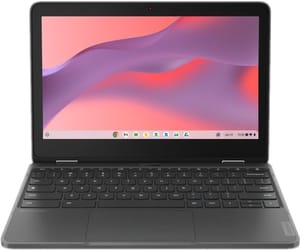
- ✓16-hour battery
- ✓MIL-STD rugged
- ✓360-degree hinge
- ✓Wi-Fi 6
- ✗HD resolution
- ✗4GB RAM in most configurations
- ✗no backlit keyboard
Acer Chromebook Spin 511
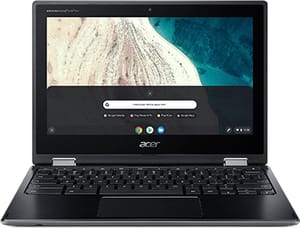
- ✓MIL-STD-810H certified
- ✓spill-resistant
- ✓fanless silent operation
- ✗Older N4020 processor
- ✗32GB storage
- ✗discontinued
Final Thoughts
Education Chromebooks exist to solve specific problems schools face: devices that survive rough handling, deploy easily at scale, and cost little enough to replace when necessary. These priorities translate to genuine value for personal buyers who share those needs, whether you’re equipping a clumsy child, outfitting a rough work environment, or simply prioritizing durability over specifications. The key is entering the purchase with clear expectations about what you’re getting and what you’re giving up.
Always verify enterprise enrollment status before purchasing used education Chromebooks, check remaining Auto Update support to ensure adequate security coverage, and honestly assess whether the durability benefits outweigh the specification compromises for your particular situation. When the fit is right, education Chromebooks deliver exceptional value. When the fit is wrong, the savings evaporate quickly as limitations compound into frustration.


