
CTL NL7 Chromebook
Updated on

Note: This product is discontinued and no longer sold new, but Google extended its Chrome OS Auto Update Expiration to June 2027 (the original AUE was November 2023), so existing units still receive updates for now. Extended-support updates may drop some features such as Android app support.
The CTL NL7 Chromebook was an education-focused device released in 2018, designed specifically for K-12 classroom environments where durability and manageability mattered more than consumer appeal. CTL, a Texas-based company that has been building computers for the education sector since 1989, positioned the NL7 series as a cost-effective fleet option for school districts deploying Chromebooks at scale. While the base NL7 featured a traditional clamshell design without touchscreen capabilities, the NL7 family included convertible variants (NL7TW-360 and NL7T-360) that offered touchscreen and stylus support for more interactive learning applications. At its $229-299 launch pricing, the NL7 series represented typical education-tier specifications with the Intel Apollo Lake platform and 4GB RAM.
CTL NL7 Chromebook Comparison Chart
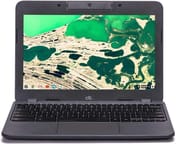 CTL NL7 Chromebook | |
| Price | List Price: $239.99 Amazon Prices: |
| Model number | CTLNL7 |
| Performance Rating | 2.3 |
| Chromebook Plus | No |
| Processor | Dual-core 1.10 Ghz (max 2.40 Ghz) Intel Celeron N3350 |
| RAM | 4 GB |
| Internal Storage | 32 GB eMMC |
| Screen Size | 11.6" |
| Screen Resolution | 1366x768 |
| Screen Type | IPS |
| Touch Screen | No |
| Stylus / Pen | No Stylus Support |
| Dimensions width x length x thickness | 12.13 x 8.27 x 0.78 inches (308.1 x 210.06 x 19.81 mm) |
| Weight | 2.49 lbs (1.13 kg) |
| Backlit Keyboard | No |
| Webcam | No Webcam |
| WiFi | 802.11 a/b/g/n/ac (2x2) |
| Bluetooth | Bluetooth 4.0 |
| Ethernet | No |
| Cellular Modem | No |
| HDMI | No HDMI |
| USB Ports | 2 USB 3, 2 USB-C (charges through usb-c) |
| Thunderbolt Ports | No |
| Card Reader | microSD Card Reader |
| Battery | unknown |
| Battery Life | 10.0 hours |
| Fanless | Yes |
| Auto Update Expiration Date | June, 2027 |
Related Chromebooks
-
 Acer Chromebook 311 (AMD)The Acer Chromebook 311 (CB311-10H) is an 11.6-inch ChromeOS laptop on an AMD A4-9120C with 4GB of…
 -
 ASUS Chromebook C203XAThe ASUS Chromebook C203XA is a rugged 11.6-inch education laptop with a MediaTek MT8173C, an…
 -
 Acer Chromebook Spin 11 CP311The Acer Chromebook Spin 11 combines functionality and portability with its 11.6-inch touch IPS…
 -
 Lenovo Flex 3 ChromebookThe Lenovo Flex 3 Chromebook is a fanless 11.6-inch convertible with an IPS touchscreen, a MediaTek…
 -
 Dell Chromebook 3120The Dell Chromebook 3120 is a fanless 11.6-inch education Chromebook with an Intel N100, sold in…
 -
 Lenovo Chromebook 3 11"The Lenovo Chromebook 3 11 is a fanless 11.6-inch Chromebook with an Intel Celeron N4020, 4GB of…
A thick fanless shell built for classroom wear
CTL built the chassis from textured plastic that could take the daily abuse of student handling, and the keyboard got spill-resistant treatment to survive the inevitable drink accidents. The 11.6-inch footprint kept the machine compact enough for smaller desks, and 2.49 pounds stayed manageable for students carrying it between classes. The 0.78-inch thickness left room for a rigid shell that a slimmer body could not have supported. Fanless operation kept the NL7 silent in a classroom and removed a moving part that could fail mid-semester.
The Intel Celeron N3350 is a dual-core Apollo Lake processor with a 1.1GHz base clock and burst speeds up to 2.4GHz. It sat at the entry tier of Intel’s 2016-2018 Apollo Lake lineup, below the quad-core N3450 and N4200 chips that went into better-equipped education Chromebooks of the era. The 4GB of DDR4 RAM and 32GB of eMMC storage met the minimum for smooth Chrome OS operation and left little headroom for demanding web applications or heavy Android app use. Android Police’s review of the related NL7TW-360, which shipped with the quad-core Celeron N3450 rather than the base NL7’s dual-core N3350, called that chip “fine for basic tasks, but it slows down under heavy workloads”; the NL7’s lower N3350 sits a tier below it.
The port set runs to two USB-C ports (one of them the charging port), two USB 3.0 Type-A ports, a microSD card slot, and a combination headphone and microphone jack. Charging over USB-C, a forward-looking choice for 2018 education hardware, let a school standardize on one charger across its fleet. WiFi 5 (802.11ac 2x2) carried enough bandwidth for classroom deployments, while Bluetooth 4.0 was already behind at launch and the missing Ethernet port meant buying a USB Ethernet adapter for a wired connection. With no HDMI output, a teacher needed a USB-C adapter every time the machine went on a projector.
Reviewer Insights
Android Police on the convertible sibling
Corbin Davenport’s Android Police review covered the NL7TW-360 convertible, which carried the base NL7’s core specifications plus a 360-degree hinge, a touchscreen, and Wacom stylus support. He called it “a decent Chromebook for clumsy students.” On the construction, Davenport wrote that “the textured plastic feels durable, and the keyboard is spill-resistant,” and he counted the port selection as enough for most classroom work without reaching for a dongle.
Davenport reported that “the laptop lasts me around eight hours, depending on the screen brightness and what I’m doing,” which covers a full school day. He described the low-resistance hinge as making tablet-mode transitions smooth, and the bundled Wacom stylus as useful for note-taking and drawing.
Davenport found “noticeable light bleed” on the 1366x768 display, and the processor slowed down under heavier workloads. He closed on the NL7TW-360 as “a good laptop that’s not mind-boggling fast, or durable enough to survive being run over by an SUV. It’s just a decent Chromebook that can take a few falls or accidental water spills.”
Sold into school districts on price and warranty
CTL’s NL7 series launched into a crowded education Chromebook market where Acer, Dell, HP, and Lenovo all competed for school district contracts. The education Chromebook segment runs on different priorities than consumer electronics: bulk pricing, centralized management, warranty and repair programs, and long-term fleet planning weigh more heavily than benchmark performance or display quality. CTL competed on price and warranty support. The N3350 left the NL7 at the lower performance tier next to the N3450-equipped machines schools could buy for similar money.
The base NL7’s Chrome OS Auto Update Expiration was originally November 2023, about five years of support, but Google later extended this board to June 2027, so units still in service keep updating for now (extended-support updates can drop some features such as Android app support). Schools that deployed NL7 fleets in 2018-2019 got a longer runway than the original date implied. CTL sold through institutional channels, so the NL7 stayed off retail shelves and drew almost no mainstream review coverage.
A slow fleet Chromebook still worth keeping until June 2027
The spill-resistant keyboard, fanless operation, all-day battery, and USB-C charging covered what school IT departments weighed when they bought Chromebooks by the cart. The Intel Celeron N3350 and 4GB of RAM handled Google Workspace and classroom web work. Heavier tasks pushed past what the pair could do. A student who needed to write assignments, take notes, and open learning materials got a machine that did the job without flair. Google’s extension keeps Chrome OS support on this board through June 2027, so an NL7 already in a cart or a closet is worth finishing out. For anyone shopping now, the Chromebook Comparison Chart lists supported devices with current specs and pricing.
Frequently Asked Questions
Is the CTL NL7 Chromebook still receiving updates?
For now, yes. Google extended the CTL NL7’s Auto Update Expiration to June 2027, up from the original November 2023 date, so the device still takes Chrome OS updates until then. Extended-support updates may drop some features such as Android app support. Updates stop after June 2027, and a school should plan its replacements around that date.
What is the difference between the NL7 and NL7TW-360?
The base NL7 is a traditional clamshell Chromebook without a touchscreen, priced around $229. The NL7TW-360 is a convertible 2-in-1 variant with a 360-degree hinge, touchscreen display, and Wacom stylus support, priced around $299. Both share the same Intel Celeron N3350 processor, 4GB RAM, and 32GB storage. There was also an NL7T-360 model with touchscreen but without the stylus functionality.
Is the CTL NL7 good for students?
CTL aimed the NL7 at student use, with a spill-resistant keyboard and textured plastic construction. Chrome OS support runs to June 2027, so a unit already in hand still works. The dual-core N3350 is slow by current standards. A student buying today gets more out of a newer Chromebook with a longer support window and a faster processor.
Can the CTL NL7 Chromebook run Android apps?
Yes. The CTL NL7 runs Android apps through the Google Play Store. The 4GB of RAM and the Intel Celeron N3350 cap how well those apps perform. One caveat: the AUE extension to June 2027 is an extended-support release, and those releases can drop Android app support, so Play Store access may go away on a device that takes the update.
What processor does the CTL NL7 Chromebook have?
The CTL NL7 uses the Intel Celeron N3350, a dual-core Apollo Lake processor with a base clock of 1.1GHz and burst speed up to 2.4GHz. This was an entry-level education processor from Intel’s 2016-2018 lineup, providing adequate performance for basic web browsing and Google Workspace applications but struggling with heavier workloads.
How long does the CTL NL7 battery last?
CTL rated the NL7 for up to 10 hours, and Android Police’s testing of the NL7TW-360 variant reported approximately 8 hours of real-world usage. The fanless design and the low-power Apollo Lake chip are what get it through a school day off the charger.