

A disclosure before we dig in: Starryhope covers Chromebooks extensively, and we have an obvious rooting interest in ChromeOS doing well. What follows is our honest assessment of Apple’s new MacBook Neo, including the parts where it genuinely outclasses anything in the Chromebook lineup. We think you deserve analysis, not defensiveness.
Apple announced the MacBook Neo on March 4, 2026, and the tech press immediately reached for the obvious headline: game over for Chromebooks. A full Mac starting at $599, dropping to $499 for schools, powered by the same A18 Pro chip found in the iPhone 16 Pro, wrapped in four appealing colors with a 16-hour battery. On paper, this looks like the moment Apple finally prices itself into the territory that Chromebooks have owned for a decade. Tom’s Hardware called it Apple’s most disruptive hardware play since the original iPad. TechCrunch described it as Apple’s colorful answer to the Chromebook.
But the question that matters to parents, students, and anyone considering a budget laptop right now isn’t whether the MacBook Neo is impressive. It clearly is. The question is whether your specific situation calls for a Mac at this price point or a Chromebook, because the answer depends on how you actually use a laptop more than it depends on benchmark scores.
What You’re Actually Getting for $599
The MacBook Neo’s spec sheet reads like it was designed to make Chromebook Plus models look overpriced. Apple’s A18 Pro processor, originally built for the iPhone 16 Pro, delivers roughly 3.3 times the single-core performance of the Intel N100 chips powering most mid-range Chromebooks, based on Geekbench 6 scores. The 13-inch Liquid Retina display runs at 2408x1506 pixels with 500 nits of brightness, which is sharper and brighter than anything you’ll find on a Chromebook under $700. Apple claims 16 hours of battery life for video streaming, and if it follows the pattern of previous Apple Silicon machines, real-world battery life should come reasonably close to that number.
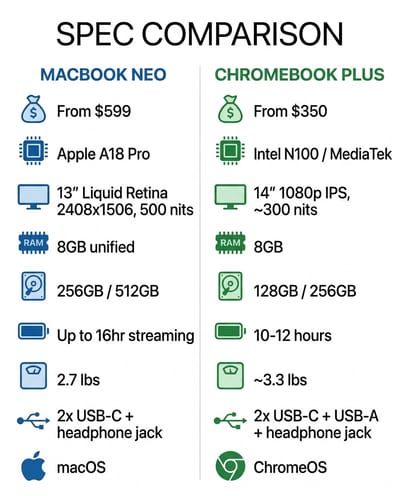
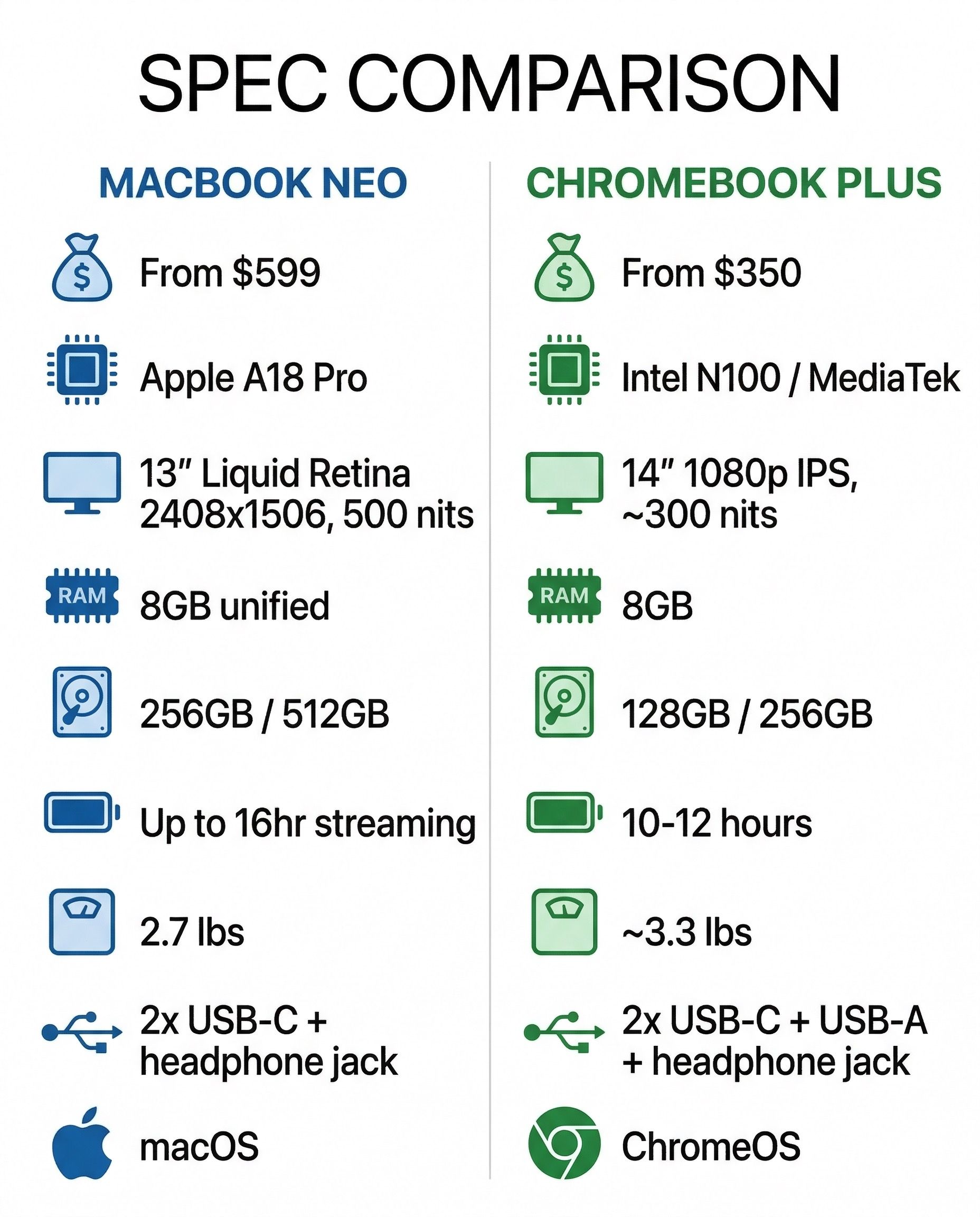
The design is unmistakably Apple. At 2.7 pounds in an aluminum body available in silver, blush, citrus, and indigo, it feels like Apple studied the original colored iMacs and the M2 MacBook Air, then asked what a student-friendly version of that formula would look like. There’s a 1080p FaceTime camera, Wi-Fi 6E, Bluetooth 6, and Apple Intelligence baked in for on-device AI features. The Neo runs full macOS, which means access to GarageBand, iMovie, Pages, and the entire Mac App Store on day one. No compromises on the operating system front. No stripped-down education edition. Full macOS.
Now for the trade-offs Apple is hoping you’ll overlook. The base $599 model ships with 256GB of storage and no Touch ID on the keyboard. You need to step up to the $699 512GB model to get the fingerprint sensor. Both models are stuck at 8GB of unified memory with no option to upgrade. The port situation is limited to two USB-C ports, one of which only supports USB 2.0 speeds, plus a headphone jack. There’s no keyboard backlight on any model. And that eye-catching $499 education price? It requires purchasing through Apple’s education store as an eligible institution, so a parent walking into an Apple Store will pay $599.
If Your Student Lives in Google Docs
Here’s where the Chromebook argument starts to reassemble itself. If your child’s school runs on Google Workspace for Education, and 93 percent of US school districts purchased Chromebooks in 2025, the MacBook Neo is an extraordinarily powerful machine for opening browser tabs. That’s not a dig at macOS. It’s an acknowledgment that the vast majority of K-12 schoolwork happens in Google Docs, Google Slides, Google Classroom, and a web browser. For that workflow, the A18 Pro chip is like strapping a jet engine to a bicycle.
A $300 Chromebook Plus handles Google Workspace flawlessly. It opens, saves, and syncs documents instantly. It runs Google Meet for video calls without stuttering. It loads Canvas, Schoology, and every other learning management system that schools actually use. The experience is fast, simple, and purpose-built because ChromeOS was designed from the ground up for exactly this kind of cloud-first workflow. Our Chromebook vs iPad comparison found that web-first workflows are where Chromebooks consistently outperform more expensive alternatives, and that logic extends to the MacBook Neo.
The simplicity advantage matters more than spec-sheet enthusiasts want to admit. ChromeOS boots in seconds, updates silently in the background, and cannot accumulate the kind of system cruft that makes every laptop slower over time. A Chromebook purchased for a sixth grader in 2026 will feel just as responsive in 2032 as it does today, because the operating system refreshes itself with every restart. macOS is a more capable operating system, but capability comes with complexity, and complexity introduces more things that can go wrong on a device used by a teenager who will never voluntarily run Disk Utility.
If Your Student Wants to Create
This is the MacBook Neo’s genuine competitive advantage, and we’d be dishonest to downplay it. There is no Chromebook at any price that matches what macOS offers for creative work. GarageBand alone turns the Neo into a legitimate music production starter kit, something Chromebook owners have been trying to replicate with workarounds and web apps that never quite feel complete. iMovie provides real video editing. The full desktop versions of apps like Affinity Photo, DaVinci Resolve, and Logic Pro can run natively on the A18 Pro chip.
If your child is showing interest in filmmaking, music production, photography, graphic design, or software development, the MacBook Neo at $599 is genuinely transformative. A year ago, the cheapest path into the Mac creative ecosystem was an $1,100 MacBook Air. Today it’s $599. For a high school student building a portfolio for art school applications, or a middle schooler who’s outgrown the creative limitations of web-based tools, this is a meaningful shift. No Chromebook can match it for this specific use case, and pretending otherwise would be doing you a disservice.
The question is whether your student actually needs these capabilities or just thinks they sound cool. Most students who say they want to edit videos end up editing three clips in the first month and then going back to watching YouTube. The ones who genuinely pursue creative work will hit ChromeOS’s limitations quickly and legitimately. If your child has been making videos on their phone for a year and is frustrated by the limitations, the Neo is a natural next step. If they mostly want a cool laptop that comes in citrus, a Chromebook Plus will serve them better for half the price.
The Price Isn’t What It Looks Like
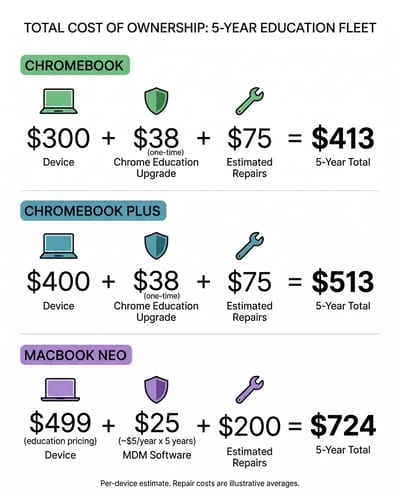
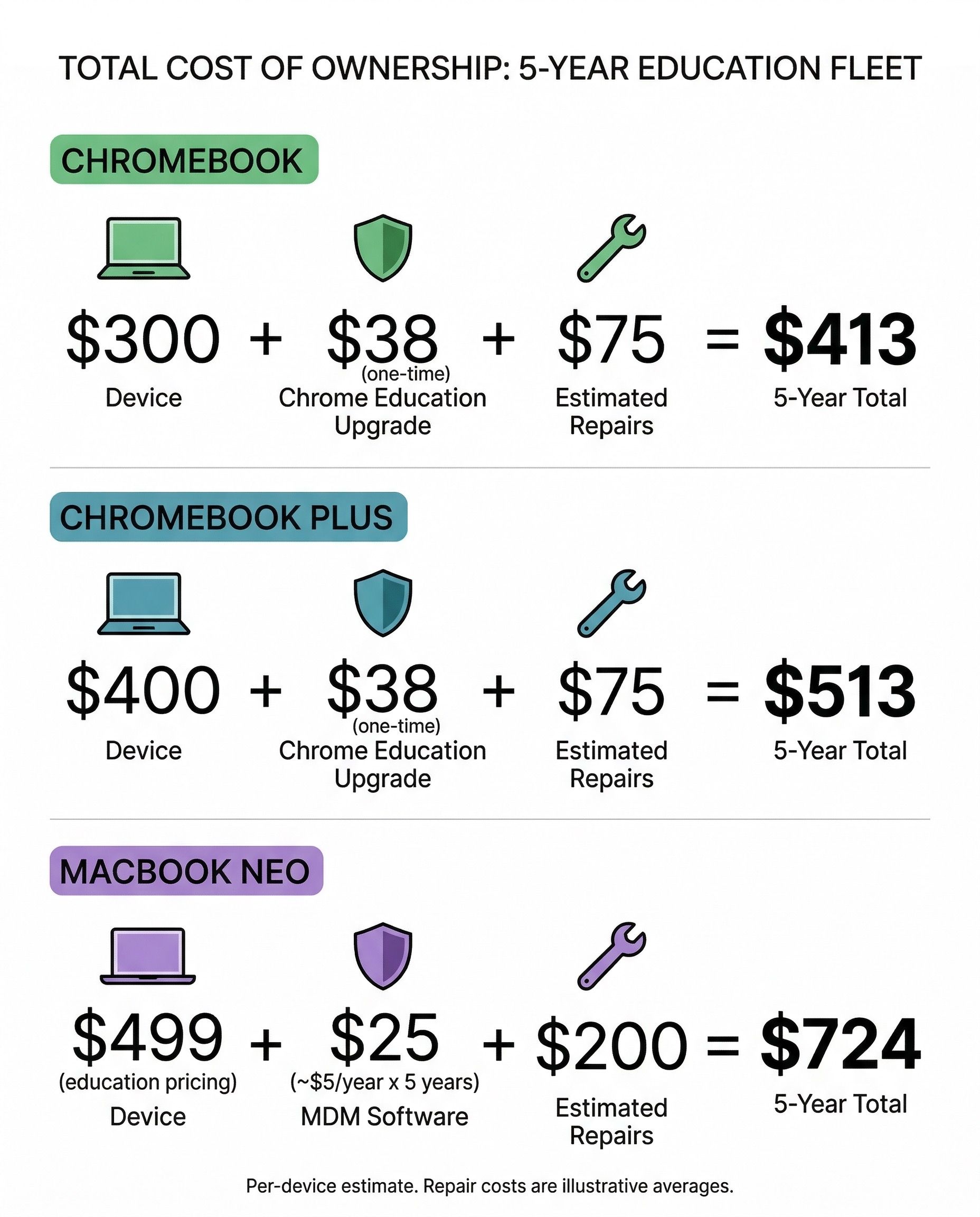
Apple’s pricing narrative places the MacBook Neo directly against Chromebook Plus models, and viewed through that narrow lens the comparison seems favorable. A well-equipped Chromebook Plus runs $350 to $450. The Neo starts at $599. That’s a $150 to $250 gap for a vastly more powerful machine running a full desktop operating system. Seems reasonable.
But the total cost of owning a student laptop extends well beyond the sticker price. When a Chromebook’s screen cracks, which happens with startling regularity in the hands of middle schoolers, the repair typically costs $50 to $100 at a local shop. Many education-focused Chromebooks are specifically designed with reinforced corners, spill-resistant keyboards, and screens chosen partly for affordable replacement. Apple hasn’t published repair pricing for the Neo, but the company’s historical approach to repairs doesn’t inspire confidence in the budget category. The MacBook Air screen repair runs $449 through Apple, and even with a cheaper panel on the Neo, we’d be surprised if an official screen replacement cost less than $200.
Google guarantees 10 years of automatic updates for new Chromebooks, a policy that extends security patches and feature additions through 2036 for a Chromebook bought today. Apple provides excellent macOS support historically, typically five to seven years, but there’s no formal commitment comparable to Google’s explicit expiration date framework. For a device bought for a student entering middle school, the difference between guaranteed support through high school graduation and probable support through high school graduation matters to budget-conscious families.
Then there’s the 8GB RAM question. Eight gigabytes is adequate for macOS today, but Apple Intelligence features are just getting started, and Apple has been steadily increasing memory requirements for its AI features. ChromeOS runs efficiently on 8GB because the operating system is lighter and cloud-oriented by design. macOS with Apple Intelligence, a web browser, and a few native apps open simultaneously will test that 8GB ceiling within a couple of years, and there’s no upgrade path.
What Schools Are Actually Thinking
The consumer pricing story is one thing. The education fleet story is entirely different, and this is where the “Chromebook killer” narrative falls apart fastest. Schools don’t buy laptops one at a time. They buy hundreds or thousands of devices, deploy them across buildings, manage them remotely, lock them down for testing, and maintain them for years on tight budgets.
Google’s education ecosystem is built around this reality. The Chrome Education Upgrade license costs roughly $38 per device as a one-time perpetual fee, and it unlocks fleet management through the Google Admin Console, which integrates directly with Google Workspace for Education that schools already use. The entire pipeline from unboxing to classroom-ready deployment can happen without a technician touching the device.
Apple offers Apple School Manager for free, which handles zero-touch enrollment. But the actual device management requires a third-party MDM solution like Jamf or Mosyle, which typically runs $3 to $8 per device per year as an ongoing subscription. For a district deploying 5,000 devices, that’s $15,000 to $40,000 annually in management costs alone, compared to a one-time $190,000 for Chrome Education Upgrade licenses. Over a five-year deployment cycle, the recurring Apple MDM costs add up to $75,000 to $200,000 versus the fixed Google cost.
This math is why the MacBook Neo at $499 for education, while headline-grabbing, isn’t keeping school IT directors up at night. As we covered when Windows 11 SE died, the fleet management story is where Chromebooks consistently defeat challengers, regardless of spec sheets. Microsoft learned this. Apple may too.
The AI Factor
Both platforms now offer on-device AI, and the comparison is more nuanced than either company wants to admit. The MacBook Neo ships with Apple Intelligence, which handles writing assistance, image generation, notification summaries, and Siri integration. It’s capable and well-integrated into macOS, though some features are still rolling out and availability varies by region.
Chromebook Plus models ship with Google’s Gemini integration, which provides similar writing tools, a “Help me write” feature across ChromeOS, and image generation through the Magic Editor in Google Photos. Gemini’s strength is its deep integration with Google Workspace, meaning the AI features work naturally within Google Docs, Gmail, and the other apps that students already live in.
For most student workflows, the AI features on both platforms are roughly equivalent: helpful for drafting emails and summarizing content, occasionally useful for creative tasks, and not yet essential enough to swing a purchasing decision. The A18 Pro’s 16-core Neural Engine gives the Neo more raw AI processing power, but that advantage matters primarily for running local models and advanced photo and video AI features. For a student writing essays and making presentations, Gemini on a Chromebook Plus does everything Apple Intelligence does, within the Google ecosystem where the work already happens.
Who Should Buy What
After sifting through the specs, the pricing, the fleet management costs, and the real-world implications of each choice, here’s our honest guidance.
If your student’s school runs on Google Workspace and the device will primarily handle schoolwork and web browsing, a Chromebook remains the right call. This is especially true if you’re buying for a child in elementary or middle school who doesn’t yet have defined creative interests, or if you value the peace of mind that comes with a nearly indestructible, affordable-to-repair device. A $250 to $350 Chromebook will do everything they need, last a decade with guaranteed updates, and survive being shoved into a backpack five days a week.
The MacBook Neo earns its price for students with genuine creative ambitions that ChromeOS can’t support. If they’re heading to high school or college and you want a device that can grow with them beyond web-based work, or if your family is already invested in the Apple ecosystem where continuity features like AirDrop and iMessage add real daily value, the Neo at $599 is legitimately good value even with its compromises.
School IT administrators should wait. The management costs, repair economics, and integration requirements need real-world data from early adopters before any district should commit procurement dollars. The Chromebook ecosystem has earned its dominance through a decade of solving education-specific problems, and a lower sticker price doesn’t erase that advantage overnight.
The Real Threat Isn’t the Neo
The MacBook Neo is a genuinely impressive product that Apple should be proud of. But the real story isn’t whether it kills Chromebooks. It’s that Apple has finally acknowledged, after years of ceding the budget market, that not every laptop buyer wants to spend $1,000 or more. The Neo is Apple’s concession that the mass market matters, and that’s a win for consumers regardless of which platform you prefer.
For Chromebook fans, the Neo should be motivating rather than threatening. It proves that powerful hardware at accessible prices is possible, and it raises the bar for what a $599 device should deliver. Google and its Chromebook partners now have clear pressure to improve display quality, build materials, and creative app support to maintain the value proposition that has served students and budget buyers for years. Competition like this doesn’t kill platforms. It makes them better.
The Chromebook’s advantages in simplicity, fleet management, repairability, and total cost of ownership are real and durable. They’re also boring advantages compared to “it comes in citrus and runs GarageBand.” Apple has always been better at making people want things. Google’s job now is to make sure Chromebooks remain the smarter choice for the people they were built for, even when the shinier option is sitting right next to them on the shelf.


