
MediaTek Kompanio 540 Chromebooks: Silent, All-Day Battery Laptops for Students
Published on by Jim Mendenhall

There’s a quiet revolution happening in the budget Chromebook market, and “quiet” is the operative word. MediaTek’s new Kompanio 540 processor, which began arriving in Chromebooks in early 2026, promises something that sounds almost too good for a sub-$500 laptop: completely silent, fanless operation combined with up to 15 hours of battery life. For anyone who’s ever sat in a library next to someone whose laptop fan sounds like a tiny jet engine, or watched a student’s Chromebook die at 2pm because it couldn’t survive a full school day, that combination addresses two of the most persistent complaints about affordable laptops.
But here’s the thing about new chips launching in budget Chromebooks: the marketing claims always sound impressive, and the reality is usually more nuanced. MediaTek says the Kompanio 540 offers 35% longer battery life than the Intel N150 in YouTube streaming tests, 50% better Geekbench single-core performance than its predecessor, and 75% faster graphics. Those numbers come from MediaTek’s own announcement, not independent testing. The first devices are just now reaching store shelves, which means we’re working with manufacturer claims and spec sheets rather than months of real-world data. With that caveat firmly in place, let’s dig into what we actually know.
What the Kompanio 540 Actually Is
The Kompanio 540 is an octa-core ARM processor built around two Cortex-A78 performance cores running at 2.6GHz and six Cortex-A55 efficiency cores at 2.0GHz. If you’re familiar with MediaTek’s previous budget Chromebook chip, the Kompanio 520, the architecture tells a clear story: the 540 swaps in newer, more capable A78 cores where the 520 used older A76 cores. That’s not a minor tweak. The A78 architecture delivers meaningfully better performance-per-watt, which is exactly why MediaTek can claim both faster speeds and longer battery life simultaneously. It’s paired with a dual-core Mali-G57 MC2 GPU and support for LPDDR5X memory up to 6400MT/s. The chip also supports UFS 3.1 storage alongside eMMC 5.1, though which standard a given device uses is up to the manufacturer.
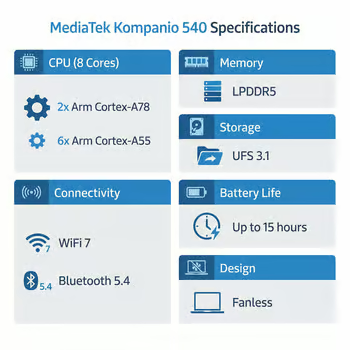
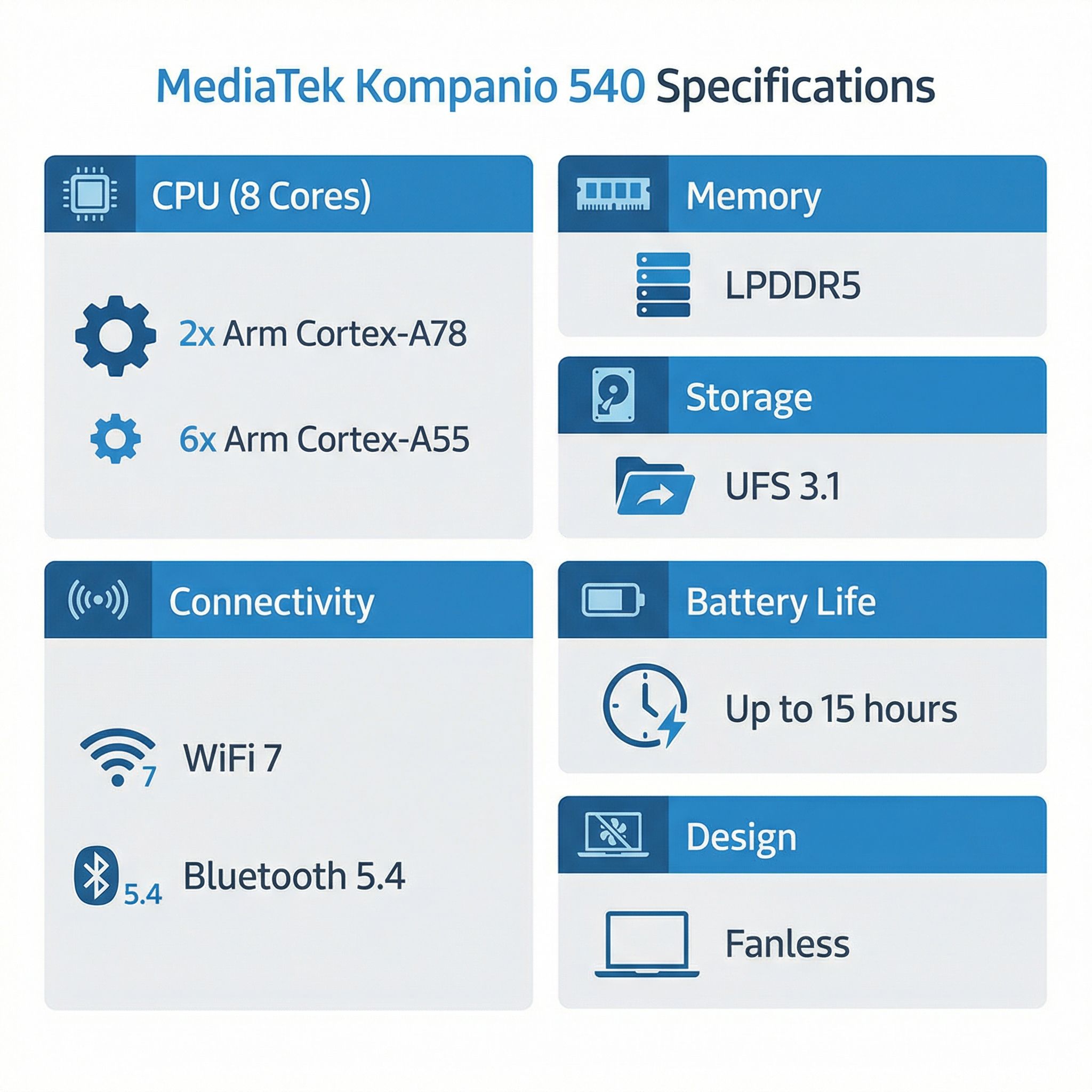
Those memory and connectivity specs matter more than they might seem at first glance. Previous budget Chromebooks were often hamstrung by LPDDR4x memory, creating bottlenecks that made the whole system feel sluggish even when the processor had cycles to spare. LPDDR5X brings both speed and power efficiency improvements. On the storage front, the Kompanio 540 supports UFS 3.1 alongside eMMC 5.1, and UFS 3.1 is dramatically faster for app loading and file operations. Notably, Acer’s first devices still use eMMC storage, so the UFS 3.1 advantage will depend on whether other OEMs choose to take advantage of it. Chrome Unboxed tracked at least 13 different Chromebook models being built on this chip under the “Skywalker” and “Jedi” development baseboards, which suggests manufacturers are enthusiastic about what the 540 can deliver.
The connectivity is worth highlighting too. The Kompanio 540 supports WiFi 7 and up to Bluetooth 5.4 (though implementation varies by device — Acer’s models use 5.3, while the ASUS CM32 ships with 5.4), making it one of the first budget Chromebook chips to bring next-generation wireless to this price tier. WiFi 7 won’t matter much in schools that haven’t upgraded their access points yet, but it future-proofs these devices for the years they’ll be in service, and newer WiFi standards generally handle congested networks more gracefully, which is exactly the scenario in a school building with hundreds of connected devices.
The Devices: What’s Available and What’s Coming
Acer was first out the gate, announcing the Chromebook 311 and Chromebook Spin 311 at BETT 2026 in January. Both are purpose-built for education, with MIL-STD 810H durability ratings (meaning they can survive drops from 48 inches onto plywood), spill-resistant keyboards, and the kind of chunky, rubberized designs that survive life in a student’s backpack. The standard Chromebook 311 (C725) is a traditional clamshell starting at $499.99 in North America, while the Spin 311 (R725T) adds a 360-degree convertible hinge for $579.99.
Those prices deserve some honest scrutiny. Previous-generation education Chromebooks with MediaTek Kompanio 520 processors typically started around $299 to $349, making the 311’s $499 starting price a noticeable jump. Part of this reflects the improved internals, the newer chip, faster memory and storage, WiFi 7, and the MIL-STD durability. But it also puts these devices in direct competition with Intel N100-powered Chromebooks that have been available for months at similar or lower prices. It’s worth noting that the European pricing tells a different story: the Chromebook 311 starts at EUR 329 (roughly $345) in EMEA markets, suggesting that education procurement channels and regional pricing will significantly affect what buyers actually pay. Schools buying in bulk through education resellers will likely see prices well below the published MSRPs.
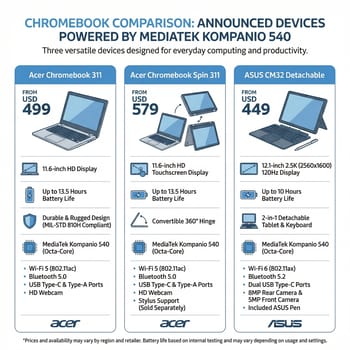
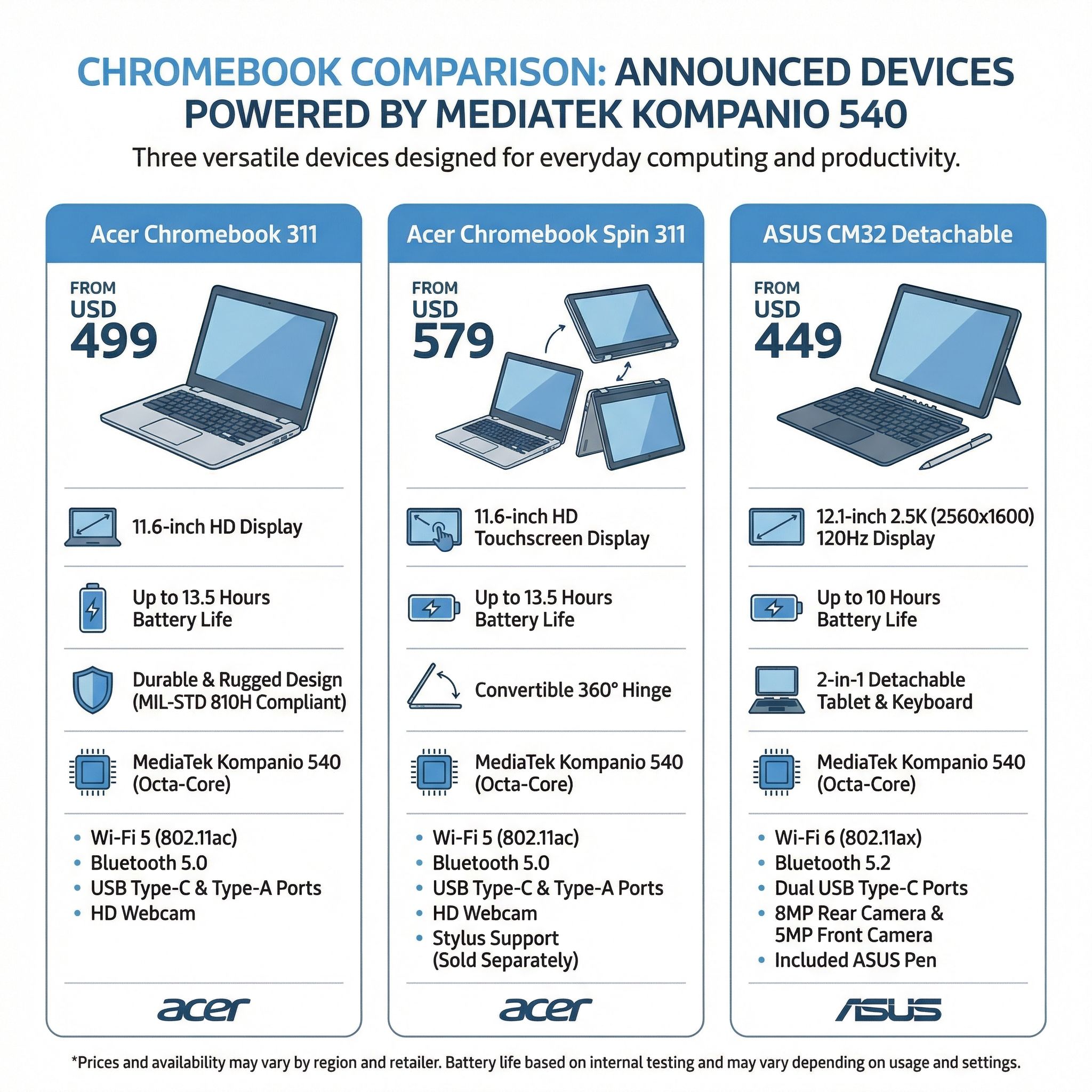
The more interesting device might be the ASUS Chromebook CM32 Detachable, which debuted at CES 2026 and shows just how far the Kompanio 540 can stretch beyond bare-bones education machines. It features a 12.1-inch 2.5K display running at 120Hz with 600-nit brightness, a USI 2.0 stylus that magnetically charges on the back of the device, and a detachable keyboard with a genuine trackpad. The CM32 proves that the Kompanio 540 isn’t limited to low-resolution screens and plastic keyboards; it can power a genuinely premium tablet experience. ASUS hasn’t announced pricing yet, but the CM32 is expected in the second quarter of 2026.
Beyond these announced models, the pipeline is substantial. MediaTek and its partners showcased additional Kompanio 540 devices at BETT 2026 from Lenovo and other manufacturers, and Chrome Unboxed’s baseboard tracking suggests we’ll see models from most major Chromebook OEMs throughout 2026.
Why Fanless and 15 Hours Actually Matters
It’s easy to dismiss “fanless” and “15-hour battery” as marketing bullet points, but for the specific audience these Chromebooks target, they address genuine pain points that affect daily experience in ways that raw performance numbers don’t capture.
Consider a typical school day. A student picks up their Chromebook at 7:30am and doesn’t get home until 3:30pm. During that eight-hour window, they’re switching between Google Classroom, Docs, research in Chrome, maybe a STEM application like Tinkercad, and whatever they can sneak in during lunch. Current budget Chromebooks with Intel N100 processors typically last 8 to 10 hours under mixed use, which technically covers a school day but leaves no margin for a student who forgot to charge overnight or wants to do homework before dinner. A genuine 12 to 13 hours of real-world battery life (accounting for the gap between manufacturer claims and actual use) means the charging conversation largely disappears. It doesn’t matter that the student forgot to plug in last night; the Chromebook will still make it through the day.
The fanless angle matters equally in classroom contexts. Anyone who’s taught a class of 30 students using laptops knows the collective hum of 30 small fans. It’s not loud individually, but it creates a persistent background noise that makes a quiet classroom impossible. Fanless Chromebooks aren’t just quieter; they’re genuinely silent. They also run cooler on students’ laps, which matters for younger children who use these devices for hours at a stretch. Google’s VP of ChromeOS, John Maletis, was quoted in MediaTek’s announcement saying that the Kompanio 540 brings “a balance of power and efficiency to more users who can rely on it to bring them a full day of work and play.” That’s corporate-speak, but the underlying point is valid: these are the kind of improvements that parents and teachers notice even if they never look at a spec sheet.
How It Stacks Up Against Intel
Here’s where honest assessment matters most, because the temptation is to position the Kompanio 540 as either the Intel killer or an inferior ARM pretender. The reality is more nuanced than either narrative.
MediaTek’s own comparison targets the Intel N150, claiming 35% longer battery life under YouTube streaming conditions. That’s a carefully chosen comparison. The N150 is Intel’s newest budget chip, and battery life is MediaTek’s strongest advantage. What MediaTek doesn’t highlight is single-core performance, where Intel’s x86 architecture traditionally leads. The Intel N100 and N200, which power most current budget Chromebooks, deliver strong single-threaded performance that translates to snappy web browsing and responsive UI interactions. Without independent benchmarks comparing the Kompanio 540 directly against Intel’s N-series chips, we can’t make definitive performance claims.
What we can say is this: the previous-generation Kompanio 520 traded raw performance for battery efficiency, and most reviewers found it adequate for educational tasks but noticeably slower than Intel alternatives for anything demanding. The 540’s architectural improvements, particularly the Cortex-A78 cores and faster memory subsystem, should narrow that gap significantly. Whether it closes it entirely remains to be seen once independent reviewers get their hands on shipping hardware.
The ARM vs. Intel choice also has implications beyond raw speed. ARM processors run Android apps natively, while Intel chips use a translation layer. For schools that rely on Android educational apps, this can mean smoother performance and better compatibility. On the flip side, Intel maintains advantages for Linux application support and x86-specific software, though that matters less for the education market where ChromeOS web apps dominate. For a deeper look at this broader competition, we covered the ARM processor battle for Chromebooks in detail.
The Bigger Picture: MediaTek’s Education Strategy
The Kompanio 540 doesn’t exist in isolation. It’s the latest step in MediaTek’s systematic campaign to become the default processor for education Chromebooks, and their progress has been remarkable. MediaTek went from less than 10% Chromebook market share a few years ago to becoming the number one provider of ARM-based Chromebooks, and the 540 is designed to cement that position.
Their strategy is straightforward: own the mid-range. While MediaTek’s premium Kompanio Ultra powers flagship devices like the Lenovo Chromebook Plus 14 at $649, the Kompanio 540 targets the volume market where schools buy devices by the hundreds and parents shop by price. The 540 is essentially a “good enough at everything, exceptional at efficiency” chip, which is precisely what education buyers need. Meanwhile, Intel still dominates the premium Chromebook tier with Panther Lake processors arriving later in 2026 for higher-end devices.
The education market specifically rewards the 540’s strengths. School IT departments care about total cost of ownership over a device’s supported lifespan, and a chip that enables longer battery life means fewer charging carts and less infrastructure overhead. Fanless designs mean fewer moving parts that can fail, reducing maintenance costs. Acer is leaning into this with features like a modular USB-C port and two-screw keyboard replacement on the Chromebook 311, designed for easy field repairs that keep devices in service rather than sitting in IT closets waiting for parts.
Should You Wait or Buy Now?
This is the practical question that matters most, and the answer depends entirely on who you are and what you need.
If you’re a parent buying for a younger student (K-8) and can wait until March or April 2026, the Acer Chromebook 311 or Spin 311 are worth considering, especially if you can find education pricing below the $499 MSRP. The combination of fanless silence, all-day battery, and military-grade durability is tailor-made for this audience. But don’t overlook current Intel N100 Chromebooks from our best Chromebooks under $300 guide, which offer proven performance at lower prices today.
If you’re a school IT buyer planning a fleet purchase for the 2026-2027 school year, the Kompanio 540 devices deserve serious evaluation. The reduced charging infrastructure needs and lower maintenance from fanless designs could offset a slightly higher per-device cost. Request education pricing from your reseller; the gap between MSRP and education procurement pricing is often substantial. Make sure to check the Auto Update Expiration dates on any model you’re considering, as the total years of ChromeOS support directly affect your cost-per-year calculation.
If you’re a college student or casual user looking for the best Chromebook right now, there’s no reason to wait. Current options with Intel N100/N200 processors or the MediaTek Kompanio 520 deliver solid performance at well-established price points. The Kompanio 540 will bring meaningful improvements, but not dramatic enough to justify pausing a purchase you need today. Check out our best Chromebooks for kids guide for options that overlap with what the 540 devices will offer.
If you’re intrigued by the ASUS CM32 Detachable, that’s the most exciting device in this bunch, but it’s also the furthest from availability. Its 2.5K 120Hz display with USI 2.0 stylus suggests a premium price point, and we won’t know pricing or availability details until closer to its Q2 launch.
The Kompanio 540 represents a genuine step forward for budget Chromebooks, bringing modern connectivity, meaningful performance improvements, and the kind of battery life that eliminates charging anxiety from the school day. Whether that translates to the best value at any given price point will depend on how aggressively manufacturers price their devices, and how the chip performs once reviewers can test it outside of controlled demonstrations. The first wave of devices arrives in March 2026; we’ll be watching closely.


