
ASUS Chromebook CM14 Flip
Published on

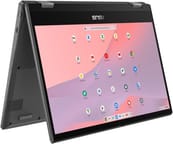
The ASUS Chromebook CM14 Flip delivers a versatile 2-in-1 experience for users seeking an affordable convertible Chromebook with all-day battery life. Powered by the MediaTek Kompanio 520 processor, this 14-inch convertible handles everyday tasks like web browsing, email, and document editing with ease. The fanless design ensures completely silent operation, making it ideal for quiet environments like libraries, classrooms, or home offices. With its 360-degree hinge, the CM14 Flip transforms between laptop, tent, stand, and tablet modes to suit different workflows. Whether you’re taking notes in class with the optional garaged USI stylus or streaming content in tent mode, this Chromebook offers flexibility at an entry-level price point.
Pros and Cons of the ASUS Chromebook CM14 Flip
| Pros | Cons |
|---|---|
| Exceptional battery life (10-14 hours real-world use) | All-plastic build attracts fingerprints easily |
| Fanless, completely silent operation | Screen brightness limited to 250-300 nits |
| Excellent keyboard with tactile, clicky feedback | Trackpad feels plasticky with sluggish response |
| WiFi 6 and Bluetooth 5.4 connectivity | No keyboard backlighting |
| Optional garaged USI 2.0 stylus charges inside chassis | Confusing SKU variations regarding stylus support |
| Chrome OS updates until June 2033 | Performance can stutter during heavy multitasking |
Related Videos
ASUS Chromebook CM14 Flip Comparison Chart
 ASUS Chromebook CM14 Flip | |
| Price | List Price: $409.99 Amazon Prices: Loading prices... Best Buy: Loading price... |
| Model number | CM1402FM2A-DS84FT-S |
| Performance Rating | 5.2 |
| Chromebook Plus | No |
| Processor | Octa-core 2.00 Ghz MediaTek Kompanio 520 |
| RAM | 8 GB |
| Internal Storage | 64 GB eMMC |
| Screen Size | 14" |
| Screen Resolution | 1920x1080 |
| Screen Type | IPS |
| Touch Screen | Yes |
| Stylus / Pen | Supported |
| Dimensions width x length x thickness | 12.78 x 8.93 x 0.72 inches (324.61 x 226.82 x 18.29 mm) |
| Weight | 3.44 lbs (1.56 kg) |
| Backlit Keyboard | No |
| Webcam | 720p HD |
| WiFi | Wi-Fi 6 (802.11ax) |
| Bluetooth | Bluetooth 5.4 |
| Ethernet | No |
| Cellular Modem | No |
| HDMI | No HDMI |
| USB Ports | 1 USB 3, 2 USB-C 2x USB-C 3.2 Gen 1 (with display & power delivery), 1x USB-A 3.2 Gen 1 |
| Thunderbolt Ports | No |
| Card Reader | microSD Card Reader |
| Battery | 2 cell, 42Wh, Li-ion |
| Battery Life | 14 hours |
| Fanless | Yes |
| Auto Update Expiration Date | June, 2033 |
Related Chromebooks
-
 ASUS Chromebook Flip C434The ASUS Chromebook Flip C434 dazzles with a 14-inch full HD touchscreen and a flexible 360-degree…
 -
 ASUS Chromebook Flip C433The ASUS Chromebook Flip C433 shines with a 14-inch full HD touchscreen, Intel Core M3 power, and…
 -
 Lenovo 14e Chromebook (Gen 3)Lightweight and versatile, the Lenovo 14e Chromebook features a 14-inch FHD IPS touch display,…
 -
 Lenovo IdeaPad Slim 3 ChromebookLenovo IdeaPad Slim 3 Chromebook offers a vibrant 14-inch FHD touchscreen, MediaTek Kompanio 520…
 -
 HP Chromebook 14a (2021)The HP Chromebook 14a combines a 14-inch BrightView touchscreen, HD webcam, and up to 14 hours of…
 -
 HP Chromebook 14 G6The HP Chromebook 14 G6 offers a 14-inch anti-glare TN display, Wi-Fi 5 connectivity, and up to…
Detailed Insights into the ASUS Chromebook CM14 Flip

The ASUS Chromebook CM14 Flip measures 12.78 x 8.93 x 0.72 inches and weighs 3.44 pounds, making it reasonably portable for a 14-inch convertible. The all-plastic construction keeps weight down but is a notable fingerprint magnet, particularly on the smooth surface finish. Build quality is solid for the price segment, with reviewers noting the chassis feels rigid despite the plastic materials. The 360-degree hinge is sturdy and allows smooth transitions between laptop, tent, stand, and tablet modes. A privacy shutter covers the 720p webcam when not in use, and the chassis incorporates spill-resistant keyboard protection for peace of mind.
At the heart of this Chromebook lies the MediaTek Kompanio 520 processor with 8 cores running at up to 2.0 GHz. This ARM-based chip prioritizes power efficiency over raw performance, enabling the fanless design and extended battery life. In real-world use, the CM14 Flip handles basic web browsing, social media, email, and document editing without significant issues. However, opening numerous Chrome tabs simultaneously or running demanding Android apps can result in noticeable slowdowns. The 8GB of RAM in this configuration provides adequate multitasking headroom for typical student or home office workflows, though the 64GB eMMC storage fills up quickly and relies on microSD expansion or cloud storage.
Connectivity options include WiFi 6 (802.11ax) wireless for fast, efficient network performance along with Bluetooth 5.4 for accessories. The port selection provides two USB-C 3.2 Gen 1 ports supporting display output and power delivery (one on each side for convenient charging), plus one USB-A 3.2 Gen 1 port for legacy peripherals. A microSD card reader handles storage expansion, and a 3.5mm combo audio jack rounds out the connectivity. The lack of HDMI requires using a USB-C adapter for external display connections, which is typical for this device class. Similarly, users who need a wired network connection can use a USB Ethernet adapter with the USB-A port.
Reviewer Insights on the ASUS Chromebook CM14 Flip

Chrome Unboxed’s Perspective
Chrome Unboxed tested the ASUS Chromebook CM14 Flip focusing on build quality, keyboard experience, and battery life expectations. Their hands-on analysis found the device to be surprisingly solid despite its all-plastic construction. They noted that “the keyboard is surprisingly good… the feedback on them is so good” and were pleasantly surprised by the typing experience for passwords and general use. The reviewer estimated “8 to 10 hour battery of actual use is probably very realistic maybe probably pushing on to 11 or 12” based on the efficient MediaTek processor and their testing experience with similar hardware.
The review highlighted the physical privacy shutter for the webcam as a thoughtful security feature. Chrome Unboxed also tested the speakers, finding them “loud and clear” for a budget device. Their overall assessment was positive for the intended use case, noting that “for basic tasks if you’re doing stuff like you know social media checking email banking those kind of things you would do with a Chromebook in this kind of price range I think it’s going to do pretty well for you.”
Tech Through the Lens Review
Tech Through the Lens provided a comprehensive review based on three weeks of actual usage. Their testing covered build quality, port selection, screen brightness, and performance during light gaming. The review emphasized the optional garaged USI 2.0 stylus as a standout feature, noting “you can push to pop it out and I like the fact it’s got charging contacts either side” which keeps the stylus charged while stored inside the chassis.
The reviewer was more critical of the display, stating “Screen brightness is limited to 250 nits” which “struggles in bright light” and may be inadequate for outdoor use. They also warned about confusing SKU variations, noting that some models lack stylus support entirely despite looking identical. The power indicator LED was called out as “one of the weakest LEDs I’ve ever seen for the power charge indicator.” Despite these concerns, the reviewer appreciated the spill-resistant keyboard with 1.5mm travel and the long Chrome OS support life extending to June 2033.
Laptop Mag
According to Laptop Mag, the ASUS Chromebook CM14 Flip is “bolstered by impressive battery life, a firm exterior, and powerful audio” making its many flaws forgivable at the entry-level price point. The review highlighted solid battery life lasting over 10 hours in testing, satisfying keyboard feel, and surprisingly loud speakers. They noted that “Asus takes us back to the good old days when they were minimalistic and affordable.”
However, Laptop Mag was critical of the display quality and trackpad experience. The reviewer described the trackpad as potentially “the worst I’ve used, as my fingers feel road blocked each time I glide them across the surface.” The webcam quality was also criticized as “ugly.” Their conclusion positioned the CM14 Flip as a solid choice for budget-conscious buyers who prioritize battery life and durability over display quality and trackpad responsiveness.
Across multiple reviews, the consensus points to exceptional battery life and a comfortable keyboard as the primary strengths, while the dim display, sluggish trackpad, and all-plastic fingerprint-prone construction appear consistently as areas for improvement. Reviewers generally agree this is a capable entry-level Chromebook for basic tasks but not suitable for demanding workflows or users who prioritize display quality.
Customer Reviews of the ASUS Chromebook CM14 Flip
Amazon customer reviews for the ASUS Chromebook CM14 Flip are limited as this model is relatively new to market. The device has not yet accumulated significant customer feedback on Amazon, though Best Buy availability and positive professional reviews suggest it meets expectations for the entry-level segment.
Based on professional reviewer testing and the specifications, typical buyers should expect a solid experience for basic productivity, web browsing, and media consumption. The 8GB RAM configuration provides more headroom than the 4GB variants common in this price range. Customers who prioritize long battery life, silent fanless operation, and convertible versatility will likely find the CM14 Flip meets their needs, while those who require a bright outdoor-visible display or premium trackpad experience may want to consider alternatives.
Conclusion
The ASUS Chromebook CM14 Flip stands out as a practical entry-level convertible for students, casual users, and anyone seeking a silent, long-lasting Chromebook. Its combination of fanless operation, 10-14 hour battery life, and versatile 360-degree hinge makes it well-suited for classrooms, libraries, and basic home productivity. The optional garaged USI stylus adds functionality for note-taking when purchased with the appropriate SKU configuration.
That said, users who prioritize display quality should consider alternatives with brighter panels, and those who rely heavily on trackpad navigation may find the sluggish response frustrating. Power users and those who frequently work outdoors will likely want to look at Chromebook Plus certified devices with better displays and faster processors.
For those comparing options, see our Chromebook Comparison Chart to find the best match for your needs.
Frequently Asked Questions
What processor does the ASUS Chromebook CM14 Flip use?
The ASUS Chromebook CM14 Flip is powered by the MediaTek Kompanio 520 processor, featuring 8 cores (2 Cortex-A76 performance cores and 6 Cortex-A55 efficiency cores) running at up to 2.0 GHz. This ARM-based processor is designed for power efficiency, enabling fanless operation and exceptional battery life while handling everyday Chrome OS tasks smoothly.
Can I upgrade the RAM in the ASUS Chromebook CM14 Flip?
No, the ASUS Chromebook CM14 Flip uses soldered memory that cannot be upgraded after purchase. The 8GB LPDDR4X RAM is permanently attached to the motherboard. Choose the RAM configuration that meets your needs at purchase time, and note that 8GB provides reasonable multitasking headroom for typical Chrome OS workflows.
What ports does the ASUS Chromebook CM14 Flip have?
The ASUS Chromebook CM14 Flip includes 2x USB-C 3.2 Gen 1 ports (supporting display output and power delivery, with one on each side), 1x USB-A 3.2 Gen 1 port, a microSD card reader for storage expansion, and a 3.5mm combo audio jack. There is no built-in HDMI port, so connecting to external displays requires a USB-C adapter.
Does the ASUS Chromebook CM14 Flip include a stylus?
Stylus inclusion depends on the specific SKU purchased. Some configurations include a garaged USI 2.0 stylus that stores and charges inside the chassis, while others have a plug in the stylus slot and do not include the pen. The touchscreen supports any USI-compatible stylus if you need to purchase one separately. Check the specific model number when purchasing to confirm stylus inclusion.
How long will the ASUS Chromebook CM14 Flip receive Chrome OS updates?
According to Google’s Auto Update Expiration (AUE) policy, the ASUS Chromebook CM14 Flip (CM1402F) will receive automatic Chrome OS updates until June 2033. This provides approximately 10 years of software support from the original release, including security patches, feature updates, and bug fixes throughout the support period.
Is the ASUS Chromebook CM14 Flip good for students?
Yes, the CM14 Flip is well-suited for student use. Its 360-degree convertible design allows comfortable note-taking in tablet mode, the fanless operation ensures silent use in libraries and classrooms, and the 10-14 hour battery life lasts through a full school day without charging. The spill-resistant keyboard adds durability for everyday use. However, students who need to work outdoors frequently may find the display brightness (250-300 nits) limiting in direct sunlight.
Can the ASUS Chromebook CM14 Flip run Android apps?
Yes, the CM14 Flip fully supports Android apps through the Google Play Store. Light productivity apps, social media, and streaming services run smoothly. However, demanding Android games or resource-intensive apps may experience slowdowns due to the entry-level MediaTek processor. The 8GB RAM configuration provides better Android app multitasking compared to 4GB variants in this price range.