
ASUS Chromebook Flip C100PA
Updated on

Note: The ASUS Chromebook Flip C100PA has been discontinued and reached its Auto Update Expiration (AUE) date in June 2020. Chrome OS no longer receives security updates on this device.
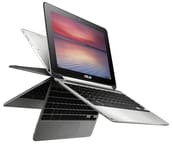
The ASUS Chromebook Flip C100PA was the first Chromebook to receive Android app support through the Google Play Store. It launched in July 2015 at $249 for the base model and pioneered the compact convertible shape that later became a standard Chromebook form factor. An aluminum body, a 360-degree hinge, and a 10.1-inch touchscreen made it small enough to hold like a tablet and capable enough to serve as a second laptop. Engadget’s review noted it was “more solidly built than I’d ever expect from a $249 machine.”
| Pros | Cons |
|---|---|
| Aluminum body on a $249 starting price | RK3288C trails the Intel Celeron chips of its era |
| Fanless, so it runs silent under any load | 10.1” keyboard takes time to get used to |
| Hinge folds a full 360 degrees for laptop, tent, and tablet use | No USB 3.0 or USB-C ports |
| Engadget measured 10 hours 49 minutes, past the 9-hour rating | 2 lbs (890g) is a lot to hold as a tablet |
| First Chromebook to get Google Play Store apps | Bezels near an inch wide on each side |
| IPS panel holds color at wide angles, 1041:1 contrast | RAM and eMMC storage are soldered down |
Related Videos
ASUS Chromebook Flip C100PA Comparison Chart
 ASUS Chromebook Flip C100PA | ASUS Chromebook Flip C100PA | |
| Price | List Price: $249.00 Amazon Prices: | List Price: $279.00 Amazon Prices: |
| Model number | C100PA-DB01 | C100PA-DB02 |
| Performance Rating | 1.7 | 2.1 |
| Chromebook Plus | No | No |
| Processor | Quad-core 1.80 Ghz Rockchip RK3288C | Quad-core 1.80 Ghz Rockchip RK3288C |
| RAM | 2 GB | 4 GB |
| Internal Storage | 16 GB eMMC | 16 GB eMMC |
| Screen Size | 10.1" | 10.1" |
| Screen Resolution | 1280x800 | 1280x800 |
| Screen Type | IPS | IPS |
| Touch Screen | Yes | Yes |
| Stylus / Pen | No Stylus Support | No Stylus Support |
| Dimensions width x length x thickness | 7.2 x 10.4 x 0.6 inches (182.88 x 264.16 x 15.24 mm) | 7.2 x 10.4 x 0.6 inches (182.88 x 264.16 x 15.24 mm) |
| Weight | 2 lbs (0.91 kg) | 2 lbs (0.91 kg) |
| Backlit Keyboard | No | No |
| Webcam | 1280x720 | 1280x720 |
| WiFi | 802.11 a/b/g/n/ac | 802.11 a/b/g/n/ac |
| Bluetooth | Bluetooth 4.1 | Bluetooth 4.1 |
| Ethernet | No | No |
| Cellular Modem | No | No |
| HDMI | Micro HDMI | Micro HDMI |
| USB Ports | 2 USB 2.0 | 2 USB 2.0 |
| Thunderbolt Ports | No | No |
| Card Reader | microSD Card Reader | microSD Card Reader |
| Battery | 2 cell, 4200, Lithium-ion | 2 cell, 4200, Lithium-ion |
| Battery Life | 9.0 hours | 9.0 hours |
| Fanless | Yes | Yes |
| Auto Update Expiration Date | June, 2020 | June, 2020 |
Related Chromebooks
-
 ASUS Chromebook C423The ASUS Chromebook C423 pairs a 14-inch 1366x768 display with a dual-core Celeron N3350, 4GB of…
 -
 ASUS Chromebook C523The ASUS Chromebook C523 is a fanless 15.6-inch Chromebook with an anti-glare display, an Intel…
 -
 Samsung Chromebook Plus v2The Samsung Chromebook Plus v2 is a fanless 12.2-inch convertible Chromebook with an Intel Celeron…
 -
 Acer Chromebook Spin 11 CP311The Acer Chromebook Spin 11 combines functionality and portability with its 11.6-inch touch IPS…
 -
 Lenovo Flex 3 ChromebookThe Lenovo Flex 3 Chromebook is a fanless 11.6-inch convertible with an IPS touchscreen, a MediaTek…
 -
 Acer Chromebook 15The Acer Chromebook 15 stands out with a 15.6" FHD IPS touch display, backlit keyboard, and up to…
An aluminum body that folds all the way back
ASUS built the chassis from aluminum with a brushed finish, giving a 2015 budget Chromebook the look of a far more expensive laptop. NotebookCheck’s detailed testing measured the weight at just under 2 pounds (874 grams), confirming ASUS’s portability claims. The lid flexes under pressure, the compromise that comes with a shell this thin and this light.
The hinge rotates the screen a full 360 degrees, so the same machine works in four positions: traditional laptop, presentation mode with the screen facing away, tent mode for watching video, and tablet mode with the keyboard folded behind. The Mammoth Tech Show’s hands-on review compared the overall aesthetic to a MacBook Air, noting “you’re basically getting that MacBook Air unibody feel but for like a fifth of the price.”
ASUS fitted two USB 2.0 ports, a micro-HDMI port for external displays, a microSD card slot for storage expansion, and a combo headphone/microphone jack. Users needing wired internet could connect a USB Ethernet adapter to one of the USB ports. There is no USB 3.0, and the proprietary charging connector ruled out the USB-C charging that became standard just a year later. Trusted Reviews particularly criticized the proprietary power socket, noting it added unnecessary inconvenience compared to a standard USB charger.
The fanless Rockchip RK3288C keeps up with tabs and video
The Rockchip RK3288C is a quad-core ARM chip running at 1.8 GHz with integrated Mali-T764 graphics, and its thermal envelope is low enough to run without a fan. Most Chromebooks of the era used Intel Celeron parts instead. NotebookCheck’s benchmarks showed the RK3288C “significantly trails Intel-based competitors in productivity benchmarks,” with Sunspider JavaScript scores roughly double those of faster Intel Celeron models.
Tim Schofield’s comprehensive review found that “benchmarks don’t really mean anything to me; what really matters is real-world performance… and I’ve been pretty impressed.” The Flip handled eight to ten browser tabs smoothly, ran Google Docs without issues, and played 1080p video content without dropped frames. Running several Android apps at once, or opening heavily scripted web applications, caused noticeable slowdowns. Lon Seidman’s review of the 4GB model recorded an Octane score of 7,512 and found that the HDMI port topped out at 1080p on a 4K television.
ASUS sold two RAM configurations: a 2GB base model (C100PA-DB01) at $249 and a 4GB model (C100PA-DB02) at $279. Engadget’s assessment concluded “the Flip is still a good deal even if you spring for the pricier $279 model,” and Tim Schofield specifically recommended the 4GB model as the better value. The 16GB eMMC storage stayed the same on both and filled up quickly for anyone keeping local files. Chrome OS’s cloud-centric design and the microSD expansion slot only partly offset that.
A 1280x800 IPS panel that reflects badly outdoors
The panel holds its colors at wide viewing angles, which matters on a convertible, where the screen gets read in tent mode and at the angles tablet mode creates. NotebookCheck measured a contrast ratio of 1041:1 and praised the “even brightness distribution” across the panel.
The touchscreen tracks accurately, and it earned its place once Android app support arrived. Trusted Reviews found the “touchscreen simply isn’t as nice to use as the comfortable keyboard.” The bezels run nearly an inch on each side according to EpicDroid’s measurements. They cut into the screen-to-body ratio and collect fingerprints.
NotebookCheck specifically noted “severe reflections outdoors” that limited the device’s usefulness in direct sunlight, the price of the glossy coating. Indoors under typical lighting, the display handles web browsing, document work, and video without complaint. Zachary Anderson rated the glossy panel’s viewing angles highly and did not find the 1280x800 resolution a problem in daily use.
A cramped keyboard deck on a 10.1-inch chassis
A 10.1-inch chassis leaves little room for a keyboard. The island-style keys use a smaller pitch than a full-size layout, so anyone with larger hands needs an adjustment period. NotebookCheck characterized it as having “good travel distance despite cramped dimensions,” while Engadget noted that the keys “feel generously spaced given the 10.6-inch deck.”
The keyboard has no backlight, so typing in a dark room means working by screen glow. The Chrome OS layout also drops dedicated Delete and Caps Lock keys, normal for Chromebooks, and The Mammoth Tech Show highlighted this as a minor frustration for users transitioning from Windows or Mac laptops. After the initial adjustment, EpicDroid called the keyboard “comfortable even for those with carpal tunnel.” Lon Seidman was surprised he could type quickly on the smaller keys, citing “very nice travel,” while Danny Winget found the deck “a little bit cramped” and said buyers with large hands should weigh that before purchasing.
The trackpad is small in proportion to the keyboard, and Trusted Reviews described it as simply “small.” Chrome OS gestures for two-finger scrolling and tap-to-click work reliably on the surface.
Past ten hours on a charge
ASUS rated the device for 9 hours, and testing beat the claim. Engadget’s battery rundown test measured 10 hours and 49 minutes: “better than most Chromebooks including the Acer Chromebook 13 and Google Pixel.” Tim Schofield reported consistent eight to ten hour results in everyday use over several weeks of testing. Danny Winget got about 7 to 8 hours of continuous media playback, a heavier load that fell short of the rating.
The ARM chip and the fanless design both feed that endurance. A 4200 mAh (approximately 31 Wh) two-cell lithium-ion battery carries a full work or school day without a charger. Trusted Reviews confirmed “8 hours realistic use” matched their testing, though they noted similar battery life could be found in cheaper non-convertible Chromebooks.
Refilling takes approximately two to three hours, and the proprietary connector means no spare charger from another device will fit.
The first Chromebook to run Play Store apps
In May 2016, nearly a year after launch, Google announced that Android apps would come to Chrome OS, and the Flip was the initial test device. That turned a browser-only machine into one that could run the full library of Android applications.
The touchscreen and convertible shape suit Android apps built for tablets. Owners could run productivity apps like Microsoft Word offline, play mobile games, and reach Android-exclusive utilities. EpicDroid’s long-term review praised this capability as significantly expanding the Flip’s utility, calling it one of the device’s major selling points during their seven to eight months of use.
Demanding Android applications expose the chip. Simple productivity apps ran well, while graphics-intensive games and apps needing real processing power struggled. The 2GB model hit its ceiling fastest, once Android apps ran alongside Chrome tabs.
A second machine for web work and media
EpicDroid called the Flip “a fancy web device” that excelled at “blogging, social media, and media consumption” but fell short “for video editing, for picture editing… the Chromebook Flip is not the device for you.”
Tim Schofield noted he “found myself using this as a replacement real quick instead of my laptop… for things I don’t need a heavy-powered PC to do.” All-day battery and silent operation suit coffee shops and flights, and the light weight made it easy to carry between classes or pack for a trip.
Engadget admitted they “mainly used this in classic notebook mode,” and Trusted Reviews questioned whether “when key features of the device aren’t worthwhile they become gimmicks.” Tent mode works for watching video. Tablet mode is awkward, because the weight sits in your hands and the keyboard presses against your palms.
Five years of updates, ending June 2020
Convertible chassis with 360-degree hinges are now common at every price point, and Android app support reached nearly all Chromebooks.
Chrome OS support ended in June 2020, following Google’s Auto Update Expiration policy. The device received roughly five years of updates, less than the eight years Google now promises for new Chromebooks, but reasonable for devices from this early convertible era. Without security updates, the Flip is a poor place to do online banking or sign in to personal accounts.
ASUS continues the Flip line with current models featuring USB-C charging, improved processors, and longer support timelines. The convertible Chromebook category the C100PA helped establish now runs from education models to premium convertibles.
For those comparing options across the current lineup, the Chromebook Comparison Chart lets you sort and filter modern Chromebooks side by side.
Frequently Asked Questions
Can I still use the ASUS Chromebook Flip C100PA?
It will still power on and run Chrome OS, but it reached its Auto Update Expiration (AUE) date in June 2020, so no further security updates, bug fixes, or Chrome OS features arrive. That makes it a poor choice for banking or email. A newer Chromebook with active support is the safer machine for anything involving an account login.
What processor does the ASUS Chromebook Flip C100PA have?
It uses a Rockchip RK3288C quad-core ARM processor running at 1.8 GHz. Most Chromebooks of its era used Intel Celeron chips instead. The ARM part enabled fanless operation and long battery life, at lower raw performance than the Intel alternatives.
What is the difference between the C100PA-DB01 and C100PA-DB02?
The C100PA-DB01 came with 2GB of RAM and sold for $249, while the C100PA-DB02 included 4GB of RAM for $279. Both models shared the same 16GB eMMC storage, display, processor, and other specifications. Tim Schofield recommended the 4GB model for smoother multitasking and better Android app performance.
Was the Chromebook Flip the first Chromebook with Android apps?
Yes, the ASUS Chromebook Flip C100PA was the first Chromebook to receive Google Play Store support in May 2016. Google used the Flip as the initial test device for bringing Android apps to Chrome OS, a feature that subsequently expanded to nearly all Chromebooks.
Can I upgrade the RAM or storage on the Chromebook Flip C100PA?
No, both the RAM and eMMC storage are soldered to the motherboard and cannot be upgraded. You can expand storage using the microSD card slot, which accepts cards of various capacities. This was a common limitation of ultraportable devices during this era.
How long does the Chromebook Flip C100PA battery last?
ASUS rated the Chromebook Flip for 9 hours of battery life, but real-world testing consistently exceeded this. Engadget measured 10 hours and 49 minutes in their battery rundown test, and other reviewers reported 8-10 hours in everyday use. Note that battery capacity degrades over time, so older units will have reduced endurance.
What ports does the ASUS Chromebook Flip C100PA have?
The Chromebook Flip C100PA includes two USB 2.0 ports, one micro-HDMI port for external displays, a microSD card slot for storage expansion, and a combo headphone/microphone jack. It uses a proprietary charging connector rather than USB-C, which was not yet standard when the device launched in 2015.