
ASUS Chromebox 3
Updated on

Note: ASUS discontinued the Chromebox 3 and no longer sells it new, but Google has set its Chrome OS Auto Update Expiration date to June 2028, so units still in service continue to receive security updates until then.
The ASUS Chromebox 3 delivered a compact desktop Chrome OS experience when it launched in 2018. ASUS sold it in configurations ranging from the Celeron 3865U up to a Core i7, in a small chassis meant for desks that run on the browser. Chrome OS support runs through June 2028, so it still handles basic web browsing and cloud-based workflows for existing owners.
ASUS Chromebox 3 Comparison Chart
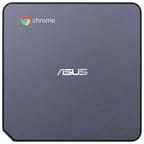 ASUS Chromebox 3 | ASUS Chromebox 3 | ASUS Chromebox 3 | ASUS Chromebox 3 | |
| Price | List Price: $749.99 Amazon Prices: | List Price: $549.99 Amazon Prices: | List Price: $249.99 Amazon Prices: | List Price: $449.99 Amazon Prices: |
| Model number | N020U | N019U | N017U | N018U |
| Performance Rating | 6.0 | 4.8 | 2.6 | 3.4 |
| Chromebook Plus | No | No | No | No |
| Processor | Quad-core 1.80 Ghz (max 4.00 Ghz) Intel Core i7-8550U | Dual-core 2.40 Ghz Intel Core i3-7100U | Dual-core 1.80 Ghz Intel Celeron 3865U | Dual-core 2.40 Ghz Intel Core i3-7100U |
| RAM | 8 GB | 8 GB | 4 GB | 4 GB |
| Internal Storage | 32 GB SSD (upgradable) | 32 GB SSD (upgradable) | 32 GB SSD (upgradable) | 32 GB SSD (upgradable) |
| Screen Size | No Screen | No Screen | No Screen | No Screen |
| Screen Resolution | No Screen | No Screen | No Screen | No Screen |
| Screen Type | No Screen | No Screen | No Screen | No Screen |
| Touch Screen | No | No | No | No |
| Stylus / Pen | No Stylus Support | No Stylus Support | No Stylus Support | No Stylus Support |
| Dimensions width x length x thickness | 5.8 x 5.88 x 1.58 inches (147.32 x 149.35 x 40.13 mm) | 5.8 x 5.88 x 1.58 inches (147.32 x 149.35 x 40.13 mm) | 5.8 x 5.88 x 1.58 inches (147.32 x 149.35 x 40.13 mm) | 5.8 x 5.88 x 1.58 inches (147.32 x 149.35 x 40.13 mm) |
| Weight | 2.2 lbs (1 kg) | 2.2 lbs (1 kg) | 2.2 lbs (1 kg) | 2.2 lbs (1 kg) |
| Backlit Keyboard | No | No | No | No |
| Webcam | No Webcam | No Webcam | No Webcam | No Webcam |
| WiFi | 802.11 b/g/n/ac | 802.11 b/g/n/ac | 802.11 b/g/n/ac | 802.11 b/g/n/ac |
| Bluetooth | Bluetooth 4.2 | Bluetooth 4.2 | Bluetooth 4.2 | Bluetooth 4.2 |
| Ethernet | Yes | Yes | Yes | Yes |
| Cellular Modem | No | No | No | No |
| HDMI | Full-Size HDMI | Full-Size HDMI | Full-Size HDMI | Full-Size HDMI |
| USB Ports | 2 USB 2.0, 3 USB 3, 1 USB-C (with DisplayPort over USB Type-C) | 2 USB 2.0, 3 USB 3, 1 USB-C (with DisplayPort over USB Type-C) | 2 USB 2.0, 3 USB 3, 1 USB-C (with DisplayPort over USB Type-C) | 2 USB 2.0, 3 USB 3, 1 USB-C (with DisplayPort over USB Type-C) |
| Thunderbolt Ports | No | No | No | No |
| Card Reader | microSD / microSD SDXC / microSD SDHC | microSD / microSD SDXC / microSD SDHC | microSD / microSD SDXC / microSD SDHC | microSD / microSD SDXC / microSD SDHC |
| Battery | No Battery | No Battery | No Battery | No Battery |
| Battery Life | 0.0 hours | 0.0 hours | 0.0 hours | 0.0 hours |
| Fanless | No | No | No | No |
| Auto Update Expiration Date | June, 2028 | June, 2028 | June, 2028 | June, 2028 |
Related Chromebooks
-
 ASUS Chromebox 5The ASUS Chromebox 5 is a Chrome OS desktop with 12th Gen Intel processors, Thunderbolt 4, Wi-Fi…
 -
 ASUS Chromebook C203XAThe ASUS Chromebook C203XA is a rugged 11.6-inch education laptop with a MediaTek MT8173C, an…
 -
 Lenovo Chromebox MicroThe Lenovo Chromebox Micro is a fanless 6.4 x 3.1 x 0.8 inch ChromeOS desktop built on the Intel…
 -
 Acer Chromebox CXI5A compact Chrome OS desktop with 12th Gen Intel processors, USB-C with DisplayPort output, and…
 -
 Acer Chromebook 311 (AMD)The Acer Chromebook 311 (CB311-10H) is an 11.6-inch ChromeOS laptop on an AMD A4-9120C with 4GB of…
 -
 CTL Chromebox CBx3The CTL Chromebox CBx3 is a Chrome OS desktop built on 13th Gen Intel processors, with Wi-Fi 6E,…
Ports and power draw are the strong points
The chassis measures 5.8 x 5.88 x 1.58 inches and weighs about 2.2 pounds, and ASUS packed a full desktop port set into it. There are three USB 3.1 ports, two USB 2.0 ports, one USB-C port with DisplayPort output, full-size HDMI, Gigabit Ethernet, and a microSD card slot that takes cards up to 256GB. Wi-Fi 802.11ac and Bluetooth 4.2 handle wireless duties, and the video outputs drive 4K displays.
The base Celeron 3865U configuration came with 4GB of DDR4 RAM and 32GB SSD storage, adequate for Chrome OS but modest by any measure. ASUS offered upgrade paths up to Core i7 processors with 16GB RAM, though Chris Barraclough at Trusted Reviews questioned the value of high-end Chrome OS configurations. Tim Danton at The Big Tech Question tested power consumption and found the device averaged around 5 watts during typical use, translating to roughly £4.50 annually in electricity costs. “Quiet operation and minuscule electricity costs” made it attractive for always-on applications.
| Pros | Cons |
|---|---|
| Compact form factor with VESA mounting support | Chrome OS support ends June 2028 |
| Extensive port selection including USB-C, HDMI, Ethernet | Android app compatibility was inconsistent |
| Silent operation and minimal power consumption | Celeron model felt sluggish compared to modern devices |
| 4K display support | Limited 32GB base storage |
| Supports up to 256GB microSD expansion | Higher-spec models offered questionable value |
| RAM and SSD are user upgradeable | Web-only workflow required browser workarounds |
Reviewer Insights
Trusted Reviews: three stars for size and ports, minus the app gaps
Chris Barraclough at Trusted Reviews awarded the Chromebox 3 three out of five stars, appreciating its compact size and strong connectivity while noting platform limitations for desktop use. “The device remained cool during use with next to no noise produced,” he observed during testing. However, he encountered frustrating app compatibility issues: “Spotify’s login screen refused to display properly,” requiring a browser workaround. His verdict was that it delivers a simplified desktop experience but has notable limitations for desk-bound use. He particularly questioned the existence of high-end configurations: “I have no idea why anyone would need a Chromebox 3 with a Core i7 chipset and 16GB of memory, considering the limitations of Chrome OS.”
A week as a primary machine exposed the Android app limits
Tim Danton at The Big Tech Question ran a one-week test using the Chromebox 3 as his primary system. He praised the cloud-centric workflow, noting that years of Google Drive documents were “instantly accessible” and that if the hardware failed, “Asus could send me a new one the following day and I could pick up from exactly where I was.” At £250 for the base Celeron model, he found it worth the price, with minimal ongoing costs.
“Laggy is a more fitting description,” he wrote of the Celeron model, “and if you’re used to a Windows PC where Chrome windows launch in an instant, you’ll find the Chromebox 3 irritating at first; even the mouse seems a little sluggish.” He documented Android app issues: Outlook wouldn’t install, and Slack “rejected the device” entirely. File management between cloud services required tedious manual download-and-upload cycles. He concluded that the Chromebox 3 works best as a supplementary device for specific use cases rather than a complete Windows replacement.
Best suited to browser-first desks and kiosk duty
It fits a school computer lab, a point-of-sale or signage kiosk, or a second computer at home for browsing and streaming. Some even explored music production on Chrome OS using web-based DAWs, taking advantage of the desktop’s reliable power supply and USB ports for audio interfaces.
The Celeron build covered web browsing, Google Workspace applications, and lightweight Android apps. Heavier multitasking called for the Core i3 or i5 configurations, though the price premium pushed into territory where the platform limits mattered more. VESA mounting allowed clean setups behind monitors, and the silent operation suited bedroom or living room installations.
Support runs to June 2028, and after that the risk moves to the owner
Chrome OS was in transition when this box launched. Android app support had just arrived on desktop Chrome and compatibility remained inconsistent. Linux container support was emerging but not yet mature. The platform worked best for people who lived in the browser, on web applications, Google’s productivity suite, and cloud storage.
Google has set the Chromebox 3’s Chrome OS support to run through June 2028, so existing units continue to receive security patches until then; these extended updates focus on security and may reduce Android (Google Play) app support. After June 2028, owners weighing continued use should consider the security implications for sensitive activities like online banking. For offline tasks, media playback, or isolated computing needs, the hardware still does the job.
If you are evaluating current options, the Chromebook Comparison Chart lets you sort and filter modern devices by specs and price.