
Lenovo Chromebox Micro
Updated on

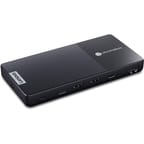
The Lenovo Chromebox Micro is a Chrome OS desktop about the size of a smartphone. At 6.4 x 3.1 x 0.8 inches and under a pound, it aims at digital signage deployments, interactive kiosks, and the other spots where a full desktop will not fit. The Intel Celeron N4500 inside runs with no fan in a sealed, dust-proof case, so the box holds up to 24/7 duty in rooms where silence and reliability count for more than speed. It charges over USB-C as well, which means a portable power bank can stand in for a wall outlet.
Pros and Cons
| Pros | Cons |
|---|---|
| Pocket-size at 6.4 x 3.1 x 0.8 inches | Celeron N4500 struggles with multitasking |
| Completely fanless and dust-proof design | Only 32GB eMMC storage with no expansion |
| Can run off a standard USB-C power bank | Not intended for desktop productivity work |
| Dual 4K display support via HDMI and USB-C | Keyboard and mouse not included |
| Full port selection including Gigabit Ethernet | Performance throttles under sustained load |
| Chrome OS updates until June 2031 | Memory and storage are soldered in |
Related Videos
Lenovo Chromebox Micro Comparison Chart
 Lenovo Chromebox Micro | |
| Price | List Price: $219 Amazon Prices: Loading prices... |
| Model number | 83F90000US |
| Performance Rating | 3.7 |
| Chromebook Plus | No |
| Processor | Dual-core 1.10 Ghz (max 2.80 Ghz) Intel Celeron Processor N4500 |
| RAM | 8 GB |
| Internal Storage | 32 GB eMMC |
| Screen Size | No Screen |
| Screen Resolution | No Screen |
| Screen Type | No Screen |
| Touch Screen | No |
| Stylus / Pen | No Stylus Support |
| Dimensions width x length x thickness | 6.4 x 3.1 x 0.8 inches (162.56 x 78.74 x 20.32 mm) |
| Weight | 0.77 lbs (0.35 kg) |
| Backlit Keyboard | No |
| Webcam | No Webcam |
| WiFi | Wi-Fi 6 (802.11ax) |
| Bluetooth | Bluetooth 5.1 |
| Ethernet | Yes |
| Cellular Modem | No |
| HDMI | Full-Size HDMI |
| USB Ports | 2 USB 3, 2 USB-C 2x USB-C 3.2 Gen 1 (one supports power delivery and DisplayPort 1.4), 2x USB-A 3.2 Gen 1 |
| Thunderbolt Ports | No |
| Card Reader | No Card Reader |
| Battery | No Battery |
| Battery Life | Unknown |
| Fanless | Yes |
| Auto Update Expiration Date | June, 2031 |
Related Chromebooks
-
 ASUS Chromebox 5The ASUS Chromebox 5 is a Chrome OS desktop with 12th Gen Intel processors, Thunderbolt 4, Wi-Fi…
 -
 Acer Chromebox CXI5A compact Chrome OS desktop with 12th Gen Intel processors, USB-C with DisplayPort output, and…
 -
 Acer Chromebook 712The Acer Chromebook 712 (C871) is a 12-inch education Chromebook with an Intel Celeron 5205U, a 3:2…
 -
 ASUS Chromebook C425The ASUS Chromebook C425 is a fanless 14-inch ChromeOS laptop on an Intel Core m3 with a 1920x1080…
 -
 Dell Chromebook 11 (3100)The Dell Chromebook 11 (3100) is a ruggedized 11.6-inch education Chromebook with rubber bumpers, a…
 -
 Dell Chromebook 3120The Dell Chromebook 3120 is a fanless 11.6-inch education Chromebook with an Intel N100, sold in…
A sealed pocket-size case with a full port set

The Lenovo Chromebox Micro measures 6.4 x 3.1 x 0.8 inches and weighs 0.77 pounds, making it the most compact Chromebox on the market since the discontinued ASUS Chromebit. The enclosure is sealed with no vents, so dust cannot get inside, which matters for retail floors, warehouses, and outdoor kiosks. For a case this size the port list runs long. You get two USB-C 3.2 Gen 1 ports (one on the side, one on the rear), two USB-A 3.2 Gen 1 ports, full-size HDMI, Gigabit Ethernet, and a 3.5mm audio combo jack, plus a Kensington lock slot for securing the box in a public space.
The Intel Celeron N4500 is a dual-core, dual-thread processor running at 1.1 GHz base with a 2.8 GHz burst frequency. Its PassMark CPU Mark score of approximately 1807 is entry level, enough to carry Chrome OS itself and short of what demanding workloads ask for. Reviewers noted sluggish performance when opening multiple browser tabs or running background apps. The 8GB of RAM takes some of that edge off, while the 32GB eMMC fills up fast, so cloud storage does the work once you move past a few app installations.
Wireless covers WiFi 6 (802.11ax) and Bluetooth 5.1 for peripherals, and the Gigabit Ethernet port handles the wired case a signage install usually wants. The USB-C ports support DisplayPort Alt Mode, so a dual 4K monitor setup works when one screen runs off HDMI. Lenovo has partnered with Instorescreen to offer custom 15.6-inch and 21.5-inch inFLEX touchscreen displays designed specifically for the Chromebox Micro, with rear cutouts for mounting.
Reviewer Insights

Chrome Unboxed
Joseph Humphrey at Chrome Unboxed awarded the Chromebox Micro four out of five stars, praising its unique form factor while acknowledging its performance limitations. He found the device excellent for digital signage and specific use cases but noted that “running more than a few windows, with messaging PWA apps open, and music playing resulted in noticeable lag.” The fanless design earned high marks for enabling silent operation, and Humphrey highlighted the ability to power the device from a portable battery pack as a significant advantage.
The review emphasized that this is a purpose-built device rather than a general-purpose desktop replacement. “As a device primarily intended for performing a single task, like running a digital signage window, I was honestly surprised that I was able to get any work done on the Chromebox Micro,” Humphrey noted. He concluded that users seeking a primary computing device should look elsewhere, such as the ASUS Chromebox 5a.
Android Authority
Andrew Grush at Android Authority characterized the Chromebox Micro as “a major evolution for the Chromebox platform,” particularly appreciating its appeal to hobbyists and DIYers. The review highlighted the combination of fanless design, USB-C power capability, and compact size as unique selling points. However, Grush noted that “the experience definitely felt more like an ultra-budget Chromebook from a few years ago than the more flawless performers Chromebooks have evolved into in recent years.”
Android Authority’s testing found Chrome OS UI sluggishness and difficulty handling more than a handful of browser tabs simultaneously. Despite these limitations, Grush found it “an affordable way to replace an aging desktop PC” for users with modest requirements and praised its ability to support three 4K monitors simultaneously via USB-C and HDMI.
Android Police
Steve Smith at Android Police gave the Chromebox Micro a score of 7 out of 10, appreciating its premium feel and comprehensive port selection despite its lightweight construction. The review noted that “thanks to its fanless design, the Chromebox Micro was completely silent, no matter how hard I pushed it.” Smith praised the inclusion of an ethernet port for stable connections and the device’s suitability for powering digital signs in business environments.
However, Smith was critical of the processor’s performance, writing that “the two-core Celeron N4500 struggled far too often to keep up.” The review also flagged an initial issue where the HDMI port was limited to 30Hz until a software update was applied. Smith concluded that the Chromebox Micro excels at its intended purpose but is not the best choice for home or office productivity work.
Customer Reviews
Across 10 ratings on Amazon, the Chromebox Micro averages 4.5 stars, with most of the spread sitting at five stars (68 percent) and the rest split between four and three stars. The recurring theme among the positive reviews is using it as a small, low-fuss box plugged into a TV or as a desktop replacement, often paired with a wireless keyboard and trackpad. Chelsea, a verified buyer who bought it to replace a six-year-old Asus Chromebit, wrote that “the Chromebox Micro seems to do that perfectly, hopefully until its EOL in June 2031 (or more).” Another verified buyer set one up for a relative who “struggles with basic technology” and reported that a USB Brother laser printer “set itself up in minutes with no work on my part.”
The three-star review centers on the 4K refresh cap. D.Z, a verified buyer who left a three-star review, was drawn in by the size but found the output capped: “it only supports 30hz at 4k and seems sluggish and over all image quality seems a little bad,” and went back to a larger Chromebox, concluding “the reduced size and ability to power off of usbc isnt worth the other sacrifices I mentioned.” If you plan to drive a 4K display, weigh that 30Hz ceiling before buying. Read more owner reviews on Amazon.
A deployment box for signage, kiosks, and embedded displays
The Lenovo Chromebox Micro fits behind a display panel or inside a kiosk cabinet, and USB-C power lets a battery pack run it on a temporary stand. The sealed case keeps dust out of installs that run for years, and the update timeline extending to June 2031 gives a signage fleet a long working life.
The Celeron N4500’s limits show up quickly during multitasking, and the 32GB storage offers no room for growth. Those who need more performance might look at the ASUS Chromebox 5 or HP Chromebox G3, which offer more powerful processors in slightly larger form factors.
For those comparing options, see our Chromebook Comparison Chart to find the best match for your needs.
Frequently Asked Questions
What processor does the Lenovo Chromebox Micro use?
It runs the Intel Celeron N4500, a dual-core, dual-thread chip with a 1.1 GHz base clock and boost up to 2.8 GHz. Its PassMark score of roughly 1807 is entry level, which covers web browsing, video playback, and one app at a time rather than heavy multitasking.
Can I upgrade the RAM or storage in the Lenovo Chromebox Micro?
No. Memory is soldered and storage is embedded, so the 8GB RAM and 32GB eMMC configuration is fixed for the life of the box. For more room, use cloud storage or an external USB drive.
What ports does the Lenovo Chromebox Micro have?
The port set includes 2x USB-C 3.2 Gen 1 ports (one supports power delivery and DisplayPort 1.4), 2x USB-A 3.2 Gen 1 ports, 1x HDMI port, 1x Gigabit Ethernet (RJ45), and a 3.5mm audio combo jack. It also features a power button with LED indicator and a Kensington lock slot for security.
Can the Lenovo Chromebox Micro run on battery power?
Yes. It charges over USB-C and runs straight from a portable USB-C power bank rated 45W or higher, which suits mobile presentations and temporary installations with no wall outlet nearby.
How many monitors can the Lenovo Chromebox Micro support?
It supports up to two 4K displays simultaneously: one via the HDMI port and one via USB-C with DisplayPort Alt Mode. Some configurations may support up to three monitors by using both USB-C ports for video output, though this depends on the specific display setup.
When will the Lenovo Chromebox Micro stop receiving updates?
Google’s Auto Update Expiration (AUE) policy sets the last Chrome OS update for June 2031. That seven-year support window is what makes the box workable for signage or kiosk installs that stay in place for years.
Is the Lenovo Chromebox Micro fanless?
Yes. The case is fanless, ventless, and dust-proof, which suits retail stores, warehouses, and outdoor kiosks where dust builds up, and it keeps the box silent in use.