
Acer Chromebox CXI5
Updated on

The Acer Chromebox CXI5 is a 12th Gen Intel desktop running Chrome OS, measuring 7.3 x 7.3 x 1.4 inches and weighing 2.2 pounds. The included VESA mount adapter lets it sit behind a monitor instead of on the desk. Configurations run from the Intel Celeron 7305 to the Core i7-1270P, so the same chassis covers light desktop duty and heavier multitasking. USB-C ports carry DisplayPort output, wireless is WiFi 6E, and both RAM and storage are user-upgradeable. Chrome OS updates run through June 2032, which suits home offices and digital signage.
Pros and Cons
| Pros | Cons |
|---|---|
| USB-C ports with DisplayPort output | Requires separate monitor, keyboard, and mouse |
| User-upgradeable RAM and storage | Base model limited to 4GB RAM and 32GB eMMC |
| Compact form factor with included VESA mount | Limited storage on lower-end configurations, per Android Police |
| WiFi 6E and 2.5GbE Ethernet (i7 model) | External audio has occasional quirks |
| Chrome OS updates until June 2032 | Cannot handle demanding games or creative apps |
| Multiple display outputs (2x HDMI + DisplayPort via USB-C) | Celeron models limited to 1GbE Ethernet |
Acer Chromebox CXI5 Comparison Chart
 Acer Chromebox CXI5 | Acer Chromebox CXI5 | Acer Chromebox CXI5 | |
| Price | List Price: $899.99 Amazon Prices: | List Price: $359.99 Amazon Prices: | List Price: $329.99 Amazon Prices: Loading prices... |
| Model number | DT.Z2NAA.001 | DT.Z2JAA.002 | DT.Z2JAA.001 |
| Performance Rating | 4.2 | 4.4 | 3.3 |
| Chromebook Plus | No | No | No |
| Processor | Twelve-core 2.20 Ghz (max 4.80 Ghz) Intel Core i7-1270P | 5-core 0.90 Ghz (max 1.10 Ghz) Intel Celeron Processor 7305 | 5-core 0.90 Ghz (max 1.10 Ghz) Intel Celeron Processor 7305 |
| RAM | 16 GB | 8 GB | 4 GB |
| Internal Storage | 256 GB NVMe SSD (upgradable) | 64 GB eMMC (upgradable) | 32 GB eMMC (upgradable) |
| Screen Size | No Screen | No Screen | No Screen |
| Screen Resolution | No Screen | No Screen | No Screen |
| Screen Type | No Screen | No Screen | No Screen |
| Touch Screen | No | No | No |
| Stylus / Pen | No Stylus Support | No Stylus Support | No Stylus Support |
| Dimensions width x length x thickness | 7.3 x 7.3 x 1.4 inches (185.42 x 185.42 x 35.56 mm) | 7.3 x 7.3 x 1.4 inches (185.42 x 185.42 x 35.56 mm) | 7.3 x 7.3 x 1.4 inches (185.42 x 185.42 x 35.56 mm) |
| Weight | 2.2 lbs (1 kg) | 2.2 lbs (1 kg) | 2.2 lbs (1 kg) |
| Backlit Keyboard | No | No | No |
| Webcam | No Webcam | No Webcam | No Webcam |
| WiFi | Wi-Fi 6E (802.11ax) | Wi-Fi 6E (802.11ax) | Wi-Fi 6E (802.11ax) |
| Bluetooth | Bluetooth 5.0 | Bluetooth 5.0 | Bluetooth 5.0 |
| Ethernet | Yes | Yes | Yes |
| Cellular Modem | No | No | No |
| HDMI | Full-Size HDMI | Full-Size HDMI | Full-Size HDMI |
| USB Ports | 4 USB 3, 2 USB-C 4x USB 3.2 Gen 2 Type-A, 2x USB 3.2 Gen 2 Type-C (DisplayPort output) | 4 USB 3, 2 USB-C 4x USB 3.2 Gen 2 Type-A, 2x USB 3.2 Gen 2 Type-C (DisplayPort output) | 4 USB 3, 2 USB-C 4x USB 3.2 Gen 2 Type-A, 2x USB 3.2 Gen 2 Type-C (DisplayPort output) |
| Thunderbolt Ports | No | No | No |
| Card Reader | microSD Card Reader | microSD Card Reader | microSD Card Reader |
| Battery | No Battery | No Battery | No Battery |
| Battery Life | Unknown | Unknown | Unknown |
| Fanless | No | No | No |
| Auto Update Expiration Date | June, 2032 | June, 2032 | June, 2032 |
Related Chromebooks
-
 ASUS Chromebox 5The ASUS Chromebox 5 is a Chrome OS desktop with 12th Gen Intel processors, Thunderbolt 4, Wi-Fi…
 -
 ASUS Chromebox 5aThe ASUS Chromebox 5a is a compact Chrome OS desktop built on 13th Gen Intel chips from the Celeron…
 -
 Acer Chromebook 314 (CB314-4H/4HT)A budget-friendly 14-inch Chromebook with Intel Alder Lake-N processors, WiFi 6E, and software…
 -
 Acer Chromebook 314The Acer Chromebook 314 is a 14-inch budget Chromebook with a 1920x1080 IPS display, an Intel…
 -
 Lenovo Chromebox MicroThe Lenovo Chromebox Micro is a fanless 6.4 x 3.1 x 0.8 inch ChromeOS desktop built on the Intel…
 -
 CTL Chromebox CBx3The CTL Chromebox CBx3 is a Chrome OS desktop built on 13th Gen Intel processors, with Wi-Fi 6E,…
A Fully Ported Box Whose Speed Depends on the Chip You Choose

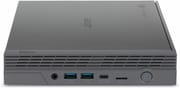
At 7.3 x 7.3 x 1.4 inches and 2.2 pounds, the CXI5 takes up little desk space, and the included VESA adapter moves it behind the monitor entirely. The front panel provides two USB 3.2 Type-A ports, a USB-C port, and a headphone/microphone combo jack. The rear houses two HDMI 2.1 ports, two more USB 3.2 Type-A ports, another USB-C port, Ethernet, and a microSD card slot. Active cooling keeps the system running quietly during typical desktop workloads.
The entry-level Intel Celeron 7305 has 5 cores and a PassMark score around 2,500, enough for web browsing, document editing, and video conferencing. The Core i7-1270P variant reaches a PassMark score of roughly 16,500 with its 12 cores and 16 threads, which covers multitasking and more demanding Chrome OS workloads. Both processors support Android apps and Linux containers, widening the software available on either build.
WiFi 6E (802.11ax) handles wireless, and Bluetooth 5.0 covers peripheral connections. The i7 model includes 2.5 Gigabit Ethernet for wired networks, while Celeron variants use standard Gigabit Ethernet. Most Chromebook laptops have no built-in Ethernet at all and need a USB Ethernet adapter; every configuration of this Chromebox has a wired port on the back. The two USB-C ports can drive external displays via DisplayPort Alt Mode, adding flexibility beyond the dual HDMI outputs. The RAM and M.2 slots are accessible, so memory and storage can be expanded after purchase.
Reviewer Insights

Android Central
Android Central awarded the CXI5 4 out of 5 stars, calling it “a long overdue upgrade” from the previous CXI4. The review praised the comprehensive port selection and the included VESA mount adapter for decluttering desk setups. The ability to upgrade RAM and storage earned particular mention as a key advantage for users wanting to customize their system over time.
The review also noted that buyers need to budget separately for a monitor, keyboard, and mouse since the Chromebox is a barebones desktop unit. Finding specific configurations in stock can prove challenging depending on the variant desired.
Android Police
Android Police gave the CXI5 a 9 out of 10 and an Editor’s Choice award, and highlighted the “impressive performance in a compact and affordable package.” The review specifically praised the premium design aesthetic, comprehensive port selection, and Linux app support. Testing revealed excellent everyday performance and capable casual gaming through Android apps and web-based games.
The review identified limited storage capacity as the primary weakness, particularly on lower-end configurations. Account switching proved less smooth than on some competitors, and external audio functionality occasionally exhibited quirks. The verdict emphasized fast performance and a solid feature set for home and office use at the price.
Buy the Core i7 for Multitasking, the Celeron for Light Desktop Duty
With 12 cores and 16 threads, the Core i7-1270P build is the one to pick if the Chromebox is someone’s main work machine. The Celeron 7305 builds cover browsing, documents, and video calls at a much lower price, though the 4GB RAM and 32GB storage base configuration will feel tight once several apps stay open at once. Graphics-heavy creative work and PC gaming sit outside what either build does.
Anyone pricing a Chromebox against a Chromebook laptop should add a monitor, keyboard, and mouse to the total before comparing. The upgradeable RAM and M.2 slot extend how long the CXI5 stays useful, and Chrome OS updates carry it to June 2032 either way.
For those comparing options, see our Chromebook Comparison Chart to find the best match for your needs.
Frequently Asked Questions
What processors are available in the Acer Chromebox CXI5?
Two: the Intel Celeron 7305 (5 cores, 5 threads, up to 1.1 GHz) and the Intel Core i7-1270P (12 cores, 16 threads, up to 4.8 GHz). The Celeron handles basic Chrome OS tasks with a PassMark score around 2,500, while the Core i7 scores around 16,500 for demanding multitasking.
Can I upgrade the RAM and storage in the Acer Chromebox CXI5?
Both are user-serviceable. The system uses accessible SO-DIMM slots for RAM and includes an M.2 slot for NVMe SSD storage, so you can expand beyond the stock configuration if your needs grow over time.
What ports does the Acer Chromebox CXI5 have?
Four USB 3.2 Gen 2 Type-A ports, two USB 3.2 Gen 2 Type-C ports (supporting DisplayPort output), two HDMI 2.1 ports, Gigabit or 2.5 Gigabit Ethernet depending on configuration, a microSD card slot, and a headphone/microphone combo jack. The dual HDMI plus USB-C DisplayPort support enables up to three simultaneous displays.
When does the Acer Chromebox CXI5 stop receiving updates?
Chrome OS automatic updates run through June 2032, according to Google’s Auto Update Policy. That is approximately 6 years of security patches and new features from the current date.
Does the Acer Chromebox CXI5 support Android and Linux apps?
Yes, the CXI5 supports Android apps through the Google Play Store and Linux applications through the built-in Linux container. That extends the software beyond web apps to productivity tools, development environments, and mobile apps adapted for the desktop.
Can the Acer Chromebox CXI5 be mounted behind a monitor?
A VESA mount adapter comes in the box. It attaches the Chromebox to the back of any VESA-compatible monitor, which cleans up the desk and turns the display into an all-in-one computer.