
ASUS Chromebox 5a
Updated on

Dual HDMI, DisplayPort, and USB-C outputs let the ASUS Chromebox 5a drive up to four 4K displays at once. Inside is 13th Generation Intel Core silicon, from the entry-level Intel Celeron 7305 up to the Core i7-1355U. Chrome OS updates run through June 2032 on a machine that launched in 2024. The form factor puts a full desktop Chrome OS install in a box small enough to hide behind a monitor, which is why these turn up on office desks and in school computer labs.
Pros and Cons
| Pros | Cons |
|---|---|
| Supports up to four 4K displays simultaneously | Lost Thunderbolt 4 present on predecessor |
| WiFi 6E and 2.5 Gigabit Ethernet networking | USB-C tops out at 10Gbps (no Thunderbolt or USB4) |
| Chrome OS updates through June 2032 | Base 4GB RAM limits heavy multitasking |
| Seven USB ports including USB-C with DisplayPort | U-series chips have lower multi-core than P-series predecessor |
| Compact design with VESA mounting support | No webcam or microphone included |
| User-upgradeable M.2 NVMe storage | Core i3+ models use DDR5, Celeron uses DDR4 |
ASUS Chromebox 5a Comparison Chart
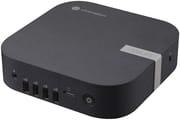 ASUS Chromebox 5a | ASUS Chromebox 5a | ASUS Chromebox 5a | ASUS Chromebox 5a | ASUS Chromebox 5a | ASUS Chromebox 5a | ASUS Chromebox 5a | |
| Price | List Price: $339 Amazon Prices: Loading prices... | List Price: $429.00 Amazon Prices: Loading prices... | List Price: $599.00 Amazon Prices: Loading prices... | List Price: Amazon Prices: | List Price: Amazon Prices: | List Price: Amazon Prices: | List Price: Amazon Prices: |
| Model number | CN67 S-1 | CN67 S-1 | CN67 S-1 | CN67 S-1 | --- | --- | --- |
| Performance Rating | 3.3 | 4.4 | 7.4 | 7.5 | 7.5 | 8.3 | 8.8 |
| Chromebook Plus | No | No | No | No | No | No | No |
| Processor | 5-core 0.90 Ghz (max 1.10 Ghz) Intel Celeron Processor 7305 | 5-core 0.90 Ghz (max 1.10 Ghz) Intel Celeron Processor 7305 | Hexa-core 1.20 Ghz (max 4.50 Ghz) Intel Core i3-1315U | Deca-core 3.40 Ghz (max 4.60 Ghz) Intel Core i5-1335U | Deca-core 3.40 Ghz (max 4.60 Ghz) Intel Core i5-1335U | Deca-core 3.40 Ghz (max 4.60 Ghz) Intel Core i5-1335U | Deca-core 3.70 Ghz (max 5.00 Ghz) Intel Core i7-1355U |
| RAM | 4 GB | 8 GB | 8 GB | 8 GB | 8 GB | 16 GB | 16 GB |
| Internal Storage | 128 GB NVMe SSD (upgradable) | 128 GB NVMe SSD (upgradable) | 128 GB NVMe SSD (upgradable) | 128 GB NVMe SSD (upgradable) | 256 GB NVMe SSD (upgradable) | 256 GB NVMe SSD (upgradable) | 256 GB NVMe SSD (upgradable) |
| Screen Size | No Screen | No Screen | No Screen | No Screen | No Screen | No Screen | No Screen |
| Screen Resolution | No Screen | No Screen | No Screen | No Screen | No Screen | No Screen | No Screen |
| Screen Type | No Screen | No Screen | No Screen | No Screen | No Screen | No Screen | No Screen |
| Touch Screen | No | No | No | No | No | No | No |
| Stylus / Pen | No Stylus Support | No Stylus Support | No Stylus Support | No Stylus Support | No Stylus Support | No Stylus Support | No Stylus Support |
| Dimensions width x length x thickness | 6.56 x 6.53 x 1.81 inches (166.62 x 165.86 x 45.97 mm) | 6.56 x 6.53 x 1.81 inches (166.62 x 165.86 x 45.97 mm) | 6.56 x 6.53 x 1.81 inches (166.62 x 165.86 x 45.97 mm) | 6.56 x 6.53 x 1.81 inches (166.62 x 165.86 x 45.97 mm) | 6.56 x 6.53 x 1.81 inches (166.62 x 165.86 x 45.97 mm) | 6.56 x 6.53 x 1.81 inches (166.62 x 165.86 x 45.97 mm) | 6.56 x 6.53 x 1.81 inches (166.62 x 165.86 x 45.97 mm) |
| Weight | 1.76 lbs (0.8 kg) | 1.76 lbs (0.8 kg) | 1.76 lbs (0.8 kg) | 1.76 lbs (0.8 kg) | 1.76 lbs (0.8 kg) | 1.76 lbs (0.8 kg) | 1.76 lbs (0.8 kg) |
| Backlit Keyboard | No | No | No | No | No | No | No |
| Webcam | No Webcam | No Webcam | No Webcam | No Webcam | No Webcam | No Webcam | No Webcam |
| WiFi | Wi-Fi 6E (802.11ax) | Wi-Fi 6E (802.11ax) | Wi-Fi 6E (802.11ax) | Wi-Fi 6E (802.11ax) | Wi-Fi 6E (802.11ax) | Wi-Fi 6E (802.11ax) | Wi-Fi 6E (802.11ax) |
| Bluetooth | Bluetooth 5.3 | Bluetooth 5.3 | Bluetooth 5.3 | Bluetooth 5.3 | Bluetooth 5.3 | Bluetooth 5.3 | Bluetooth 5.3 |
| Ethernet | Yes | Yes | Yes | Yes | Yes | Yes | Yes |
| Cellular Modem | No | No | No | No | No | No | No |
| HDMI | Full-Size HDMI | Full-Size HDMI | Full-Size HDMI | Full-Size HDMI | Full-Size HDMI | Full-Size HDMI | Full-Size HDMI |
| USB Ports | 6 USB 3, 1 USB-C Front: 1x USB 3.2 Gen 2 Type-A, 3x USB 3.2 Gen 1 Type-A; Back: 2x USB 3.2 Gen 2 Type-A, 1x USB 3.2 Gen 2 Type-C (supports DisplayPort 1.4 and Power Delivery input) | 6 USB 3, 1 USB-C Front: 1x USB 3.2 Gen 2 Type-A, 3x USB 3.2 Gen 1 Type-A; Back: 2x USB 3.2 Gen 2 Type-A, 1x USB 3.2 Gen 2 Type-C (supports DisplayPort 1.4 and Power Delivery input) | 6 USB 3, 1 USB-C Front: 1x USB 3.2 Gen 2 Type-A, 3x USB 3.2 Gen 1 Type-A; Back: 2x USB 3.2 Gen 2 Type-A, 1x USB 3.2 Gen 2 Type-C (supports DisplayPort 1.4 and Power Delivery input) | 6 USB 3, 1 USB-C Front: 1x USB 3.2 Gen 2 Type-A, 3x USB 3.2 Gen 1 Type-A; Back: 2x USB 3.2 Gen 2 Type-A, 1x USB 3.2 Gen 2 Type-C (supports DisplayPort 1.4 and Power Delivery input) | 6 USB 3, 1 USB-C Front: 1x USB 3.2 Gen 2 Type-A, 3x USB 3.2 Gen 1 Type-A; Back: 2x USB 3.2 Gen 2 Type-A, 1x USB 3.2 Gen 2 Type-C (supports DisplayPort 1.4 and Power Delivery input) | 6 USB 3, 1 USB-C Front: 1x USB 3.2 Gen 2 Type-A, 3x USB 3.2 Gen 1 Type-A; Back: 2x USB 3.2 Gen 2 Type-A, 1x USB 3.2 Gen 2 Type-C (supports DisplayPort 1.4 and Power Delivery input) | 6 USB 3, 1 USB-C Front: 1x USB 3.2 Gen 2 Type-A, 3x USB 3.2 Gen 1 Type-A; Back: 2x USB 3.2 Gen 2 Type-A, 1x USB 3.2 Gen 2 Type-C (supports DisplayPort 1.4 and Power Delivery input) |
| Thunderbolt Ports | No | No | No | No | No | No | No |
| Card Reader | microSD Card Reader | microSD Card Reader | microSD Card Reader | microSD Card Reader | microSD Card Reader | microSD Card Reader | microSD Card Reader |
| Battery | No Battery | No Battery | No Battery | No Battery | No Battery | No Battery | No Battery |
| Battery Life | Unknown | Unknown | Unknown | Unknown | Unknown | Unknown | Unknown |
| Fanless | No | No | No | No | No | No | No |
| Auto Update Expiration Date | June, 2032 | June, 2032 | June, 2032 | June, 2032 | June, 2032 | June, 2032 | June, 2032 |
Related Chromebooks
-
 ASUS Chromebox 5The ASUS Chromebox 5 is a Chrome OS desktop with 12th Gen Intel processors, Thunderbolt 4, Wi-Fi…
 -
 Acer Chromebox CXI5A compact Chrome OS desktop with 12th Gen Intel processors, USB-C with DisplayPort output, and…
 -
 ASUS Chromebook C424The ASUS Chromebook C424 boasts a crisp 14-inch FHD anti-glare display, durable spill-resistant…
 -
 Lenovo Chromebox MicroThe Lenovo Chromebox Micro is a fanless 6.4 x 3.1 x 0.8 inch ChromeOS desktop built on the Intel…
 -
 Acer Chromebook 314 (CB314-4H/4HT)A budget-friendly 14-inch Chromebook with Intel Alder Lake-N processors, WiFi 6E, and software…
 -
 CTL Chromebox CBx3The CTL Chromebox CBx3 is a Chrome OS desktop built on 13th Gen Intel processors, with Wi-Fi 6E,…
Seven USB Ports and a User-Swappable NVMe Slot
The ASUS Chromebox 5a measures 6.56 x 6.53 x 1.81 inches and weighs 1.76 pounds, compact enough to mount behind a monitor with the included VESA bracket. The front panel carries one USB 3.2 Gen 2 Type-A port, three USB 3.2 Gen 1 Type-A ports, a 3.5mm combo audio jack, and a microSD card reader. The rear adds two more USB 3.2 Gen 2 Type-A ports, one USB 3.2 Gen 2 Type-C port with DisplayPort 1.4 and power delivery support, dual HDMI ports, one DisplayPort 1.4 output, and 2.5 Gigabit Ethernet. Between them those outputs feed up to four 4K displays and still leave USB free for a keyboard, mouse, and printer.
An entry-level Intel Celeron 7305 pairs one Performance core with four Efficiency cores, enough for web browsing and Google Workspace, though heavy tab loads and Android applications expose its limits. The Core i3-1315U moves up to six cores and eight threads, which suits educational deployments and general office work. The Core i5-1335U and Core i7-1355U configurations bring ten cores and twelve threads, enough for Linux development environments, music production through web-based DAWs, and heavier Chrome OS workloads.
WiFi 6E (802.11ax) covers wireless networking including the 6GHz band, and Bluetooth 5.3 handles peripherals. A 2.5 Gigabit Ethernet port (Realtek RTL8125BG) provides the wired path. Storage uses PCIe Gen 4 x4 NVMe SSDs from 128GB to 512GB depending on configuration, and the M.2 2280 slot is open for a user upgrade. RAM spans 4GB to 16GB, with DDR5 on the Core i3 and higher models and DDR4 on the Celeron.
Reviewers Weighed Newer Chips Against the Lost Thunderbolt Port
Liliputing
Brad Linder at Liliputing compared the Chromebox 5a to its predecessor when ASUS quietly launched the device in June 2024. The 13th-gen U-series processors offer better single-core performance than the 12th-gen P-series chips in the Chromebox 5, he wrote, but the lower power envelope means multi-core performance may be lower in some scenarios.
Linder noted the connectivity changes directly: “Another change that’s more of a lateral move than a straightforward upgrade? The Chromebox 5a has more USB ports… but the fastest of them tops out at USB 3.2 Gen 2 speeds (10 Gbps). The older Chromebox 5 has a Thunderbolt 4 port with support for 40 Gbps data transfer speeds.” At a starting price of $294, the Chromebox 5a costs slightly less than the $309 starting price of its predecessor. (Note: that early coverage also reported a drop to Gigabit Ethernet, but ASUS’s own spec sheet and retailers give the 5a a 2.5GbE port.)
NotebookCheck
Anyone upgrading from the Chromebox 5 should weigh the lost connectivity features against the newer silicon, per NotebookCheck’s coverage, which called the 5a “a minor refresh with some compromises.” The newer processors deliver improved single-core performance. USB 3.2 Gen 2 ports still move data at a respectable 10Gbps, the publication noted, though the absence of Thunderbolt 4 limits high-bandwidth peripheral options.
Android Central
Android Central’s best-Chromebox guide features the Chromebox 5a as a top pick among efficient, affordable Chrome OS mini PCs, writing that it “has everything you could want in a Chromebox.” Four display outputs are the practical draw for digital signage and conference rooms, and the VESA bracket keeps the box out of sight behind the screen.
The Core i3 Build Fits Most Office and Classroom Desks
The Celeron variant covers point-of-sale terminals, digital signage, reception desks, and school lab machines where the work is all web applications. Schools running Chromebooks often pair them with Chromeboxes for shared workspaces, since both sit under the same Chrome OS management console.
Stepping up to the Core i3 buys enough headroom for Google Workspace, web applications, and moderate multitasking without paying for a higher-tier chip. The Core i5 and i7 configurations are for people running Linux development containers, demanding Android applications, or who want spare capacity for whatever Chrome OS adds later.
Update support runs to June 2032, which matters most to organizations that plan replacement cycles around patch availability. Swapping aging Windows desktops for Chrome OS spreads the hardware cost across that whole window, which is where the total cost of ownership argument holds up.
A Multi-Display Desktop With Updates Into 2032
Buy the Core i3 build or higher and the Chromebox 5a drives four 4K screens from behind the monitor, with WiFi 6E, 2.5 Gigabit Ethernet, and seven USB ports. The base 4GB RAM configuration limits the Celeron variant to the lightest workloads.
Owners of the Chromebox 5 give up the 40Gbps Thunderbolt port in the move. The 5a’s USB-C stops at 10Gbps, a step back for anyone who relied on the predecessor’s Thunderbolt for high-bandwidth peripherals.
For those comparing options, see our Chromebook Comparison Chart.
Frequently Asked Questions
What processor options are available for the ASUS Chromebox 5a?
Four chips: Intel Celeron 7305, Core i3-1315U, Core i5-1335U, and Core i7-1355U. The Celeron 7305 features 5 cores and 5 threads clocking up to 1.10 GHz with a PassMark score around 2,501. The Core i7-1355U at the high end provides 10 cores and 12 threads with boost speeds up to 5.0 GHz and a PassMark score over 13,000.
Can I upgrade the RAM and storage in the ASUS Chromebox 5a?
Yes to both. There are two DDR4 SO-DIMM slots (DDR5 on Core i3 and higher models) supporting up to 32GB total. Storage can be upgraded via the M.2 2280 slot, which accepts PCIe Gen 4 x4 NVMe SSDs. The microSD card reader provides additional expansion for media storage.
How many displays can the ASUS Chromebox 5a support?
Up to four 4K displays at once, using the dual HDMI ports, one DisplayPort 1.4 port, and one USB-C port with DisplayPort 1.4 Alt Mode. That covers multi-monitor workstations, digital signage applications, and conference room setups.
What ports does the ASUS Chromebox 5a have?
Seven USB ports in total: one USB 3.2 Gen 2 Type-A and three USB 3.2 Gen 1 Type-A ports on the front, plus two USB 3.2 Gen 2 Type-A and one USB 3.2 Gen 2 Type-C on the back. Additional connectivity includes dual HDMI, DisplayPort 1.4, 2.5 Gigabit Ethernet, 3.5mm combo audio jack, and a microSD card reader.
When will the ASUS Chromebox 5a stop receiving Chrome OS updates?
Chrome OS updates run through June 2032 on this model, counted from its 2024 launch. That Auto Update Expiration (AUE) date is Google’s commitment to maintaining the device’s security and functionality.
Does the ASUS Chromebox 5a support Android and Linux apps?
Yes. Android apps come through the Google Play Store, and Linux applications run in a container, which opens the door to productivity apps and development tools beyond the web. The Core i3 and higher configurations handle Linux development environments particularly well.
Can the ASUS Chromebox 5a be mounted behind a monitor?
Yes, using the included VESA bracket. The compact 6.56 x 6.53 x 1.81-inch dimensions and 1.76-pound weight make it easy to attach behind VESA-compatible monitors.