
ASUS Chromebox 5
Published on

The ASUS Chromebox 5 is the fifth generation of ASUS’s desktop Chrome OS line, and it moves the compact chassis onto 12th-generation Intel Alder Lake processors. The box targets businesses, educational institutions, and home users who want a Chrome OS workstation without a laptop wrapped around it. A 15W Qi wireless charger sits under the top surface, so a phone parked on the lid charges while you work. Support for up to four 4K displays, Thunderbolt 4, and WiFi 6E fills out the rest of the specification.
Pros and Cons
| Pros | Cons |
|---|---|
| 12th-gen Intel Alder Lake processors with up to Core i7 | Higher-spec models carry premium pricing |
| Built-in 15W Qi wireless charger | Maximum display refresh rate limited to 60Hz |
| Thunderbolt 4 port for high-speed peripherals and displays | Base Celeron model has limited RAM (4GB) |
| WiFi 6E and 2.5 Gbps Ethernet connectivity | SSD read and write speeds lag competing machines |
| Supports up to four simultaneous 4K displays | No discrete graphics option |
| Chrome OS updates until June 2032 | Requires separate keyboard, mouse, and monitor |
Related Videos
ASUS Chromebox 5 Comparison Chart
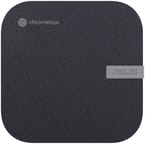 ASUS Chromebox 5 | ASUS Chromebox 5 | ASUS Chromebox 5 | ASUS Chromebox 5 | |
| Price | List Price: Amazon Prices: Loading prices... | List Price: Amazon Prices: | List Price: Amazon Prices: | List Price: Amazon Prices: |
| Model number | CN67-B7005UN | CN67-B5004UN | --- | --- |
| Performance Rating | 4.2 | 3.4 | 3.2 | 3.3 |
| Chromebook Plus | No | No | No | No |
| Processor | Twelve-core 2.10 Ghz (max 4.70 Ghz) Intel Core i7-1260P | Twelve-core 1.70 Ghz (max 4.40 Ghz) Intel Core i5-1240P | Deca-core 3.30 Ghz (max 4.40 Ghz) Intel Core i3-1220P | 5-core 0.90 Ghz (max 1.10 Ghz) Intel Celeron Processor 7305 |
| RAM | 16 GB | 8 GB | 8 GB | 4 GB |
| Internal Storage | 256 GB NVMe SSD (upgradable PCIe Gen 4) | 128 GB NVMe SSD (upgradable PCIe Gen 4) | 128 GB NVMe SSD (upgradable PCIe Gen 4) | 128 GB NVMe SSD (upgradable PCIe Gen 4) |
| Screen Size | No Screen | No Screen | No Screen | No Screen |
| Screen Resolution | No Screen | No Screen | No Screen | No Screen |
| Screen Type | No Screen | No Screen | No Screen | No Screen |
| Touch Screen | No | No | No | No |
| Stylus / Pen | No Stylus Support | No Stylus Support | No Stylus Support | No Stylus Support |
| Dimensions width x length x thickness | 6.56 x 6.53 x 1.81 inches (166.62 x 165.86 x 45.97 mm) | 6.56 x 6.53 x 1.81 inches (166.62 x 165.86 x 45.97 mm) | 6.56 x 6.53 x 1.81 inches (166.62 x 165.86 x 45.97 mm) | 6.56 x 6.53 x 1.81 inches (166.62 x 165.86 x 45.97 mm) |
| Weight | 1.76 lbs (0.8 kg) | 1.76 lbs (0.8 kg) | 1.76 lbs (0.8 kg) | 1.76 lbs (0.8 kg) |
| Backlit Keyboard | No | No | No | No |
| Webcam | No Webcam | No Webcam | No Webcam | No Webcam |
| WiFi | Wi-Fi 6E (802.11ax) | Wi-Fi 6E (802.11ax) | Wi-Fi 6E (802.11ax) | Wi-Fi 6E (802.11ax) |
| Bluetooth | Bluetooth 5.4 | Bluetooth 5.4 | Bluetooth 5.4 | Bluetooth 5.4 |
| Ethernet | Yes | Yes | Yes | Yes |
| Cellular Modem | No | No | No | No |
| HDMI | Full-Size HDMI | Full-Size HDMI | Full-Size HDMI | Full-Size HDMI |
| USB Ports | 4 USB 3, 1 USB-C Front: 2x USB 3.2 Gen 2 Type-A; Rear: 2x USB 3.2 Gen 1 Type-A, 1x Thunderbolt 4 (DisplayPort 1.4, Power Delivery), 1x DisplayPort 1.4 | 4 USB 3, 1 USB-C Front: 2x USB 3.2 Gen 2 Type-A; Rear: 2x USB 3.2 Gen 1 Type-A, 1x Thunderbolt 4 (DisplayPort 1.4, Power Delivery), 1x DisplayPort 1.4 | 4 USB 3, 1 USB-C Front: 2x USB 3.2 Gen 2 Type-A; Rear: 2x USB 3.2 Gen 1 Type-A, 1x Thunderbolt 4 (DisplayPort 1.4, Power Delivery), 1x DisplayPort 1.4 | 4 USB 3, 1 USB-C Front: 2x USB 3.2 Gen 2 Type-A; Rear: 2x USB 3.2 Gen 1 Type-A, 1x Thunderbolt 4 (DisplayPort 1.4, Power Delivery), 1x DisplayPort 1.4 |
| Thunderbolt Ports | 1 | 1 | 1 | 1 |
| Card Reader | microSD Card Reader | microSD Card Reader | microSD Card Reader | microSD Card Reader |
| Battery | No Battery | No Battery | No Battery | No Battery |
| Battery Life | Unknown | Unknown | Unknown | Unknown |
| Fanless | No | No | No | No |
| Auto Update Expiration Date | June, 2032 | June, 2032 | June, 2032 | June, 2032 |
Related Chromebooks
-
 ASUS Chromebox 5aThe ASUS Chromebox 5a is a compact Chrome OS desktop built on 13th Gen Intel chips from the Celeron…
 -
 ASUS Chromebook C424The ASUS Chromebook C424 boasts a crisp 14-inch FHD anti-glare display, durable spill-resistant…
 -
 Lenovo Chromebox MicroThe Lenovo Chromebox Micro is a fanless 6.4 x 3.1 x 0.8 inch ChromeOS desktop built on the Intel…
 -
 Acer Chromebox CXI5A compact Chrome OS desktop with 12th Gen Intel processors, USB-C with DisplayPort output, and…
 -
 Acer Chromebook 314 (CB314-4H/4HT)A budget-friendly 14-inch Chromebook with Intel Alder Lake-N processors, WiFi 6E, and software…
 -
 CTL Chromebox CBx3The CTL Chromebox CBx3 is a Chrome OS desktop built on 13th Gen Intel processors, with Wi-Fi 6E,…
Thunderbolt 4, upgradeable slots, and a wireless charging lid

The chassis measures 6.56 x 6.53 x 1.81 inches and weighs 1.76 pounds, small enough to hang behind a monitor on a standard VESA bracket. Its surface uses post-consumer recycled plastics with a scratch-resistant textured finish. Two USB 3.2 Gen 2 Type-A ports sit on the front next to a 3.5mm combo audio jack and a microSD card slot. The rear panel carries two USB 3.2 Gen 1 Type-A ports, dual HDMI 2.0 outputs, a DisplayPort 1.4 connection, Thunderbolt 4, and 2.5 Gbps Ethernet.
Four processors cover the lineup: the entry-level Intel Celeron 7305, then the Core i3-1220P, the Core i5-1240P, and the Core i7-1260P at the top. All four are Alder Lake parts that pair performance cores with efficiency cores, which keeps multi-threaded throughput up without pushing power draw. The Core i7-1260P build with 16GB of RAM handles heavy browser tab loads, Linux development containers, and Android applications at the same time. IT Pro’s review noted that even under load, “in anything other than a perfectly tranquil environment, the Chromebox 5 is effectively silent.”
Wireless runs on WiFi 6E (802.11ax) with 6GHz band support and Bluetooth 5.4, and a Realtek RTL8125BG controller drives the Ethernet port. The Thunderbolt 4 port takes single-cable docking stations, external SSDs, or one more display. Storage is an M.2 2280 PCIe 4.0 x4 NVMe SSD, and ASUS left the RAM and storage slots user-accessible, which is rare on a Chrome OS device. Core models take up to 32GB of DDR4-3200 RAM; the Celeron variant stops at 16GB.
Reviewer Insights

Digital Citizen on simplicity and four-display setups
Digital Citizen tested the Core i7-1260P configuration and awarded it 4.5 out of 5 stars. The reviewer wrote: “It represents the fine-tuning of an older recipe, which works well. It’s very simple to use and manage, even for non-technical users.” They rated the wireless charger more than a gimmick, useful for keeping phones topped up while working. The four-display support impressed for digital signage and multi-monitor workstation setups. Their criticism focused on the 60Hz refresh rate limitation and premium pricing for higher configurations.
The construction materials got their own mention in the review. “The surface of the ASUS Chromebox 5 is made of post-consumer recycled plastics (PCR) with a durable scratch-resistant textured surface to ensure device longevity.” For businesses running Chrome OS deployments, they pointed to Google’s management console support alongside the hardware as a fit for fleet management.
IT Pro on silent operation and slow SSD speeds
IT Pro described the Chromebox 5 as the point at which “it has entered the world of contemporary computing technology,” crediting the Alder Lake processor upgrade. “Building a wireless charger into a small desktop is a great idea,” they noted. Their testing confirmed silent operation and reasonable thermal management despite the compact enclosure.
SSD read and write speeds disappointed them compared to competitors. They also marked the device as having “zero upgradability,” which contradicts ASUS’s own specifications showing accessible RAM and storage slots. Their overall verdict positioned the Chromebox 5 as the best current desktop Chrome OS option, primarily due to its modern processor and the wireless charging feature.
Tom’s Guide on the charging pad and desk clutter
Tom’s Guide named the Chromebox 5 their favorite PC at CES 2023. The wireless charging pad won them over because it keeps a phone charged during work without an extra adapter or more cables on the desk.
Fleet deployments, classrooms, and quiet home desks
Businesses deploying Chrome OS fleets get one hardware platform, Google’s management capabilities, and an update runway through June 2032. The same VESA mounting that puts it behind a classroom display also hides it behind a monitor at home, where it covers web browsing, streaming, and productivity without a Windows license.
The Core i7 build has the headroom for Linux containers, dozens of open tabs, and music production on Chrome OS with browser-based DAWs and a connected audio interface. At the other end, the Celeron model is the pick for digital signage, kiosks, and single-application workstations, where long-term support matters more than speed.
Anyone who needs discrete graphics, high-refresh gaming, or specialized Windows applications should look elsewhere. This machine stays inside what Chrome OS does: cloud-centric workflows, web applications, and the growing library of Android and Linux apps.
A quiet Chrome OS desktop that stays supported to 2032
The Core i7-1260P build is the most capable desktop Chrome OS device currently available, and the Thunderbolt 4 port replaces a hub on the desk. Updates through June 2032 matter most to enterprise buyers deploying dozens of these at a time. The premium pricing on the higher configurations warrants a comparison with Windows mini PCs that offer similar hardware with more operating-system flexibility.
Our Chromebook Comparison Chart lines it up against the other Chrome OS desktops.
Frequently Asked Questions
What processor options are available in the ASUS Chromebox 5?
Four options: Intel Celeron 7305 (5 cores, 1.1 GHz), Intel Core i3-1220P (10 cores, up to 4.4 GHz), Intel Core i5-1240P (12 cores, up to 4.4 GHz), and Intel Core i7-1260P (12 cores, up to 4.7 GHz). All four are 12th-generation Alder Lake parts that mix performance and efficiency cores.
Can I upgrade the RAM and storage in the ASUS Chromebox 5?
Yes. The Core i3, i5, and i7 models take up to 32GB of DDR4-3200 RAM in SO-DIMM slots, and the Celeron model takes up to 16GB. Storage sits in a standard M.2 2280 PCIe 4.0 x4 NVMe slot that you can swap or upgrade.
What ports does the ASUS Chromebox 5 have?
On the front, two USB 3.2 Gen 2 Type-A ports. On the rear, two USB 3.2 Gen 1 Type-A ports, one Thunderbolt 4 port (supporting DisplayPort 1.4 and Power Delivery), two HDMI 2.0 ports, one DisplayPort 1.4, and 2.5 Gbps Ethernet. A microSD card slot and a 3.5mm combo audio jack round out the set.
How many displays can the ASUS Chromebox 5 support?
Up to four 4K displays at once, spread across the two HDMI ports, the DisplayPort, and the Thunderbolt 4 port. Every output caps at 60Hz.
Does the ASUS Chromebox 5 have a built-in wireless charger?
Yes. A 15W Qi charger sits on the top surface, so a compatible phone or earbud case charges when you set it down there. No separate charging pad or cable required.
When will the ASUS Chromebox 5 stop receiving Chrome OS updates?
Chrome OS updates run until June 2032. That is the device’s Auto Update Expiration (AUE) date, after which it no longer receives security patches or feature updates.
Can I run Linux apps on the ASUS Chromebox 5?
Yes. Chrome OS’s built-in Linux container runs development tools, desktop applications, and command-line utilities. The Core i5 and i7 configurations have the most headroom for that work.