
CTL Chromebox CBx3
Updated on

The CTL Chromebox CBx3 was the first Chrome OS desktop to ship with Intel’s 13th Gen Raptor Lake silicon. It comes with either the Core i7-1355U or the Celeron 7305, and it is aimed at education, business, and home office setups that want a simple desktop to manage. It has WiFi 6E, Bluetooth 5.3, upgradeable RAM and storage, and Chrome OS updates through June 2032. Computer labs, kiosks, and single-user desks are all in scope for the same small box.
Pros and Cons
| Pros | Cons |
|---|---|
| First Chrome OS device with 13th Gen Intel Raptor Lake | Core i7 model pricing approaches Windows mini PC territory |
| User-upgradeable DDR4 RAM and NVMe storage | Celeron model ships with only 4GB of RAM |
| WiFi 6E and Bluetooth 5.3 wireless connectivity | One rear USB-A port is only USB 2.0 |
| Chrome OS updates through June 2032 | Desktop form factor requires monitor, keyboard, mouse |
| Dual HDMI plus USB-C drives three displays | No built-in webcam or microphone |
| Compact chassis with VESA mounting support | Performance difference between i7 and 12th Gen is minimal |
Related Videos
CTL Chromebox CBx3 Comparison Chart
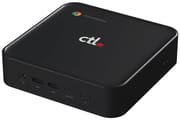 CTL Chromebox CBx3 | CTL Chromebox CBx3 | |
| Price | List Price: $998.75 Amazon Prices: Loading prices... | List Price: $649 Amazon Prices: Loading prices... |
| Model number | CBx3-7 | CBx3 |
| Performance Rating | 9.7 | 3.8 |
| Chromebook Plus | No | No |
| Processor | Deca-core 3.70 Ghz (max 5.00 Ghz) Intel Core i7-1355U | 5-core 0.90 Ghz (max 1.10 Ghz) Intel Celeron Processor 7305 |
| RAM | 8 GB | 4 GB |
| Internal Storage | 256 GB NVMe (upgradable) | 256 GB NVMe (upgradable) |
| Screen Size | No Screen | No Screen |
| Screen Resolution | No Screen | No Screen |
| Screen Type | No Screen | No Screen |
| Touch Screen | No | No |
| Stylus / Pen | No Stylus Support | No Stylus Support |
| Dimensions width x length x thickness | 5.83 x 5.85 x 1.57 inches (148.08 x 148.59 x 39.88 mm) | 5.83 x 5.85 x 1.57 inches (148.08 x 148.59 x 39.88 mm) |
| Weight | 1.32 lbs (0.6 kg) | 1.32 lbs (0.6 kg) |
| Backlit Keyboard | No | No |
| Webcam | No Webcam | No Webcam |
| WiFi | Wi-Fi 6E (802.11ax) | Wi-Fi 6E (802.11ax) |
| Bluetooth | Bluetooth 5.3 | Bluetooth 5.3 |
| Ethernet | Yes | Yes |
| Cellular Modem | No | No |
| HDMI | Full-Size HDMI | Full-Size HDMI |
| USB Ports | 1 USB 2.0, 3 USB 3, 1 USB-C Two USB 3.0 ports on front, one USB 3.0 on rear, one USB 2.0 on rear, one USB-C on rear with DisplayPort Alt Mode | 1 USB 2.0, 3 USB 3, 1 USB-C Two USB 3.0 ports on front, one USB 3.0 on rear, one USB 2.0 on rear, one USB-C on rear with DisplayPort Alt Mode |
| Thunderbolt Ports | No | No |
| Card Reader | microSD Card Reader | microSD Card Reader |
| Battery | No Battery | No Battery |
| Battery Life | Unknown | Unknown |
| Fanless | No | No |
| Auto Update Expiration Date | June, 2032 | June, 2032 |
Related Chromebooks
-
 Acer Chromebox CXI6The Acer Chromebox CXI6 is a Chrome OS desktop built on Intel Raptor Lake processors (Core i3 to…
 -
 ASUS Chromebox 5The ASUS Chromebox 5 is a Chrome OS desktop with 12th Gen Intel processors, Thunderbolt 4, Wi-Fi…
 -
 HP Chromebox G4The HP Chromebox G4 is a 5.87-inch-square Chrome OS desktop sold with 13th-generation Intel chips…
 -
 ASUS Chromebook CX14 (CX1405)The ASUS Chromebook CX14 (CX1405) offers a solid, portable design with a 180-degree hinge and…
 -
 Lenovo Chromebox MicroThe Lenovo Chromebox Micro is a fanless 6.4 x 3.1 x 0.8 inch ChromeOS desktop built on the Intel…
 -
 Acer Chromebook Spin 312The Acer Chromebook Spin 312 is a compact 12.2-inch convertible Chromebook with a 360-degree hinge,…
Two SODIMM slots and a VESA-mount chassis

The chassis measures 5.83 x 5.85 x 1.57 inches and weighs 1.32 pounds, and it accommodates VESA mounting for clean installations behind monitors. Two USB 3.0 ports and a combo audio jack sit on the front panel for headsets and thumb drives. The rear carries one USB 3.0 port, one USB 2.0 port, one USB-C port with DisplayPort Alt Mode, dual HDMI ports, Gigabit Ethernet, and a microSD card slot. That layout wires up a multi-monitor desk without adapters.
The flagship build uses the Intel Core i7-1355U with 10 cores and 12 threads, boosting to 5.0 GHz. According to Chrome Unboxed, the performance difference between 12th and 13th Gen is “minimal with the only notable difference being a slightly higher clock frequency.” The Celeron 7305 variant uses an Alder Lake chip with 5 cores at 1.1 GHz, which covers web browsing and cloud-based productivity. The Core i7 ships with 8GB of DDR4 and the Celeron with 4GB, both with 256GB of NVMe storage and room to upgrade.
WiFi 6E (802.11ax) handles tri-band networks, Bluetooth 5.3 covers peripherals, and Gigabit Ethernet covers wired deployments. The USB-C port supports DisplayPort Alt Mode, so paired with the two HDMI outputs it drives up to three external displays. Storage expands through the internal M.2 NVMe slot and the external microSD card reader. Liliputing notes the CBx3 uses two SODIMM slots, so “the DDR4-3200 memory is user upgradeable, as is the NVMe SSD,” which matters to organizations planning long deployments.
Reviewer Insights

Chrome Unboxed
According to Chrome Unboxed, the CTL Chromebox CBx3-7 marks a historic moment as “the first-ever Raptor Lake ChromeOS device to break cover.” The publication compared its pre-order pricing favorably against 12th Gen competitors priced between $900 and $1,100, noting the CTL’s approximately 20% discount brought the i7 model to $849 during the launch period. Their coverage highlighted the device’s suitability for “home desktops, school computer labs, multi-user office setups and…kiosks and signage.”
Liliputing
Brad Linder at Liliputing noted the dual processor options give buyers flexibility between performance and budget, with the Celeron 7305 model targeting basic workloads while the Core i7-1355U handles more demanding multitasking. The article emphasized the user-upgradeable memory and storage as distinguishing features in a market where many compact systems use soldered components.
Tech Live
Fred of the French channel Tech Live tested a CBX3-7 fitted with the Core i7-1355U, 32GB of DDR4, and a 256GB NVMe drive, above the usual 8GB retail build. It reached the login screen in 8 to 10 seconds, and 20 HD YouTube videos across two Chrome sessions ran without slowdown, with CPU load under 50 percent and memory use between 12 and 20GB. GeForce Now streaming ran smoothly over Ethernet, and older Steam games were playable at reduced settings. He found the box silent in daily use, with the fan audible only under Steam loads.
Labs, kiosks, and home office desks
In a school, the Google Admin Console manages the box and Chrome OS updates run through June 2032. The Celeron variant covers computer lab stations at the lower price, while the Core i7 model suits faculty workstations with heavier multitasking needs.
Behind digital signage, a kiosk, or a reception desk terminal, the compact chassis and VESA mounting keep those installations tidy, and the upgradeable components let an organization stretch a hardware lifecycle with a memory or SSD swap instead of a replacement.
On a home office desk, the dual HDMI outputs drive two monitors and WiFi 6E covers the wireless side. The Core i7 model also has the headroom for browser-based music production with tools like BandLab or Soundtrap. Chrome OS updates run to June 2032, though buyers should weigh the platform limitations against similarly-priced Windows mini PCs.
A current-generation upgrade for Chrome OS fleets
Organizations already invested in Chrome OS management will find this a straightforward upgrade path from aging Chromebox fleets. Buyers who need Windows applications, extensive local storage, or offline-first workflows might find better value in comparable Windows mini PCs. The Core i7 model in particular pushes into pricing territory where Windows alternatives offer broader software compatibility.
For those comparing options, see our Chromebook Comparison Chart to find the best match for your needs.
Frequently Asked Questions
What processor does the CTL Chromebox CBx3 use?
There are two options. The CBx3-7 flagship uses the Intel Core i7-1355U with 10 cores and 12 threads, boosting up to 5.0 GHz, and the entry-level model uses the Intel Celeron 7305 with 5 cores at 1.1 GHz. The Core i7 variant was the first Chrome OS device to ship Intel’s 13th Gen Raptor Lake architecture.
Can I upgrade the RAM and storage in the CTL Chromebox CBx3?
Yes. Liliputing notes the CBx3 uses two SODIMM slots, so “the DDR4-3200 memory is user upgradeable, as is the NVMe SSD.” The Core i7 model ships with 8GB of RAM and the Celeron model with 4GB, both with 256GB of NVMe storage and room to expand.
What ports does the CTL Chromebox CBx3 have?
The front panel carries two USB 3.0 ports and a combo audio jack. The rear adds one USB 3.0 port, one USB 2.0 port, one USB-C port with DisplayPort Alt Mode, dual HDMI ports, Gigabit Ethernet, and a microSD card slot. Up to three external displays connect without adapters.
When does Chrome OS support end for the CTL Chromebox CBx3?
The Auto Update Expiration (AUE) date is June 2032. Google provides Chrome OS updates, including security patches and new features, until that date. That is one of the longest support windows currently available for Chrome OS devices.
Can the CTL Chromebox CBx3 connect to multiple monitors?
Yes. The dual HDMI ports and the USB-C port with DisplayPort Alt Mode together drive up to three external displays, with no additional adapters required.
Does the CTL Chromebox CBx3 support Android and Linux apps?
Yes, through the Google Play Store for Android apps and the built-in Linux container for Linux apps. That expands software options beyond web applications, though Android app compatibility can vary and Linux app performance depends on the processor configuration you choose.