
ASUS Chromebook CX14 (CX1405)
Updated on

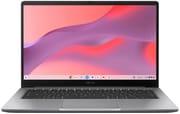
The ASUS Chromebook CX14 (CX1405) is a 2025 budget Chromebook sold in two configurations. The base model pairs an Intel Celeron N4500 with 4GB RAM and 64GB storage at $279, and the Chromebook Plus variant steps up to an Intel Core 3 N355 with 8GB RAM and 128GB storage. Both share a textured plastic build that feels more premium than the price suggests, a 180-degree lay-flat hinge, and military-grade durability testing (MIL-STD 810H). Software support runs through June 2035 on either one. The CX14 is aimed at students, casual users, and anyone who wants a portable machine for web browsing and document editing.
Pros and Cons
| Pros | Cons |
|---|---|
| Unique textured finish makes plastic chassis feel premium | Bottom-firing speakers easily muffled when used on lap |
| 180-degree lay-flat hinge for flexible viewing and sharing | Celeron model has TN display with poor viewing angles |
| Core 3 model supported through June 2035 | Core 3 model has disappointing 5-hour battery life |
| Military-grade durability (MIL-STD 810H) | Celeron model struggles with multitasking on 4GB RAM |
| Good port selection including full-sized HDMI | Privacy shutter on camera is difficult to operate |
| Lightweight at 3.04-3.06 lbs for easy portability | Core 3 model’s backlit keyboard not available on Celeron |
Related Videos
ASUS Chromebook CX14 (CX1405) Comparison Chart
 ASUS Chromebook CX14 (CX1405) | ASUS Chromebook CX14 (CX1405) | |
| Price | List Price: $279 Amazon Prices: Loading prices... | List Price: $239 Amazon Prices: |
| Model number | CX1405CKA | CX1405CTA |
| Performance Rating | 2.6 | 7.8 |
| Chromebook Plus | No | No |
| Processor | Dual-core 1.10 Ghz (max 2.80 Ghz) Intel Celeron Processor N4500 | Octa-core 1.70 Ghz (max 3.90 Ghz) Intel Core 3 N355 |
| RAM | 4 GB | 8 GB |
| Internal Storage | 64 GB | 128 GB |
| Screen Size | 14" | 14" |
| Screen Resolution | 1920x1080 | 1920x1080 |
| Screen Type | TN | TN |
| Touch Screen | No | No |
| Stylus / Pen | No Stylus Support | No Stylus Support |
| Dimensions width x length x thickness | 12.78 x 8.44 x 0.78 inches (324.61 x 214.38 x 19.81 mm) | 12.78 x 8.44 x 0.78 inches (324.61 x 214.38 x 19.81 mm) |
| Weight | 3.04 lbs (1.38 kg) | 3.04 lbs (1.38 kg) |
| Backlit Keyboard | No | No |
| Webcam | 720p | 720p |
| WiFi | Wi-Fi 6 (802.11ax) | Wi-Fi 6 (802.11ax) |
| Bluetooth | Bluetooth 5.4 | Bluetooth 5.4 |
| Ethernet | No | No |
| Cellular Modem | No | No |
| HDMI | Full-Size HDMI | Full-Size HDMI |
| USB Ports | 2 USB 3, 2 USB-C | 2 USB 3, 2 USB-C |
| Thunderbolt Ports | No | No |
| Card Reader | No Card Reader | No Card Reader |
| Battery | 42WHrs | 42WHrs |
| Battery Life | 9.5 hours | 9.5 hours |
| Fanless | Yes | Yes |
| Auto Update Expiration Date | June, 2031 | June, 2035 |
Related Chromebooks
-
 ASUS Chromebook Plus CX34 (CX3402)The ASUS Chromebook Plus CX34 balance power and affordability, featuring an Intel Core i3, 8GB RAM,…
 -
 ASUS ExpertBook CX54 Chromebook PlusThe ASUS ExpertBook CX54 Chromebook Plus pairs an Intel Core Ultra 5 processor with a 14-inch…
 -
 HP Elite c640 G3 ChromebookThe HP Elite c640 G3 Chromebook is a 14-inch business Chromebook with an Intel Core i5-1245U vPro,…
 -
 Acer Chromebook Spin 314 (2024)A 14-inch convertible Chromebook with a 16:10 WUXGA touch display, 360-degree hinge, and software…
 -
 Acer Chromebook Vero 514The Acer Chromebook Vero 514 blends sustainability with performance. Sporting a Full HD IPS…
 -
 Acer Chromebook Plus Spin 514The Acer Chromebook Plus Spin 514 (CP514-5HN) is an ARM 2-in-1 convertible built on the MediaTek…
One chassis, two very different machines
The textured plastic finish has a paper-like feel, and the chassis holds together better than most entry-level Chromebooks do. At 3.04 to 3.06 pounds and 12.78 x 8.44 x 0.67-0.78 inches, the CX14 stays easy to carry while keeping the 14-inch screen that many buyers prefer over smaller 11-inch alternatives. The 180-degree lay-flat hinge is rare at this price and makes it simple to share the screen in a classroom or across a desk. Every port sits on the left side: two USB-C ports (both supporting DisplayPort and Power Delivery), two USB-A 3.2 Gen 1 ports, a full-sized HDMI 1.4 port, and a 3.5mm combo audio jack. Wired internet needs a USB Ethernet adapter in one of the USB-A ports. Ports split across both sides would be more flexible, but the selection covers most peripherals and displays without an adapter.
The Celeron N4500 build, dual-core with 4GB RAM, operates at what NotebookCheck describes as the “lowest acceptable limit” for ChromeOS, and multitasking across many browser tabs is a test of patience. NotebookCheck measured Geekbench 6 scores of 462 (single-core) and 757 (multi-core) on that model, which puts it in basic-use territory for web browsing and simple document editing. The Core 3 N355 variant has an 8-core processor (10,476 PassMark score) and 8GB LPDDR5 RAM, and it handled Android gaming and heavier multitasking without trouble in MergeDroid’s hands-on testing with Real Racing 3. That puts it near entry-level Windows laptop territory, and ChromeOS’s lighter overhead makes it feel more responsive than the raw benchmark numbers suggest.
The Celeron variant ships a TN panel that NotebookCheck criticizes for 56% sRGB color gamut coverage, poor viewing angles, and a washed-out look, even though the resolution is Full HD 1920x1080. At 250 nits it is fine indoors and struggles in bright rooms or outdoors. The Core 3 Chromebook Plus model uses an IPS panel at the same Full HD resolution with 300 nits of brightness and better color and viewing angles, still short of the displays on pricier Chromebooks. Both share an anti-glare coating and an 86% screen-to-body ratio from slim bezels.
Reviewer Insights
MergeDroid covers the Chromebook Plus CX14 with the Core 3 N355 processor in his unboxing and initial review. He highlights the rigid build quality, noting that despite being constructed entirely from plastic, the chassis exhibits minimal flex and feels substantially more solid than competing budget Chromebooks. The reviewer praises the backlit keyboard as a rare feature in this price range, calling out the new Quick Insert key that provides quick access to emoji, GIFs, and Google Drive files. MergeDroid describes the Rock Grey color as boring and the plastic texture as feeling slightly cheap despite the solid construction. He criticizes the privacy shutter on the 1080p webcam, which requires fingernails to operate effectively rather than sliding easily with a finger press. The reviewer confirms software updates through June 2035, positioning this as a good deal for users seeking a Chromebook that will remain supported for nearly a decade.
In a detailed comparison video, MergeDroid pits the ASUS Chromebook Plus CX14 against the Acer Chromebook Plus 514, both featuring identical Intel Core 3 N355 specifications, to help buyers distinguish between similarly-priced options. In a controlled battery drain test the ASUS lasted only five hours during continuous 4K video playback, against over six hours for the competing Acer. The 42Wh capacity is respectable, so power management or the 16:9 display’s draw is the likelier explanation. MergeDroid notes the ASUS delivers richer sound output than the Acer when placed on a desk, but the bottom-firing speaker placement means this audio advantage disappears when the Chromebook rests on your lap, with sound becoming noticeably muffled. The reviewer emphasizes the backlit keyboard as the ASUS’s key differentiator, recommending it specifically for users who type in dim environments and aren’t concerned about maximizing battery endurance. He suggests waiting for sale prices around £167 ($210 USD) to get the best value.
MergeDroid’s budget model review examines the Celeron N4500 variant (CX1405CKA), which he positions as potentially the “least worst option” for entry-level Chromebook shopping under £130 ($170 USD). The reviewer is pleasantly surprised by the Full HD 1920x1080 resolution, which remains uncommon in the absolute budget tier where 1366x768 HD displays dominate. He qualifies that praise with the TN panel’s limitations. Colors wash out dramatically at any viewing angle besides straight-on, and the low 250-nit brightness makes outdoor use impractical. MergeDroid highlights that despite being marketed as a 2025 model, the use of the 2021-vintage Celeron N4500 processor means software support only extends to June 2031 (both models are supported through June 2035). The unique “Pure Grey” textured finish earns specific praise for its paper-like feel that helps the budget device punch above its weight class aesthetically. He recommends strongly considering the 8GB RAM variant if budget allows, as 4GB proves limiting even for ChromeOS’s lightweight demands when juggling multiple tabs and Android apps.
According to NotebookCheck, the Celeron CX1405CKA earns a 66% rating as an “average” device designed for a specific niche. Reviewer Marc Herter positions it primarily for users who prioritize completely silent operation, as the fanless passive cooling design produces zero noise even under sustained load. The thermal measurements confirm this benefit, with the chassis reaching only 38.1°C maximum temperature while consuming just 12.99W at peak load. NotebookCheck’s standardized battery testing recorded 9 hours 26 minutes of runtime in their Wi-Fi web surfing scenario, well clear of the Core 3 model’s result, so the Celeron’s lower power draw pays off for all-day unplugged use. Herter is blunt about the performance limits, characterizing the Celeron N4500 as operating at the “lowest acceptable limit” for ChromeOS and warning that multitasking becomes “a test of patience.” The review’s measured specs reveal a keyboard with greater than 1mm key travel (subjectively comfortable), a generously sized 10.5 x 7.5 cm touchpad, and WiFi speeds around 867 Mbps transmit / 821 Mbps receive using the Realtek RTL8852BE chip. NotebookCheck concludes the Celeron CX14 works best for users with very specific requirements: silent computing for basic tasks in quiet environments like libraries or offices, where the TN display’s deficiencies and minimal performance prove acceptable trade-offs.
Take the Core 3 unless battery life comes first
The Celeron model at $279 fits basic needs (web browsing, Google Docs, email, and light YouTube viewing) for anyone who wants silent fanless operation and 9+ hour battery life and can live with the TN display and sluggish multitasking. Students buying for note-taking and research, or seniors who want a simple machine for staying connected online, will find it adequate as long as they are not juggling many tabs at once.
The Chromebook Plus Core 3 variant at $239 (frequently on sale from $429 MSRP) is the better value for most buyers despite the 5-hour battery life. Faster silicon, 8GB RAM for comfortable multitasking, the IPS display, a 1080p webcam, and a backlit keyboard change the daily experience enough to outweigh the short runtime unless unplugged endurance is the top priority. The backlit keyboard matters for anyone who types in dim rooms, from students in dorm rooms to professionals taking notes during evening meetings. Best Buy promotional pricing under $250 puts Chromebook Plus features and Google AI capabilities at budget Chromebook money.
Both configurations share the build quality, the 180-degree hinge for content sharing, and the port selection with full HDMI. Software support runs through June 2035 on the Core 3 model and June 2031 on the Celeron model. Educators and students who share screens during collaboration or tutoring get the most out of that hinge. Starry Hope’s Chromebook Comparison Chart weighs the CX14 against alternatives from Acer, HP, and Lenovo that trade display quality, battery life, or performance differently at similar prices.
Frequently Asked Questions
What’s the main difference between the Celeron and Core 3 versions?
The Core 3 version (model CX1405CTA) offers significantly better performance with an 8-core processor, double the RAM at 8GB, double the storage at 128GB, an upgraded IPS display, a 1080p webcam instead of 720p, and a backlit keyboard. However, it suffers from shorter battery life at around 5 hours compared to the Celeron model’s 9+ hours. The Celeron version (CX1405CKA) uses a dual-core processor with 4GB RAM and 64GB storage at a lower $279 price point, suitable for basic tasks only.
How long will the CX14 receive software updates?
Through June 2035 on the Core 3 N355 model (CX1405CTA) and June 2031 on the Celeron N4500 model (CX1405CKA). That Auto Update Expiration (AUE) date covers security patches, feature updates, and compatibility with new web standards.
Can I upgrade the RAM or storage?
No, the RAM and storage are soldered directly to the motherboard and cannot be upgraded after purchase. This makes choosing the right configuration upfront critical. If you anticipate running multiple tabs, Android apps, or Linux applications, the 8GB RAM version is strongly recommended over the 4GB model, as ChromeOS with limited RAM can struggle with multitasking.
Does the CX14 have a good display?
Only on the Core 3 model. The Celeron uses a TN panel that NotebookCheck criticizes for poor viewing angles, washed-out colors (56% sRGB), and 250-nit brightness, though the resolution is Full HD. The Core 3 Chromebook Plus swaps in an IPS panel at 300 nits with better angles and color, which makes media and productivity work far easier on the eyes.
What ports does the CX14 have?
The CX14 offers comprehensive connectivity all positioned on the left side: two USB-C 3.2 Gen 1 ports (both supporting DisplayPort and Power Delivery), two USB-A 3.2 Gen 1 ports, one full-sized HDMI 1.4 port, one 3.5mm combo audio jack, and a Kensington Nano security slot. This port selection allows connection to external monitors up to 4K resolution, legacy USB peripherals, and charging without needing adapters or dongles.
Is the ASUS Chromebook CX14 good for students?
Yes, both versions suit different student needs effectively. The Celeron model works well for students focused on Google Workspace apps, research, and note-taking who prioritize all-day battery life and affordability. The Core 3 model better serves students who need to multitask heavily with research tabs, Google Docs, and Spotify simultaneously, or who take notes during evening study sessions and value the backlit keyboard. The military-grade durability (MIL-STD 810H), lightweight 3.04-3.06 lb design, and long software support through 2035 make both configurations solid choices for education.
Does the 180-degree hinge make a difference?
Yes, in a few specific situations. Laying the screen flat on a desk lets several people read it at once, which helps when collaborating with classmates or demonstrating something to students seated across the table. It also opens far enough to work in tight spaces where a traditional 130-degree maximum angle will not fit, such as an airplane tray table or a cramped library desk.
How is the battery life on the Core 3 Chromebook Plus version?
The Core 3 model delivers disappointing battery life at approximately 5 hours during continuous video playback testing, according to MergeDroid’s controlled comparison test. This falls well short of typical Chromebook expectations and means users will likely need to recharge by afternoon with morning-to-evening use. The Celeron model performs much better at 9+ hours in NotebookCheck’s testing, suggesting the more powerful Core 3 processor and brighter IPS display drain the 42Wh battery significantly faster despite identical capacity across both models.