
HP Chromebox G4
Updated on

The HP Chromebox G4 is a desktop Chrome OS machine built on 13th-generation Intel silicon. Configurations run from the entry-level Intel Celeron 7305 up to a Core i7, so one chassis covers everything from basic web browsing to productivity-focused workloads. WiFi 6E and Bluetooth 5.3 handle wireless, and the dual HDMI ports plus USB-C with DisplayPort drive three displays with no adapter involved. Two SODIMM slots and NVMe storage expansion leave more room to change later than most Chrome OS devices allow. About Chromebooks noted that HP pushed things forward with 13th-gen Intel chips, making this one of the first Chromeboxes to feature Raptor Lake processors.
Strengths and compromises
| Pros | Cons |
|---|---|
| 13th-generation Intel processors (Celeron through Core i7 options) | Uses DDR4 RAM instead of faster DDR5 |
| WiFi 6E for modern high-speed wireless connectivity | AUE date (June 2032) provides no extra longevity over 12th-gen models |
| Triple display support via dual HDMI and USB-C | Entry-level Celeron model has limited 4GB RAM |
| Upgradeable memory (2 SODIMM slots, up to 32GB) | No webcam or microphone built-in |
| Compact form factor with VESA mounting support | Storage options limited to 64GB or 256GB from HP |
| USB-C port supports 10Gbps, Power Delivery, and DisplayPort | No Thunderbolt support |
HP Chromebox G4 Comparison Chart
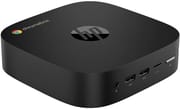 HP Chromebox G4 | HP Chromebox G4 | |
| Price | List Price: $349 Amazon Prices: Loading prices... | List Price: $460 Amazon Prices: Loading prices... |
| Model number | 8R2T3UT#ABA | 8R2T6UT#ABA |
| Performance Rating | 3.3 | 3.2 |
| Chromebook Plus | No | No |
| Processor | 5-core 0.90 Ghz (max 1.10 Ghz) Intel Celeron Processor 7305 | Deca-core 1.60 Ghz (max 4.70 Ghz) Intel Core i5-1345U |
| RAM | 4 GB | 8 GB |
| Internal Storage | 64 GB eMMC (upgradable) | 64 GB SSD (upgradable) |
| Screen Size | No Screen | No Screen |
| Screen Resolution | No Screen | No Screen |
| Screen Type | No Screen | No Screen |
| Touch Screen | No | No |
| Stylus / Pen | No Stylus Support | No Stylus Support |
| Dimensions width x length x thickness | 5.87 x 5.87 x 1.57 inches (149.1 x 149.1 x 39.88 mm) | 5.87 x 5.87 x 1.57 inches (149.1 x 149.1 x 39.88 mm) |
| Weight | 1.3 lbs (0.59 kg) | 1.3 lbs (0.59 kg) |
| Backlit Keyboard | No | No |
| Webcam | No Webcam | No Webcam |
| WiFi | Wi-Fi 6E (802.11ax) | Wi-Fi 6E (802.11ax) |
| Bluetooth | Bluetooth 5.3 | Bluetooth 5.3 |
| Ethernet | Yes | Yes |
| Cellular Modem | No | No |
| HDMI | Full-Size HDMI | Full-Size HDMI |
| USB Ports | 4 USB 3, 1 USB-C Front: 2x USB-A 10Gbps, microSD, audio jack. Rear: 2x USB-A 10Gbps, 1x USB-C 10Gbps (DisplayPort, Power Delivery), 2x HDMI, Gigabit Ethernet | 4 USB 3, 1 USB-C Front: 2x USB-A 10Gbps, microSD, audio jack. Rear: 2x USB-A 10Gbps, 1x USB-C 10Gbps (DisplayPort, Power Delivery), 2x HDMI, Gigabit Ethernet |
| Thunderbolt Ports | No | No |
| Card Reader | microSD Card Reader | microSD Card Reader |
| Battery | No Battery | No Battery |
| Battery Life | Unknown | Unknown |
| Fanless | No | No |
| Auto Update Expiration Date | June, 2032 | June, 2032 |
Related Chromebooks
-
 Acer Chromebox CXI6The Acer Chromebox CXI6 is a Chrome OS desktop built on Intel Raptor Lake processors (Core i3 to…
 -
 ASUS Chromebox 5The ASUS Chromebox 5 is a Chrome OS desktop with 12th Gen Intel processors, Thunderbolt 4, Wi-Fi…
 -
 CTL Chromebox CBx3The CTL Chromebox CBx3 is a Chrome OS desktop built on 13th Gen Intel processors, with Wi-Fi 6E,…
 -
 HP Chromebook 14a (2022)The 2022 HP Chromebook 14a (14a-na0 platform) pairs a quad-core Intel Celeron N4120 with 4GB RAM,…
 -
 HP Chromebook 14a (2023)The HP Chromebook 14a balances performance and portability with its 14-inch display, 47 Wh battery…
 -
 Lenovo Chromebox MicroThe Lenovo Chromebox Micro is a fanless 6.4 x 3.1 x 0.8 inch ChromeOS desktop built on the Intel…
Two SODIMM slots and three display outputs in a 5.87-inch square

The HP Chromebox G4 measures 5.87 x 5.87 x 1.57 inches and weighs about 1.3 pounds, small enough to mount behind most monitors on a VESA bracket. Active cooling handles sustained workloads that would throttle a fanless box of the same size, and the square footprint keeps the desk clear. The front panel carries two USB-A 10Gbps ports, a microSD card reader, and the audio combo jack for headphones or a headset. The rear panel holds the display outputs, dual HDMI plus the USB-C port, alongside two more USB-A ports and Gigabit Ethernet, so the cables you rarely touch stay behind the machine.
The Celeron 7305 sits at the bottom of the range and the Core i5-1345U near the top. The Celeron is a 5-core part (1 P-core plus 4 E-cores) that runs at 1.1 GHz with no turbo boost and scores approximately 2,501 on PassMark’s CPU benchmark, which covers web browsing, document editing, and light multitasking. The Core i5-1345U steps up to 10 cores (2 P-cores plus 8 E-cores), 12 threads, and turbo frequencies up to 4.7 GHz, delivering a PassMark score around 14,176. That gap shows in Chrome OS features like Linux containers and Android app multitasking, where the i5 has headroom the Celeron does not.
WiFi 6E (802.11ax) brings the 6 GHz band, which means faster wireless speeds and less congestion on a router that supports it. Bluetooth 5.3 handles peripherals and audio devices with better efficiency than previous versions, and the Gigabit Ethernet port covers setups where wireless is not ideal. The two SODIMM slots take DDR4-3200 MHz memory up to 32GB total. DDR4 is the older standard to find on a 13th-gen platform, and the upside is wide compatibility with modules people already own.
Reviewer Insights

About Chromebooks: 13th-gen chips paired with mundane memory choices
About Chromebooks covered the HP Chromebox Enterprise G4 announcement in May 2023, noting the device’s forward-looking processor choice. Kevin Tofel highlighted that “Unlike other Chromeboxes that debuted earlier this year, HP is pushing things forward with 13th-gen Intel chips.” The review praised the wide range of processor options from Celeron to Core i7 and the modern connectivity including WiFi 6E and Bluetooth 5.3.
“Memory choices are surprisingly mundane with either 4GB/8GB/16GB/32GB of DDR4-3200 MHz RAM,” noting the absence of DDR5 support despite the newer processor generation. Storage options were similarly constrained to either 64GB eMMC or a 256GB NVMe SSD from HP’s standard configurations. On support, “This HP Chromebox will get software and security updates through June 2030,” later updated to June 2032 per Google’s official AUE policy, which provides no additional longevity over competing 12th-generation Chromeboxes. The enterprise variant includes HP’s management features for commercial deployments, while the standard G4 serves home and small business users.
Three monitors from either build, no adapters needed
The Core i5-1345U configuration has performance headroom for demanding Chrome OS workloads, and the entry-level Celeron 7305 keeps costs down for basic browsing and kiosk deployments. Either one drives three monitors straight from the box, which makes the G4 practical for a productivity desk that would otherwise need adapters. Buyers who want 13th-generation Intel silicon on a Chrome OS desktop get it here without waiting for the refresh cycles that usually lag laptop releases.
The DDR4 specification will disappoint anyone who wanted newer memory technology, and the June 2032 AUE date matches the software support timeline that older 12th-generation alternatives already carry. Competing Chromeboxes from Acer and ASUS cover similar ground, so the pick often comes down to processor preference and availability.
The Chromebook Comparison Chart lines these specs up against other models if you are still weighing candidates.
Frequently Asked Questions
What processor options are available for the HP Chromebox G4?
Several Intel 13th-generation chips appear across the range. The entry-level model uses the Intel Celeron 7305 (5 cores, 5 threads, 1.1 GHz, approximately 2,501 PassMark score), and higher configurations use the Intel Core i5-1345U (10 cores, 12 threads, up to 4.7 GHz turbo, approximately 14,176 PassMark score). HP also lists Core i3 and Core i7 variants for enterprise customers.
Can I upgrade the RAM in the Chromebox G4?
Yes. Two SODIMM slots accept DDR4-3200 MHz memory modules up to 32GB total, so the memory is not soldered the way it is on many Chrome OS devices. Choose compatible DDR4 SODIMM modules from reputable manufacturers for best results.
What ports does the Chromebox G4 have?
There are 4x USB-A 10Gbps ports (2 front, 2 rear), 1x USB-C 10Gbps port with DisplayPort and Power Delivery support, 2x HDMI ports for display output, a microSD card reader, Gigabit Ethernet, and a 3.5mm audio combo jack. The combination of dual HDMI and USB-C DisplayPort enables triple-monitor configurations.
How many displays can the Chromebox G4 support?
Three run simultaneously. Two HDMI ports and one USB-C port with DisplayPort alternate mode let you connect three monitors directly, with no dock or adapter in the chain, which suits multi-monitor productivity setups and digital signage deployments alike.
Can I upgrade the storage in the Chromebox G4?
An M.2 slot takes an NVMe SSD, which is more flexible than the soldered eMMC storage many Chromeboxes ship with. The base Celeron model ships with 64GB eMMC and the i5 model with a 64GB SSD, so a larger M.2 NVMe drive is the route to more local capacity.
How long will the Chromebox G4 receive Chrome OS updates?
The Auto Update Expiration (AUE) date is June 2032. Until then the device keeps receiving Chrome OS updates, including security patches, new features, and performance improvements. After the AUE date it continues to work but no longer receives updates from Google.
Does the Chromebox G4 support WiFi 6E?
Yes, with WiFi 6E (802.11ax) covering the 2.4 GHz, 5 GHz, and 6 GHz bands. The 6 GHz band brings faster speeds, lower latency, and less interference than previous WiFi generations, which matters most in dense network environments. Bluetooth 5.3 covers wireless peripherals and audio devices.