
HP Chromebook 14a (2023)
Updated on

The HP Chromebook 14a (2023) is an entry-level 14-inch laptop built around Intel’s Celeron N4120 quad-core processor and a 47 Wh battery rated for up to 14 hours. It ships with 4GB of RAM and 64GB of eMMC storage, a configuration meant for browser work, school assignments, and streaming rather than heavy multitasking. In the budget Chromebook tier, it lands among other budget Chromebooks, with HP’s keyboard and chassis as the main points of difference.
| Pros | Cons |
|---|---|
| 14-hour battery life for all-day use without charging | HD resolution (1366x768) lacks the sharpness of 1080p displays |
| A full 14-inch chassis at a budget list price | 4GB RAM limits multitasking with many open tabs |
| Quad-core N4120 handles basic browsing and document tasks smoothly | Non-touch TN panel has limited viewing angles |
| USB-C with DisplayPort and Power Delivery for modern connectivity | 64GB eMMC storage fills quickly with offline content |
| Chrome OS updates guaranteed through June 2033 (10 years of support) | No keyboard backlight for low-light typing |
| Lightweight at 3.35 lbs with slim 0.72” profile | WiFi 5 instead of newer WiFi 6 standard |
HP Chromebook 14a (2023) Comparison Chart
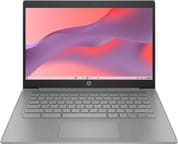 HP Chromebook 14a (2023) | |
| Price | List Price: $299.99 Amazon Prices: Loading prices... |
| Model number | 14a-nb0013dx / 542F0UA |
| Performance Rating | 3.4 |
| Chromebook Plus | No |
| Processor | Quad-core 1.10 Ghz (max 2.60 Ghz) Intel Celeron Processor N4120 |
| RAM | 4 GB |
| Internal Storage | 64 GB eMMC |
| Screen Size | 14" |
| Screen Resolution | 1366x768 |
| Screen Type | TN |
| Touch Screen | No |
| Stylus / Pen | No Stylus Support |
| Dimensions width x length x thickness | 12.85 x 8.94 x 0.72 inches (326.39 x 227.08 x 18.29 mm) |
| Weight | 3.35 lbs (1.52 kg) |
| Backlit Keyboard | No |
| Webcam | 720p HD |
| WiFi | Wi-Fi 5 (802.11ac) |
| Bluetooth | Bluetooth 5.1 |
| Ethernet | No |
| Cellular Modem | No |
| HDMI | Full-Size HDMI |
| USB Ports | 2 USB 3, 1 USB-C (Power Delivery, DisplayPort 1.4 over USB-C) |
| Thunderbolt Ports | No |
| Card Reader | No Card Reader |
| Battery | 2 cell, 47 Wh, Li-ion |
| Battery Life | 14.0 hours |
| Fanless | No |
| Auto Update Expiration Date | June, 2033 |
Related Chromebooks
-
 HP Chromebook 14a (2022)The 2022 HP Chromebook 14a (14a-na0 platform) pairs a quad-core Intel Celeron N4120 with 4GB RAM,…
 -
 HP Chromebook 14 G6The HP Chromebook 14 G6 is an education and business model with a Celeron N4020, 4GB or 8GB of RAM,…
 -
 ASUS Chromebook CM14The ASUS Chromebook CM14 is a sub-$300 14-inch Chromebook built around a MediaTek Kompanio 520,…
 -
 Acer Chromebook Spin 314The Acer Chromebook Spin 314 is a budget 14-inch convertible Chromebook with a 360-degree hinge, a…
 -
 Acer Chromebook 314The Acer Chromebook 314 is a 14-inch budget Chromebook with a 1920x1080 IPS display, an Intel…
 -
 ASUS Chromebook C424The ASUS Chromebook C424 boasts a crisp 14-inch FHD anti-glare display, durable spill-resistant…
The 1366x768 TN panel is the price of the light, long-running body

The 14-inch display gives a comfortable working area for documents and video, though the 1366x768 resolution leaves text and images softer than a 1080p panel would. TN technology keeps the cost down at the expense of color accuracy and viewing angles, so the screen looks its best when you sit square in front of it. There is no touch layer and no stylus support, which is normal at this price.
The Intel Celeron N4120 runs four cores at a 1.1 GHz base clock with burst speeds up to 2.6 GHz, and its PassMark score of 2,456 sits firmly in budget territory. That is enough for web browsing, document editing in Google Docs, video streaming, and light productivity work, as long as the tab count stays reasonable and Android apps do not stack up. The 4GB of RAM works with Chrome OS memory management well enough day to day, but 15 or more open browser tabs will start to drag.
The chassis measures 12.85 x 8.94 x 0.72 inches and weighs 3.35 pounds, so it travels easily in a backpack. HP rates the 47 Wh battery at 14 hours on a charge, which covers a school or work day at moderate brightness. The single USB-C port handles both Power Delivery charging and DisplayPort 1.4 output to an external display, and alongside it sit a full-size HDMI output, two USB-A ports, and a combo headphone jack. Wireless is WiFi 5 and Bluetooth 5.1.
Customer Reviews
Across 874 ratings on Amazon, the HP Chromebook 14a (2023) averages 4.3 stars, though the spread is wider than that number suggests: 71 percent of ratings are five stars while 14 percent sit at one or two. Most of the positive reviews describe simple, light-duty use. Lisa Wright, a verified buyer, called it “Perfect for my grandson for school when they have virtual learning,” and Jason Lafler, also a verified purchaser, kept his expectations narrow and was satisfied: “I bought it strictly for music playback. It works perfectly for that application.” School work and email come up repeatedly among the families buying it.
The low ratings cluster around shipping damage and refurbished units rather than the hardware itself. One verified buyer, CAROL KERKHOVEN, reported that a unit “got it opened it the screen was all broken from shipment” (her other three orders arrived fine). The harshest one-star review, from a verified buyer posting as Sharome Moody under the title “BUYER BEWARE- REFURBISHED TRASH!!!!!!,” describes a refurbished unit that “just STOPPED WORKING” after about five months with no support from the seller or insurer. If you buy this model, stick to a new-condition listing and check the screen on arrival. Read more owner reviews on Amazon.
Reviewer Insights

No established tech publication or trusted hardware channel has published a hands-on review of this exact 2023 N4120 variant (model 14a-nb0013dx). Buyer feedback is the closest thing to a performance record for this configuration, and it is thin on anything beyond everyday use.
The Intel Celeron N4120 is a quad-core Gemini Lake Refresh part with a modest ceiling. Browsing, Google Docs, email, and 1080p streaming are within reach, and it slows once many tabs or heavier Android apps pile up; the fixed 4GB of RAM is the tighter constraint of the two. Earlier 14a models built on similar N-series Celeron chips reviewed as competent light-duty machines with strong battery life and budget-grade displays, which matches what owners of this configuration report.
A browser-first buy with updates running to June 2033
The June 2033 update runway, close to a decade from the 2023 release, outlasts the rest of the package, which is entry-level by design.
That makes it a fit for someone who lives in the browser, wants all-day battery, and is spending as little as possible: a first school laptop, or a spare for college students working to a tight budget. Anyone who needs a sharper screen, space for offline files, or headroom for demanding Android apps should start with a Chromebook Plus certified model instead of this tier.
If you are weighing this model against other budget options, the Chromebook Comparison Chart lets you size up specs side by side to find the right fit.
Frequently Asked Questions
How long will the HP Chromebook 14a receive Chrome OS updates?
Its Auto Update Expiration date is June 2033, roughly 10 years of Chrome OS security updates and feature releases counting from the 2023 launch.
Can I upgrade the RAM or storage on the HP Chromebook 14a?
No. The 4GB of RAM and the 64GB eMMC drive are both soldered to the motherboard, which is typical for budget Chromebooks. Cloud storage or an external USB drive is the way to add room for files.
Is the HP Chromebook 14a good for students?
For school work, yes. The 14-hour battery rating covers a full day away from an outlet, and the quad-core processor is adequate for Google Docs, web research, and educational web apps. Amazon reviewers mention schoolwork and online classes often.
Can I connect an external monitor to the HP Chromebook 14a?
Two ports can drive a display: the full-size HDMI output, and the USB-C port, which carries DisplayPort 1.4 and may need a USB-C to HDMI or USB-C to DisplayPort adapter depending on the monitor. That same USB-C port also charges the laptop over Power Delivery.
What’s the difference between the HP Chromebook 14a and HP Chromebook 14?
HP has used the 14a name across several generations of its entry-level 14-inch Chromebooks, with different processors and displays behind each model number, and has sold other 14-inch Chromebooks without the letter. The model number is what identifies a specific machine. This page covers 14a-nb0013dx, the Celeron N4120 build with 4GB of RAM and 64GB of eMMC storage.
Does the HP Chromebook 14a have a touchscreen?
No. The 2023 model uses a standard non-touch TN panel and does not support a stylus. Touch and pen input mean looking at a convertible or a Chromebook Plus certified device instead.