
ASUS Chromebox 5
Published on

The ASUS Chromebox 5 represents the fifth generation of ASUS’s desktop Chrome OS line, bringing modern 12th-generation Intel Alder Lake processors to the compact form factor. This small-form-factor desktop targets businesses, educational institutions, and home users who need a reliable Chrome OS workstation without the laptop form factor. What sets it apart from competitors is its built-in 15W Qi wireless charger—a thoughtful addition that transforms the top surface into a convenient phone charging pad. With support for up to four 4K displays, Thunderbolt 4 connectivity, and WiFi 6E, the Chromebox 5 delivers contemporary specifications for users invested in the Chrome OS ecosystem.
Pros and Cons of the ASUS Chromebox 5
| Pros | Cons |
|---|---|
| 12th-gen Intel Alder Lake processors with up to Core i7 | Higher-spec models carry premium pricing |
| Built-in 15W Qi wireless charger | Maximum display refresh rate limited to 60Hz |
| Thunderbolt 4 port for high-speed peripherals and displays | Base Celeron model has limited RAM (4GB) |
| WiFi 6E and 2.5 Gbps Ethernet connectivity | No discrete graphics option |
| Supports up to four simultaneous 4K displays | Requires separate keyboard, mouse, and monitor |
| Chrome OS updates until June 2032 | Android app support varies by application |
Related Videos
ASUS Chromebox 5 Comparison Chart
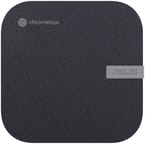 ASUS Chromebox 5 | ASUS Chromebox 5 | ASUS Chromebox 5 | ASUS Chromebox 5 | |
| Price | List Price: Amazon Prices: Loading prices... | List Price: Amazon Prices: | List Price: Amazon Prices: | List Price: Amazon Prices: |
| Model number | CN67-B7005UN | CN67-B5004UN | --- | --- |
| Performance Rating | 5.0 | 4.1 | 3.9 | 3.8 |
| Chromebook Plus | No | No | No | No |
| Processor | Twelve-core 2.10 Ghz (max 4.70 Ghz) Intel Core i7-1260P | Twelve-core 1.70 Ghz (max 4.40 Ghz) Intel Core i5-1240P | Deca-core 3.30 Ghz (max 4.40 Ghz) Intel Core i3-1220P | 5-core 0.90 Ghz (max 1.10 Ghz) Intel Celeron Processor 7305 |
| RAM | 16 GB | 8 GB | 8 GB | 4 GB |
| Internal Storage | 256 GB NVMe SSD (upgradable PCIe Gen 4) | 128 GB NVMe SSD (upgradable PCIe Gen 4) | 128 GB NVMe SSD (upgradable PCIe Gen 4) | 128 GB NVMe SSD (upgradable PCIe Gen 4) |
| Screen Size | No Screen | No Screen | No Screen | No Screen |
| Screen Resolution | No Screen | No Screen | No Screen | No Screen |
| Screen Type | No Screen | No Screen | No Screen | No Screen |
| Touch Screen | No | No | No | No |
| Stylus / Pen | No Stylus Support | No Stylus Support | No Stylus Support | No Stylus Support |
| Dimensions width x length x thickness | 6.56 x 6.53 x 1.81 inches (166.62 x 165.86 x 45.97 mm) | 6.56 x 6.53 x 1.81 inches (166.62 x 165.86 x 45.97 mm) | 6.56 x 6.53 x 1.81 inches (166.62 x 165.86 x 45.97 mm) | 6.56 x 6.53 x 1.81 inches (166.62 x 165.86 x 45.97 mm) |
| Weight | 1.76 lbs (0.8 kg) | 1.76 lbs (0.8 kg) | 1.76 lbs (0.8 kg) | 1.76 lbs (0.8 kg) |
| Backlit Keyboard | No | No | No | No |
| Webcam | No Webcam | No Webcam | No Webcam | No Webcam |
| WiFi | Wi-Fi 6E (802.11ax) | Wi-Fi 6E (802.11ax) | Wi-Fi 6E (802.11ax) | Wi-Fi 6E (802.11ax) |
| Bluetooth | Bluetooth 5.4 | Bluetooth 5.4 | Bluetooth 5.4 | Bluetooth 5.4 |
| Ethernet | Yes | Yes | Yes | Yes |
| Cellular Modem | No | No | No | No |
| HDMI | Full-Size HDMI | Full-Size HDMI | Full-Size HDMI | Full-Size HDMI |
| USB Ports | 4 USB 3, 1 USB-C Front: 2x USB 3.2 Gen 2 Type-A; Rear: 2x USB 3.2 Gen 1 Type-A, 1x Thunderbolt 4 (DisplayPort 1.4, Power Delivery), 1x DisplayPort 1.4 | 4 USB 3, 1 USB-C Front: 2x USB 3.2 Gen 2 Type-A; Rear: 2x USB 3.2 Gen 1 Type-A, 1x Thunderbolt 4 (DisplayPort 1.4, Power Delivery), 1x DisplayPort 1.4 | 4 USB 3, 1 USB-C Front: 2x USB 3.2 Gen 2 Type-A; Rear: 2x USB 3.2 Gen 1 Type-A, 1x Thunderbolt 4 (DisplayPort 1.4, Power Delivery), 1x DisplayPort 1.4 | 4 USB 3, 1 USB-C Front: 2x USB 3.2 Gen 2 Type-A; Rear: 2x USB 3.2 Gen 1 Type-A, 1x Thunderbolt 4 (DisplayPort 1.4, Power Delivery), 1x DisplayPort 1.4 |
| Thunderbolt Ports | 1 | 1 | 1 | 1 |
| Card Reader | microSD Card Reader | microSD Card Reader | microSD Card Reader | microSD Card Reader |
| Battery | No Battery | No Battery | No Battery | No Battery |
| Battery Life | Unknown | Unknown | Unknown | Unknown |
| Fanless | No | No | No | No |
| Auto Update Expiration Date | June, 2032 | June, 2032 | June, 2032 | June, 2032 |
Related Chromebooks
-
 Lenovo ThinkCentre M60q ChromeboxLenovo's first Chromebox in seven years delivers 12th-gen Intel power in a compact 1-liter desktop…
 -
 ASUS Chromebox 5aThe ASUS Chromebox 5a delivers 13th Gen Intel power in a compact desktop package, supporting up to…
 -
 Acer Chromebox Mini CXM1The Acer Chromebox Mini CXM1 delivers enterprise-grade digital signage in an ultra-compact fanless…
 -
 ASUS Chromebook C424The ASUS Chromebook C424 boasts a crisp 14-inch FHD anti-glare display, durable spill-resistant…
 -
 Lenovo Chromebox MicroAn ultra-compact, fanless Chromebox designed for digital signage and specialized deployments,…
 -
 Acer Chromebox CXI5A compact Chrome OS desktop with 12th Gen Intel processors, USB4 connectivity, and support through…
Detailed Insights into the ASUS Chromebox 5

The ASUS Chromebox 5 measures 6.56 x 6.53 x 1.81 inches and weighs just 1.76 pounds, making it compact enough to mount behind a monitor using standard VESA brackets. The chassis surface uses post-consumer recycled plastics with a scratch-resistant textured finish, reflecting ASUS’s environmental considerations. The front panel provides two USB 3.2 Gen 2 Type-A ports for high-speed device connections, along with a 3.5mm combo audio jack and microSD card slot. The rear panel houses two additional USB 3.2 Gen 1 Type-A ports, dual HDMI 2.0 outputs, a DisplayPort 1.4 connection, Thunderbolt 4, and 2.5 Gbps Ethernet—a comprehensive selection for a mini desktop.
The processor lineup spans from the entry-level Intel Celeron 7305 through Core i3-1220P and Core i5-1240P to the top-tier Core i7-1260P. These Alder Lake chips use Intel’s hybrid architecture with performance and efficiency cores, delivering strong multi-threaded performance while maintaining reasonable power consumption. The Core i7-1260P configuration with 16GB RAM handles demanding workloads including heavy browser tab loads, Linux development containers, and Android applications simultaneously. IT Pro’s review noted that even under load, “in anything other than a perfectly tranquil environment, the Chromebox 5 is effectively silent.”
Connectivity options include WiFi 6E (802.11ax) wireless supporting the 6GHz band, Bluetooth 5.4 for peripheral connections, and 2.5 Gbps Ethernet via a Realtek RTL8125BG controller. The Thunderbolt 4 port adds versatility, supporting single-cable docking stations, high-speed external storage, and an additional display output. Storage uses M.2 2280 PCIe 4.0 x4 NVMe SSDs, and ASUS designed the system with user-accessible RAM and storage slots—a rarity for Chrome OS devices. Core models support up to 32GB of DDR4-3200 RAM, while the Celeron variant maxes out at 16GB.
Reviewer Insights on the ASUS Chromebox 5

Digital Citizen’s Assessment
Digital Citizen tested the Core i7-1260P configuration and awarded it 4.5 out of 5 stars. The reviewer praised the combination of performance and simplicity: “It represents the fine-tuning of an older recipe, which works well. It’s very simple to use and manage, even for non-technical users.” They highlighted the wireless charger as more than a gimmick, finding it genuinely useful for keeping phones topped up while working. The four-display support impressed for digital signage and multi-monitor workstation setups. Their criticism focused on the 60Hz refresh rate limitation and premium pricing for higher configurations.
The review specifically called out the eco-friendly construction: “The surface of the ASUS Chromebox 5 is made of post-consumer recycled plastics (PCR) with a durable scratch-resistant textured surface to ensure device longevity.” For businesses considering Chrome OS deployments, they noted the combination of Google’s management console support and the hardware’s reliability makes it a strong choice for fleet management.
IT Pro’s Perspective
IT Pro approached the review from an enterprise angle, describing the Chromebox 5 as the point at which “it has entered the world of contemporary computing technology.” The Alder Lake processor upgrade marked a significant generational leap. “Building a wireless charger into a small desktop is a great idea,” they noted, appreciating ASUS’s practical innovation. Their testing confirmed silent operation and reasonable thermal management despite the compact enclosure.
However, they identified weaknesses in the storage subsystem—SSD read and write speeds disappointed compared to competitors. They also marked the device as having “zero upgradability,” which contradicts ASUS’s own specifications showing accessible RAM and storage slots. This discrepancy likely reflects the reviewer’s unit or testing methodology. Their overall verdict positioned the Chromebox 5 as the best current desktop Chrome OS option, primarily due to its modern processor and unique wireless charging feature.
Tom’s Guide CES 2023 Coverage
Tom’s Guide singled out the Chromebox 5 as their favorite PC at CES 2023, highlighting its combination of practical features and thoughtful design. The coverage emphasized how the wireless charging pad addressed a real user need—keeping phones charged during work—without requiring additional desk clutter or power adapters.
Who Should Consider the ASUS Chromebox 5
The ASUS Chromebox 5 serves several distinct audiences. Businesses deploying Chrome OS fleets benefit from the management capabilities, consistent hardware platform, and long update runway through June 2032. Educational institutions can mount these units behind classroom displays for secure, managed workstations. Home users seeking a quiet, compact desktop for web browsing, streaming, and productivity find capable hardware without Windows complexity or licensing costs.
The Core i7 configuration targets power users who need performance for Linux containers, Android applications, and heavy multitasking. The powerful processors and USB connectivity also make the Chromebox 5 a viable option for music production on Chrome OS, with enough headroom for browser-based DAWs and connected audio interfaces. The Core i3 and i5 variants offer a balance of capability and cost for general office use. The Celeron model suits dedicated-purpose deployments like digital signage, kiosks, or single-application workstations where raw performance matters less than reliability and long-term support.
Those who need discrete graphics, high-refresh gaming, or specialized Windows applications should look elsewhere. The Chromebox 5 excels within Chrome OS’s strengths—cloud-centric workflows, web applications, and the growing library of Android and Linux apps—but remains limited by the platform’s fundamental design.
Conclusion
The ASUS Chromebox 5 stands out as the most capable desktop Chrome OS device currently available. Its combination of modern 12th-generation Intel processors, comprehensive connectivity including Thunderbolt 4, and the practical innovation of built-in wireless charging creates a compelling package for Chrome OS enthusiasts. The eight-year update support through 2032 provides long-term value for enterprise deployments.
That said, potential buyers should consider whether Chrome OS meets their needs before investing in hardware. Users dependent on specific Windows or macOS applications, those needing high-refresh displays for gaming, or anyone requiring discrete graphics should explore alternatives. The premium pricing on higher configurations also warrants careful comparison with competing mini PCs that might offer similar hardware with more operating system flexibility.
For those comparing options, see our Chromebook Comparison Chart to find the best match for your needs.
Frequently Asked Questions
What processor options are available in the ASUS Chromebox 5?
The ASUS Chromebox 5 offers four processor options: Intel Celeron 7305 (5 cores, 1.1 GHz), Intel Core i3-1220P (10 cores, up to 4.4 GHz), Intel Core i5-1240P (12 cores, up to 4.4 GHz), and Intel Core i7-1260P (12 cores, up to 4.7 GHz). All are 12th-generation Alder Lake processors using Intel’s hybrid architecture with performance and efficiency cores.
Can I upgrade the RAM and storage in the ASUS Chromebox 5?
Yes, the ASUS Chromebox 5 supports user-upgradeable RAM and storage. The Core i3, i5, and i7 models support up to 32GB of DDR4-3200 RAM using SO-DIMM slots, while the Celeron model supports up to 16GB. Storage uses a standard M.2 2280 PCIe 4.0 x4 NVMe slot that can be replaced or upgraded.
What ports does the ASUS Chromebox 5 have?
The ASUS Chromebox 5 includes two USB 3.2 Gen 2 Type-A ports on the front, two USB 3.2 Gen 1 Type-A ports on the rear, one Thunderbolt 4 port (supporting DisplayPort 1.4 and Power Delivery), two HDMI 2.0 ports, one DisplayPort 1.4, 2.5 Gbps Ethernet, a microSD card slot, and a 3.5mm combo audio jack.
How many displays can the ASUS Chromebox 5 support?
The ASUS Chromebox 5 supports up to four 4K displays simultaneously using its two HDMI ports, one DisplayPort, and one Thunderbolt 4 port. All displays are limited to 60Hz maximum refresh rate.
Does the ASUS Chromebox 5 have a built-in wireless charger?
Yes, the ASUS Chromebox 5 features a built-in 15W Qi wireless charger on its top surface. This allows you to charge compatible smartphones and earbuds by simply placing them on top of the unit, eliminating the need for a separate charging pad or cable.
When will the ASUS Chromebox 5 stop receiving Chrome OS updates?
The ASUS Chromebox 5 will receive Chrome OS updates until June 2032. This Auto Update Expiration (AUE) date guarantees eight years of security patches and feature updates from the device’s release, making it suitable for long-term enterprise deployments.
Can I run Linux apps on the ASUS Chromebox 5?
Yes, the ASUS Chromebox 5 supports Linux applications through Chrome OS’s built-in Crostini container. This enables running Linux development tools, desktop applications, and command-line utilities. The more powerful Core i5 and i7 configurations handle Linux workloads particularly well.