
CTL Chromebook NL7TW-360
Updated on

The CTL Chromebook NL7TW-360 was built to survive K-12 classrooms, with reinforced corners, a spill-resistant keyboard, and no fan to clog. Released in 2018, this 11.6-inch convertible pairs the Intel Celeron N3450 with 4GB of RAM and 32GB of eMMC storage, enough for Google Classroom, web-based learning, and educational apps. Wacom EMR stylus support lets students write and draw straight on the IPS touchscreen with a pen that carries no battery. The 360-degree hinge folds the screen into tablet, tent, and stand modes for different classroom activities, and the fanless design stays silent through tests and quiet study periods. Google extended this board’s Chrome OS support to June 2027 (the original Auto Update Expiration was November 2023), so existing units still receive updates for now even though the NL7TW-360 is no longer sold.
| Pros | Cons |
|---|---|
| EMR stylus support enabled natural handwriting and drawing without battery-powered stylus | Chrome OS updates end at the June 2027 Auto Update Expiration |
| Real-world battery life of 8-10 hours covers a full school day | Intel Celeron N3450 struggled with heavy multitasking beyond basic educational tasks |
| 360-degree convertible hinge supported multiple usage modes for flexible classroom activities | Only 32GB eMMC storage limited offline app and file capacity |
| IPS display provided wider viewing angles than the TN panels typical of education Chromebooks | No keyboard backlight made typing difficult in dim classrooms |
| Fanless design meant completely silent operation during tests and quiet work | 1366x768 resolution on an 11.6-inch panel |
| Rugged construction with reinforced corners for education durability | At 2.8 pounds, heavy for an 11.6-inch machine |
CTL Chromebook NL7TW-360 Comparison Chart
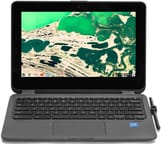 CTL Chromebook NL7TW-360 | |
| Price | List Price: $379.00 Amazon Prices: |
| Model number | NL7TW-360 |
| Performance Rating | 2.7 |
| Chromebook Plus | No |
| Processor | Quad-core 1.10 Ghz (max 2.20 Ghz) Intel Celeron Processor N3450 |
| RAM | 4 GB |
| Internal Storage | 32 GB eMMC |
| Screen Size | 11.6" |
| Screen Resolution | 1366x768 |
| Screen Type | IPS |
| Touch Screen | Yes |
| Stylus / Pen | Supported |
| Dimensions width x length x thickness | 12.13 x 8.27 x 0.78 inches (308.1 x 210.06 x 19.81 mm) |
| Weight | 2.8 lbs (1.27 kg) |
| Backlit Keyboard | No |
| Webcam | HD |
| WiFi | 802.11 a/b/g/n/ac (2x2) |
| Bluetooth | Bluetooth 4.0 |
| Ethernet | No |
| Cellular Modem | No |
| HDMI | No HDMI |
| USB Ports | 1 USB 3, 2 USB-C |
| Thunderbolt Ports | No |
| Card Reader | microSD Card Reader |
| Battery | unknown |
| Battery Life | 12.0 hours |
| Fanless | Yes |
| Auto Update Expiration Date | June, 2027 |
Related Chromebooks
-
 ASUS Chromebook Flip CR1The ASUS Chromebook Flip CR1 (CR1100FKA) is a rugged 11.6-inch education convertible on an Intel…
 -
 Acer Chromebook Spin 11 CP311The Acer Chromebook Spin 11 combines functionality and portability with its 11.6-inch touch IPS…
 -
 Lenovo Flex 3 ChromebookThe Lenovo Flex 3 Chromebook is a fanless 11.6-inch convertible with an IPS touchscreen, a MediaTek…
 -
 ASUS Chromebook Flip C214The ASUS Chromebook Flip C214 is a rugged 11.6-inch education convertible with an Intel Celeron…
 -
 Acer Chromebook 15The Acer Chromebook 15 stands out with a 15.6" FHD IPS touch display, backlit keyboard, and up to…
 -
 Samsung Chromebook Plus v2The Samsung Chromebook Plus v2 is a fanless 12.2-inch convertible Chromebook with an Intel Celeron…
An EMR Stylus in a Rugged 11.6-Inch Convertible
CTL sells technology to schools, and it positioned the NL7TW-360 as a premium education option. The Wacom EMR (Electro-Magnetic Resonance) digitizer is what earned that position. A passive stylus writes and draws directly on the screen, drawing its power from the display rather than from a battery, so there is nothing to charge and nothing to replace. That fits handwriting practice for younger students and the kind of math and science work where the answer is drawn rather than typed. A stylus slot in the chassis gives the pen a home, which matters in 1:1 programs where loose pens go missing.
The Intel Celeron N3450 is an Apollo Lake chip with four cores at a 1.1GHz base clock and 2.2GHz burst. That covers web browsing, Google Docs, educational apps, and video playback. The 4GB of LPDDR4 RAM works with Chrome OS memory management well enough for a class period, but many open tabs slow the machine noticeably. The 32GB eMMC drive matches typical education configurations and fills quickly once offline apps and files pile up, and the microSD card slot is the way to add room. Nothing spins inside, so there is no fan to fail and no noise during testing.
The 11.6-inch IPS touchscreen holds color and contrast when viewed off-axis, which matters when a group of students crowds around one device or a teacher reads a screen while walking the room. Resolution stops at 1366x768. The 360-degree hinge lays the panel flat for tablet mode, props it up in tent mode for watching educational videos, or stands it upright for sharing work. Build quality favors durability over looks: reinforced corners, a spill-resistant keyboard design, and a sturdy plastic chassis that takes the drops and bumps of student use.
Two USB-C ports handle charging, data transfer, and DisplayPort output to a classroom projector or monitor, and a single USB 3.0 Type-A port takes mice and flash drives. Wireless is 802.11ac with 2x2 MIMO plus Bluetooth 4.0, and wired networking needs a USB Ethernet adapter. The HD webcam and integrated microphone cover the video conferencing that remote learning came to depend on. Battery claims of 12 hours proved optimistic but not unrealistic; education use typically yields 8-10 hours depending on screen brightness and workload.
A Durable Classroom Machine That Runs Out of Speed
The Android Police review is titled “A decent Chromebook for clumsy students.” Reviewer Corbin Davenport noted that while the device wasn’t going to win any performance awards, it delivered exactly what schools needed: a durable, functional Chromebook with useful features like stylus support. The EMR digitizer received particular praise for enabling natural handwriting without the complexity of active stylus management. The review acknowledged the trade-offs inherent in education-focused devices: the display was merely adequate, the processor handled basic tasks well but struggled under load, and the build prioritized durability over sleekness.
Review coverage stayed thin. CTL sells primarily through education channels directly to schools and districts, rather than courting tech reviewers the way Acer, HP, and Lenovo do, so few writers ever had one on the desk to test.
Updates Run Out in June 2027
Released in 2018, the NL7TW-360 predates both the remote-learning surge and the Chromebook Plus certification that later raised the baseline for Chrome OS hardware. CTL shipped EMR stylus support when the larger manufacturers had not standardized it, and stylus support has since become common across education Chromebooks.
Chrome OS support was originally set to expire in November 2023, but Google extended it to June 2027, giving the board roughly nine years of updates from its 2018 release. Schools that deployed these devices got substantial use from their investment, and units still in service keep receiving security updates until that cutoff. After June 2027, a remaining unit should stay away from anything needing current security updates. Offline-only tasks, a Linux install through developer mode, or responsible electronics recycling are the options left.
Frequently Asked Questions
Is the CTL Chromebook NL7TW-360 still receiving Chrome OS updates?
Yes, for now. Google extended the Auto Update Expiration date to June 2027; it was originally November 2023. Until then, existing units still receive Chrome OS updates and security patches. After that date, keep the device away from online banking, sensitive accounts, and anything else that needs current security protections.
What type of stylus does the CTL Chromebook NL7TW-360 use?
Wacom EMR (Electro-Magnetic Resonance). The pen is passive: it draws power from the display’s electromagnetic field, so it never needs a battery or a charge and stays maintenance-free. Any EMR-compatible stylus works, not only the pen that shipped with the machine.
Can I upgrade the RAM or storage in the CTL Chromebook NL7TW-360?
No. The 4GB of RAM and 32GB eMMC storage are soldered to the motherboard and fixed. The microSD card slot is the only way to add space for files and media.
What can I do with a CTL Chromebook NL7TW-360 after its June 2027 support window?
Until June 2027 it still receives Chrome OS updates and works normally. After that Auto Update Expiration date, the useful options are offline tasks that need no security updates, a Linux install via developer mode for a more capable second life, duty as a dedicated machine for one low-risk job, or recycling through an electronics program. Once updates stop, avoid online banking, email with sensitive information, and other security-critical tasks.
How does the CTL Chromebook NL7TW-360 compare to modern education Chromebooks?
Current education Chromebooks offer faster processors, more RAM (often 8GB), larger storage, better displays, and Chrome OS support running through 2030 or later. EMR stylus support is no longer unusual, and Chromebook Plus certification now sets baseline quality standards. Schools replacing these units should look for an Auto Update Expiration date in 2030 or beyond.