
Dell Latitude 3445 Chromebook
Published on

The Dell Latitude 3445 Chromebook marks Dell’s first AMD-powered Chromebook, bringing the Mendocino processor family to the enterprise market. This 14-inch notebook targets business users who need a reliable ChromeOS device with extended software support through June 2033. Available in configurations ranging from entry-level AMD Athlon Silver to the more capable AMD Ryzen 5, the Latitude 3445 offers flexibility for organizations with varying performance requirements. The 16:10 aspect ratio display provides extra vertical space for productivity work, while dual USB-C ports with Power Delivery simplify docking and charging setups. Whether you’re deploying a fleet for classroom use or equipping a mobile workforce, the Latitude 3445 delivers the manageability and long-term support that IT departments prioritize.
Pros and Cons of the Dell Latitude 3445 Chromebook
| Pros | Cons |
|---|---|
| Extended ChromeOS support until June 2033 provides long-term value | Not Chromebook Plus certified despite meeting some specs |
| AMD Mendocino processors offer improved power efficiency on 6nm process | Entry-level configurations limited to 1366x768 resolution |
| 16:10 aspect ratio delivers extra vertical screen space for documents | No Thunderbolt ports limit high-speed peripheral options |
| FHD webcam supports better video conferencing than typical 720p | Business-focused distribution limits consumer availability |
| Optional fingerprint reader adds biometric security | Lower-tier Athlon variants have only 2 cores |
| Dual USB-C with Power Delivery enables flexible charging and docking | 3.37 lb weight is heavier than some competitors |
Dell Latitude 3445 Chromebook Comparison Chart
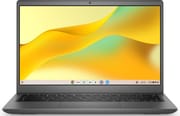 Dell Latitude 3445 Chromebook | Dell Latitude 3445 Chromebook | Dell Latitude 3445 Chromebook | Dell Latitude 3445 Chromebook | |
| Price | List Price: Amazon Prices: | List Price: Amazon Prices: | List Price: Amazon Prices: | List Price: Amazon Prices: |
| Model number | Latitude 3445 | Latitude 3445 | Latitude 3445 | Latitude 3445 |
| Performance Rating | 4.4 | 3.5 | 3.3 | 1.8 |
| Chromebook Plus | No | No | No | No |
| Processor | Quad-core 2.80 Ghz (max 4.30 Ghz) AMD Ryzen 5 7520C | Quad-core 2.40 Ghz (max 4.10 Ghz) AMD Ryzen 3 7320C | Dual-core 2.40 Ghz (max 3.70 Ghz) AMD Athlon Gold 7220C | Dual-core 2.40 Ghz (max 3.50 Ghz) AMD Athlon Silver 7120C |
| RAM | 16 GB | 8 GB | 8 GB | 4 GB |
| Internal Storage | 256 GB NVMe SSD | 128 GB eMMC | 64 GB eMMC | 32 GB eMMC |
| Screen Size | 14" | 14" | 14" | 14" |
| Screen Resolution | 1920x1200 | 1920x1200 | 1366x768 | 1366x768 |
| Screen Type | IPS | IPS | IPS | IPS |
| Touch Screen | Yes | No | No | No |
| Stylus / Pen | No Stylus Support | No Stylus Support | No Stylus Support | No Stylus Support |
| Dimensions width x length x thickness | 12.74 x 8.68 x 0.8 inches (323.6 x 220.47 x 20.32 mm) | 12.74 x 8.68 x 0.8 inches (323.6 x 220.47 x 20.32 mm) | 12.74 x 8.68 x 0.8 inches (323.6 x 220.47 x 20.32 mm) | 12.74 x 8.68 x 0.8 inches (323.6 x 220.47 x 20.32 mm) |
| Weight | 3.37 lbs (1.53 kg) | 3.37 lbs (1.53 kg) | 3.37 lbs (1.53 kg) | 3.37 lbs (1.53 kg) |
| Backlit Keyboard | Yes | Yes | Yes | Yes |
| Webcam | 1080p FHD | 1080p FHD | 1080p FHD | 1080p FHD |
| WiFi | Wi-Fi 6 (802.11ax) | Wi-Fi 6 (802.11ax) | Wi-Fi 6 (802.11ax) | Wi-Fi 6 (802.11ax) |
| Bluetooth | Bluetooth 5.2 | Bluetooth 5.2 | Bluetooth 5.2 | Bluetooth 5.2 |
| Ethernet | No | No | No | No |
| Cellular Modem | No | No | No | No |
| HDMI | Full-Size HDMI | Full-Size HDMI | Full-Size HDMI | Full-Size HDMI |
| USB Ports | 1 USB 3, 2 USB-C 2x USB-C 3.2 Gen 1 with Power Delivery and DisplayPort Alt Mode, 1x USB-A 3.2 Gen 1 with PowerShare | 1 USB 3, 2 USB-C 2x USB-C 3.2 Gen 1 with Power Delivery and DisplayPort Alt Mode, 1x USB-A 3.2 Gen 1 with PowerShare | 1 USB 3, 2 USB-C 2x USB-C 3.2 Gen 1 with Power Delivery and DisplayPort Alt Mode, 1x USB-A 3.2 Gen 1 with PowerShare | 1 USB 3, 2 USB-C 2x USB-C 3.2 Gen 1 with Power Delivery and DisplayPort Alt Mode, 1x USB-A 3.2 Gen 1 with PowerShare |
| Thunderbolt Ports | No | No | No | No |
| Card Reader | microSD Card Reader | microSD Card Reader | microSD Card Reader | microSD Card Reader |
| Battery | 54Wh, Li-ion | 54Wh, Li-ion | 54Wh, Li-ion | 54Wh, Li-ion |
| Battery Life | 15.75 hours | 15.75 hours | 15.75 hours | 15.75 hours |
| Fanless | No | No | No | No |
| Auto Update Expiration Date | June, 2033 | June, 2033 | June, 2033 | June, 2033 |
Related Chromebooks
-
 Dell Latitude 5430 Chromebook 2-in-1Elevate your productivity with the Dell Latitude 5430 Chromebook, featuring a high-resolution…
 -
 HP Chromebook 14a (2021)The HP Chromebook 14a combines a 14-inch BrightView touchscreen, HD webcam, and up to 14 hours of…
 -
 Acer Chromebook Spin 314 (2024)A 14-inch convertible Chromebook with a 16:10 WUXGA touch display, 360-degree hinge, and software…
 -
 Acer Chromebook Spin 314Meet the Acer Chromebook Spin 314: a budget-friendly powerhouse with a 14-inch responsive…
 -
 ASUS Chromebook CX9The ASUS Chromebook CX9 packs a punch with an 11th Gen Intel Core i7 processor, 16GB RAM, and 512GB…
 -
 ASUS Chromebook Flip CX1 (Touchscreen)The ASUS Chromebook Flip CX1 features a 14-inch Full HD 360-degree touchscreen, Intel Celeron N4500…
Detailed Insights into the Dell Latitude 3445 Chromebook

The Dell Latitude 3445 Chromebook measures 12.74 x 8.68 x 0.80 inches and weighs 3.37 pounds, placing it squarely in the mid-weight category for 14-inch notebooks. Dell’s enterprise build quality shows in the chassis construction, designed to withstand the rigors of daily business and educational use. The port selection covers most connectivity needs: two USB-C 3.2 Gen 1 ports with Power Delivery and DisplayPort Alt Mode on the sides, a USB-A 3.2 Gen 1 port with PowerShare for legacy peripherals, and a full-sized HDMI output for presentations. A microSD card reader handles expandable storage, while the 3.5mm combo jack works with standard headsets. For wired networking, users can connect a USB Ethernet adapter through the USB-A port.
The display configurations span a wide range depending on your budget and needs. Higher-end variants feature a 14-inch FHD+ (1920x1200) IPS panel with the taller 16:10 aspect ratio that’s become standard for productivity laptops. This resolution and aspect ratio provide comfortable viewing for documents, spreadsheets, and web browsing, with the extra vertical pixels reducing scrolling. The touchscreen option on the Ryzen 5 configuration adds versatility for Android apps and casual interaction. Budget-minded configurations drop to the older 1366x768 HD resolution, which feels cramped on a 14-inch panel and should be avoided for extended productivity work.
Under the hood, the AMD Mendocino processor family powers all Latitude 3445 variants. The top-tier AMD Ryzen 5 7520C delivers four Zen 2 cores with eight threads, clocking from 2.8 GHz base to 4.3 GHz boost, achieving approximately 8,104 on PassMark’s CPU benchmark. The Ryzen 3 7320C offers similar core counts but slightly lower clocks, while the Athlon Gold 7220C and Athlon Silver 7120C step down to just two cores for basic workloads. All Mendocino chips benefit from the modern 6nm manufacturing process and integrate AMD Radeon 610M graphics for everyday tasks. The 15-watt TDP rating helps balance performance with battery life, with Dell claiming up to 15.75 hours on a single charge from the 54Wh battery.
Connectivity includes WiFi 6 (802.11ax) wireless and Bluetooth 5.2 for modern peripheral support. The absence of WiFi 6E keeps costs down but means the device won’t take advantage of the newer 6GHz band. Storage options include NVMe SSD on the Ryzen 5 variant for faster performance, while lower configurations use eMMC storage that’s adequate but noticeably slower for large file operations. RAM configurations range from 4GB on the entry model to 16GB on the top spec, all using LPDDR5 memory that’s soldered and cannot be upgraded after purchase.
Reviewer Insights on the Dell Latitude 3445 Chromebook

About Chromebooks’ Perspective
About Chromebooks covered the surprise announcement of the Latitude 3445, highlighting Dell’s shift to AMD processors for the Chromebook market. The review notes that “newer AMD Ryzen processors” represent meaningful progress over prior AMD-based Chromebooks, with the 6nm process technology and low 15W TDP supporting better power efficiency. They emphasize the importance of avoiding the 1366x768 display option, calling out the inadequate pixel density on a 14-inch screen.
The publication compares the Latitude 3445 to earlier AMD Chromebooks like the Acer 315 and HP Pro c645, noting that previous AMD-powered Chromebooks “weren’t compelling” overall. This makes the Latitude 3445’s success dependent on competitive pricing relative to its enhanced specifications. The AMD Radeon 610M GPU capabilities exceed typical Chromebook graphics, which could benefit users running Android games or graphics-intensive web applications.
Industry Context
The Dell Latitude 3445 arrives at a time when enterprise customers are increasingly evaluating ChromeOS for fleet deployments. The June 2033 Auto Update Expiration date provides roughly ten years of software support, matching the longest support periods available in the Chromebook market. This extended lifecycle appeals to organizations planning multi-year device investments and wanting to minimize hardware refresh cycles.
The Mendocino processor family was specifically designed by AMD for the Chromebook market, combining older Zen 2 cores with modern manufacturing and integrated graphics. While not as powerful as mainstream laptop processors, the balanced approach prioritizes battery efficiency and consistent performance for typical ChromeOS workloads. The lack of Chromebook Plus certification on any configuration suggests Dell is positioning this primarily as a business device rather than competing directly with consumer-focused models that emphasize Google’s AI features.
Conclusion
The Dell Latitude 3445 Chromebook serves as a solid entry point for organizations seeking AMD-powered ChromeOS devices with long-term support. Its combination of modern Mendocino processors, a productivity-friendly 16:10 display, and robust connectivity makes it well-suited for education deployments, call centers, and general business use. The Ryzen 5 and Ryzen 3 configurations offer the best value, with the 16GB/256GB NVMe variant providing enough headroom for demanding multitasking.
That said, the entry-level Athlon configurations with their 2-core processors and 768p displays feel like they’re stretching the product line too thin. Users who need strong performance should avoid the Athlon variants entirely and step up to at least the Ryzen 3 model. The lack of Thunderbolt ports and Chromebook Plus certification may disappoint users seeking premium features, though these omissions keep costs competitive for bulk enterprise purchases.
For those comparing options, see our Chromebook Comparison Chart to find the best match for your needs.
Frequently Asked Questions
What processor options are available for the Dell Latitude 3445 Chromebook?
The Dell Latitude 3445 Chromebook offers four AMD Mendocino processor options: the AMD Ryzen 5 7520C (4 cores, 8 threads, up to 4.3 GHz), AMD Ryzen 3 7320C (4 cores, 8 threads, up to 4.1 GHz), AMD Athlon Gold 7220C (2 cores, 4 threads, up to 3.7 GHz), and AMD Athlon Silver 7120C (2 cores, 2 threads, up to 3.5 GHz). The Ryzen variants deliver the best performance for multitasking and demanding workloads.
How long will the Dell Latitude 3445 Chromebook receive ChromeOS updates?
The Dell Latitude 3445 Chromebook has an Auto Update Expiration (AUE) date of June 2033. This provides approximately ten years of ChromeOS security updates, feature releases, and bug fixes from its launch date, making it suitable for organizations planning extended device lifecycles.
Can I upgrade the RAM or storage in the Dell Latitude 3445 Chromebook?
No, the Dell Latitude 3445 Chromebook uses soldered LPDDR5 memory that cannot be upgraded after purchase. Storage is also not user-upgradeable. Choose your configuration carefully at purchase time, with 8GB or 16GB RAM being recommended for comfortable multitasking and the 256GB NVMe SSD for faster performance.
What ports does the Dell Latitude 3445 Chromebook have?
The Dell Latitude 3445 Chromebook includes two USB-C 3.2 Gen 1 ports with Power Delivery and DisplayPort Alt Mode for charging and external displays, one USB-A 3.2 Gen 1 port with PowerShare for legacy devices, a full-sized HDMI output, a microSD card reader, and a 3.5mm combo audio jack for headsets.
Is the Dell Latitude 3445 Chromebook a Chromebook Plus device?
No, the Dell Latitude 3445 Chromebook is not Chromebook Plus certified, despite the Ryzen 5 and Ryzen 3 configurations meeting many of Google’s Chromebook Plus requirements. This means it won’t include Google’s enhanced AI features like Magic Eraser and Help Me Write that come pre-loaded on Chromebook Plus devices.
What display options are available for the Dell Latitude 3445 Chromebook?
The Dell Latitude 3445 Chromebook offers two display resolutions: a 14-inch FHD+ (1920x1200) IPS panel with a 16:10 aspect ratio on the Ryzen configurations, and a 14-inch HD (1366x768) panel on the Athlon configurations. The FHD+ display is strongly recommended for productivity work, as the HD resolution feels cramped on a 14-inch screen.
Where can I buy the Dell Latitude 3445 Chromebook?
The Dell Latitude 3445 Chromebook is primarily sold through Dell’s enterprise channels to business and education customers. It’s also available at retailers like Best Buy. Individual consumers may find limited availability compared to Dell’s consumer Chromebook lineup, as this model targets IT department procurement rather than retail sales.