
HP Chromebook 11a (Intel)
Updated on

Note: Google extended Chrome OS support for this device to June 2027 (the original Auto Update Expiration was June 2024), so existing units still receive updates for now. The device is no longer sold new; the information below is kept as a historical reference and owner guide.
The HP Chromebook 11a (Intel) arrived in 2020 as an affordable entry point into the Chrome OS ecosystem, targeting students and casual users who needed a lightweight machine for basic productivity tasks. Powered by the Intel Celeron N3350 processor with 4GB of DDR4 memory and 32GB of eMMC storage, this 11.6-inch Chromebook delivered adequate performance for web browsing, document editing, and streaming media. HP positioned the 11a as a reliable companion for Google ecosystem services like Gmail, Drive, and Docs, where the lightweight Chrome OS could use cloud storage to compensate for limited local capacity. While overshadowed by its MediaTek-powered sibling that received more professional review attention, the Intel variant offered a familiar x86 architecture that some users preferred for compatibility reasons.
HP Chromebook 11a (Intel) Comparison Chart
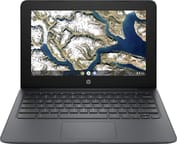 HP Chromebook 11a (Intel) | |
| Price | List Price: $219.99 Amazon Prices: |
| Model number | 11a-nb0013dx / #1N091UA |
| Performance Rating | 2.8 |
| Chromebook Plus | No |
| Processor | Dual-core 1.10 Ghz (max 2.40 Ghz) Intel Celeron N3350 |
| RAM | 4 GB |
| Internal Storage | 32 GB eMMC |
| Screen Size | 11.6" |
| Screen Resolution | 1366x768 |
| Screen Type | WLED-backlit anti-glare |
| Touch Screen | No |
| Stylus / Pen | No Stylus Support |
| Dimensions width x length x thickness | 12.05 x 8.19 x 0.71 inches (306.07 x 208.03 x 18.03 mm) |
| Weight | 2.99 lbs (1.36 kg) |
| Backlit Keyboard | No |
| Webcam | 720p HD |
| WiFi | 802.11 a/b/g/n/ac (2x2) |
| Bluetooth | Bluetooth 4.2 |
| Ethernet | No |
| Cellular Modem | No |
| HDMI | No HDMI |
| USB Ports | 2 USB 3, 2 USB-C (USB-C supports DisplayPort) |
| Thunderbolt Ports | No |
| Card Reader | microSD Card Reader |
| Battery | 2 cell, 47 Wh, Li-ion |
| Battery Life | 15.0 hours |
| Fanless | No |
| Auto Update Expiration Date | June, 2027 |
Related Chromebooks
-
 HP Chromebook 11a (ARM)The HP Chromebook 11a offers an 11.6-inch anti-glare display, 720p HD webcam, and up to 15 hours of…
 -
 Acer Chromebook 311 (AMD)The Acer Chromebook 311 (CB311-10H) is an 11.6-inch ChromeOS laptop on an AMD A4-9120C with 4GB of…
 -
 ASUS Chromebook C203XAThe ASUS Chromebook C203XA is a rugged 11.6-inch education laptop with a MediaTek MT8173C, an…
 -
 HP Chromebook 14 (AMD)The HP Chromebook 14 (AMD) is a fanless 14-inch Chromebook built on the AMD A4-9120C APU with…
 -
 Acer Chromebook 311 C723The Acer Chromebook 311 C723 is an 11.6-inch education Chromebook built to MIL-STD-810H durability,…
 -
 ASUS Chromebook Flip CR1The ASUS Chromebook Flip CR1 (CR1100FKA) is a rugged 11.6-inch education convertible on an Intel…
Detailed Insights into the HP Chromebook 11a (Intel)
The HP Chromebook 11a’s design prioritized portability over premium materials, resulting in a plastic chassis that kept weight to just under 3 pounds (1.36kg). This lightweight construction made the device portable for students carrying it between classes or users who needed a grab-and-go machine for coffee shop productivity. The Ash Gray color scheme gave it a professional appearance that avoided the cheap look of some budget competitors, though the all-plastic build did include some flex under pressure. HP’s ergonomic keyboard provided a comfortable typing experience for extended sessions, which mattered for a device positioned toward educational and productivity use cases.
Performance expectations should be calibrated to the Celeron N3350’s capabilities. This dual-core processor, running at 1.1GHz base with burst speeds up to 2.4GHz, paired with Intel HD Graphics 500 to handle basic tasks competently. LoBaratoSaleCaro’s testing (a Spanish-language review of the N3350 model) found the device suitable for everyday Chrome OS tasks like browsing the internet, messaging, and entertainment apps such as Netflix, while noting that graphics-intensive 3D applications would struggle. The eMMC storage, while slower than SSD alternatives, provided adequate read/write speeds for Chrome OS’s lightweight footprint. For users whose workflow centered on Google services and browser-based applications, the 11a delivered responsive performance within its intended use case.
Battery life represented one of the HP Chromebook 11a’s genuine strengths, with HP claiming up to 15 hours of mixed usage on a single charge. Real-world testing typically showed 11-13 hours for standard web browsing and productivity tasks, which still exceeded most competitors in this price range. The 47Wh 2-cell lithium-ion battery meant students could realistically leave their charger at home for a full school day without anxiety. This all-day capability, combined with the lightweight design and affordable price point, made the 11a a practical choice for users who valued portability and endurance over raw performance.
Connectivity options served basic needs without frills. Two USB-C ports (supporting DisplayPort for external monitors) and two USB 3.0 Type-A ports provided adequate expansion for peripherals. The lack of HDMI meant users needed a USB-C adapter for most projectors and older displays, a minor inconvenience for classroom presentations. Users who needed wired networking could add it with a USB Ethernet adapter. WiFi 5 (802.11ac) with 2x2 MIMO antennas delivered reliable wireless performance, while Bluetooth 4.2 handled accessories like wireless mice or headphones. A microSD card reader offered storage expansion for those needing to supplement the limited 32GB internal capacity, and the combination headphone/microphone jack covered audio needs.
Reviewer Insights on the HP Chromebook 11a (Intel)
Professional review coverage for the Intel Celeron N3350 variant of the HP Chromebook 11a proved challenging to locate, as most major publications reviewed the MediaTek MT8183 version instead. This created an unusual situation where consumers choosing the Intel variant had limited independent testing to reference before purchase.
LoBaratoSaleCaro Analysis
The Spanish technology publication LoBaratoSaleCaro provided one of the few verified reviews specifically covering the Intel N3350 variant (model 11a-nb0000ns, European equivalent of the US 11a-nb0013dx). Their testing awarded the device a solid 3.8/5 editor’s score, praising its optimal performance for the adjusted price that made it attractive for budget-conscious buyers. The review highlighted the ergonomic keyboard design, extended battery autonomy, and DDR4 memory as notable positives, while acknowledging the eMMC storage limitations and lack of dedicated graphics as acceptable trade-offs at the price point. Their verdict positioned the 11a as a device for users who primarily work within Google’s ecosystem and don’t require local processing power beyond basic tasks.
Historical Context and Market Position
The HP Chromebook 11a Intel variant launched into a crowded budget Chromebook market in 2020, competing against models from Acer, Lenovo, and Samsung at similar price points. HP’s decision to offer both Intel and MediaTek processor options gave consumers a choice between familiar x86 architecture and ARM-based efficiency. The Intel variant appealed to users who anticipated needing Linux app compatibility (x86 applications ran more reliably than on ARM chips) or who simply preferred the known quantity of Intel processors. Google extended Chrome OS support for this board (model 11a-nb0) to June 2027 from its original June 2024 date, so existing units keep updating for now, even as the device represents a snapshot of the affordable Chromebook segment during the pandemic-era surge in remote learning and working from home.
For those curious about how this device stacks up against current models, the Chromebook Comparison Chart lets you filter and sort the full catalog by specs, price, and features.
Frequently Asked Questions
What is the difference between the HP Chromebook 11a Intel and MediaTek versions?
The HP Chromebook 11a came in two processor variants: the Intel Celeron N3350 (model numbers starting with 11a-nb) and the MediaTek MT8183 (model numbers starting with 11a-na). The Intel version offered x86 compatibility for better Linux app support, while the MediaTek version used ARM architecture with potentially better power efficiency. Both shared the same 11.6-inch display, 4GB RAM, and 32GB storage configuration.
Is the HP Chromebook 11a still supported by Google?
For now, yes. Google extended the HP Chromebook 11a (Intel, model 11a-nb0) Auto Update Expiration to June 2027 (it was originally June 2024). Until then, existing units still receive Chrome OS security updates. After June 2027 the device stops receiving updates, and using an out-of-support Chromebook then carries security risks for sensitive activities like online banking.
Can you upgrade the RAM or storage on the HP Chromebook 11a?
No, both the RAM and storage are soldered to the motherboard and cannot be upgraded. The device is fixed at 4GB of DDR4 memory and 32GB of eMMC storage. Users can expand storage using the built-in microSD card reader for photos, documents, and media files, though Chrome OS apps and Android apps must remain on internal storage.
Does the HP Chromebook 11a have a touchscreen?
No, the HP Chromebook 11a (Intel) model 11a-nb0013dx does not include a touchscreen. It features a standard WLED-backlit anti-glare display with 1366x768 resolution. Some MediaTek variants of the 11a line did include touchscreen options, so buyers should verify the specific model number before purchase.
What ports does the HP Chromebook 11a have?
The HP Chromebook 11a (Intel) includes two USB-C ports (with DisplayPort support for external monitors), two USB 3.0 Type-A ports, a microSD card reader, and a combination headphone/microphone jack. It does not have HDMI, Ethernet, or Thunderbolt ports. USB-C adapters are required for connecting to projectors or older displays with HDMI inputs.
Can you run Linux on the HP Chromebook 11a?
Yes, the HP Chromebook 11a supports Linux apps through Chrome OS’s built-in Linux development environment (Crostini). The Intel Celeron N3350 processor provides x86 architecture, which means better compatibility with Linux applications compared to ARM-based Chromebooks. Chrome OS support runs through June 2027; after that, users may want to consider installing a full Linux distribution for continued security updates.