
HP Chromebook 15 (15a-na2)
Updated on

The HP Chromebook 15 (15a-na2) is a budget-friendly laptop that punches above its weight class. Powered by the Intel Processor N200 and sporting 8GB of DDR5 RAM, this Chromebook offers snappy performance for everyday tasks like web browsing, document editing, and streaming. The standout feature is its generous 15.6-inch display paired with a full-size keyboard complete with numeric keypad, making it particularly appealing for spreadsheet work, data entry, or anyone who appreciates the extra screen real estate without spending a fortune. At around $229, it represents solid value for students, remote workers, and casual users who want a no-fuss computing experience.
Pros and Cons of the HP Chromebook 15 (15a-na2)
| Pros | Cons |
|---|---|
| Full numeric keypad for productivity work | HD display looks stretched on 15.6-inch screen |
| Excellent keyboard and trackpad feel | No HDMI port for external displays |
| DDR5 memory outperforms typical DDR4 Chromebooks | 64GB eMMC storage fills up quickly |
| USB-C ports on both sides for convenient charging | All-plastic build feels less premium |
| 10+ hour battery life for all-day use | 250-nit display can feel dim in bright rooms |
| Fanless design means silent operation | No keyboard backlighting |
Related Videos
HP Chromebook 15 (15a-na2) Comparison Chart
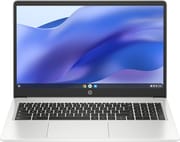 HP Chromebook 15 (15a-na2) | |
| Price | List Price: $229 Amazon Prices: Loading prices... |
| Model number | --- |
| Performance Rating | 4.9 |
| Chromebook Plus | No |
| Processor | Quad-core 3.70 Ghz (max 3.70 Ghz) Intel Processor N200 |
| RAM | 8 GB |
| Internal Storage | 64 GB eMMC |
| Screen Size | 15.6" |
| Screen Resolution | 1366x768 |
| Screen Type | SVA antiglare |
| Touch Screen | No |
| Stylus / Pen | No Stylus Support |
| Dimensions width x length x thickness | 14.28 x 9.51 x 0.71 inches (362.71 x 241.55 x 18.03 mm) |
| Weight | 3.75 lbs (1.7 kg) |
| Backlit Keyboard | No |
| Webcam | 720p HD |
| WiFi | Wi-Fi 5 (802.11ac) |
| Bluetooth | Bluetooth 5.0 |
| Ethernet | No |
| Cellular Modem | No |
| HDMI | No HDMI |
| USB Ports | 1 USB 3, 2 USB-C USB-C ports support Power Delivery and DisplayPort 1.4 |
| Thunderbolt Ports | No |
| Card Reader | microSD Card Reader |
| Battery | 2 cell, 47Wh, Li-ion Polymer |
| Battery Life | 10+ hours |
| Fanless | Yes |
| Auto Update Expiration Date | June, 2031 |
Related Chromebooks
-
 Samsung Chromebook 4+The Samsung Chromebook 4+ offers a vivid 15.6" FHD LED display, 10.5 hours of battery life, fanless…
 -
 Acer Chromebook 715The Acer Chromebook 715 boasts a 15.6-inch full-HD IPS display, a backlit keyboard, and up to 11…
 -
 HP Chromebook 14a (ne Series)The HP Chromebook 14a (ne Series) is a budget-friendly 14-inch notebook powered by the Intel…
 -
 Lenovo 3i ChromebookThe Lenovo 3i Chromebook offers a large 15.6-inch anti-glare FHD display with a numeric keypad,…
 -
 Lenovo IdeaPad 3i ChromebookA budget-friendly 15.6" Chromebook featuring a Full HD display, Intel Celeron N4500 processor, and…
 -
 Acer Chromebook 15 315The Acer Chromebook 15 315 combines a comfortable 15.6'' ComfyView display and fanless design for…
Detailed Insights into the HP Chromebook 15 (15a-na2)

The HP Chromebook 15 (15a-na2) embraces a practical, no-nonsense design philosophy that prioritizes functionality over flashiness. The all-plastic chassis in Natural Silver keeps the weight down to a manageable 3.75 pounds despite the larger form factor, making it reasonably portable for a 15.6-inch machine. The build quality feels sturdy enough to handle daily use and the occasional bump, which reviewers note makes it suitable for students who may not always treat their devices with care. HP has thoughtfully placed USB-C ports on both sides of the chassis, allowing for flexible positioning when charging or connecting peripherals.
Performance from the Intel Processor N200 delivers responsive handling for typical Chromebook workloads. The processor, paired with 8GB of DDR5-4800 memory, provides enough headroom to keep multiple browser tabs open alongside Google Docs or Sheets without noticeable lag. Scott from Scott The IT Guy was notably impressed, stating “I am surprised and shocked how fast this laptop actually is” and comparing it favorably to more expensive business laptops. The fanless design means completely silent operation, which students and library dwellers will appreciate.
Connectivity options cover the essentials without going overboard. You get two USB-C 3.2 Gen 1 ports with Power Delivery and DisplayPort support, one USB-A 3.2 port, a microSD card reader, and a headphone/microphone combo jack. The notable omission is an HDMI port, meaning you will need a USB-C adapter or hub to connect to external monitors or projectors, and a USB ethernet adapter for wired networking. WiFi 5 (802.11ac) and Bluetooth 5.0 handle wireless duties reliably, with reviewers praising the strong signal reception and consistent performance.
Reviewer Insights on the HP Chromebook 15 (15a-na2)

Chrome Unboxed’s Perspective
Chrome Unboxed provided detailed coverage of the HP Chromebook Plus variant in the 15a series. Robby Payne highlighted the excellent keyboard as a standout feature, noting “If you decide to pick up this Chromebook Plus model for its larger size and its excellent key framing and keyboard layout, I just don’t think you’re going to be disappointed.” However, he expressed frustration with the display brightness, commenting “Seriously, please give us 300 nits” in reference to the dim 250-nit panel. The review praised the dual speakers as better than average for the category while acknowledging that the all-plastic construction makes the MSRP harder to justify at full price.
Scott The IT Guy’s Perspective
Scott The IT Guy offered a refreshingly candid take from someone who typically works with high-end business laptops and generally avoids Chromebooks. He was genuinely surprised by the overall quality, stating “It feels like a $500, $600 laptop. It doesn’t feel cheap at all.” His most effusive praise went to the audio system: “The speaker system built into this laptop is absolutely amazing.” Scott also noted exceptional WiFi performance, claiming “This laptop outperforms my [business class] laptop. The signal strength is higher, the speed is higher.” His recommendation was enthusiastic for anyone finding it on sale under $200.
According to NotebookCheck, the HP Chromebook 15a series represents a “bare minimum internet machine for students and casual surfers” with the publication giving it a 77.2% rating. They praised the sturdy construction suitable for student use and the stable WiFi performance, while criticizing the dated display technology and lack of keyboard backlighting. The review emphasized that the device “makes significant hardware compromises to maintain its low price point” but acknowledged it succeeds at its primary mission of affordable internet access.
About Chromebooks noted that while the base model’s 1366x768 resolution “isn’t going to look crisp at all” when spread across the 15.6-inch panel, the DDR5 memory represents “a win over typical DDR4 found in competing Chromebooks.” Kevin Tofel’s coverage highlighted the privacy shutter on the webcam and convenient USB-C placement as thoughtful features.
Customer Reviews of the HP Chromebook 15 (15a-na2)
Amazon customers have responded positively to the HP Chromebook 15 (15a-na2), awarding it a 4.4-star rating across over 4,000 reviews. The most common praise centers on the impressive value proposition, with buyers repeatedly expressing surprise at the build quality and performance relative to the sub-$230 price point. Students and their parents frequently mention the laptop holding up well to daily academic use, while seniors appreciate the larger display and full keyboard layout making it easier to work with documents and spreadsheets.
Common complaints tend to focus on the limited 64GB storage, with users recommending cloud storage or an SD card for those planning to store media locally. Some buyers were initially disappointed by the HD resolution but note that text remains readable for document work. A few reviewers mention wishing the display were brighter for outdoor or window-adjacent use, echoing the professional reviews. The overall sentiment suggests customers find the tradeoffs acceptable given the affordable price, with many highlighting that it does exactly what a budget Chromebook should do without unnecessary complications.
Conclusion
The HP Chromebook 15 (15a-na2) hits a sweet spot for budget-conscious buyers who want a larger screen and proper keyboard without the premium price tag. It excels as a student laptop, secondary home computer, or travel companion for anyone whose computing needs center on web browsing, productivity apps, and media streaming. The full numeric keypad, silent fanless operation, and all-day battery life make it particularly well-suited for spreadsheet jockeys and remote workers who prioritize practicality over aesthetics.
This Chromebook is less ideal for creative professionals, power users, or anyone who needs to connect to external displays frequently without an adapter. The HD resolution can look soft on the 15.6-inch panel, and the 64GB storage will require cloud-based workflows or careful media management. For those looking to compare options, Starry Hope’s Chromebook Comparison Chart provides a valuable resource for weighing alternatives at various price points.
Frequently Asked Questions
How long will the HP Chromebook 15 (15a-na2) receive updates?
The HP Chromebook 15 (15a-na2) will receive Chrome OS automatic updates until June 2031, giving you approximately 5 more years of security patches, feature updates, and ongoing support from Google.
Can I connect the HP Chromebook 15 (15a-na2) to an external monitor?
Yes, you can connect to external monitors using either of the two USB-C ports, which support DisplayPort 1.4 output. However, there is no dedicated HDMI port, so you will need a USB-C to HDMI adapter or hub for HDMI-only monitors or projectors.
Is the storage expandable on the HP Chromebook 15 (15a-na2)?
The 64GB eMMC internal storage is not user-upgradeable, but you can expand storage using the built-in microSD card reader. Many users add a 128GB or 256GB microSD card to store photos, videos, and downloaded media while keeping the internal storage free for apps and Chrome OS.
Does the HP Chromebook 15 (15a-na2) have a touchscreen?
No, the HP Chromebook 15 (15a-na2) features a standard non-touch display. This helps keep the price down and reduces weight, but means you cannot use touch-based Android apps or draw directly on the screen.
Can I run Linux apps on the HP Chromebook 15 (15a-na2)?
Yes, the HP Chromebook 15 (15a-na2) supports Linux apps through Chrome OS’s Linux development environment (Crostini). This allows you to install and run Linux applications alongside your Chrome apps, useful for developers or users who need access to specific Linux software.
Is the HP Chromebook 15 (15a-na2) good for students?
Yes, the HP Chromebook 15 (15a-na2) is well-suited for students. The large 15.6-inch screen makes document work comfortable, the full keyboard with numeric keypad helps with math assignments and spreadsheets, and the sturdy build handles daily backpack transport. The 10+ hour battery lasts through a full school day, and the affordable price point makes it accessible for education budgets.
What type of charger does the HP Chromebook 15 (15a-na2) use?
The HP Chromebook 15 (15a-na2) charges via USB-C with Power Delivery (PD). It comes with a 45W USB-C charger, but you can also use third-party USB-C PD chargers. Both USB-C ports on the laptop support charging, so you can plug in from either side.