
HP Chromebook x360 11 G3 EE
Updated on

Note: The HP Chromebook x360 11 G3 EE is no longer available for purchase new. This page is maintained for historical reference and to help owners of this device.
When HP announced the Chromebook x360 11 G3 EE at CES 2020, it represented the company’s most durability-focused education Chromebook to date. Built specifically for the demanding K-12 classroom environment, this 11.6-inch convertible 2-in-1 was designed to survive drops, spills, and the general rough handling that comes with daily student use. The “EE” designation stands for Education Edition, and HP delivered on that promise with MIL-STD-810H certification, a spill-resistant keyboard, and anchored keys resistant to curious fingers. While not flashy or powerful by consumer standards, the x360 11 G3 EE exemplified the practical, rugged approach that has made HP a dominant force in K-12 Chromebook deployments.
| Pros | Cons |
|---|---|
| MIL-STD-810H durability with 76cm drop test on concrete | Budget HD resolution (1366x768) appears dated |
| 360-degree hinge enables laptop, tablet, tent, and stand modes | Intel Celeron N4120 offers basic performance only |
| Spill-resistant keyboard handles up to 350ml of liquid | No HDMI port limits presentation options |
| Dual cameras: 720p webcam and 5MP world-facing for collaboration | Relatively thick and heavy for an 11-inch device |
| 11-hour battery life suits full school days | Storage limited to 64GB eMMC with no upgrade path |
| Fanless silent operation ideal for quiet classrooms | Stylus support optional and sold separately |
Related Videos
HP Chromebook x360 11 G3 EE Comparison Chart
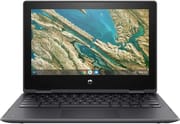 HP Chromebook x360 11 G3 EE | |
| Price | List Price: $399.99 Amazon Prices: |
| Model number | 1A769UT#ABA |
| Performance Rating | 5.4 |
| Chromebook Plus | No |
| Processor | Quad-core 1.10 Ghz (max 2.60 Ghz) Intel Celeron Processor N4120 |
| RAM | 8 GB |
| Internal Storage | 64 GB eMMC |
| Screen Size | 11.6" |
| Screen Resolution | 1366x768 |
| Screen Type | IPS |
| Touch Screen | Yes |
| Stylus / Pen | No Stylus Support |
| Dimensions width x length x thickness | 11.61 x 8.08 x 0.82 inches (294.89 x 205.23 x 20.83 mm) |
| Weight | 3.19 lbs (1.45 kg) |
| Backlit Keyboard | Yes |
| Webcam | 720p webcam and 5 MP camera world-facing |
| WiFi | 802.11 a/b/g/n/ac (2x2) |
| Bluetooth | Bluetooth 5.0 |
| Ethernet | No |
| Cellular Modem | No |
| HDMI | No HDMI |
| USB Ports | 2 USB 3, 2 USB-C |
| Thunderbolt Ports | No |
| Card Reader | microSD Card Reader |
| Battery | 2 cell, 47 Wh, Li-ion polymer |
| Battery Life | 11.0 hours |
| Fanless | Yes |
| Auto Update Expiration Date | June, 2029 |
Related Chromebooks
-
 ASUS Chromebook Flip C214The ASUS Chromebook Flip C214 combines versatility with a 360° hinge, 11.6-inch anti-glare…
 -
 Acer Chromebook 311Dive into productivity with the Acer Chromebook 311—an 11.6-inch HD touchscreen laptop packing an…
 -
 Acer Chromebook Spin 311The Acer Chromebook Spin 311 offers an 11.6-inch HD touch display, versatile 360-degree hinge, and…
 -
 HP Chromebook 11a (ARM)The HP Chromebook 11a offers an 11.6-inch anti-glare display, 720p HD webcam, and up to 15 hours of…
 -
 Lenovo 300e Yoga Chromebook Gen 4The Lenovo 300e Yoga Chromebook Gen 4 shines with a MediaTek Kompanio 520 processor, up to 16 hours…
 -
 ASUS Chromebook Flip CX5 (CX5400)Maximize productivity with the ASUS Chromebook Flip CX5, boasting a versatile touchscreen, backlit…
Built for the Classroom
The HP Chromebook x360 11 G3 EE was designed from the ground up for educational environments where durability matters more than cutting-edge specifications. HP’s engineers focused on the specific challenges faced in K-12 classrooms: devices that get dropped, drinks that get spilled, and keys that get pried off by bored students. The result was a Chromebook that could genuinely withstand the rigors of daily student use while remaining affordable enough for district-wide deployment.
The MIL-STD-810H certification wasn’t just marketing speak—HP tested this device to survive 76cm (30-inch) drops onto concrete and 122cm (48-inch) drops onto plywood, simulating falls from desk height onto both hard floors and classroom carpeting. The reinforced rubber bumpers around the chassis absorbed impact energy, while Corning Gorilla Glass 3 protected the touchscreen from scratches and minor impacts. The power port received special reinforcement to prevent damage from students tripping over charging cables, a surprisingly common classroom issue.
Hardware and Performance
The Intel Celeron N4120 processor inside the x360 11 G3 EE was never going to win any benchmark awards. This quad-core chip with its integrated UHD 600 graphics delivered adequate performance for educational web applications, Google Classroom, and basic Android apps. Students running multiple Chrome tabs with Google Docs, educational videos, and learning management systems would find the 8GB of RAM sufficient for typical classroom workflows. The 64GB eMMC storage, while modest, proved adequate given Chrome OS’s cloud-centric design and the availability of Google Drive storage for student work.
The 11.6-inch HD IPS touchscreen with 1366x768 resolution showed its age even at launch. While the IPS panel provided decent viewing angles for group work and the touch capability enabled intuitive tablet-mode interaction, the relatively low resolution meant text appeared less crisp than on higher-end devices. For elementary school students, this rarely mattered. For high school students doing more text-intensive work, the display’s limitations became more apparent.
Connectivity and Ports
HP equipped the x360 11 G3 EE with a practical selection of ports for educational use. Two USB-C ports (one on each side) handled charging and data transfer, ensuring students could plug in from either direction regardless of desk arrangement. The reinforced design of these ports addressed a common failure point in student Chromebooks. Two USB 3.1 Gen 1 Type-A ports accommodated mice, flash drives, and other peripherals without requiring adapters. Schools needing wired network access could connect a USB Ethernet adapter to one of the USB-A ports. The absence of HDMI meant teachers needed USB-C adapters for projector connections, a minor inconvenience in presentation scenarios.
Wireless connectivity included 802.11ac Wi-Fi with 2x2 MIMO and Bluetooth 5.0, providing reliable connection to school networks. The microSD card slot offered a simple way to expand storage, useful for students working with larger media files. The combo headphone/microphone jack supported both personal audio and headsets for video calls—increasingly important as remote and hybrid learning became more common.
Education-Specific Features
The dual camera setup reflected HP’s understanding of modern educational needs. The front-facing 720p webcam handled video conferencing adequately, while the 5MP world-facing camera on the keyboard deck enabled students to capture whiteboard notes, document experiments, or photograph reference materials. When folded into tablet mode, this rear camera became a convenient tool for classroom documentation.
HP’s anchored keyboard design prevented students from removing keycaps, addressing a surprisingly common vandalism issue in schools. The full-size keyboard with 1.5mm key travel provided a reasonable typing experience for developing typists, while the spill-resistant design channeled up to 350ml (nearly 12 ounces) of liquid away from internal components—enough to survive a knocked-over water bottle or juice box.
Battery Life and Reliability
The 47Wh battery consistently delivered on HP’s 11-hour claim in real classroom conditions. Students could unplug at the start of the school day and have power remaining when they returned home. HP’s Fast Charge technology provided an added convenience: 90% charge in 90 minutes when the device was powered off, useful for quick top-ups during lunch periods.
The fanless thermal design meant silent operation—no fan noise to distract during quiet reading time or testing. This passively cooled approach did mean the chassis could become warm during sustained workloads, but temperatures remained comfortable for lap use in typical educational scenarios.
Support Timeline
Chrome OS updates for the HP Chromebook x360 11 G3 EE continue through June 2029, providing security patches and new features for several more years. Schools that deployed these devices at launch have enjoyed and will continue to enjoy a long software support window, maximizing the return on their technology investment.
Frequently Asked Questions
Can I still buy an HP Chromebook x360 11 G3 EE?
The HP Chromebook x360 11 G3 EE is no longer available new from retailers. As an Education Edition device, it was primarily sold through school procurement channels rather than consumer retail. You may find refurbished units through educational technology resellers or secondary markets.
How long will my HP Chromebook x360 11 G3 EE receive updates?
The HP Chromebook x360 11 G3 EE will receive Chrome OS updates until June 2029. After this Auto Update Expiration (AUE) date, the device will continue to function but will no longer receive security updates or new features from Google.
Is the HP Chromebook x360 11 G3 EE good for students?
The x360 11 G3 EE was specifically designed for students, particularly in elementary and middle school. Its durability features (MIL-STD-810H certification, spill-resistant keyboard, anchored keys) make it well-suited for younger users. The 360-degree hinge allows tablet mode for reading and drawing. However, older students doing more intensive work might find the HD resolution and Celeron processor limiting.
Can you upgrade the RAM or storage on the HP Chromebook x360 11 G3 EE?
No, the HP Chromebook x360 11 G3 EE’s RAM and storage are soldered to the motherboard and cannot be upgraded. The device comes with 8GB of RAM and 64GB of eMMC storage. Users needing more storage can use the microSD card slot for expansion.
Does the HP Chromebook x360 11 G3 EE support a stylus?
The HP Chromebook x360 11 G3 EE does not include a stylus. The touchscreen works with basic capacitive styluses for navigation and simple input, though without pressure sensitivity or palm rejection. For active pen support with drawing and handwriting capabilities, consider Chromebooks specifically designed with USI or EMR digitizer support.
What is MIL-STD-810H certification?
MIL-STD-810H is a U.S. military standard for testing equipment durability. For the HP Chromebook x360 11 G3 EE, this means the device passed drop tests (76cm onto concrete, 122cm onto plywood), vibration tests, and various environmental stress tests. This certification doesn’t guarantee the device won’t break, but indicates it’s been designed and tested to handle rough treatment better than typical consumer laptops.