
Lenovo Chromebook 500e (2nd Gen)
Updated on

Note: This product is discontinued and no longer sold new, but Google extended its Auto Update Expiration to June 2029 (the original date was June 2025), so existing units still receive Chrome OS updates for now. Extended-support updates may reduce Android app support. The information below is kept for historical reference and as an owner guide.
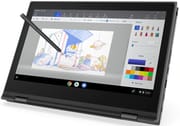
Lenovo built the Chromebook 500e (2nd Gen) for the classroom, pairing rugged construction with features aimed at K-12 deployments. The 11.6-inch convertible carried MIL-STD-810G military-grade durability certification, rated to survive drops from desk height. Its 360-degree hinge gave four usage modes (laptop, tablet, tent, and stand), and the included EMR stylus wrote and drew without needing battery power. An Intel Celeron N4100 quad-core processor covered educational apps, web research, and Google Workspace, with battery life that lasted through a full school day.
| Pros | Cons |
|---|---|
| MIL-STD-810G certified rugged construction survives 75cm drops (Trusted Reviews) | 1366×768 resolution feels cramped on 11.6-inch display |
| Included EMR stylus with excellent digitizer responsiveness | Chunky bezels give dated aesthetic appearance |
| 360-degree convertible hinge enables four usage modes | Keyboard and trackpad quality below average |
| 10-hour battery life delivers full-day classroom use | Low-quality speakers with thin audio output |
| Decent quad-core Celeron N4100 performance for basic tasks | Limited 32GB storage fills quickly |
| Good port selection with 2× USB-C and 2× USB 3.0 | 2.68 lbs behind an 11.6-inch screen |
Lenovo Chromebook 500e (2nd Gen) Comparison Chart
 Lenovo Chromebook 500e (2nd Gen) | |
| Price | List Price: $369.99 Amazon Prices: |
| Model number | 81MC000GUS |
| Performance Rating | 2.7 |
| Chromebook Plus | No |
| Processor | Quad-core 1.10 Ghz (max 2.60 Ghz) Intel Celeron N4100 Processor |
| RAM | 4 GB |
| Internal Storage | 32 GB eMMC |
| Screen Size | 11.6" |
| Screen Resolution | 1366x768 |
| Screen Type | IPS |
| Touch Screen | Yes |
| Stylus / Pen | Supported |
| Dimensions width x length x thickness | 11.41 x 8.03 x 0.8 inches (289.81 x 203.96 x 20.32 mm) |
| Weight | 2.68 lbs (1.22 kg) |
| Backlit Keyboard | No |
| Webcam | 720p |
| WiFi | 802.11ac (2x2) |
| Bluetooth | Bluetooth 4.2 |
| Ethernet | No |
| Cellular Modem | No |
| HDMI | No HDMI |
| USB Ports | 2 USB 3, 2 USB-C |
| Thunderbolt Ports | No |
| Card Reader | microSD Card Reader |
| Battery | 3 cell, 42 WHr, Li-Polymer |
| Battery Life | 10.0 hours |
| Fanless | Yes |
| Auto Update Expiration Date | June, 2029 |
Related Chromebooks
-
 Lenovo Flex 3 ChromebookThe Lenovo Flex 3 Chromebook is a fanless 11.6-inch convertible with an IPS touchscreen, a MediaTek…
 -
 Acer Chromebook Spin 11 CP311The Acer Chromebook Spin 11 combines functionality and portability with its 11.6-inch touch IPS…
 -
 Lenovo 300e Yoga Chromebook Gen 4The Lenovo 300e Yoga Chromebook Gen 4 is a rugged 11.6-inch education convertible with a MediaTek…
 -
 Acer Chromebook 311An 11.6-inch Chromebook with an Intel Celeron N4000, 4GB of RAM, a fanless chassis, and up to 10…
 -
 ASUS Chromebook Flip CR1The ASUS Chromebook Flip CR1 (CR1100FKA) is a rugged 11.6-inch education convertible on an Intel…
 -
 Samsung Chromebook Plus v2The Samsung Chromebook Plus v2 is a fanless 12.2-inch convertible Chromebook with an Intel Celeron…
A rugged convertible built around a battery-free pen
Lenovo engineered the device to pass MIL-STD-810G military-grade testing, which meant it could survive falls from approximately 75cm, roughly the height of a typical school desk. The rubberized edges absorbed impact, while the reinforced ports and hinges resisted the wear of daily plugging and unplugging.
Inside sat an Intel Celeron N4100 quad-core processor, running at a base frequency of 1.1GHz with burst speeds up to 2.4GHz. Chrome OS’s lightweight nature meant the 4GB of RAM rarely felt limiting for typical student tasks: Google Docs, Classroom, research in Chrome tabs, and educational web apps all ran smoothly. The 32GB eMMC storage suited an operating system that emphasizes cloud storage, though teachers and IT administrators needed to educate students about file management and Google Drive usage.
Color reproduction and viewing angles from the 11.6-inch IPS touchscreen held up for a convertible that might be viewed from various orientations. The 1366×768 resolution looked dated compared to higher-resolution panels available in 2019, and the chunky bezels surrounding the display contributed to the industrial rather than consumer aesthetic. The touchscreen itself responded accurately, supporting Chrome OS gestures and Android app navigation. An EMR (Electro-Magnetic Resonance) stylus garaged neatly in the body and provided pressure-sensitive input without needing batteries, so students could take handwritten notes and annotate worksheets.
Two USB-C ports handled charging and data transfer, while two USB 3.0 Type-A ports maintained compatibility with common peripherals like mice and flash drives. The microSD card slot allowed storage expansion for offline files, and the 3.5mm audio jack supported headphones for individual learning activities. A USB Ethernet adapter could be connected through the USB-A ports for wired networking in testing environments. A 720p front-facing webcam enabled video calls, while a 5MP world-facing camera mounted near the keyboard allowed students to photograph documents, science experiments, or artwork for incorporation into digital projects.
Reviewer Insights
Trusted Reviews’ Assessment
Trusted Reviews awarded the Lenovo 500e Chromebook 2nd Gen 4 out of 5 stars, describing it as “a budget-friendly Chromebook that’s ideal for children thanks to its rugged and sturdy build.” Ryan Jones praised the durability credentials: “Lenovo states that device is compliant with MIL-STD-810G military-grade testing, and should survive falls of 75cm, roughly the height of a school desk.” The reviewer found the 2-in-1 design useful, noting that the 360-degree hinge and included stylus make it “a great option for those who like to doodle and sketch on the touchscreen.”
The keyboard and trackpad quality fell below the reviewer’s expectations, and the speakers produced thin audio. The design was described as utilitarian rather than attractive, with “chunky bezels” and an overall aesthetic suited more to durability than style. At its original price point of approximately £360/$370, Trusted Reviews concluded the 500e represented “solid value for budget-conscious families prioritizing durability over performance.”
On performance, Jones wrote that “since ChromeOS has been designed specifically for low-powered chips, the Lenovo 500e Chromebook 2nd Gen still runs perfectly fine” despite the modest Celeron specifications. Battery life matched Lenovo’s 10-hour claim, and “My own results backed up this claim,” ensuring the device could last through a full school day without charging. He rated the digitizer highly: “The digitizer on the 500e is excellent. It’s responsive and accurate even when working with multiple windows at the same time.”
A school-fleet machine that also worked for younger kids at home
The 500e 2nd Gen found its audience in educational deployments, where IT administrators needed devices that could survive years of student handling while providing reliable access to Chrome OS and Google Workspace. Teachers managing fleets of these devices should be aware of the Chromebook magnet trick, a common prank where students use magnets to trigger lid sensors and put classmates’ Chromebooks to sleep. At home, families with younger children got the same durability benefit, though the keyboard and trackpad quality made it a poor pick for long typing sessions. A Celeron N4100 with 4GB of RAM tops out at basic productivity.
To see how the 500e 2nd Gen stacks up against current models, visit our Chromebook Comparison Chart to compare specs and find a better-supported option.
Frequently Asked Questions
When did the Lenovo Chromebook 500e (2nd Gen) reach end of life?
Google extended the Lenovo Chromebook 500e (2nd Gen) Auto Update Expiration to June 2029 (originally June 2025), so until then it still receives Chrome OS security updates and features (extended-support updates may reduce Android app support). After June 2029, Chrome OS will no longer provide updates and the device should not be used for tasks requiring current security protections. Schools and organizations typically retire devices once support ends and transition to newer models.
What was the main difference between the Lenovo 500e 1st Gen and 2nd Gen?
The primary difference was the processor upgrade. The 1st Gen used an Intel Celeron N3450, while the 2nd Gen upgraded to the Intel Celeron N4100. The N4100 offered improved performance thanks to a newer architecture (Gemini Lake vs. Apollo Lake), resulting in smoother multitasking and better overall responsiveness. Both generations shared the same rugged design philosophy, stylus support, and convertible form factor.
Did the Lenovo Chromebook 500e (2nd Gen) include a stylus?
Yes. An EMR (Electro-Magnetic Resonance) stylus stored inside the chassis, so it never needed batteries or charging for note-taking, drawing, and annotating documents. Trusted Reviews praised the digitizer for its responsiveness and accuracy.
Was the Lenovo Chromebook 500e (2nd Gen) good for schools?
Lenovo aimed it at educational environments. MIL-STD-810G certification meant it could survive drops, bumps, and daily student handling, and the included stylus and 10-hour battery life suited a school day.
Could you upgrade the RAM or storage in the Lenovo Chromebook 500e (2nd Gen)?
No, the Lenovo Chromebook 500e (2nd Gen) did not support RAM or storage upgrades. The 4GB RAM was soldered to the motherboard, and the 32GB eMMC storage was not user-replaceable. Storage expansion was possible through the microSD card slot or USB drives, and Chrome OS was designed to work efficiently with cloud storage via Google Drive.
What cameras did the Lenovo Chromebook 500e (2nd Gen) have?
The 500e 2nd Gen featured two cameras: a 720p HD webcam above the display for video calls, and an unusual 5MP world-facing camera positioned near the keyboard. The world-facing camera let students photograph documents, experiments, and artwork for class projects.