
LG Chromebase
Updated on

Note: This product has been discontinued. It is no longer available for purchase new. The information below is kept for historical reference.
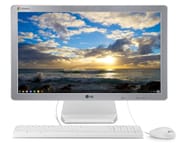
The LG Chromebase arrived in 2014 as one of the earliest Chrome OS all-in-one desktop computers, offering an alternative to traditional Windows and Mac desktops for users whose computing needs centered around web browsing and cloud applications. With its 21.5-inch Full HD IPS display, Intel Celeron 2955U processor, and space-saving design, the Chromebase carved out a niche for itself in homes, schools, and offices where simplicity and quick access to web-based tools mattered more than raw processing power.
Pros and Cons
| Pros | Cons |
|---|---|
| Large 21.5” Full HD IPS display with excellent viewing angles | No SD card reader limits local media workflows |
| Fast boot times measured in seconds, not minutes | Weak rear-firing speakers produce tinny audio |
| HDMI input allows use as external monitor for other devices | Chrome OS limits offline functionality |
| Strong WiFi reception with speeds up to 120-150 Mbps in testing | Keyboard and mouse bundle feels basic |
| Full-size keyboard with numerical pad included | Fixed desktop form factor lacks Chrome OS portability benefits |
| Simple setup process faster than Windows or Mac alternatives | 2GB RAM baseline struggles with heavy tab loads on base model |
Related Videos
LG Chromebase Comparison Chart
 LG Chromebase | LG Chromebase | LG Chromebase | |
| Price | List Price: $349.99 Amazon Prices: | List Price: $349.99 Amazon Prices: | List Price: $379.99 Amazon Prices: |
| Model number | 22CV241-W | 22CV241-B | 22CB25S-B |
| Performance Rating | 2.1 | 2.1 | 2.6 |
| Chromebook Plus | No | No | No |
| Processor | Dual-core 1.40 Ghz Intel Celeron 2955U | Dual-core 1.40 Ghz Intel Celeron 2955U | Dual-core 1.40 Ghz Intel Celeron 2955U |
| RAM | 2 GB | 2 GB | 4 GB |
| Internal Storage | 16 GB SSD | 16 GB SSD | 16 GB SSD |
| Screen Size | 21.5" | 21.5" | 21.5" |
| Screen Resolution | 1920x1080 | 1920x1080 | 1920x1080 |
| Screen Type | IPS | IPS | IPS |
| Touch Screen | No | No | No |
| Stylus / Pen | No Stylus Support | No Stylus Support | No Stylus Support |
| Dimensions width x length x thickness | 20.8 x 15.6 x 1.7 inches (528.32 x 396.24 x 43.18 mm) | 20.8 x 15.6 x 1.7 inches (528.32 x 396.24 x 43.18 mm) | 20.8 x 15.6 x 1.7 inches (528.32 x 396.24 x 43.18 mm) |
| Weight | 9.5 lbs (4.32 kg) | 9.5 lbs (4.32 kg) | 9.5 lbs (4.32 kg) |
| Backlit Keyboard | No | No | No |
| Webcam | No Webcam | No Webcam | No Webcam |
| WiFi | 802.11 a/b/g/n | 802.11 a/b/g/n | 802.11 a/b/g/n |
| Bluetooth | Bluetooth 4.0 | Bluetooth 4.0 | Bluetooth 4.0 |
| Ethernet | Yes | Yes | Yes |
| Cellular Modem | No | No | No |
| HDMI | Full-Size HDMI | Full-Size HDMI | Full-Size HDMI |
| USB Ports | 3 USB 2.0, 1 USB 3 | 3 USB 2.0, 1 USB 3 | 3 USB 2.0, 1 USB 3 |
| Thunderbolt Ports | No | No | No |
| Card Reader | No Card Reader | No Card Reader | No Card Reader |
| Battery | No Battery | No Battery | No Battery |
| Battery Life | 0.0 hours | 0.0 hours | 0.0 hours |
| Fanless | No | No | No |
| Auto Update Expiration Date | June, 2020 | June, 2020 | June, 2020 |
Related Chromebooks
-
 Acer Chromebook 311 (AMD)The Acer Chromebook 311 (CB311-10H) is an 11.6-inch ChromeOS laptop on an AMD A4-9120C with 4GB of…
 -
 ASUS Chromebook C203XAThe ASUS Chromebook C203XA is a rugged 11.6-inch education laptop with a MediaTek MT8173C, an…
 -
 Acer Chromebook 315The Acer Chromebook 315 (CB315-4H) is a fanless 15.6-inch FHD IPS Chromebook with an Intel Celeron…
 -
 ASUS Chromebook C403The ASUS Chromebook C403 is a fanless 14-inch education Chromebook with an anti-glare 1366x768…
 -
 HP Chromebook 14 (AMD)The HP Chromebook 14 (AMD) is a fanless 14-inch Chromebook built on the AMD A4-9120C APU with…
 -
 HP Chromebook 11a (ARM)The HP Chromebook 11a offers an 11.6-inch anti-glare display, 720p HD webcam, and up to 15 hours of…
Design and Display
The LG Chromebase embraced the minimalist aesthetic that defined Chrome OS devices of its era. Reviewers consistently praised its slim profile and premium appearance, with the all-in-one design eliminating desktop clutter by integrating all components behind the display. The 21.5-inch Full HD (1920x1080) IPS panel drew particular praise from GadgetyNews, which described it as “pleasant to view and less fatiguing” for extended use compared to smaller laptop screens.
The IPS technology provided consistent colors and wide viewing angles for shared viewing scenarios in family rooms or educational settings. At 20.8 inches wide and weighing 9.5 pounds with its stand, the unit occupied a modest desktop footprint while delivering a display size that laptop users could only envy.
Performance and Everyday Use
Powered by the Intel Celeron 2955U dual-core processor running at 1.4 GHz, the Chromebase delivered adequate performance for its intended Chrome OS workload. Dapper and Groomed’s review noted handling “9-10 tabs open and never experienced any lags” during normal usage, though heavy multitasking could expose the 2GB RAM limitation on base models.
The 16GB SSD provided fast boot times and application launches, with reviewers consistently reporting boot-to-usable-desktop times measured in seconds rather than the minutes typical of traditional spinning-drive desktops of the era. This speed advantage exemplified Chrome OS’s lightweight approach, though the limited local storage meant users needed to embrace cloud storage for documents and media.
WiFi performance surprised testers, with Dapper and Groomed reporting on wireless reception: “With the LG Chromebase I always get 120mb-150mb speed, which is really impressive!” The 802.11 a/b/g/n wireless, combined with Gigabit Ethernet, ensured reliable connectivity for cloud-dependent workflows.
Connectivity and Versatility
A standout feature that distinguished the Chromebase from many competitors was its HDMI input port. This allowed the device to function as an external monitor for laptops, game consoles, or other video sources when not serving as a Chrome OS workstation. THE Journal’s review highlighted this capability as valuable for educational deployments where the display might serve multiple purposes.
The port selection included three USB 2.0 ports, one USB 3.0 port for faster peripheral connections, Gigabit Ethernet, and the HDMI output alongside the HDMI input. The notable omission was an SD card reader, which Dapper and Groomed cited as a significant limitation for users who work with camera memory cards.
The built-in 1.3MP webcam produced what GadgetyNews described as “clear video quality” for video calls, though the rear-firing speakers received criticism across multiple reviews for their weak, tinny output. Users who valued audio quality needed to budget for external speakers.
Target Audience and Use Cases
Reviewers consistently identified specific user groups who would benefit most from the Chromebase. GadgetyNews recommended it for “families, children’s first computers, elderly users, and light office work,” while THE Journal evaluated it from an educational deployment perspective, concluding it “makes sense as a companion to a larger Chrome OS deployment.”
The Chrome OS approach meant users needed to embrace cloud-based alternatives to traditional software. Photo editing meant Google Photos rather than Photoshop, document creation meant Google Docs rather than Microsoft Office (though web versions worked), and any offline work capability was severely limited. For users whose computing life already centered around a web browser, these trade-offs posed no issue. For those requiring specific Windows or Mac applications, the Chromebase was never the right choice.
Reviewer Insights
Dapper and Groomed
Jerome Henry’s extensive review provided the most detailed hands-on testing of the LG Chromebase. After daily use over an extended period, Henry praised the device’s reliability and performance within its intended scope. His comparative WiFi testing against an HP Chromebook revealed the Chromebase’s superior wireless reception, consistently delivering 120-150 Mbps speeds versus more modest results from the laptop. Henry particularly valued the HDMI input feature for flexibility and concluded that buyers “won’t regret it because LG has done something pretty amazing with the Chromebase.”
GadgetyNews
Jay Garrett’s balanced review acknowledged both the Chromebase’s strengths and the inherent limitations of Chrome OS for certain users. At its UK price of £256.94 (around $349 US), Garrett found the value compelling for users with appropriate expectations. YouTube and Netflix streaming performed smoothly, and the fast boot times impressed. However, Garrett cautioned Windows users about the keyboard layout differences and the learning curve involved in adapting to Chrome OS’s browser-centric approach.
THE Journal
David Nagel’s education-focused review evaluated the Chromebase from an institutional deployment perspective. While acknowledging that the fixed desktop form factor negated some of Chrome OS’s portability advantages, Nagel praised the large display as less fatiguing for extended sessions compared to laptop alternatives. The simple setup process that proved “significantly faster and easier than the setup for a Mac or a Windows-based PC” appealed to IT administrators managing multiple deployments.
For those researching Chrome OS desktop options, our Chromebook Comparison Chart covers the full range of current models with specs and prices side by side.
FAQ
What processor does the LG Chromebase have?
The LG Chromebase is powered by an Intel Celeron 2955U dual-core processor running at 1.4 GHz. This processor provided adequate performance for Chrome OS workloads including web browsing, video streaming, and cloud application use.
Can the LG Chromebase be used as an external monitor?
Yes, the LG Chromebase features an HDMI input port that allows it to function as an external display for laptops, game consoles, or other video sources. This distinguishes it from many all-in-one computers that only offer HDMI output.
What is the screen size and resolution of the LG Chromebase?
The LG Chromebase features a 21.5-inch Full HD (1920x1080) IPS display. Reviewers praised the screen for its excellent viewing angles and comfortable viewing experience during extended use sessions.
Does the LG Chromebase have an SD card reader?
No, the LG Chromebase does not include an SD card reader. This was noted as a significant limitation by reviewers who work with camera memory cards or other SD media. Users needed USB card readers as a workaround.
When did Google support end for the LG Chromebase?
Google’s Auto Update Expiration (AUE) date for the LG Chromebase was June 2020. After this date, the device no longer receives Chrome OS updates, security patches, or new features from Google.
Is the LG Chromebase still available to purchase?
No, the LG Chromebase has been discontinued and is no longer available for purchase new. As a 2014 product that reached its end-of-life in 2020, it may occasionally appear on used marketplaces but is not recommended for purchase due to its expired security support.