
Samsung Galaxy Chromebook 2
Updated on

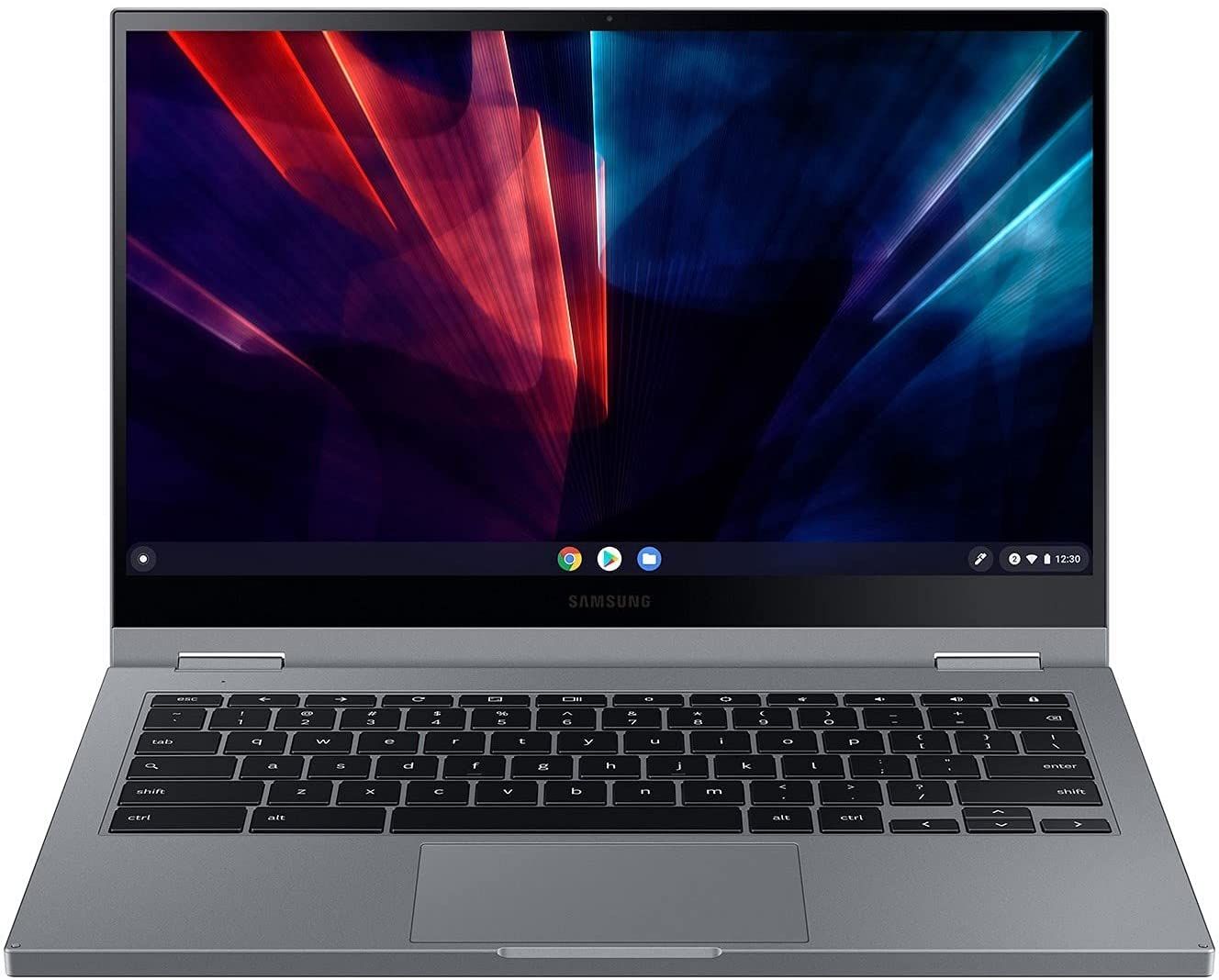
The Samsung Galaxy Chromebook 2 is a 2-in-1 Chromebook featuring a sleek design, sturdy construction, and improved battery life compared to its predecessor. It comes in two configurations, starting at $550, and offers solid performance, making it a top choice among budget laptops and student Chromebooks. With Chrome OS support extending through June 2030, this device offers years of reliable use ahead.
| Pros | Cons |
|---|---|
| First Chromebook with QLED display delivering 118% sRGB color gamut (Tom’s Guide testing) | Shallow keyboard travel may not suit heavy typists (Chrome Unboxed) |
| Striking Fiesta Red and Mercury Grey aluminum design | No fingerprint reader or privacy shutter for webcam |
| Significantly improved battery life at 8-12 hours (Android Authority tested 12.8 hours) | eMMC storage slower than SSD alternatives |
| Lightweight at 2.7 pounds with premium feel | Base Celeron model has limited multitasking capability |
| Wi-Fi 6 and Bluetooth 5.0 for fast connectivity | No USB-A ports - USB-C only with adapters needed |
| USI stylus compatible for note-taking and drawing | Stylus not included despite predecessor having built-in S Pen |
Related Videos
Samsung Galaxy Chromebook 2 Comparison Chart
 Samsung Galaxy Chromebook 2 |  Samsung Galaxy Chromebook 2 | Samsung Galaxy Chromebook 2 | Samsung Galaxy Chromebook 2 | |
| Price | List Price: $699.99 Amazon Prices: Loading prices... | List Price: $549.00 Amazon Prices: Loading prices... | List Price: $699.00 Amazon Prices: Loading prices... | List Price: $549.00 Amazon Prices: Loading prices... |
| Model number | XE530QDA-KB1US | XE530QDA-KA2US | XE530QDA-KA1US | XE530QDA-KB2US |
| Performance Rating | 5.5 | 3.1 | 5.5 | 3.1 |
| Chromebook Plus | No | No | No | No |
| Processor | Dual-core 2.10 Ghz (max 4.10 Ghz) Intel Core i3-10110U Processor | Dual-core 1.90 Ghz Intel Celeron Processor 5205U | Dual-core 2.10 Ghz (max 4.10 Ghz) Intel Core i3-10110U Processor | Dual-core 1.90 Ghz Intel Celeron Processor 5205U |
| RAM | 8 GB | 4 GB | 8 GB | 4 GB |
| Internal Storage | 128 GB eMMC | 64 GB eMMC | 128 GB eMMC | 64 GB eMMC |
| Screen Size | 13.3" | 13.3" | 13.3" | 13.3" |
| Screen Resolution | 1920x1080 | 1920x1080 | 1920x1080 | 1920x1080 |
| Screen Type | FHD QLED | FHD QLED | FHD QLED | FHD QLED |
| Touch Screen | Yes | Yes | Yes | Yes |
| Stylus / Pen | Supported | Supported | Supported | Supported |
| Dimensions width x length x thickness | 12 x 8 x 0.55 inches (304.8 x 203.2 x 13.97 mm) | 12 x 8 x 0.55 inches (304.8 x 203.2 x 13.97 mm) | 12 x 8 x 0.55 inches (304.8 x 203.2 x 13.97 mm) | 12 x 8 x 0.55 inches (304.8 x 203.2 x 13.97 mm) |
| Weight | 2.71 lbs (1.23 kg) | 2.71 lbs (1.23 kg) | 2.71 lbs (1.23 kg) | 2.71 lbs (1.23 kg) |
| Backlit Keyboard | Yes | Yes | Yes | Yes |
| Webcam | 1MP | 1MP | 1MP | 1MP |
| WiFi | Wi-Fi 6 (Gig+), 802.11ax 2x2 | Wi-Fi 6 (Gig+), 802.11ax 2x2 | Wi-Fi 6 (Gig+), 802.11ax 2x2 | Wi-Fi 6 (Gig+), 802.11ax 2x2 |
| Bluetooth | Bluetooth 5.0 | Bluetooth 5.0 | Bluetooth 5.0 | Bluetooth 5.0 |
| Ethernet | No | No | No | No |
| Cellular Modem | No | No | No | No |
| HDMI | No HDMI | No HDMI | No HDMI | No HDMI |
| USB Ports | 2 USB-C (4K display out with optional adapter, charging) | 2 USB-C (4K display out with optional adapter, charging) | 2 USB-C (4K display out with optional adapter, charging) | 2 USB-C (4K display out with optional adapter, charging) |
| Thunderbolt Ports | No | No | No | No |
| Card Reader | microSD Card Reader | microSD Card Reader | microSD Card Reader | microSD Card Reader |
| Battery | 4 cell, 5920mAh, Lithium-ion | 4 cell, 5920mAh, Lithium-ion | 4 cell, 5920mAh, Lithium-ion | 4 cell, 5920mAh, Lithium-ion |
| Battery Life | 13.0 hours | 13.0 hours | 13.0 hours | 13.0 hours |
| Fanless | No | No | No | No |
| Auto Update Expiration Date | June, 2030 | June, 2030 | June, 2030 | June, 2030 |
Related Chromebooks
-
 Acer Chromebook Spin 513The Acer Chromebook Spin 513 offers a versatile 13.3-inch Full HD IPS touchscreen display, backlit…
 -
 Samsung Galaxy Chromebook Go 14"The Samsung Galaxy Chromebook Go offers LTE connectivity, military-grade durability, and a…
 -
 HP Chromebook x360 14aSeamlessly switch between work and play with the HP Chromebook x360 14a's versatile 360-degree…
 -
 HP Chromebook x360 14bThe HP Chromebook x360 14b, with its 14-inch WLED-backlit touch screen and 360-degree hinge, offers…
 -
 Samsung Chromebook 4The Samsung Chromebook 4 shines with its compact design, sturdy build, and budget-friendly price.…
 -
 Lenovo IdeaPad Flex 5iThe Lenovo IdeaPad Flex 5i Chromebook, with its snappy 10th gen Intel CPU, vibrant 1080p…
Detailed Insights into the Samsung Galaxy Chromebook 2

The Galaxy Chromebook 2 represents Samsung’s course correction after the original Galaxy Chromebook, which impressed with premium specs but suffered from poor battery life. This sequel prioritizes practicality by swapping the 4K AMOLED panel for a more efficient 1080p QLED display while retaining the striking visual appeal. The 13.3-inch touchscreen delivers rich, vibrant colors that outperform typical Chromebook displays, with Android Authority noting it “looks more high-end than it really is.”
Available in eye-catching Fiesta Red and understated Mercury Grey, the aluminum-clad chassis weighs just 2.7 pounds and measures 0.55 inches thin. The convertible hinge allows the device to be used in laptop, tent, stand, and tablet modes, though reviewers note it doesn’t fold completely flat like some 2-in-1 competitors. Build quality is generally praised, though Chrome Unboxed pointed out some chassis flex and a plastic palm rest that feels out of place on a $699 device.
Two configurations target different users: the base model with Intel Celeron 5205U, 4GB RAM, and 64GB eMMC suits light web browsing and document work, while the Core i3-10110U model with 8GB RAM and 128GB storage handles more demanding tasks. Performance benchmarks show Geekbench 5 scores of 1,003 single-core and 2,179 multi-core on the Core i3 variant. Both models include Wi-Fi 6 for fast wireless connectivity, Bluetooth 5.0, two USB-C ports (one on each side), a microSD card reader, and a headphone jack.
Reviewer Insights on the Samsung Galaxy Chromebook 2

Android Authority’s Perspective
Android Authority awarded the Galaxy Chromebook 2 an 8/10 score, praising how “Samsung managed to assemble an attractive Chromebook that exceeds expectations for this class.” Their testing revealed impressive battery life, averaging 12.8 hours over five days of real-world use. The review highlighted the QLED display’s visual appeal and the device’s solid performance for everyday computing needs. Their main critiques focused on the limited port selection and keyboard travel that may not suit everyone’s preferences.
Chrome Unboxed’s Perspective
Chrome Unboxed offered a more critical assessment, expressing disappointment with the price-to-value ratio. Reviewer Robby Payne noted, “For the $699 Samsung is asking for this Chromebook, I expect quite a bit.” While praising the “excellent 1080p QLED display” with 400 nits brightness and good thermal management, the review criticized the plastic palm rest, chassis flex, keyboard typing accuracy issues, and the removal of premium features from the original like the fingerprint scanner and included stylus. The verdict: “I really wanted to love this Chromebook and I just don’t.”
Tom’s Guide’s Perspective
Tom’s Guide gave the Galaxy Chromebook 2 a 4/5 star rating, calling it “a compelling sequel with meaningful improvements.” Their color accuracy testing showed the screen delivers 118.4% of the sRGB color spectrum, surpassing the M1 MacBook Air (114.3%) and Pixelbook Go (108%). Average brightness measured at 390 nits, an improvement over the original’s 357 nits. Battery testing yielded 7 hours 50 minutes of web surfing, and the review praised the impressive audio quality alongside the gorgeous display.
Thomas Tech’s Perspective
Thomas Tech emphasized the QLED display as the standout feature, noting “This is the first Chromebook to feature a QLED panel, and it makes a huge difference in terms of color accuracy and vibrancy.” The review praised the lightweight aluminum chassis, comfortable backlit keyboard, and fast WiFi 6 connectivity. Battery life estimates of 8-10 hours were highlighted as a major improvement over the original. The main drawbacks noted were the lack of a built-in stylus, display brightness struggling in direct sunlight, and no USB-A ports.
Overall, reviewers agree the Galaxy Chromebook 2’s QLED display and improved battery life represent genuine strengths, while the keyboard feel and missing premium features from the original divide opinion. The Core i3 model with 8GB RAM is consistently recommended over the base Celeron configuration for a better overall experience.
Customer Reviews of the Samsung Galaxy Chromebook 2
Amazon customers have given the Samsung Galaxy Chromebook 2 ratings between 4.1 and 4.2 stars across its various configurations, based on dozens of verified purchases. The most common praise focuses on the stunning QLED display, with many describing it as the best screen they’ve seen on a Chromebook. Customers particularly appreciate the vibrant colors for streaming video content and the touch responsiveness for casual use.
Build quality receives mixed feedback. Many users love the premium aluminum design and Fiesta Red color option, calling it “beautiful” and “eye-catching.” However, some note the keyboard feels cramped compared to full-sized laptops, and a few report concerns about long-term durability. The 2-in-1 convertible design is popular among students who use tablet mode for reading and note-taking.
Battery life is a frequent discussion point, with experiences varying significantly. Some users report easily achieving 8-10 hours of light use, while others find it closer to 6 hours with more intensive browsing. The Celeron model receives criticism for sluggish performance with multiple tabs open, with several reviewers strongly recommending the Core i3 upgrade for anyone planning to multitask. Port selection is a common complaint, with users wishing for at least one USB-A port to avoid carrying adapters.
Conclusion
The Samsung Galaxy Chromebook 2 successfully balances premium aesthetics with practical functionality, making it an appealing choice for students, content consumers, and anyone who values a beautiful display. The world’s first QLED Chromebook screen delivers genuinely impressive color reproduction, and the dramatically improved battery life addresses the original model’s most significant weakness. With Chrome OS support through June 2030, buyers get years of updates ahead.
The Core i3 configuration with 8GB RAM and 128GB storage is the clear recommendation, offering enough performance headroom for comfortable daily use. The base Celeron model works for very light browsing but struggles with multitasking. At current street prices well below the original $699 MSRP, the value proposition has improved significantly. Those prioritizing display quality and portability over raw performance will find the Galaxy Chromebook 2 a compelling option in the mid-range Chromebook market.
Frequently Asked Questions
How long will the Samsung Galaxy Chromebook 2 receive Chrome OS updates?
The Samsung Galaxy Chromebook 2 has an Auto Update Expiration (AUE) date of June 2030. This means Google will continue providing Chrome OS updates, security patches, and new features until then, ensuring years of continued support.
Should I get the Celeron or Core i3 model of the Galaxy Chromebook 2?
The Core i3 model with 8GB RAM is strongly recommended by reviewers. While the Celeron model handles basic web browsing, it struggles with multiple tabs and light multitasking. Android Authority and Tom’s Guide both noted the Core i3 provides a noticeably snappier experience that’s worth the upgrade, especially at current discounted prices.
Can I use a stylus with the Samsung Galaxy Chromebook 2?
Yes, the Galaxy Chromebook 2 supports USI (Universal Stylus Initiative) pens for drawing and note-taking. However, unlike the original Galaxy Chromebook which included a built-in S Pen, no stylus is included with this model. You’ll need to purchase a compatible USI stylus separately, which typically costs $30-70.
What makes the QLED display special on this Chromebook?
The Galaxy Chromebook 2 was the first Chromebook to feature a QLED display. Tom’s Guide testing showed it delivers 118.4% of the sRGB color spectrum with 390 nits brightness, outperforming even the M1 MacBook Air in color reproduction. The vibrant, accurate colors make it excellent for streaming video, photo viewing, and general content consumption.
What ports does the Samsung Galaxy Chromebook 2 have?
The Galaxy Chromebook 2 has two USB-C ports (one on each side), a microSD card reader, and a 3.5mm headphone jack. There are no USB-A ports, so you’ll need adapters or a USB-C hub for older USB devices or a USB ethernet adapter for wired networking. The USB-C ports support charging and 4K display output with appropriate adapters.
How long does the battery last on the Galaxy Chromebook 2?
Battery life varies by usage and configuration. Android Authority measured an impressive 12.8 hours average over five days of mixed use, while Tom’s Guide’s web surfing test yielded 7 hours 50 minutes. Most users report 8-10 hours of light to moderate use. This is a significant improvement over the original Galaxy Chromebook, which only managed around 4 hours.