
HP Chromebook x360 14b
Updated on

The HP Chromebook x360 14b brings a full-size 14-inch touchscreen experience to budget-conscious users who need a versatile convertible laptop for everyday tasks. With its 360-degree hinge design, this Chromebook transitions smoothly between laptop, tent, stand, and tablet modes, making it suitable for everything from typing documents to watching videos or taking notes with a stylus. The Intel Celeron N4000 processor paired with 4GB of RAM handles typical Chrome OS workloads without issue, and the fanless design means completely silent operation during use.
| Pros | Cons |
|---|---|
| Excellent typing experience with sturdy, responsive keys (HomeTechHacker) | HD 1366x768 display appears grainy compared to Full HD alternatives (Papa Culture) |
| Large, responsive trackpad with superior click mechanism (HomeTechHacker) | Plastic chassis and trackpad texture feel budget-oriented (Papa Culture) |
| All-day battery life rated at 12.5 hours for extended productivity | Heavier at 3.48 lbs compared to some 14-inch competitors |
| 360-degree hinge enables tablet mode for note-taking and entertainment | No keyboard backlight on base model configuration |
| Fanless design ensures completely silent operation | Only 32GB internal storage limits offline app installs |
| Dual USB-C ports with DisplayPort support for external monitors | No HDMI port requires adapter for some display connections |
Related Videos
HP Chromebook x360 14b Comparison Chart
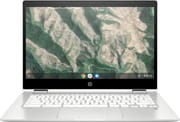 HP Chromebook x360 14b | |
| Price | List Price: $379.99 Amazon Prices: Loading prices... |
| Model number | 14b-ca0010nr / 7NV95UA |
| Performance Rating | 3.1 |
| Chromebook Plus | No |
| Processor | Dual-core 1.10 Ghz (max 2.60 Ghz) Intel Celeron N4000 Processor |
| RAM | 4 GB |
| Internal Storage | 32 GB eMMC |
| Screen Size | 14" |
| Screen Resolution | 1366x768 |
| Screen Type | WLED-backlit |
| Touch Screen | Yes |
| Stylus / Pen | No Stylus Support |
| Dimensions width x length x thickness | 12.76 x 8.9 x 0.74 inches (324.1 x 226.06 x 18.8 mm) |
| Weight | 3.48 lbs (1.58 kg) |
| Backlit Keyboard | No |
| Webcam | HP Wide Vision HD Camera |
| WiFi | 802.11 a/b/g/n/ac (2x2) |
| Bluetooth | Bluetooth 5.0 |
| Ethernet | No |
| Cellular Modem | No |
| HDMI | No HDMI |
| USB Ports | 2 USB 3, 2 USB-C (with DisplayPort 1.2) |
| Thunderbolt Ports | No |
| Card Reader | microSD Card Reader |
| Battery | 2 cell, 47 Wh, Li-ion |
| Battery Life | 12.5 hours |
| Fanless | No |
| Auto Update Expiration Date | June, 2029 |
Related Chromebooks
-
 HP Chromebook x360 14aSeamlessly switch between work and play with the HP Chromebook x360 14a's versatile 360-degree…
 -
 HP Chromebook 14a (2021)The HP Chromebook 14a combines a 14-inch BrightView touchscreen, HD webcam, and up to 14 hours of…
 -
 ASUS Chromebook Flip CX1 (Touchscreen)The ASUS Chromebook Flip CX1 features a 14-inch Full HD 360-degree touchscreen, Intel Celeron N4500…
 -
 Acer Chromebook 314The Acer Chromebook 314 combines a crisp 1920x1080 IPS display with a robust 12.5-hour battery life…
 -
 Lenovo IdeaPad Slim 3 ChromebookThe Lenovo IdeaPad Slim 3 Chromebook 14 pairs a fanless MediaTek Kompanio 520 processor with a…
 -
 Samsung Galaxy Chromebook Go 14"The Samsung Galaxy Chromebook Go offers LTE connectivity, military-grade durability, and a…
Detailed Insights into the HP Chromebook x360 14b

The HP Chromebook x360 14b’s design prioritizes functionality over premium aesthetics. The white ceramic finish gives it a clean, modern look, though the plastic construction is apparent when handling the device. The keyboard deck is sturdy enough for comfortable typing, and the hinges feel solid throughout the full 360-degree rotation. At 12.76 x 8.90 x 0.74 inches and 3.48 pounds, it’s not the lightest 14-inch Chromebook available, but the weight distribution feels balanced in laptop mode and acceptable when used as a tablet for short periods.
The 14-inch WLED-backlit touchscreen with 1366x768 resolution serves its purpose for general productivity, though users accustomed to Full HD displays will notice the difference in text clarity and screen real estate. The touch response is accurate and responsive, making the tablet mode useful for browsing, annotating documents, or casual Android gaming. The display’s brightness is adequate for indoor use, though it struggles somewhat in brightly lit environments. B&O-tuned speakers provide decent audio quality for video calls and casual media consumption, though they won’t replace a dedicated Bluetooth speaker for music.
Connectivity options on the HP Chromebook x360 14b are well-considered for its price range. The dual USB-C ports with DisplayPort 1.2 support allow for flexible monitor connections and charging from either side, while two USB-A 3.0 ports maintain compatibility with older peripherals without requiring adapters. Users who need wired networking can connect a USB Ethernet adapter to one of the USB-A ports. The microSD card reader addresses the limited 32GB internal storage by enabling easy expansion for media files and downloads. The 802.11ac Wi-Fi with 2x2 antenna configuration delivers reliable wireless performance, and Bluetooth 5.0 ensures solid connections with wireless accessories.
Reviewer Insights on the HP Chromebook x360 14b

Papa Culture Podcast’s Perspective
Papa Culture Podcast provided a detailed hands-on review of the HP Chromebook x360 14b series, praising the keyboard as “really great” with tactile feedback superior to more expensive x360 models. The reviewer noted that the Celeron-class processor handles everyday browsing and Android apps without struggle, though CPU usage occasionally spikes during system updates or heavy background tasks. The fanless design was highlighted as a significant benefit for users who prioritize silent operation.
However, the review identified the display and trackpad as areas where HP made cost-cutting decisions. The screen was described as “definitely much more grainy” than expected, lacking the vibrancy of premium Chromebooks. The plastic trackpad texture was noted as “slightly irritating on fingertips over time” compared to glass trackpads on higher-end devices. Despite these drawbacks, the reviewer concluded that the HP Chromebook x360 14b represents “a solid budget Chromebook at the price that I paid,” recommending it particularly for users who value a quality typing experience.
HomeTechHacker’s Perspective
HomeTechHacker offered an enthusiastic assessment after several months of daily use, describing the device as “lightning fast and responsive” for typical Chromebook workloads. The review emphasized that the keyboard and trackpad are “excellent and superior to all Chromebooks I’ve used,” with the extremely large trackpad earning particular praise for its reliable click mechanism. The reviewer noted successfully managing 10+ browser tabs without slowdown and even performing basic video editing tasks.
The review highlighted practical strengths like achieving the rated 13.5-hour battery life in regular use and the convenience of having USB Type-A ports alongside USB-C. On the negative side, the 3.7-pound weight was noted as heavier than competing models, and the B&O speaker branding was dismissed as “marketing hype” with actual audio quality being merely “okay.” The plastic white top was called out for cheapening the overall look and feel. Overall, the reviewer remained “very happy” with the purchase, especially when factoring in sale prices.
Customer Reviews of the HP Chromebook x360 14b
Across 2,729 ratings on Amazon, the HP Chromebook x360 14b averages 4.6 stars, with 79 percent of raters leaving five stars and 4 percent leaving one. Owners most often bought it as an affordable everyday machine for browsing, streaming, and school, and several mention picking it up for their kids. Cynthia Wood, a verified buyer who owns three of them, wrote that her youngest “loves it and uses it with ease” and called it a “Fast processing” computer with a touch screen her family enjoys. Battery life and the convertible touchscreen come up repeatedly: verified buyer Paul D. wrote “Battery life is really long” and called it a “Perfect solution for when I travel,” and verified buyer Jen said the “battery life is impressive, lasting all day on a single charge.”
The praise is not unanimous, and a couple of caveats are worth flagging. Verified buyer chetalee rated it four stars and reported a hardware failure: “the touchpad stopped working after less than a year,” along with screen resolution that “isn’t the best” and is most noticeable in tablet mode. Verified buyer Thrifty_Mom warns that “There are several variations of this same Chromebook that look nearly identical but are very different,” noting that the white-keyboard model she bought has 4GB of RAM and ships without a stylus or backlit keyboard, so check the exact configuration before ordering. Read more owner reviews on Amazon.
Conclusion
The HP Chromebook x360 14b delivers a well-rounded Chrome OS experience for users who prioritize versatility and value over premium features. Its standout strengths include an excellent keyboard for extended typing sessions, reliable all-day battery life, and the flexibility of 360-degree convertible design. While the HD display resolution and plastic construction reveal its budget positioning, these compromises make sense for students, light productivity users, and anyone seeking a secondary device for browsing and media consumption. With Chrome OS updates guaranteed through June 2029, this Chromebook offers years of secure, supported use ahead. To see how it stacks up against other options, visit our Chromebook Comparison Chart.
Frequently Asked Questions
How long will the HP Chromebook x360 14b receive Chrome OS updates?
The HP Chromebook x360 14b (model 14b-ca0010nr) will receive Chrome OS updates until June 2029 according to Google’s Auto Update Expiration policy. This means security patches, new features, and system improvements will continue for several more years.
Can I expand the storage on the HP Chromebook x360 14b?
The 32GB internal eMMC storage cannot be upgraded, but you can expand storage using the built-in microSD card reader. Most users insert a 128GB or 256GB microSD card for additional space for downloads, media files, and offline content. Chrome OS is designed to work primarily with cloud storage, so the 32GB is sufficient for apps and cached files.
Is the HP Chromebook x360 14b good for students?
Yes, the HP Chromebook x360 14b is well-suited for students. The keyboard is praised by reviewers as excellent for extended typing, the all-day battery life means no charging during classes, and the 360-degree hinge allows tablet mode for note-taking with a USI stylus. The fanless design ensures quiet operation in libraries or classrooms.
Does the HP Chromebook x360 14b support external monitors?
Yes, both USB-C ports support DisplayPort 1.2, allowing you to connect external monitors directly with a USB-C to HDMI or USB-C to DisplayPort cable. There is no built-in HDMI port, so you’ll need an adapter if your monitor only has HDMI input. The Chromebook can drive external displays up to 4K resolution.
How does the HP Chromebook x360 14b perform for everyday tasks?
The Intel Celeron N4000 processor with 4GB RAM handles typical Chrome OS tasks smoothly, including web browsing with 10+ tabs, Google Docs editing, video streaming, and Android apps. Reviews note occasional slowdown during heavy background activities like system updates, but day-to-day performance is described as “lightning fast and responsive” for its target use cases.
Does the HP Chromebook x360 14b have a backlit keyboard?
No, the HP Chromebook x360 14b (model 14b-ca0010nr) does not include keyboard backlighting. This is one of the cost-saving measures on this budget model. If you frequently work in low-light environments, you may want to consider other models with backlit keyboards.