

Listen to this article:
Steam for Chromebook officially died on January 1, 2026. After four years stuck in beta, Google finally pulled the plug on the experiment, and installed games are no longer available to play. If you were one of the few users who invested in a Steam-capable Chromebook for native gaming, you’re probably feeling some frustration right now.
But here’s the thing: Google isn’t abandoning Chromebook gaming. They’re pivoting to a strategy that actually makes sense for the hardware. Just two months before Steam’s shutdown, Google and NVIDIA launched GeForce NOW Fast Pass exclusively for Chromebooks. New Chromebook buyers now get a free year of priority cloud gaming access with over 2,000 games available. That’s not a retreat from gaming. It’s a strategic shift toward cloud gaming that works better with what Chromebooks actually are.
Why Steam for Chromebook Failed
The core problem with Steam on Chromebooks was never ambition. It was physics. As Chrome Unboxed put it: “For the project to truly succeed, we needed a wide range of powerful, GPU-equipped Chromebooks. And frankly, those devices never really materialized.” Most Chromebooks ship with integrated graphics designed for web browsing and video playback, not rendering 3D games at playable framerates.
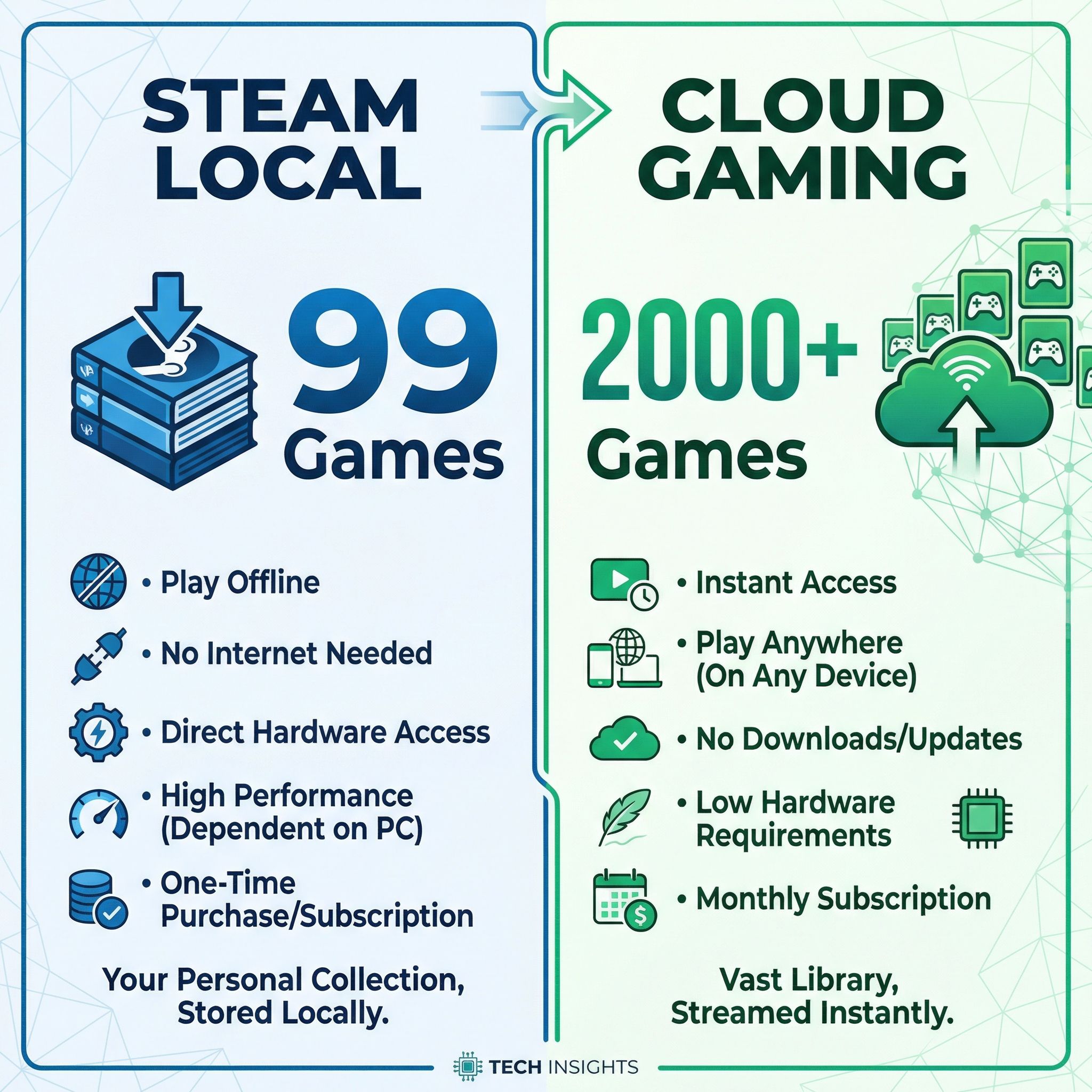
Steam required serious hardware to work well. The minimum specs called for an Intel Core i3 or AMD Ryzen 3 with 8GB of RAM, but Google recommended Core i5 or Ryzen 5 with 16GB for acceptable performance. Even then, Google only certified 99 games as compatible after four years of development. Compare that to GeForce NOW’s library of over 2,000 titles, and you start to see why this pivot makes sense.
The user base was always going to be small. Chromebooks that met Steam’s requirements cost $600 or more, putting them in direct competition with Windows gaming laptops that could run Steam natively without the beta software limitations. Why buy a $700 Chromebook for Steam when a similarly-priced Windows laptop runs the full Steam library without compatibility concerns?
The Better Path: Cloud Gaming
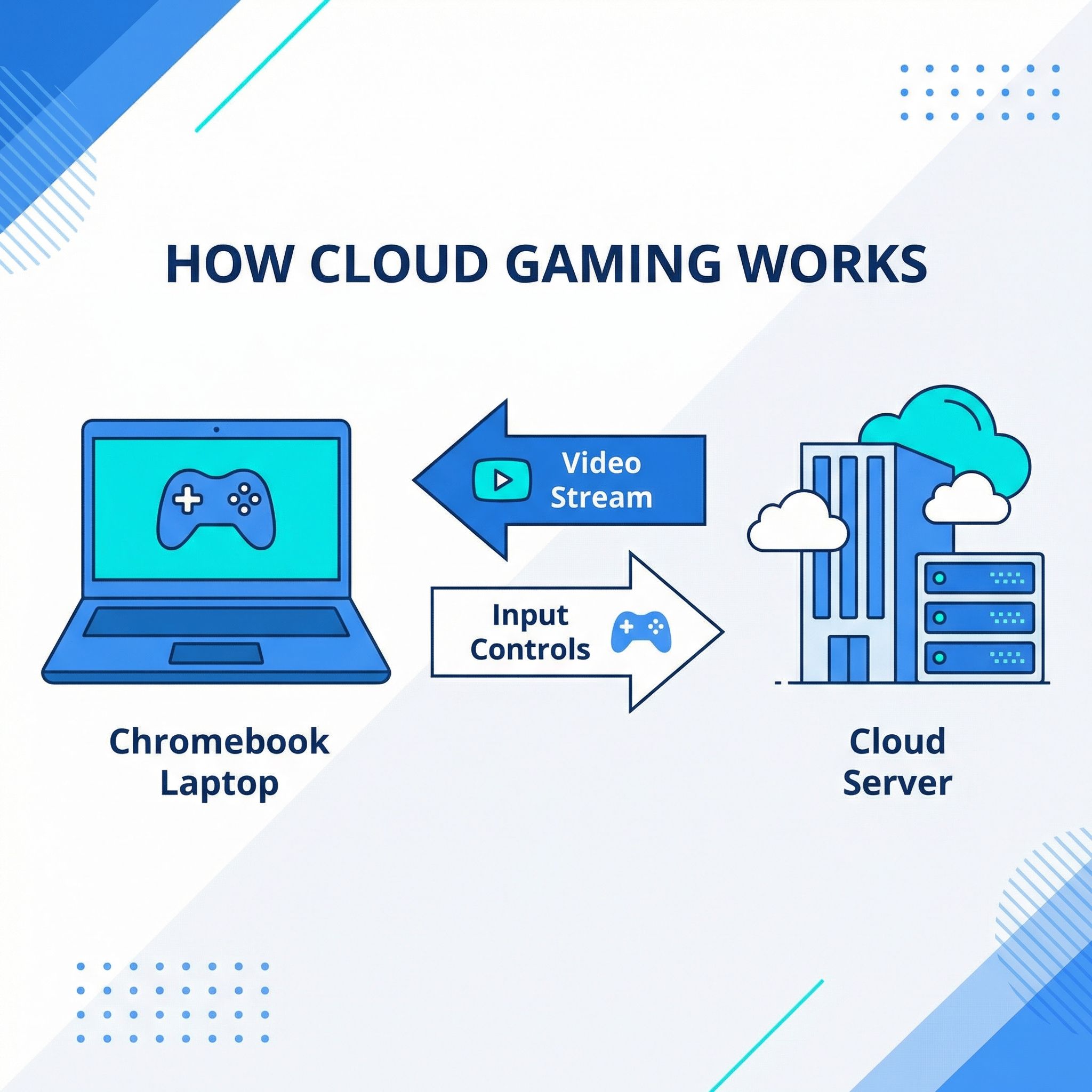
Cloud gaming sidesteps the hardware problem entirely. When you play through GeForce NOW, Xbox Cloud Gaming, or Amazon Luna, the actual game runs on powerful servers in a data center. Your Chromebook just displays the video stream and sends your inputs. A $300 Chromebook can play Cyberpunk 2077 at high settings because your Chromebook isn’t doing the heavy lifting. And with Panther Lake Chromebooks arriving in 2026, even local performance is set to improve.
This approach actually plays to Chromebook strengths. ChromeOS excels at web applications, and modern cloud gaming services run as Progressive Web Apps that integrate seamlessly with the operating system. The same fast boot times and automatic updates that make Chromebooks great for productivity work just as well for gaming. And because the games run remotely, you get access to Windows-only titles that would never run on ChromeOS natively.
The trade-off is internet dependency. Cloud gaming requires a solid connection, ideally 25 Mbps or faster with low latency. If you’re in a rural area with spotty internet, or gaming somewhere without reliable WiFi, cloud gaming won’t work as well as local games would. But for users with decent broadband, which is most Chromebook owners in 2026, the benefits outweigh the limitations.
GeForce NOW Fast Pass: The Standout Option
NVIDIA’s GeForce NOW Fast Pass is the headline story here. Announced in November 2025, this Chromebook-exclusive tier gives new Chromebook owners a free year of priority cloud gaming access. No ads, no waiting in queues, and access to over 2,000 games at 1080p and 60 frames per second.
The service has some limitations. You get 10 hours of playtime per month, with the ability to roll over up to 5 unused hours to the next month for a maximum of 15 hours. That’s enough for casual gaming but probably not enough for hardcore players who game for hours daily. The free year offer only applies to new Chromebook purchases, so existing owners would need to pay for the subscription directly.
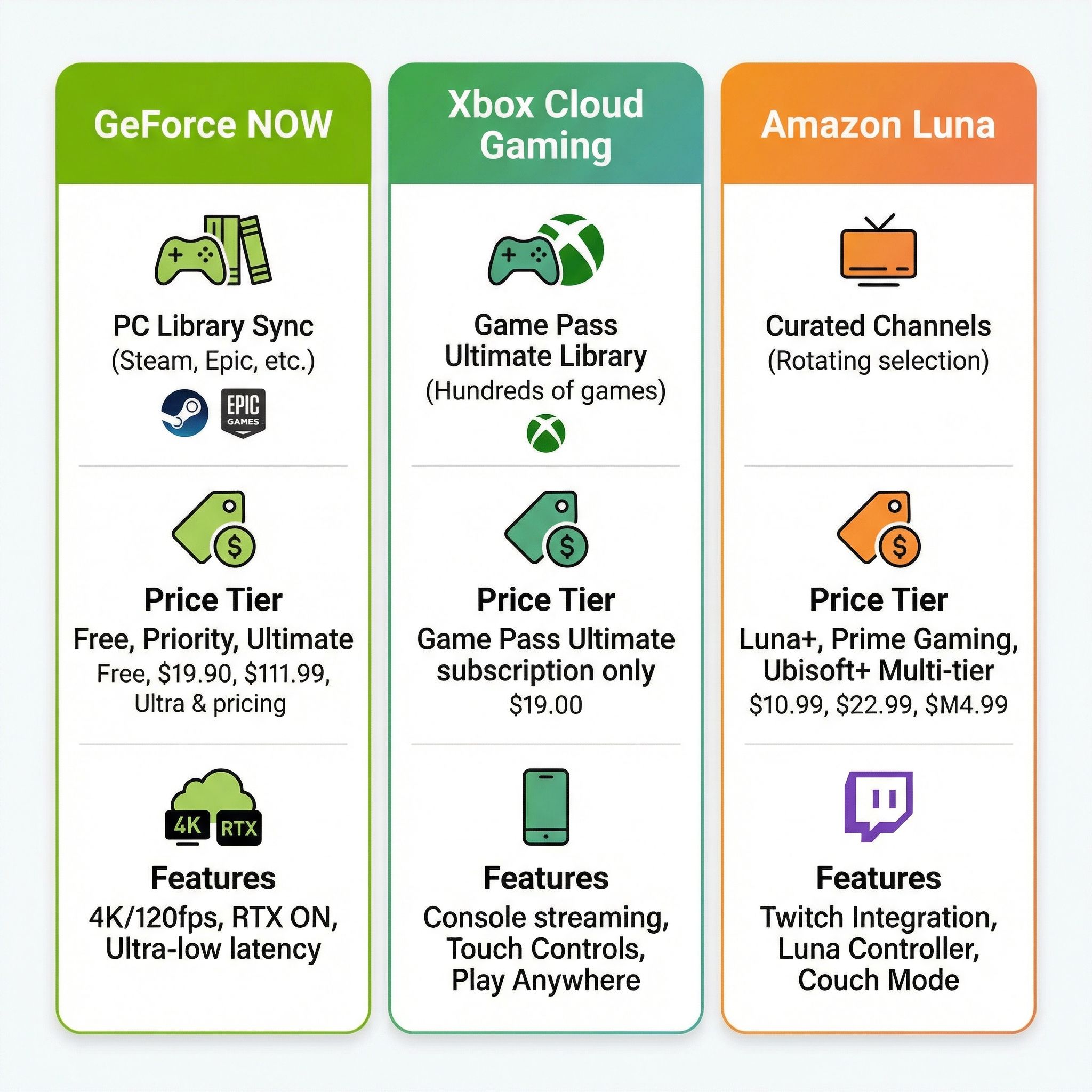
What makes GeForce NOW particularly compelling is that it works with games you already own. If you have a Steam library, you can play those games through GeForce NOW without repurchasing them. The same goes for games from Epic Games Store, Ubisoft Connect, EA App, and GOG. For former Steam on Chromebook users, this means your game purchases aren’t lost. You’re just playing them via the cloud instead of locally.
Other Cloud Gaming Options
GeForce NOW isn’t the only option. Xbox Cloud Gaming comes bundled with Xbox Game Pass Ultimate at $17 per month, giving you access to hundreds of games including Microsoft exclusives like Halo, Forza, and upcoming releases from Activision Blizzard studios. The library rotates monthly, so you’re essentially renting access to a large catalog rather than buying individual games.
Amazon Luna offers a different model with channel-based subscriptions. Prime members get Luna Standard for free with access to over 50 games. Additional channels like Luna+ and Ubisoft+ add more titles for monthly fees. Luna tends to focus more on family-friendly and casual games, making it a good fit for households with kids who want to game on a Chromebook.
For power users, Shadow PC provides a full Windows virtual machine in the cloud. Instead of running individual games through a streaming service, you get a complete Windows desktop that you can use for anything, including Steam, other game launchers, or productivity software. It’s more expensive than game-specific services, but also more flexible.
What About Android Games?
Let’s not forget that Chromebooks already have access to a massive gaming library through the Google Play Store. Android games range from casual time-wasters to surprisingly deep titles that work well with keyboard and mouse input. Games like Stardew Valley, Alto’s Odyssey, Minecraft, and hundreds of others play excellently on Chromebooks.
Android gaming is getting even more interesting with the upcoming ChromeOS and Android merger. Google confirmed that Aluminium OS will launch sometime in 2026, unifying the two platforms on an Android foundation. While it’s too early to say exactly how this will affect gaming, the expectation is that Android game compatibility and performance should improve when apps run natively rather than through compatibility layers.
That said, I’d be cautious about buying decisions based on Aluminium OS gaming improvements. We don’t have concrete details yet, and the transition will take time. If you want to game on a Chromebook today, plan around what works now rather than speculating about what might work in a year.
Which Chromebook for Gaming?
If cloud gaming is the future, what matters most is display quality and network connectivity, not raw processing power. A vibrant screen with good color accuracy makes games look better. WiFi 6E or Ethernet capability ensures low-latency streaming. A comfortable keyboard and responsive touchpad improve the gaming experience.
The Acer Chromebook Plus 516 GE was designed specifically for cloud gaming. Its 16-inch 120Hz display, 2.5 Gigabit Ethernet port, and RGB keyboard were built with services like GeForce NOW in mind. For users who want the best possible cloud gaming setup, this is the device to consider.
For a more versatile option, the Lenovo Chromebook Plus 14 offers a beautiful 2.8K OLED display that makes games look stunning, along with strong WiFi performance. It works great for productivity and entertainment as well as gaming, making it a solid all-around choice.
Budget-conscious buyers don’t need to spend much. Any Chromebook Plus device with WiFi 6 support will handle cloud gaming adequately. The processing power doesn’t matter much since games run on remote servers. Focus on screen quality and connectivity instead.
Moving Forward
Steam for Chromebook failed because it tried to turn Chromebooks into something they’re not. Gaming laptops need powerful GPUs, substantial cooling systems, and beefy processors. Chromebooks are designed for efficiency, simplicity, and web-first workflows. The hardware mismatch was fundamental, and no amount of software optimization could bridge that gap.
Cloud gaming works with Chromebook hardware rather than against it. A lightweight machine that excels at streaming video and handling web applications is exactly what you want for cloud gaming. The shift from local Steam gaming to cloud services like GeForce NOW isn’t a downgrade. It’s a better fit for what Chromebooks actually are.
If you’re a former Steam on Chromebook user feeling burned by this transition, I get it. You invested in specific hardware and now the feature you bought it for is gone. But your game purchases aren’t lost if you own them on Steam, and GeForce NOW lets you play them without the hardware limitations that held back the native Steam experience.
For everyone else considering Chromebook gaming, the message is clear: cloud gaming is the path forward. The GeForce NOW Fast Pass partnership shows Google is committed to gaming on Chromebooks. They’re just approaching it in a way that works with the platform’s strengths instead of fighting against its limitations.


