

Listen to this article:
The phrase “year of Linux desktop” has become a running joke in tech circles. Every year since the late 1990s, someone declares that this will be the year Linux finally breaks through to mainstream adoption. Every year, they’re wrong. Linux hovers around 2-3% market share while Windows dominates and macOS holds its premium niche. The prediction became so predictable that it transformed from earnest hope into ironic meme.
But something strange happened in 2025. According to multiple market share trackers, Linux desktop usage climbed to approximately 4.7% globally, with the United States crossing 5% for the first time. That’s roughly a 70% increase from where it had been stuck for years. Windows 10 reached end-of-life, pushing millions of users to choose between upgrading, replacing hardware, or trying something different. Steam Deck sold millions of units running Linux-based SteamOS, introducing an entire generation of gamers to KDE Plasma without ever using the word “Linux.” Germany announced plans to migrate 30,000 government computers from Microsoft to Linux and LibreOffice. Denmark and Switzerland began similar initiatives.
So here we are in January 2026, asking the same question with slightly more evidence behind it: Is this finally the year? The honest answer is complicated. Some things have genuinely changed. Other things remain stubbornly broken. And the “year of Linux desktop” probably means something different than what we imagined twenty years ago.
The Windows 10 Cliff
October 2025 marked the end of extended support for Windows 10. Microsoft officially stopped providing security updates for the operating system that had been the de facto standard for a decade. Hundreds of millions of computers worldwide faced an uncomfortable deadline: upgrade to Windows 11, pay Microsoft for continued security patches through their Extended Security Updates program, or find another option entirely.
The problem is that Windows 11 requires hardware that many functional computers don’t have. Microsoft’s strict requirements around TPM 2.0 chips and specific processor generations locked out millions of perfectly capable machines. A five-year-old laptop with an Intel 7th generation processor can’t run Windows 11 officially, regardless of how much RAM or storage it has. The machine works fine. The software refuses to install.
This created a moment that Linux advocates had been waiting for. The “buy a new computer” requirement for Windows 11 pushed people to consider alternatives they would never have explored otherwise. Linux Mint, Zorin OS, and similar distributions designed to feel familiar to Windows users saw significant download spikes in late 2025. Zorin OS reportedly exceeded 780,000 downloads just from Windows users seeking an alternative.
But downloads aren’t the same as sustained adoption. Many of those Windows refugees will try Linux, hit a friction point, and either struggle through or return to what they know. Some will discover that their specific printer doesn’t work, or their VPN client isn’t compatible, or the game they play every evening requires anti-cheat software that refuses to run on Linux. The download numbers tell us something important is happening. They don’t tell us how many of those downloads become permanent switches.
Steam Deck’s Trojan Horse
If you wanted to design a strategy for getting Linux onto mainstream devices without users realizing they were using Linux, you couldn’t do better than Steam Deck. Valve’s handheld gaming PC runs SteamOS, a Linux distribution based on Arch with a KDE Plasma desktop. Millions of units have sold since launch, introducing an entire category of users to Linux gaming without requiring them to understand or even acknowledge the underlying operating system.
This matters enormously for the broader Linux ecosystem. Steam Deck proved that Linux gaming works well enough for a mass-market device. Valve’s Proton compatibility layer, which translates Windows game calls to Linux equivalents, handles roughly 80% of the top Steam games. Titles like God of War, Spider-Man, and Horizon Forbidden West run smoothly on a device that boots to a Linux desktop when you flip it into desktop mode.
The KDE Plasma desktop that Steam Deck users encounter when they exit gaming mode is the same desktop environment available on any Linux distribution. Users who become comfortable with it on their Steam Deck might consider it for their main computer. Developers who optimize games for Steam Deck are optimizing for Linux, expanding the library of compatible titles for everyone. The ecosystem benefits compound over time.
There’s a catch, though. Steam Deck succeeds partly because Valve controls the entire hardware and software stack. When something doesn’t work, they can fix it in a way that traditional Linux distributions can’t. Installing Linux on arbitrary hardware still involves compatibility questions that Steam Deck buyers never face. The success of a closed, controlled Linux appliance doesn’t automatically translate to success for Linux on the chaotic diversity of PC hardware. If you’re looking for hardware with better Linux support, our best Linux laptops guide covers the current landscape of Linux-friendly options.
Gaming: Better Than Ever, Still Not Good Enough
Linux gaming in 2026 is genuinely impressive compared to even five years ago. Proton handles most mainstream titles. The open-source graphics driver stack has matured significantly. Specialized gaming distributions like Bazzite and Nobara offer turnkey setups optimized for performance. Someone building a new gaming PC today could reasonably choose Linux as their primary operating system for the first time.
But the anti-cheat problem remains unsolved, and it’s arguably getting worse rather than better. Games that use kernel-level anti-cheat systems like BattlEye or Easy Anti-Cheat require developers to explicitly enable Linux support. Many don’t. Some games that previously worked on Linux have broken recently due to anti-cheat updates that weren’t tested against Proton. Popular competitive titles like Fortnite, Valorant, and many others simply don’t run on Linux at all.
This creates a frustrating situation where most games work fine, but the specific game you care about might not. If your gaming habits revolve around single-player titles and cooperative games, Linux handles them beautifully. If you play competitive multiplayer games, you’re gambling that the developers bothered to test their anti-cheat on Linux. For many players, “most games work” isn’t good enough when their friends are all playing something that doesn’t.
The promising news is that kernel-level anti-cheat represents a technical choice, not a fundamental limitation. Developers who enable Linux support for their anti-cheat see it work correctly. The barrier is motivation rather than capability. As Linux gaming’s market share grows, the economic incentive to support it grows as well. But we’re not there yet, and pretending otherwise doesn’t help anyone considering the switch.
The Professional App Gap Is Narrowing (Sort Of)
One of the classic arguments against Linux desktop adoption has been professional software compatibility. Creative professionals need Adobe’s suite. Engineers need AutoCAD. Business users need Microsoft Office. Linux alternatives exist for all of these, but “alternatives” imply compromise, and many professionals can’t afford compromise in their primary tools.
The situation has improved, though not as dramatically as some articles suggest. DaVinci Resolve, the industry-standard video editing software, runs natively on Linux and provides a genuine professional-grade option for video editors. LibreOffice has matured significantly and handles Microsoft Office file formats better than ever. GIMP, Inkscape, and Blender offer professional capabilities for specific workflows.
But be cautious about articles claiming the professional gap has closed. Affinity Photo and Designer, often cited as Adobe alternatives, don’t have official Linux versions. They can sometimes run through Wine or compatibility layers, but “sometimes works through emulation” isn’t the same as native support. The Linux version of DaVinci Resolve has more limited codec support than its Windows counterpart. Many specialized professional applications in fields like architecture, medicine, and law have no Linux equivalent at all.
For many professional workflows, Linux works fine. Web developers, software engineers, data scientists, and system administrators often prefer Linux for their daily work. The gap is real but narrower than it used to be. Whether it’s narrow enough for your specific workflow requires honest evaluation of what you actually need rather than what advocates wish were true.
Enterprise Is Taking Linux Seriously
One of the most significant shifts in 2026 isn’t happening on enthusiast desktops but in government offices and corporate IT departments. Germany’s Schleswig-Holstein state is migrating 30,000 government computers to Linux and LibreOffice, one of the largest desktop Linux deployments in the European Union. Denmark has announced plans to reduce Microsoft dependency across government systems. Switzerland is exploring open-source requirements for public digital infrastructure.
These aren’t technology companies making ideological choices. They’re governments responding to legitimate concerns about data sovereignty, privacy, and vendor lock-in. When your government runs on software controlled by a foreign corporation, you’ve outsourced a degree of national sovereignty. European regulators have grown increasingly uncomfortable with that dynamic, and Linux offers an alternative where the government controls its own infrastructure.
Enterprise adoption matters because it drives investment in the tools that benefit everyone. When governments deploy Linux at scale, they fund development of the management tools, security certifications, and support infrastructure that make Linux more viable for smaller organizations. Canonical, SUSE, and Red Hat see increased enterprise demand as validation of their desktop offerings. The rising tide lifts all boats.
The enterprise use case also differs fundamentally from consumer adoption in ways that favor Linux. Corporate users typically run a standardized set of applications. IT departments can control which software gets installed. Training can be provided. The chaotic diversity of consumer needs gets replaced with managed uniformity that Linux handles well. A government office running LibreOffice, a browser, and email doesn’t face the same compatibility questions as a home user who wants to run their favorite games, connect arbitrary devices, and install random software.
The Developer Exodus: It’s Not Just Windows Users
While Windows 10 refugees get the headlines, something interesting is happening among developers who’ve been loyal macOS users for decades. High-profile programmers are publicly abandoning Apple for Linux, and their reasons have nothing to do with Windows end-of-life.
David Heinemeier Hansson, creator of Ruby on Rails and co-founder of 37signals, has become the most visible evangelist for this shift. In 2025, he released Omarchy, an opinionated Arch Linux distribution built around the Hyprland tiling window manager. But what made waves wasn’t just the software—it was his relentless demonstration that budget mini PCs running Linux could match or beat expensive Macs for developer workloads.
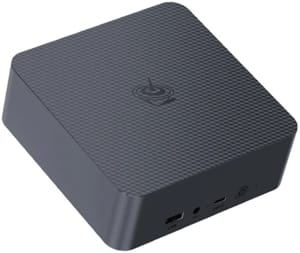
The EQR5 he mentions represents the entry point for developers curious about the switch. At under $300, it’s cheap enough to experiment with, yet powerful enough to run real development workloads.
Beelink EQR5
DHH’s criticism of Apple goes beyond just value. He’s been vocal about what he sees as declining quality under Tim Cook’s leadership.
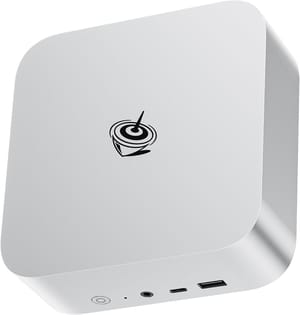
His setup of choice at multiple locations? The Beelink SER8, a $499 machine with 32GB RAM and a 1TB SSD that he calls “the Mac Mini competitor nobody’s talking about.”
Beelink SER8
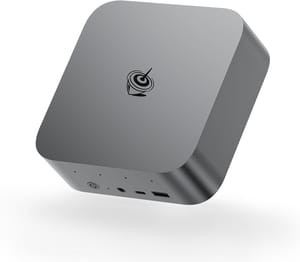
For developers who need more horsepower, DHH has also been testing the Beelink SER9, which pairs AMD’s HX370 processor with better integrated graphics and superior single-threaded performance.
Beelink SER9
The shift isn’t isolated to DHH. Daniel Lockyer, a software engineer, captured the emerging sentiment when news broke about Linux crossing 5% market share in the US.
Even DHH himself has become bullish on Linux’s trajectory, pushing back against conservative analyst predictions.
What makes this developer migration significant is that it’s not driven by ideology or cost savings alone. These are professionals who could easily afford Apple hardware but have concluded that the premium no longer buys them a better experience. The idea of running Ubuntu on Apple hardware isn’t new, but the motivations have shifted from curiosity to conviction. When DHH runs an old Intel Mac with Omarchy to give it new life after Apple abandoned it, he’s making a point about values as much as value.
Windows Has Become an Advertising Platform
Beyond hardware requirements and end-of-life deadlines, something more fundamental is pushing people away from Windows: the operating system increasingly feels like an advertising platform that happens to run your programs. Microsoft has spent years adding ads to the Start menu, lock screen, File Explorer, and Settings app. They call them “suggestions” and “recommendations,” but users know what they’re looking at.
The situation reached a new low with Windows Recall, a feature Microsoft announced in 2024 that takes screenshots of everything you do on your computer every few seconds. The idea was to let you search your activity history, but security researchers immediately pointed out that storing a complete visual record of your computing creates an obvious target for malware and bad actors. The initial backlash was so intense that Microsoft delayed the feature multiple times, eventually making it opt-in rather than on by default.
Then there’s Copilot, Microsoft’s AI assistant that the company seems determined to integrate into every corner of Windows whether users want it or not. QR codes advertising Copilot appeared on lock screens. Copilot buttons appeared in taskbars. Entire tools emerged specifically to remove Microsoft’s AI features from Windows because so many users wanted them gone.
The frustration isn’t just about any single feature. It’s about the cumulative effect of an operating system that increasingly serves Microsoft’s interests over its users’. As one tech writer put it, it’s “downright infuriating to both have to pay $140 for an official Windows 11 license and then see countless ads on your lock screen, Start Menu, and more.” Users pay for the license, see the ads, and have their data collected. They’re customers, products, and revenue streams simultaneously.
Linux offers a genuinely different model. There’s no corporate data pipeline to feed. No advertising platform to monetize your attention. No AI assistant being shoved into every interface. The default apps are open source and designed to do their job without ulterior motives. Updates deliver security fixes and new features, not new ways to show you things you didn’t ask for. For users who’ve grown exhausted by the constant battle to keep Windows configured the way they want it, Linux feels like computing used to feel.
What’s Still Broken
An honest assessment of Linux in 2026 has to acknowledge the persistent problems that years of progress haven’t solved. Hardware compatibility, while better than ever, still isn’t universal. That random USB device might not work. That specific printer might require proprietary drivers that don’t exist. Your laptop’s fingerprint reader probably won’t function. Bluetooth can be finicky. Nvidia graphics cards work but require more configuration than they should.
The “normie test” remains challenging. Could your parents use Linux? Could your non-technical friends? The answer depends heavily on their specific needs and tolerance for learning something new. Linux Mint and similar distributions have made the basics approachable, but edge cases still require technical knowledge that average users don’t have. Something will inevitably break, and fixing it will probably involve the terminal. For power users, that’s fine. For everyone else, it’s a barrier.
Software installation, despite improvements through Flatpak and AppImage, still confuses new users. Back in 2013, Ubuntu’s Software Center made installing software a simple, App Store-like experience. Today, the same application might be available through apt, snap, flatpak, and as a standalone AppImage, with different versions and behaviors in each format. Power users appreciate the flexibility. Normal users just want to install a program without thinking about packaging formats and dependency management.
The fragmentation that gives Linux its diversity also limits its polish. No single organization controls the desktop Linux experience the way Apple controls macOS or Microsoft controls Windows. This means no one ensures that all the pieces work together seamlessly. You might choose a distribution that makes different default choices than your application expects. The resulting friction, even if minor, accumulates over time.
What “Year of Linux Desktop” Actually Means
Perhaps the real question isn’t whether 2026 is “the year” but whether that framing even makes sense anymore. Linux passing some arbitrary market share threshold won’t suddenly make it the dominant consumer platform. That was never realistic. Windows and macOS aren’t going anywhere.
What seems more likely is a gradual normalization where Linux becomes one of several reasonable choices rather than an eccentric outlier. Steam Deck users think of it as a gaming device that happens to run Linux. Government workers use it because IT deployed it. Developers prefer it for professional work. Privacy-conscious users appreciate the control it offers. None of these groups are declaring a revolution. They’re just using what works for their needs.
The 4.7% market share figure, if accurate, represents something meaningful. It’s large enough that companies can’t entirely ignore Linux users when making software decisions. It’s large enough that hardware manufacturers increasingly consider Linux compatibility. It’s large enough that a teenager discovering programming might reasonably encounter Linux before Windows in certain contexts.
Should You Switch?
If you’re reading this article wondering whether to try Linux in 2026, the honest answer depends entirely on your situation. For many use cases, Linux works beautifully. Web browsing, email, document editing, software development, photo organization, media consumption - these all function perfectly well. If your computing needs fit within that scope, Linux offers a faster, more private, and more customizable experience than Windows with zero license fees. Mini PCs in particular work well as Linux machines since they often use standard Intel or AMD components with solid driver support.
But if you depend on specific software that only runs on Windows, if you play competitive games with aggressive anti-cheat, if your workflow involves specialized professional applications, or if you simply don’t want to learn something new - Windows or macOS remains the path of least resistance. There’s no shame in choosing convenience over ideology.
The best approach for the curious is a test drive. Most Linux distributions let you boot from a USB drive without installing anything. Spend an afternoon exploring. See if your hardware works. Try your critical applications. If something doesn’t function, you’ve learned something without commitment. If everything works, maybe you’ve found your new operating system.
2026 probably isn’t “the year of Linux desktop” in the revolutionary sense that phrase once implied. But it might be the year Linux becomes normal enough that the question stops mattering.


