
Bmax B4 Plus
Updated on

The BMAX B4 Plus pairs the Intel N100 with a dedicated 2.5-inch SATA bay, so a second drive goes in alongside the M.2 NVMe SSD instead of replacing it. It ships with 16GB of DDR4 and a 512GB NVMe SSD, which covers everyday desktop work out of the box and leaves the bay free for a media library, a backup target, or a home server’s data volume. Windows 11 Professional is preinstalled, and a VESA bracket in the box lets the machine hang behind a monitor.
Pros and cons
| Pros | Cons |
|---|---|
| Dedicated 2.5-inch SATA expansion bay | WiFi 5 instead of WiFi 6 |
| 16GB RAM and 512GB SSD included | Single RAM slot limits upgrade options |
| Dual HDMI for multi-monitor setups | Bluetooth 4.2 is dated |
| Easy internal access for upgrades | No 2.5GbE networking |
| Windows 11 Pro preinstalled | Plastic chassis, not metal |
| VESA mount included in box | Integrated graphics not suited for gaming |
Related Videos
Bmax B4 Plus Comparison Chart
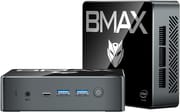 Bmax B4 Plus | |
| Price | List Price: $159.99 Amazon Prices: |
| Version | 16GB/512GB/Intel N100 |
| Performance Rating | 3.1 |
| Operating System | Windows 11 Pro |
| Processor | Quad-core 3.40 Ghz (max 3.40 Ghz) Intel Processor N100 |
| GPU | Integrated Intel UHD Graphics |
| RAM | 16 GB |
| Internal Storage | 512 GB |
| Dimensions width x length x thickness | 4.4 x 4.92 x 1.85 inches (111.76 x 124.97 x 46.99 mm) |
| Weight | 0.7 lbs (0.32 kg) |
| WiFi | Wi-Fi 5 (802.11ac) |
| Bluetooth | Bluetooth 4.2 |
| Ethernet | 1 Ethernet port at 1 Gbps |
| HDMI | 2 Full-Size HDMI Ports |
| DisplayPort | DisplayPort over USB-C |
| VGA | No VGA Ports |
| USB Ports | 2 USB 2.0, 2 USB 3, 1 USB-C |
| Thunderbolt Ports | No |
| OCuLink | No |
| Internal SATA Ports | 1 SATA port, includes 2.5" drive bay (Dedicated 2.5-inch SATA bay for additional storage expansion) |
| Card Reader | No Card Reader |
| Headphone Jack | combo |
| Fanless | No |
| VESA Mount | Yes |
| In the Box | Mini PC, Power Adapter, HDMI Cable, VESA Mount Kit, Manual |
| Expandability | Single RAM slot (16GB max), M.2 2280 slot, dedicated 2.5-inch SATA bay for secondary drive |
Related Mini PCs
-
 Bmax B4 UltraThe Bmax B4 Ultra is an ultra-compact mini PC featuring Intel's N150 processor, 12GB LPDDR5 RAM,…
 -
 Bmax B2 PowerThe Bmax B2 Power is a palm-sized mini PC with an Intel Celeron 5205U, 8GB of DDR4, a 256GB NVMe…
 -
 BOSGAME B100The BOSGAME B100 is a budget Intel N100 mini PC with 16GB of DDR4, a 512GB NVMe SSD, dual HDMI plus…
 -
 BOSGAME B95The BOSGAME B95 is a low-cost Intel N95 mini PC with 16GB of DDR4, a 512GB M.2 SSD, 2.5Gb Ethernet,…
 -
 CyberGeek Nano A1The CyberGeek Nano A1 is a compact Intel N100 mini PC with Windows 11 Pro, Wi-Fi 6, dual HDMI 4K…
 -
 DreamQuest Pro Mini PCThe DreamQuest Pro Mini PC is a budget Intel N95 box (16GB or 32GB RAM, 512GB or 1TB SSD) with dual…
A SATA bay next to the M.2 slot

The Intel N100 runs four efficient cores at up to 3.4GHz, which covers office work, web browsing, and video playback without the heat or power draw of a faster chip. The 16GB of DDR4 sits in one slot running single channel, so multitasking is comfortable but 16GB is the ceiling, because there is no second slot to fill later. Document editing, email, and streaming stay responsive, and the platform is quiet enough about power that it can run all day without attention.
The 2.5-inch bay takes a standard laptop hard drive or SSD of several terabytes, so the included NVMe drive can hold the operating system while bulk data lives on cheaper storage. The M.2 2280 slot holding the 512GB SSD can also be swapped for a larger NVMe drive, which gives two separate upgrade paths. Home servers, local backup targets, and media libraries are the workloads that need that combination, and they are the reason to pick this box over a smaller N100 machine that has room for one drive.
Two HDMI ports carry 4K 60Hz output for a dual-monitor desk, and the USB-C port adds DisplayPort alternate mode for a third screen. The front panel holds two USB 3.0 ports and the Type-C port, while two USB 2.0 ports on the rear cover a keyboard, a mouse, and other legacy devices. Wired networking stops at gigabit Ethernet, so file moves across a 2.5GbE switch will be capped at the machine. WiFi 5 and Bluetooth 4.2 are the oldest parts of the spec sheet, and a combo audio jack handles headphones and a headset mic.
Cooling is active, with a fan and visible chassis vents, and noise stays modest under normal desktop load. The plastic shell keeps weight under a pound and keeps the price down, though it feels less solid in the hand than a metal-bodied box. At roughly 4.4 x 4.92 x 1.85 inches the machine is larger than the smallest N100 systems and far smaller than a desktop tower, and that extra thickness is where the drive bay lives.
Reviewer Insights
Living Linux: accessible screws and a drive bay

Living Linux unboxes the machine and takes it apart on camera. The reviewer picks the 2.5-inch SATA bay as the differentiator, noting “This one also has a slot for a 2.5 inch drive.” Disassembly is straightforward, and the reviewer observes that “The screws are accessible, probably to make it easier to install the 2.5 inch drive.”
He recommended it with a condition: “If you really want to have a lot of storage but you still want a small computer, then this is an interesting option.” The video walks the internal layout, showing the single RAM slot with its 16GB module, the M.2 2280 SSD position, and the dedicated SATA connector and bay.
Customer Reviews
Across 60 ratings on Amazon, the Bmax B4 Plus averages 4.1 stars, with most owners (65 percent) leaving five stars and 13 percent leaving one star. Buyers using it for ordinary desktop work and media tend to be the happiest. A verified buyer, “Almost Satisfied,” replaced an aging tower with it and reported it “works perfectly” for email and web browsing, though they added a minor gripe: “My only complaint is that the audio jack is on the front.” Another verified owner, LR, gave it four stars and a narrower use case: “I use this for my PLEX server,” along with Netflix, YouTube, and casual browsing.
The most pointed one-star review, from verified buyer michael lumley, is about the listing not matching the hardware: he expected Linux and got Windows instead, writing “Description says Pro Ubuntu. I specifically needed a Linux device that is not a VM.” A three-star review from Jason C. Coleman, who owns several N100 mini PCs, said it “runs as expected” once set up but that he hit trouble with his first unit out of the box. If you specifically need a Linux machine, confirm the OS before buying; for basic Windows desktop and media use, the reviews skew positive.
Read more owner reviews on Amazon.
Buy it for the storage bay, skip it if you need WiFi 6
If a second drive matters to you, this is a cheaper route than hanging external storage off a smaller machine, and the included NVMe drive stays free to run the operating system. If one 512GB drive covers everything you do, a more compact N100 box does the same desktop work in less space for the same kind of money.
Memory stops at 16GB with no second slot, so there is no headroom to buy later, and the wireless stack sits on WiFi 5 and Bluetooth 4.2. Neither matters for a machine wired to a router and used for documents, browsing, and streaming. They matter more if this is meant to be a main computer for the next several years.
Starry Hope’s Mini PC Comparison Tool lines these specs up against other models if you want to check the alternatives before committing.
Frequently Asked Questions
What operating system does the BMAX B4 Plus come with?
Windows 11 Professional is preinstalled and licensed, so the machine boots to a usable desktop the first time you plug it in.
Can I add a second hard drive to the BMAX B4 Plus?
Yes. The dedicated 2.5-inch SATA bay takes a standard laptop hard drive or SSD, and it sits alongside the included 512GB NVMe drive instead of replacing it, so capacity can grow into the terabytes.
Can I upgrade the RAM in the BMAX B4 Plus?
No. There is a single RAM slot, it ships populated with 16GB of DDR4, and that is the supported maximum. Unlike mini PCs with two slots, this one leaves no memory headroom to buy later.
How many displays can the BMAX B4 Plus support?
Three. The two HDMI ports and the USB Type-C port with DisplayPort alternate mode each drive a display at up to 4K resolution at 60Hz.
Is the BMAX B4 Plus suitable for gaming?
Only for undemanding titles. The Intel UHD integrated graphics handle older games, retro emulation, and lightweight indie releases at reduced settings, while modern AAA titles are out of reach for this hardware.
Does the BMAX B4 Plus include a VESA mount?
Yes. A VESA mounting bracket and screws come in the box, so the machine can hang behind any VESA-compatible monitor and free up the desk.
What is the power consumption of the BMAX B4 Plus?
Very little. The low-power Intel N100 platform typically stays well under 20 watts in normal use, far below a traditional desktop, which makes 24/7 duty as a home server or network appliance cheap to run.
Can I install Linux on the BMAX B4 Plus?
The Intel N100 is a common Linux target and the box ships with Windows 11 Pro, so plan on installing a distribution yourself. One buyer expected the listing’s Ubuntu wording to mean Linux was preinstalled and received Windows instead.