
Bmax B4 Ultra
Updated on

The Bmax B4 Ultra represents a compelling option in the ultra-compact mini PC category, designed for users who prioritize portability and space efficiency over raw computing power. Weighing just over half a pound and measuring roughly 4 inches on each side, this palm-sized device fits comfortably behind a monitor or can be tucked away virtually anywhere. The Intel N150 Twin Lake processor offers a modest upgrade over the popular N100, providing approximately 15-25% better performance in single and multi-threaded workloads respectively. For everyday tasks like web browsing, document editing, and media consumption, the B4 Ultra delivers a surprisingly capable experience at its under-$200 price point.
Pros and Cons of the Bmax B4 Ultra
| Pros | Cons |
|---|---|
| Ultra-compact form factor (4.25 x 4.13 x 1.38 inches) | USB-C port lacks video output capability |
| Exceptionally lightweight at just 0.57 lbs | Single-channel RAM limits performance potential |
| Smooth 4K and 8K video playback capability | WiFi 5 instead of WiFi 6 |
| Includes Windows 11 Pro with recovery partition | Fan runs constantly (though quietly) |
| Dual HDMI outputs for 4K displays | Entry-level CPU not suited for demanding tasks |
| VESA mount and 2.5” SATA expansion included | LPDDR5 RAM is soldered and not upgradeable |
Bmax B4 Ultra Comparison Chart
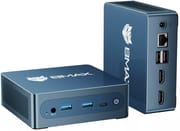 Bmax B4 Ultra | |
| Price | List Price: $199.99 Amazon Prices: Loading prices... |
| Version | --- |
| Perfomance Rating | 4.5 |
| Operating System | Windows 11 Pro |
| Processor | Quad-core 3.60 Ghz Intel Processor N150 |
| GPU | Integrated Intel UHD Graphics |
| RAM | 12 GB LPDDR5 |
| Internal Storage | 512 GB |
| Dimensions width x length x thickness | 4.25 x 4.13 x 1.38 inches (107.95 x 104.9 x 35.05 mm) |
| Weight | 0.57 lbs (0.26 kg) |
| WiFi | Wi-Fi 5 (802.11ac) |
| Bluetooth | Bluetooth 5.0 |
| Ethernet | 1 Ethernet port at 1 Gbps |
| HDMI | 2 Full-Size HDMI Ports |
| DisplayPort | No DisplayPort |
| VGA | No VGA Ports |
| USB Ports | 2 USB 2.0, 2 USB 3, 1 USB-C |
| Thunderbolt Ports | No |
| Internal SATA Ports | 1 SATA port, includes 2.5" drive bay |
| Card Reader | No Card Reader |
| Headphone Jack | 3.5mm combo |
| Fanless | No |
| VESA Mount | Yes |
| In the Box | -- |
| Expandability | RAM: Soldered LPDDR5 (not upgradeable for this variant), Storage: Dual M.2 slots + 2.5-inch SATA bay |
Related Mini PCs
-
 Bmax B4 PlusThe BMAX B4 Plus Mini PC delivers Intel N100 performance with a unique 2.5-inch SATA expansion bay…
 -
 Bmax B2 PowerThe Bmax B2 Power delivers budget-friendly computing in an ultra-compact package. With its Intel…
 -
 Beelink SER3The Beelink SER3 offers a compact form factor with AMD Ryzen 3 3200U power, dual 4K HDMI output,…
 -
 BOSGAME B100Compact yet powerful, the BOSGAME B100 features Intel UHD Graphics for 4K playback, dual HDMI for…
 -
 BOSGAME B95Compact yet powerful, the BOSGAME B95 Mini PC features an Intel Processor N95, 16GB DDR4 RAM, and…
 -
 CHUWI LarkBox X (2023)Harness robust quad-core performance and connect seamlessly with the CHUWI LarkBox X Mini PC's…
Detailed Insights into the Bmax B4 Ultra

The build quality of the Bmax B4 Ultra reflects thoughtful engineering for its intended use case. The compact chassis measures just 4.25 by 4.13 by 1.38 inches, making it one of the smallest mini PCs available with Intel Alder Lake-N architecture. The included VESA mounting bracket allows the unit to be attached directly behind a monitor, effectively creating an all-in-one setup. Port accessibility is well-considered with connections spread across the front, rear, and sides of the unit, though the short power adapter cord noted by reviewers may require careful placement or an extension.
Performance from the Intel N150 processor positions the B4 Ultra as a capable light-duty workstation. The 6W TDP chip handles office applications, web browsing, and even serves as an excellent HTPC for streaming content. Testing by reviewers confirms smooth 4K video playback from YouTube, with some users reporting acceptable 8K playback as well. Light gaming is possible with titles like Roblox running on high settings, though more demanding games like Genshin Impact require low settings at 30 FPS. The N150 runs approximately 15% faster in single-threaded and 25% faster in multi-threaded tasks compared to the N100.
Connectivity options are solid for a mini PC in this class, with dual HDMI 2.1 ports enabling connection to two 4K displays simultaneously. The B4 Ultra includes two USB 2.0 ports, two USB 3.0 ports, a single USB-C port (data only, no video output), and Gigabit Ethernet. WiFi 5 (802.11ac) and Bluetooth 5.0 handle wireless connectivity, though the WiFi performance has been noted as slower than some competitors. For storage expansion, dual M.2 slots and a 2.5-inch SATA bay provide ample upgrade paths despite the soldered RAM limiting memory upgrades.
Reviewer Insights on the Bmax B4 Ultra

GOOJODOQ’s Perspective
GOOJODOQ provides a comprehensive hands-on review of the Bmax B4 Ultra, focusing extensively on the unboxing experience and initial setup process. The reviewer emphasizes the incredibly compact form factor, stating that “it fits in the palm of one hand” and “weighs about 200 grams, just a little more than a mobile phone.” A significant portion of the review covers practical aspects like navigating Windows 11 Pro setup and utilizing the F9 recovery partition feature.
Performance testing in the review demonstrates impressive media capabilities for an entry-level device. GOOJODOQ confirms that “8K resolution is actually playable,” which speaks to the N150’s improved media decoding capabilities. The teardown portion reveals the internal layout, showing a single RAM slot and M.2 storage configuration. Regarding the USB-C port, the reviewer explicitly tested and confirmed that “in the specs, it doesn’t support display output. I tested it, and it really doesn’t work.” The overall recommendation positions this as an ideal secondary PC for office work, students, or media consumption.
NotebookCheck’s Analysis
According to NotebookCheck’s review of the similar B4 Turbo, the N150-equipped Bmax models work well as basic HTPC solutions but shouldn’t be expected to handle demanding workloads. The technical review awarded a 58% score, noting that the 6W processor means users shouldn’t “expect to get a lot done on the Twin Lake processor” but that it’s “sufficient for the most part” for its intended use cases. The review highlighted the easy serviceability and VESA mount support as positives, while pointing out concerns about single-channel RAM configuration and the always-active cooling fan.
Customer Reviews of the Bmax B4 Ultra
Amazon customers have rated the Bmax B4 Ultra at 4.6 out of 5 stars based on 58 reviews, indicating strong satisfaction for its price category. Users frequently praise the ultra-compact size and silent operation, making it an excellent choice for living room setups or cramped workspaces. Many buyers specifically mention using it as a secondary computer or home server, applications where the N150’s efficiency shines. Users interested in running Linux on their mini PC will find the Intel N150 generally well-supported.
Common praise centers on the device’s value proposition, with many customers highlighting that it performs better than expected for sub-$200 hardware. The included Windows 11 Pro license and recovery partition receive positive mentions, as these add genuine value compared to barebones alternatives. Several users appreciate the dual HDMI outputs for multi-monitor setups.
Criticism from customers primarily focuses on expectations management. Some buyers expecting laptop-level performance found the N150 limiting for multitasking. A few reviews mention the non-upgradeable RAM as a disappointment, though this is clearly stated in the product specifications. The WiFi performance has occasionally been noted as underwhelming compared to wired ethernet connections.
Conclusion
The Bmax B4 Ultra fills a specific niche in the mini PC market: users who need a functional Windows computer in the smallest possible package at the lowest reasonable price. It excels as a secondary workstation, HTPC, digital signage player, or basic office computer where space is at a premium. The Intel N150 provides meaningful improvements over the N100 while maintaining the same efficient 6W power envelope.
Those requiring more computational power should look elsewhere, as the B4 Ultra isn’t designed for video editing, heavy multitasking, or demanding applications. The soldered LPDDR5 RAM limits future upgrades, though the dual M.2 slots and SATA bay provide excellent storage expansion options. The lack of USB-C video output is a notable omission for those planning monitor connections through that port.
For users whose needs align with its capabilities, the Bmax B4 Ultra delivers remarkable value. The combination of ultra-compact design, dual 4K display support, genuine Windows 11 Pro, and sub-$200 pricing makes it a strong contender in the entry-level mini PC segment. For those looking to compare options, Starry Hope’s Mini PC Comparison Chart provides a valuable resource for evaluating alternatives.
Frequently Asked Questions
Can the Bmax B4 Ultra run two monitors simultaneously?
Yes, the B4 Ultra features dual HDMI 2.1 ports that support two 4K displays at 60Hz simultaneously. Note that the USB-C port does not support video output, so all display connections must use the HDMI ports.
Is the RAM upgradeable on the Bmax B4 Ultra?
No, the 12GB LPDDR5 RAM in the B4 Ultra variant sold on Amazon is soldered directly to the motherboard and cannot be upgraded. If RAM upgradability is important to you, note that Bmax offers a different B4 Ultra variant with SO-DIMM DDR4 slots, though availability varies by region.
What storage expansion options does the B4 Ultra offer?
The B4 Ultra offers excellent storage expansion with dual M.2 slots (one NVMe, one SATA) and a 2.5-inch SATA drive bay. This allows for up to 4TB of additional storage beyond the included 512GB NVMe SSD, making it suitable for media server applications.
How does the Intel N150 compare to the Intel N100?
The Intel N150 offers approximately 15% better single-threaded performance and 25% better multi-threaded performance compared to the N100. Both are 6W TDP processors, so power consumption and thermal characteristics are similar. The N150 provides a noticeable but not dramatic improvement for everyday tasks. If the N100’s performance is sufficient for your needs, the BMAX B4 Plus offers similar features with upgradeable RAM.
Can the Bmax B4 Ultra play 4K video smoothly?
Yes, the B4 Ultra handles 4K video playback smoothly for most streaming services and local files. Reviewers have confirmed successful playback of both 4K and even 8K content from YouTube. However, some technical reviews note that 4K at 60fps can occasionally show imperfect playback depending on the codec and source.
Is the Bmax B4 Ultra fanless?
No, the B4 Ultra has an active cooling fan. However, reviewers note that the fan operates very quietly, making it suitable for living room or bedroom use. The fan does run continuously during operation rather than cycling on and off based on temperature.
Does the B4 Ultra support VESA mounting?
Yes, the Bmax B4 Ultra includes a VESA mounting bracket in the box, allowing you to attach it directly to the back of a compatible monitor. This is especially useful given its compact size, effectively turning your monitor into an all-in-one computer setup.