
UXX X20 Mini PC
Updated on

The UXX X20 Mini PC sits at the ultra-budget end of the mini PC market. At 4.6 inches square and under an inch thick, it fits a dual-core Intel Celeron N3350 processor, 6GB of DDR3 memory, and 64GB of eMMC storage into a body that disappears behind a monitor. It will not win performance benchmarks, but reviewers put it to work for retro gaming emulation and basic office work.
At its original price of around $90, the X20 shipped as a complete system. The box included a wireless mouse, VESA mounting bracket, and HDMI cable, and the HDMI and VGA outputs together drive legacy displays that newer mini PCs have dropped.
Design, ports, and cooling
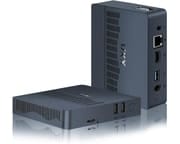
The chassis measures 4.6 x 4.6 x 0.9 inches and weighs about 1.1 pounds. Construction is plastic, in line with the price, though some units carry a metallic finish.
The rear panel carries a full-size HDMI port, a VGA output for legacy monitors, three USB 3.0 ports, a gigabit Ethernet jack, and a 3.5mm audio combo jack, a wide spread for the money. A microSD slot takes a card, and a single M.2 2242 SATA slot supports drives up to 2TB. The 64GB eMMC fills up under Windows 10 and a few applications.
Cooling comes from a small internal fan. The Intel Celeron N3350 has a 6-watt TDP and puts out little heat, so the fan rarely has to spin up. That suits a bedroom media center or an office where noise carries. The VESA mount lets the unit hang behind a compatible monitor and stay out of sight.
Wireless is dual-band WiFi 5 (802.11ac) and Bluetooth 4.2, enough for web browsing and streaming. Gigabit Ethernet is on the back for anyone who wants a wired connection.
Pros and Cons
| Pros | Cons |
|---|---|
| Ultra-compact 4.6” square footprint | Limited performance for demanding tasks |
| Includes wireless mouse, VESA bracket, HDMI cable | Only 64GB base storage |
| Both HDMI and VGA outputs for legacy display support | WiFi 5 and Bluetooth 4.2 are aging standards |
| M.2 slot supports up to 2TB storage expansion | 6GB single-channel RAM limits multitasking |
| Whisper-quiet operation | Struggles with video conferencing applications |
| $89.99 list price | Celeron N3350 is an entry-level processor |
| VESA mountable for clean installations | Currently unavailable from Amazon |
Related Videos
UXX X20 Mini PC Comparison Chart
 UXX X20 Mini PC | UXX X20 Mini PC | |
| Price | List Price: $89.99 Amazon Prices: | List Price: $89.99 Amazon Prices: |
| Version | 6GB/64GB/Intel Celeron N3350 Black | 6GB/64GB/Intel Celeron N3350 Silver |
| Performance Rating | 2.4 | 2.4 |
| Operating System | Windows 10 Pro | Windows 10 Pro |
| Processor | Dual-core 1.10 Ghz (max 2.40 Ghz) Intel Celeron N3350 | Dual-core 1.10 Ghz (max 2.40 Ghz) Intel Celeron N3350 |
| GPU | Integrated Intel UHD Graphics | Integrated Intel UHD Graphics |
| RAM | 6 GB | 6 GB |
| Internal Storage | 64 GB | 64 GB |
| Dimensions width x length x thickness | 4.6 x 4.6 x 0.9 inches (116.84 x 116.84 x 22.86 mm) | 4.6 x 4.6 x 0.9 inches (116.84 x 116.84 x 22.86 mm) |
| Weight | 1.1 lbs (0.5 kg) | 1.1 lbs (0.5 kg) |
| WiFi | Wi-Fi 5 (802.11ac) | Wi-Fi 5 (802.11ac) |
| Bluetooth | Bluetooth 4.2 | Bluetooth 4.2 |
| Ethernet | 1 Ethernet port at 1 Gbps | 1 Ethernet port at 1 Gbps |
| HDMI | 1 Full-Size HDMI Port | 1 Full-Size HDMI Port |
| DisplayPort | No DisplayPort | No DisplayPort |
| VGA | 1 VGA Port | 1 VGA Port |
| USB Ports | 3 USB 3 | 3 USB 3 |
| Thunderbolt Ports | No | No |
| OCuLink | No | No |
| Internal SATA Ports | No SATA ports | No SATA ports |
| Card Reader | microSD Card Reader | microSD Card Reader |
| Headphone Jack | combo | combo |
| Fanless | No | No |
| VESA Mount | Yes | Yes |
| In the Box | Adaptor, Mouse, User Manual, HD Cable, Mini PC, VESA Mount | Adaptor, Mouse, User Manual, HD Cable, Mini PC, VESA Mount |
| Expandability | Supports M.2 SSD up to 2TB | Supports M.2 SSD up to 2TB |
Related Mini PCs
-
 NIMO Mini PCThe NIMO Mini PC is a 0.73-pound aluminum mini PC assembled in the USA with an Intel N100, triple…
 -
 AWOW AK10The AWOW AK10 is an Intel N100 mini PC with 8GB of soldered DDR5, a 256GB SSD in an M.2 slot that…
 -
 Beelink Mini SA compact Celeron N5095 mini PC with dual 4K HDMI outputs, a swappable M.2 SSD plus a 2.5-inch…
 -
 Bmax B1 PlusThe Bmax B1 Plus is an ultra-budget mini PC on Intel's 2016 Celeron J3355, with 6GB of soldered…
 -
 Bmax B3The Bmax B3 is a small Intel Celeron N5095 mini PC with two HDMI outputs, two gigabit Ethernet…
 -
 CHUWI HeroBox (2023)The CHUWI HeroBox (2023) is an Intel N100 mini PC with 8GB of LPDDR5, a 256GB M.2 drive, a 2.5-inch…
Reviewer Insights
The UXX X20 is a white-label budget box, so it never reached the lab-bench review circuit. No reviewer measured its power draw or ran benchmarks on it. What exists is two hands-on videos plus one spec-overview article.
Chase Brogan’s Retro Gaming Perspective
Chase Brogan (presenting as the Retro Gaming Guy) skipped productivity entirely and tested the X20 purely as an emulation box, framing it in the video title as “the Cheapest Mini PC on Amazon” at $89.99 and asking whether it could beat a Raspberry Pi 4 for retro gaming. He ran a spread of emulators on camera and described how each console felt.
NES, SNES, and MAME arcade titles ran cleanly, and he singled the X20 out as a fit for “an arcade oneup mod.” Genesis and Master System were “very much playable” but imperfect: he said “the audio was a little bit off at times” and “garbled” on Sonic, which he read as a sign the hardware was nearing its ceiling. PlayStation 1 and Dreamcast were playable but soft, “not unplayable but it’s not that smooth crisp performance that we really want.” Sega Saturn failed outright: “the games do launch but they’re a laggy disaster so not at all playable in my opinion,” though he allowed that it “gets you further than you would on Raspberry Pi 4.”
“I was totally expecting N64 to fall short,” he said, but it “turned out to be the best experience on here today,” with Mario Kart 64 and Cruis’n World running well. His verdict stayed measured: “I would never recommend this for somebody that’s looking to get into flawless … gameplay experiences across the board,” but for the right retro collections at $89.99 he rated it worth the price.
Mini PC Reviewer Cites Only Spec-Sheet Figures
Mini PC Reviewer published a written overview of the X20 without independent testing. Its only hard numbers come from the spec sheet, including the N3350’s “1.1GHz” base and “2.4GHz” maximum clocks (which match the processor’s published specifications) and a “-20 to 70°C” storage temperature rating. It frames the “499g” weight and 4.6 x 4.6 x 0.9-inch body as fit for “crowded workstations and business travel” and points to the M.2 slot as the route around the 64GB base storage.
The N3350 in 2026
The X20’s dual-core Intel Celeron N3350 is an Apollo Lake chip from 2016, and a decade on, its PassMark multi-thread score of 1,112 sits far below current entry-level parts. For scale, the budget Celeron chips that followed it already pull far ahead: the N4500 lands near 1,805 and the quad-core N5105 near 4,066, and both of those have themselves been superseded by the Alder Lake-N (N100-class) parts that define today’s entry tier. The X20 works as a single-task appliance: a near-silent retro-emulation box up to the N64 era, a digital-signage or home-automation host, or a light web-and-Office machine. The Italian channel techPaolo earmarked it for the signage and home-automation role in his hands-on look, where he found it ran with no audible fan noise and stayed cool.
Customer Reviews
Owner feedback on the X20 diverged sharply. The satisfied buyers tend to use it as a light, secondary machine for web browsing, email, and Office work, and they call out the quick setup and small footprint. David Miller, a verified buyer who runs it as a personal computer alongside his work rig, wrote “It has a fast processor, and is installed with Windows 10. It took less than 30 minutes to set up and I was up to speed and working in a matter of minutes.”
A verified buyer posting as eddy gave it one star, reporting “The product couldn’t even run Google chrome. I opened task manager and it took 2 mins for it to open. Overheated the pc.” Max’s Mom, a verified three-star reviewer, found it unworkable for calls: “Very ineffective and slow for using Zoom or MS Teams. The meetings freeze and there’s severe delays when using it for this.” Even some of the more positive owners flag limits; verified four-star buyer Gary Lee Wright noted it “can lag a bit if you have too many tabs open” and was surprised the unit ships without a sound card (he used Bluetooth audio instead).
A one-task secondary machine, not a primary computer
The X20 works as a secondary machine for one task at a time, with the bundled accessories, the legacy VGA output, and the M.2 expansion slot covering what that role needs. The Celeron N3350 and 6GB of RAM rule it out as a primary computer for anything past web browsing and document editing. Video conferencing, heavy multitasking, and modern gaming sit outside its range, typical constraints of budget mini PCs.
Our Mini PC Comparison Chart lines its specifications up against other options in this price range.
Frequently Asked Questions
Can the UXX X20 run Windows 11?
No. The Intel Celeron N3350 misses Microsoft’s official Windows 11 requirements. Apollo Lake chips are not on Microsoft’s list of supported processors, and the X20 lacks TPM 2.0 support. Workarounds exist for installing Windows 11 on unsupported hardware, but 6GB of RAM and an entry-level processor would run it poorly. Windows 10 is the operating system to stay on.
Is the UXX X20 good for retro game emulation?
Yes, up to the N64/PlayStation 1 era. Chase Brogan found NES, SNES, MAME, and N64 titles ran well, with Genesis playable but glitchy on audio. PlayStation 1 and Dreamcast ran but felt soft, and Sega Saturn was a laggy failure, though he said even that gets further than it would on a Raspberry Pi 4.
How much storage can I add to the UXX X20?
One M.2 2242 SATA slot, supporting drives up to 2TB. That is the shorter M.2 form factor (42mm) rather than the more common 2280 (80mm), so buy the matching size. With only 64GB of base eMMC, plan on adding a drive.
Can the UXX X20 be used for video conferencing?
Not well. The Celeron N3350 and 6GB of RAM bottleneck on video encoding and decoding while the conferencing software runs, which is where demanding applications like Zoom fall down. Occasional calls may get through, but regular conferencing needs more powerful alternatives.
Is the UXX X20 still available?
Both color variants (Black and Silver) show as “Currently unavailable” on Amazon. The product appears discontinued, though used units or other retailers may still carry stock.