
TerraMaster F2-425
Published on

The TerraMaster F2-425 is a 2-bay NAS for home backups, shared folders, phone photos, and media streaming, sold without drives. It suits a first-time owner who wants a box for those jobs and no more. Its limits are an older Intel Celeron N5095, one 2.5GbE port, and no M.2 slots, so it has little room to take on heavier work later. It launched in October 2025 at $249.99, and TerraMaster’s store now lists it at $299.99.
Pros and cons
| Pros | Cons |
|---|---|
| Intel x86 chip with Quick Sync for Plex and Jellyfin | The Celeron N5095 is a 2021 chip |
| 2.5GbE port that reaches about 250 to 300 MB/s in wired tests from PCWorld and Hardware Busters | One network port, so no link aggregation or failover |
| Tool-less trays and hot-swap bays for 3.5-inch or 2.5-inch drives | No M.2 slots for SSD cache or a fast pool |
| 4GB of DDR4 in one slot, upgradable to 16GB | 4GB is tight for several services |
| Quiet in normal use, with about 11 to 12 W idle on SSDs | Mostly plastic case; PCWorld had a rubber foot come loose |
| TOS includes backup tools, Docker, and IP camera recording without license fees | HDMI shows only a terminal under TOS |
Related Videos
TerraMaster F2-425 Comparison Chart
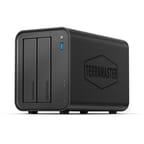 TerraMaster F2-425 | |
| Price | List Price: $299.99 Amazon Prices: Loading prices... TerraMaster store: |
| Version | Intel N5095, 4GB DDR4, diskless |
| Drive Bays | 2 x 3.5-inch SATA (2.5-inch compatible) Hot-swap, tool-less trays |
| M.2 Slots | None |
| Max Raw Capacity | 60 TB |
| Included Drives | None (diskless) |
| System Drive | none (TOS installs on the drives) |
| Processor | Quad-core 2.00 Ghz (max 2.90 Ghz) Intel Celeron Processor N5095 |
| Hardware Transcoding | Yes (Intel Quick Sync (UHD Graphics)) |
| RAM | 4 GB DDR4 SO-DIMM Max 16 GB, 1 slot Non-ECC SO-DIMM |
| ECC Memory | No |
| Network Ports | 1 x 2.5GbE RJ45 |
| PCIe Slot | No |
| Expansion Unit | No dedicated expansion unit; TerraMaster USB DAS over USB |
| Operating System | TOS 6, TOS 7 by update |
| Third-Party OS | Yes (TrueNAS runs from a USB stick) |
| File Systems | Btrfs, ext4 (external drives also EXT3, NTFS, FAT32, HFS+) |
| USB Ports | 3 USB 3 Front: 10Gbps. Rear: 10Gbps, 5Gbps. All USB-A |
| Thunderbolt Ports | No |
| HDMI | 1 |
| WiFi | No |
| Idle Power | 17 W (two HDDs spinning, Ex-IT guy; 11 to 12 W with two SSDs, Hardware Busters) |
| Load Power | 22 W (two 4TB Seagate HDDs in read and write, maker spec) |
| Power Supply | 48W external |
| Noise | 26.8 dB (medium fan, 1 m; 13.7 dB low, 33.6 dB full, Hardware Busters) |
| Dimensions width x length x thickness | 4.7 x 8.7 x 6.1 inches (119.38 x 220.98 x 154.94 mm) |
| Weight | 3.3 lbs (1.5 kg) |
| Released | October 2025 at $249.99 |
| In the Box | Main unit, 48W power adapter, Cat 6 Ethernet cable, drive screws, drive labels, quick guide. |
| Expandability | RAM to 16GB (one SO-DIMM). No M.2 slots. No PCIe slot. |
Room for two drives and 16GB of memory
The F2-425 measures about 4.7 x 8.7 x 6.1 inches and weighs 3.3 pounds without drives, and the case is plastic over some metal framing. Each 3.5-inch drive snaps into a push-lock tray without screws, and each bay also takes a 2.5-inch SATA drive or SSD and supports hot swap. TerraMaster rates the bays for 30TB drives, or 60TB raw. The unit offers RAID 0, RAID 1, JBOD, single-drive volumes, and TerraMaster’s TRAID, with Btrfs or EXT4. Neowin found that TRAID with two drives leaves the capacity of one, the same as a mirror. There are no drive locks.
The single SO-DIMM slot holds a 4GB non-ECC DDR4 module and takes up to 16GB. Reaching it takes two screws on the rear and one side panel, and Neowin warns that the thin rubber screw covers tend to break when you remove them. There are no M.2 slots, so a fast SSD tier or cache means filling one of the two bays with a SATA SSD. TOS installs onto the data drives, because there is no separate system drive.
One 2.5GbE port and 11 to 17 W at idle

The single RJ45 port caps file transfers near 300 MB/s. Hardware Busters and PCWorld both measured results close to that ceiling, and NASCompares notes that a pair of modern hard drives can approach it, so faster drives add little over the network. There is no PCIe slot or network upgrade slot. The front has a 10Gbps USB-A port, and the rear has one 10Gbps and one 5Gbps USB-A port. TerraMaster advertises HDMI 2.0b output to a TV, but under TOS the port shows only a command prompt or system information.
Idle draw depends on the drives. Hardware Busters measured 11 to 12 W with two SSDs, and Ex-IT guy measured 17 W with two spinning hard drives and about 10 W with none installed. His unit reached about 20 W while synchronizing two 4TB drives, and TerraMaster rates 22 W in read and write with two 4TB Seagate drives. Hardware Busters measured about 1.1 W in standby, TerraMaster rates hibernation at 11 W, and a 48 W external adapter powers the unit.
A rear 80mm fan pulls air through the case. It measured 13.7 dBA on low, 26.8 dBA on medium, and 33.6 dBA on full at Hardware Busters, and TerraMaster rates the unit at 19 dB(A) in standby at about 3 feet.
A 2021 Celeron with Quick Sync, and an OS you can replace

The N5095 has four cores and four threads, a 2.9GHz boost, a 15 W TDP, and a PassMark score of about 4,000, against about 5,300 for the Intel N100 in the UGREEN DXP2800. That is enough for file sharing, backups, photo indexing, and a few light containers, with less headroom than current Intel N-series boxes. Its UHD Graphics handle H.264 and H.265 transcoding through Quick Sync, and Neowin notes there is no AV1 decode.
The F2-425 shipped with TOS 6, and TerraMaster’s forum says the 425 series began receiving the TOS 7 update in July 2026, for units running TOS 6.0.794. TOS includes TRAID, Btrfs snapshots, Docker, a photo app with face and scene recognition, CloudSync, TerraSync, and Centralized Backup. Plex, Emby, and Jellyfin are available from the app center. Surveillance Manager records from ONVIF cameras without per-camera license fees.
Replacing TOS is allowed. Hardware Busters and NASCompares both say installing another operating system does not void the warranty, and Ex-IT guy ran TrueNAS from a USB stick. The internal flash in his unit measured 251MB, too small to hold a full system.
Reviewer Insights
TechRadar, Neowin, Hardware Busters, and JuanBagnell all describe it as quiet, and PCWorld, TechRadar, Neowin, and JuanBagnell note the plastic build. Views on TOS range from TechRadar’s “works well for beginners” to Neowin’s complaint that it still feels like a beta.
PCWorld
Jon L. Jacobi of PCWorld tested it with one 2TB SATA SSD and saw read and write speeds between 250 and 300 MB/s. His screenshots show 292 MB/s reads with 202 MB/s writes in one tool and 260 and 270 MB/s in another. The October 2025 review carries an Editors’ Choice badge and ends, “So yes, I’m recommending the F2-425 as a top choice in a two-bay NAS box for multimedia streaming, backup, home file sharing, and storing video from ONVIF IP cams.” He also complains about multitasking (“One thing I don’t like about TOS is that it doesn’t multitask particularly well”) and wrote of the build, “I’d love to say it’s ruggedly constructed, but on one of the rubberized feet was falling off after only a few drags across the rough surface you see in the photos.”
TechRadar
Alastair Jennings of TechRadar scored it 4.5 out of 5 after three weeks with two Lexar NS100 SSDs, using it as a backup target, a Plex and iTunes server, and a local WordPress server. He wrote, “Fan noise proved to be minimal for day-to-day use and far less than many larger NAS systems, and it was only under sustained image or video processing that the fans really kicked in.” Of the software he said, “The TOS software works well for beginners, though advanced setups like web servers require some technical skill.” Connected through a Wi-Fi 6 router, he reported AJA System Test Lite results of 60 MB/s read and 50 MB/s write with the SSDs in RAID 0, well under the wired results from PCWorld and Hardware Busters. His cons were the two-bay limit, the learning curve, and the slightly plastic build.
Neowin
Neowin scored it 8 out of 10 and found that it nearly filled the 2.5GbE link. The reviewer wrote of the noise, “I had this sat next to my computer on my work desk for the past week, and I did wonder if the noise I was accustomed to with NAS devices would annoy me, but all I could hear was a soft whirring of the rear fan when the disks were not actively copying or reading data.” The same review faults software support, saying, “As I’ve said in the past and will continue to say until things change, the downside is still the clear lack of community and even staff support on the official forums.” TOS 6 still feels like a beta to this reviewer, and “The apps are a bit lacking, and things don’t always work as expected.” The rubber feet stayed on throughout testing.
Hardware Busters
Hardware Busters measured about 270 MB/s from the NAS and 250 MB/s to it with two SSDs in RAID 1 and a large file. “In our testing, long sequential transfers easily maxed out the 2.5GbE connection in both directions; however, random operations were noticeably more challenging.” Of the chip it says, “The x86 CPU here is Intel’s N5095, which won’t set any performance records but is more than capable for most tasks.” The unit booted in 57 seconds, and the cons list names no NVMe support, a single RAM slot, and the HDMI port, adding, “One missed opportunity is the limited functionality of the HDMI port, which is only used to display system information and cannot be utilized for media playback.”
NASCompares
NASCompares scored it 7.8 out of 10, with 10 for price, 9 for value, 8 for software, and 6 for both hardware and performance. Its main objection is limited headroom. “The lack of NVMe support and faster native networking means there is little room to grow into more demanding workloads, and the aging processor reinforces its position as an entry level Intel NAS.” It also says, “For users with modest, stable requirements, it can serve reliably as a central data hub.” Its companion video, which covers the F2-425 and the 4-bay F4-425 together, calls the N5095 “an underwhelming processor in 2026.”
JuanBagnell
JuanBagnell, whose unit came from TerraMaster, ran two older 2TB drives over a 10 gig network. He found the link fast enough to edit 4K video from the box, and he said the chip does well at sending a lower quality version of a 4K movie to a phone on a weak connection. He called the chip slow for compute tasks such as installing apps (“the box is pretty pokey”), and said, “It’ll get a little bogged down if you’re hitting it with multiple streams or you’re trying to use it as a document server while you’re editing video.” He liked the labeled rear ports and the lack of case flex or drive noise, and he wanted a stronger fan because the case runs warmer than he prefers under heavy drive work. One of his bigger gripes was the HDMI port, which only outputs a command prompt.
Ex-IT guy
Ex-IT guy also got his unit from TerraMaster, and he ran drive failure tests. TOS lived on one of the drives, so pulling that drive broke the system and meant reinstalling the OS, though the data survived on the other drive. He then made both drives system disks to avoid a repeat. A rebuild took about an hour and 25 minutes, and swapping in a larger drive and extending the pool took almost 8 hours. He said you might want more than 4GB for several services, and he concluded, “I do like this unit hardware-wise but I’m not a big fan of the original operating system.”
Who should buy it
The F2-425 suits a household or small office that wants two mirrored drives for backups and photos, a shared folder, IP camera recording, or one Plex or Jellyfin stream, and that will not ask much more of it later. It also suits someone who wants a low-power Intel box to run TrueNAS from a USB stick.
Skip it if you want to run several Docker services, add SSD cache, or move past 2.5GbE. The UGREEN DXP2800 has a newer Intel N100, 8GB of DDR5, and two M.2 slots, and the TerraMaster F4-425 Plus has four bays and two 5GbE ports. Our guide to budget NAS boxes prices these setups with drives, and the NAS comparison chart lines up every model.
Frequently Asked Questions
What is the difference between the TerraMaster F2-425 and the F2-425 Plus?
The F2-425 has an Intel Celeron N5095, 4GB of DDR4, one 2.5GbE port, and no M.2 slots in a plastic case. The F2-425 Plus has an Intel N150, DDR5 memory, two 5GbE ports, and M.2 NVMe slots in a metal shell. The two are separate models, so reviews of the Plus do not apply to this one.
Can the F2-425 transcode video for Plex or Jellyfin?
Yes, for H.264 and H.265, with the Intel UHD Graphics doing the work through Quick Sync. Plan on one converted stream at a time, and expect no hardware help with AV1 files. Neowin advises using Direct Play for media streaming on this box, which sends the file as it is with no conversion.
Can I watch movies on a TV through the HDMI port?
Not under TOS, which limits the port to status text, as PCWorld, Hardware Busters, NASCompares, and JuanBagnell all report. Stream to the TV over the network with Plex, Emby, or Jellyfin instead. NASCompares says the port is useful for diagnostics or installing another operating system.
Does the F2-425 ship with TOS 6 or TOS 7?
It ships with TOS 6, and a unit on version 6.0.794 can move to TOS 7 through an over-the-air update.
Can I install TrueNAS on the F2-425?
Yes. Boot it from a USB stick, as Ex-IT guy did, because the unit has no M.2 slot and its internal flash is too small for a full system. Hardware Busters and NASCompares report that a different operating system leaves the warranty intact.
How much power does the TerraMaster F2-425 use?
About 11 to 22 W, depending on the drives and the load. Two idle SSDs sit at the low end, and two hard drives in read and write sit at the high end.