

Google’s biggest operating system overhaul in Chromebook history is getting closer, and the picture of who gets left behind is starting to crystallize. In a March 2026 interview with Android Authority, Google VP Sameer Samat reaffirmed that Aluminium OS remains on track for late 2026, saying he’s “super excited about later this year.” That’s a notable statement, because court documents from Google’s antitrust case had suggested the full rollout might not happen until 2028.
But here’s the part that matters more than the timeline debate: not every Chromebook is making the jump. Google has been clear about that much, even while staying frustratingly vague about the specific hardware requirements. Google VP John Maletis confirmed that older devices won’t all migrate due to “differing technical specifications,” and the testing hardware we’ve seen points to a significant chunk of the existing Chromebook fleet being left on what’s effectively being called “ChromeOS Classic.” So we dug into what’s actually been confirmed versus what’s speculation, cross-referenced the evidence against our product database, and put together a practical guide to help you figure out where your Chromebook likely stands.
What Google Has Actually Confirmed
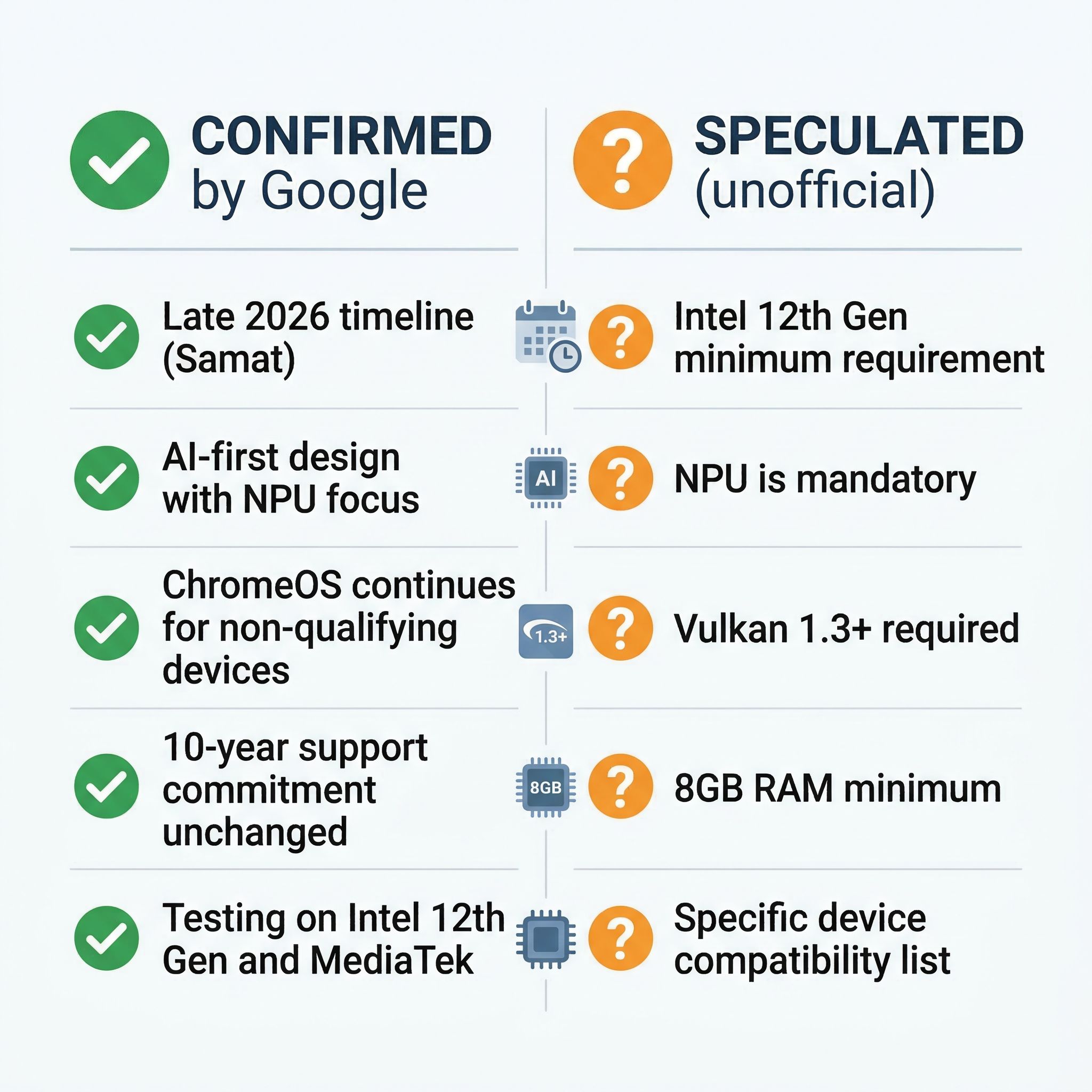
Let me be clear about something upfront: Google has not published an official compatibility list or minimum system requirements for Aluminium OS. Various tech sites have circulated specific specs like “Intel 12th Gen minimum” or “NPU required,” but many of these claims trace back to unofficial fan sites or circular reporting rather than official Google statements. Before buying or panicking based on a spec list you found online, it’s worth understanding what Google has actually said versus what the tech press has inferred.
What we know for certain is that Sameer Samat confirmed Aluminium OS is built with AI capabilities at its core, leveraging CPUs, GPUs, and Neural Processing Units for on-device features like summarization and context-aware assistance. He also confirmed that development for ChromeOS “will absolutely continue as is” for devices that don’t migrate. John Maletis has separately confirmed that the 10-year automatic update commitment remains in place regardless of which platform a device runs, meaning your Chromebook isn’t losing support even if it never sees Aluminium OS.
What Google has been less forthcoming about is exactly which hardware gets to make the jump. The company has been observed testing Aluminium OS on Intel Alder Lake (12th Gen) and MediaTek Kompanio chipsets, and the internal testing tiers labeled “AL Mass Premium,” “AL Premium,” and “AL Entry” suggest different hardware levels will get different experiences. But “we tested it on this hardware” is not the same thing as “this is the minimum requirement,” and Google has been careful not to draw that line publicly.
The Timeline Question: 2026 or 2028?
The timeline situation is more nuanced than the headlines suggest. Samat’s March interview confirmed he’s excited about “later this year,” but court documents from the antitrust case indicate the 2026 milestone is limited to “commercial trusted testers,” with the full consumer release potentially not arriving until 2028. These two statements aren’t necessarily contradictory. Google could absolutely ship a limited tester version in late 2026 while the mainstream rollout follows years later. We covered the court document revelations in detail when they surfaced in February.
What this means practically is that even if Aluminium OS devices appear at Google I/O in May or ship to partners later this year, the version your existing Chromebook might eventually receive is likely further out. First-generation platforms always have rough edges, and Google’s cautious enterprise and education rollout suggests they know this. The people who need to worry least about the timeline are the ones who already own Chromebooks. Your device works today, it’ll work tomorrow, and Google’s support commitment extends through 2033-2034 for recent purchases.
What the Evidence Suggests About Hardware Requirements
While Google hasn’t published official specs, the available evidence points to a reasonably clear picture of what’s likely needed. We’re presenting this as our best assessment based on testing observations, Google’s AI-first design philosophy, and the hardware in recently certified Chromebook Plus devices, not as confirmed minimum requirements.
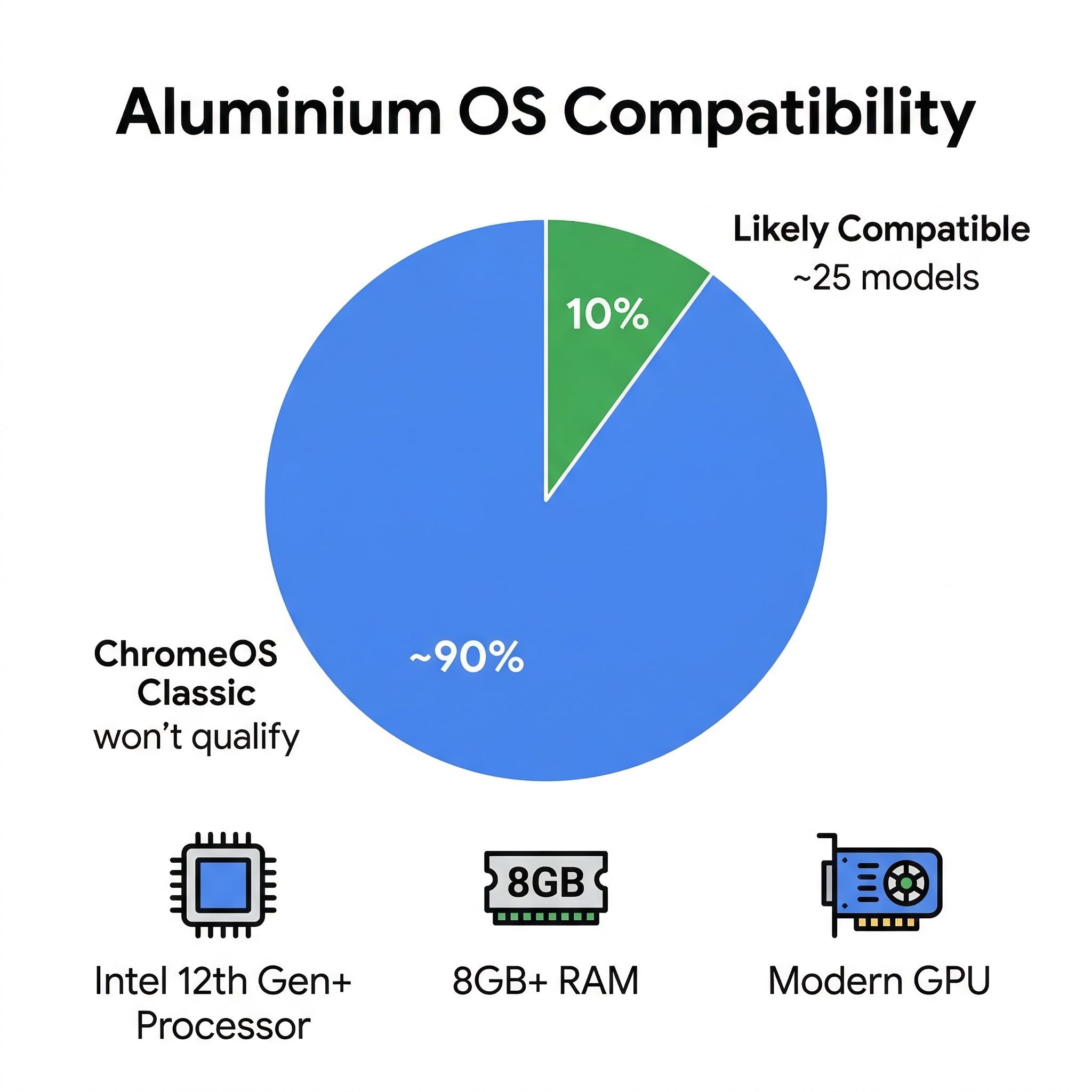
Processor generation is the strongest signal. Google’s testing has been observed exclusively on Intel 12th Gen (Alder Lake) and newer chipsets, plus recent MediaTek Kompanio and Qualcomm Snapdragon platforms. Older Intel Celeron and Pentium chips from pre-2022 generations are almost certainly out. The Chromebook Plus certification program, which launched in late 2023 with minimum requirements including Intel 12th Gen or equivalent processors, looks increasingly like a preview of the Aluminium OS hardware baseline.
RAM is the second major factor. Chromebook Plus requires 8GB minimum, and given Aluminium OS’s emphasis on on-device AI features, 8GB seems like the floor. The vast majority of budget Chromebooks ship with 4GB of RAM, which has always been adequate for ChromeOS but would likely struggle with Android-based workloads plus AI models running locally. If your Chromebook has 4GB of RAM, the odds of it receiving Aluminium OS are slim regardless of its processor.
AI hardware support is the wild card. Samat’s emphasis on NPU-powered features suggests devices with dedicated neural processing hardware will get the best Aluminium OS experience, but whether an NPU is a hard requirement or simply enables premium features remains unclear. Some of the MediaTek Kompanio chips being tested don’t have traditional dedicated NPUs, which suggests Google may be flexible about how AI workloads are handled across CPU, GPU, and dedicated silicon.
Storage and GPU round out the likely requirements. Modern Vulkan graphics support and at least 64GB of storage (preferably 128GB+) align with what Android typically needs for a full desktop experience, especially once you factor in Android app installations alongside system files. Many older Chromebooks ship with just 32GB of eMMC storage, which barely fits ChromeOS today and would be completely inadequate for an Android-based system running local AI models. If your Chromebook has 32GB of storage, that alone may disqualify it regardless of other specs.
Which Chromebooks in Our Database Likely Qualify
We went through our entire Chromebook product database and identified the models that meet what we believe are the likely requirements: a processor from 2022 or newer (Intel 12th Gen, recent MediaTek Kompanio, or equivalent) plus at least 8GB of RAM in at least one configuration. The results are sobering. Out of hundreds of Chromebook models we track, only about 25 currently published models hit both criteria.
The premium end of the qualifying list is encouraging. The Acer Chromebook Spin 714 with its Intel Core i5-1335U processor and up to 16GB of RAM is exactly the kind of device that should transition smoothly. The Acer Chromebook Plus 516 GE with its Intel Core 5 processor and 16-inch display is another strong candidate, and it was designed with the Chromebook Plus certification that increasingly looks like the Aluminium OS preview program.
The mid-range picture is where things get interesting. Devices like the ASUS Chromebook Plus CX34 with an Intel Core i3-1215U and 8GB of RAM sit right on what appears to be the boundary. They meet the likely processor and RAM requirements, but they lack dedicated NPUs. Whether these devices get a full Aluminium OS experience, a limited version, or stay on ChromeOS depends on decisions Google hasn’t made public yet.
The budget segment tells the starkest story. Chromebooks with Intel Celeron N4000 or N4020 processors, 4GB of RAM, and 32GB eMMC storage represent the majority of Chromebooks sold globally, especially in education. These devices were never designed for the kind of workloads Aluminium OS is targeting, and they’ll remain on ChromeOS for their full support lifecycle. That’s not a failure. It’s a recognition that a $200 education laptop from 2021 was built for web browsing and Google Docs, and it still does those things perfectly well.
What “ChromeOS Classic” Actually Means
Google hasn’t used the term “ChromeOS Classic” officially, but it’s a useful shorthand for what happens to Chromebooks that don’t make the Aluminium OS cut. These devices will continue receiving ChromeOS updates, including security patches and feature improvements, through their full 10-year Auto Update Expiration date. A Chromebook purchased in 2024 will receive updates through at least 2034, well past the point when most people replace their laptops.
The practical difference between a ChromeOS Classic device and an Aluminium OS device will likely mirror the difference between an older iPhone running iOS 17 and a newer one running iOS 19. The older device still works, still gets security updates, and still runs the apps you use every day. It just doesn’t get the newest features. For the millions of Chromebooks in schools and offices doing exactly what they were designed to do, that’s a perfectly acceptable outcome.
Where it gets more complicated is for people who bought mid-range Chromebooks expecting them to be their primary computers for five or more years. If you spent $500 on a Chromebook in 2023 with an Intel 11th Gen processor and 8GB of RAM, you might have a device that’s powerful enough to run Aluminium OS but falls just outside the compatibility window due to its processor generation. That’s a frustrating position, and Google’s lack of transparency about the exact cutoff makes it worse.
Should You Buy a Chromebook Right Now?
Here’s my honest take: yes, but buy smart.
If you need a laptop today and want the best chance of eventually running Aluminium OS, look for Chromebook Plus certified devices. They already meet the 8GB RAM and modern processor requirements that appear to be the baseline, and Google has every incentive to ensure its premium certification program aligns with its next-generation platform. Devices with Intel 12th Gen or newer processors, or recent MediaTek and Qualcomm chips, are your safest bets.
If you don’t care about Aluminium OS and just want a reliable Chromebook for everyday use, the equation hasn’t changed at all. ChromeOS works great today, will continue to work great tomorrow, and your device will receive updates for its full 10-year lifecycle. A $300 Chromebook that does everything you need isn’t suddenly a bad purchase because it might not get a platform upgrade two years from now.
The one thing I’d avoid is buying a new Chromebook today with 4GB of RAM and an older processor at anything close to full price. Those devices are approaching the end of their design relevance regardless of Aluminium OS. If you’re spending money on new hardware, spending a bit more to get 8GB of RAM and a current-generation processor is worth it for the option value alone.
We’ll know significantly more after Google I/O 2026, which is expected in May. If Google follows its usual playbook, that’s when we’ll get official hardware requirements, a migration timeline, and likely the first public demos of Aluminium OS on real hardware. Until then, the advice is simple: buy what works for you today, look for Chromebook Plus certification if you want future-proofing, and don’t lose sleep over a platform transition that’s designed to be gradual and backwards-compatible.
For the full technical breakdown of what Aluminium OS is and how it works, check out our original deep-dive from January. And for the court document revelations about the 2034 ChromeOS phaseout timeline, we covered that in detail last month.


