
Acer Chromebook 14
Updated on

Note: The Acer Chromebook 14 (CB3-431) reached its Auto Update Expiration date in June 2022 and no longer receives Chrome OS updates from Google. While the hardware may still function, we recommend considering a newer Chromebook for continued security updates and feature support.
The Acer Chromebook 14 (CB3-431) made waves when it launched in 2016 by proving that budget Chromebooks could deliver premium build quality. With its all-aluminum construction reminiscent of the MacBook Air, vibrant 14-inch 1080p IPS display, and price tag under $300, Acer created a compelling package for students and productivity users who wanted more than the typical plastic Chromebook experience. The Intel Celeron N3160 processor paired with 4GB of RAM handled everyday Chrome OS tasks competently, though demanding workloads like high-resolution video playback revealed its limitations. For those seeking a current alternative with similar build quality, consider the Acer Chromebook Plus 514 or ASUS Chromebook CX1 (CX1500).
Related Videos
Acer Chromebook 14 Comparison Chart
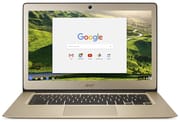 Acer Chromebook 14 | Acer Chromebook 14 | 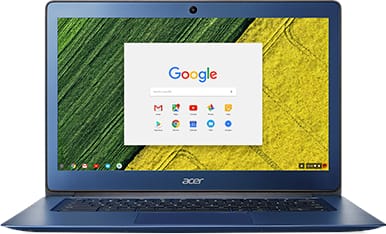 Acer Chromebook 14 | Acer Chromebook 14 | Acer Chromebook 14 | |
| Price | List Price: $299.99 Amazon Prices: | List Price: $299.99 Amazon Prices: | List Price: $299.99 Amazon Prices: | List Price: $249.99 Amazon Prices: | List Price: $349.99 Amazon Prices: |
| Model number | CB3-431-C5FM / NX.GC2AA.007 | CB3-431-C0AK / NX.GJEAA.001 | CB3-431-C539 / NX.GU7AA.001 | CB3-431-C99D / NX.GC2AA.016 | CB3-431-C6ZB / NX.GJEAA.002 |
| Performance Rating | 2.5 | 2.5 | 2.5 | 2.4 | 2.5 |
| Chromebook Plus | No | No | No | No | No |
| Processor | Quad-core 1.60 Ghz (max 2.24 Ghz) Intel Celeron Processor N3160 | Quad-core 1.60 Ghz (max 2.24 Ghz) Intel Celeron Processor N3160 | Quad-core 1.60 Ghz (max 2.24 Ghz) Intel Celeron Processor N3160 | Dual-core 1.60 Ghz (max 2.48 Ghz) Intel Celeron Processor N3060 | Quad-core 1.60 Ghz (max 2.24 Ghz) Intel Celeron Processor N3160 |
| RAM | 4 GB | 4 GB | 4 GB | 4 GB | 4 GB |
| Internal Storage | 32 GB eMMC | 32 GB eMMC | 32 GB eMMC | 16 GB eMMC | 32 GB eMMC |
| Screen Size | 14" | 14" | 14" | 14" | 14" |
| Screen Resolution | 1920x1080 | 1920x1080 | 1920x1080 | 1366x768 | 1920x1080 |
| Screen Type | IPS | IPS | IPS | IPS | IPS |
| Touch Screen | No | No | No | No | No |
| Stylus / Pen | No Stylus Support | No Stylus Support | No Stylus Support | No Stylus Support | No Stylus Support |
| Dimensions width x length x thickness | 13.4 x 9.3 x 0.7 inches (340.36 x 236.22 x 17.78 mm) | 13.4 x 9.3 x 0.7 inches (340.36 x 236.22 x 17.78 mm) | 13.4 x 9.3 x 0.7 inches (340.36 x 236.22 x 17.78 mm) | 13.4 x 9.3 x 0.7 inches (340.36 x 236.22 x 17.78 mm) | 13.4 x 9.3 x 0.7 inches (340.36 x 236.22 x 17.78 mm) |
| Weight | 3.4 lbs (1.55 kg) | 3.4 lbs (1.55 kg) | 3.4 lbs (1.55 kg) | 3.4 lbs (1.55 kg) | 3.4 lbs (1.55 kg) |
| Backlit Keyboard | No | No | No | No | No |
| Webcam | 1280x720 | 1280x720 | 1280x720 | 1280x720 | 1280x720 |
| WiFi | 802.11ac with MIMO (2.4GHz and 5GHz) | 802.11ac with MIMO (2.4GHz and 5GHz) | 802.11ac with MIMO (2.4GHz and 5GHz) | 802.11ac with MIMO (2.4GHz and 5GHz) | 802.11ac with MIMO (2.4GHz and 5GHz) |
| Bluetooth | Bluetooth 4.2 | Bluetooth 4.2 | Bluetooth 4.2 | Bluetooth 4.2 | Bluetooth 4.2 |
| Ethernet | No | No | No | No | No |
| Cellular Modem | No | No | No | No | No |
| HDMI | Full-Size HDMI | Full-Size HDMI | Full-Size HDMI | Full-Size HDMI | Full-Size HDMI |
| USB Ports | 2 USB 3 | 2 USB 3 | 2 USB 3 | 2 USB 3 | 2 USB 3 |
| Thunderbolt Ports | No | No | No | No | No |
| Card Reader | No Card Reader | No Card Reader | No Card Reader | No Card Reader | No Card Reader |
| Battery | 3 cell, 3950 mAh, Lithium-ion | 3 cell, 3950 mAh, Lithium-ion | 3 cell, 3950 mAh, Lithium-ion | 3 cell, 3950 mAh, Lithium-ion | 3 cell, 3950 mAh, Lithium-ion |
| Battery Life | 12.0 hours | 12.0 hours | 12.0 hours | 12.0 hours | 12.0 hours |
| Fanless | Yes | Yes | Yes | Yes | Yes |
| Auto Update Expiration Date | June, 2022 | June, 2022 | June, 2022 | June, 2022 | June, 2022 |
Related Chromebooks
-
 Acer Chromebook 514The Acer Chromebook 514 shines with its Full HD IPS touch display, fanless design for silent…
 -
 Acer Chromebook 314The Acer Chromebook 314 offers a crisp 14-inch FHD IPS display, 12.5 hours of battery life, and a…
 -
 ASUS Chromebook C403The ASUS Chromebook C403 shines with a 14-inch anti-glare display, robust 12-hour battery life, and…
 -
 ASUS Chromebook CX1 (CX1400)The ASUS Chromebook CX1 combines a 14-inch anti-glare FHD display, 12-hour battery life, and…
 -
 HP Chromebook 14The HP Chromebook 14 was a popular budget Chromebook known for its WLED-backlit display,…
 -
 HP Chromebook 14 (AMD)The HP Chromebook 14 combines a 14-inch WLED-backlit display, TrueVision HD webcam, and fanless…
Detailed Insights into the Acer Chromebook 14
The Acer Chromebook 14’s all-aluminum chassis was its defining characteristic and set it apart from the sea of plastic budget laptops available at the time. TechRadar described it as “solid as they come with an all-metal enclosure that is rigid, with minimal flexing and almost no creaking.” At 3.4 pounds and just 0.67 inches thick, the device struck a balance between portability and durability. The brushed metal finish in silver, gold, and blue variants gave buyers options that looked more expensive than the $299 price tag suggested. The fanless design meant completely silent operation, which proved valuable in quiet study environments and libraries.
The 14-inch 1920x1080 IPS display was another standout feature for this price range, where many competitors offered only 768p screens. Digital Trends praised the “vibrant 1080p display” and gave the Chromebook an 8/10 score. The matte finish reduced glare and improved outdoor visibility, while IPS technology provided wide viewing angles essential for sharing content with others. However, Laptop Mag noted that brightness could be insufficient in well-lit environments, measuring below average in their testing.
Performance was adequate for the intended use case but showed clear boundaries. The quad-core Intel Celeron N3160 processor achieved an Octane score of around 8,186, which translated to smooth web browsing, document editing, and standard-definition video streaming. However, TechRadar found “video playback was hit-and-miss, with stuttering and dropped frames while watching 1080p HD video.” Battery life was marketed at 12 hours but real-world testing consistently showed 8-10 hours depending on workload. Laptop Mag’s battery test recorded an impressive 9 hours and 25 minutes, making it genuinely capable of lasting through a full school or work day.
Reviewer Insights on the Acer Chromebook 14
Lon.TV’s Perspective
Lon Seidman from Lon.TV provided one of the most thorough reviews of the Chromebook 14, praising its build quality while documenting specific limitations. He noted that the “all aluminum, a pretty nice design here, really nice display” made it feel premium despite its budget positioning. His benchmark testing showed the Octane score of 8,186, typical for this processor class. Lon appreciated the 180-degree hinge that allows the screen to lay flat, useful for sharing content in meetings or classrooms. However, he criticized the trackpad as lacking precision with a “sticky” feel, and pointed out the conspicuous absence of an SD card slot that could have expanded the limited 32GB storage. The lack of Ethernet also meant users needing a wired connection required a USB Ethernet adapter. His recommendation was conditional: a good value if you prioritize aesthetics and display quality over raw performance.
Techusiast’s Review
Techusiast compared the Chromebook 14 favorably to Apple’s MacBook Pro in terms of design language, noting that “the design is fairly minimal and it takes a lot of cues from Apple’s MacBook Pro lineup.” He found the keyboard “really easy and comfortable to type on” and “very quiet,” making it suitable for library use and shared workspaces. The review highlighted that the battery genuinely “allows you to go through a full work day without charging,” validating claims of extended endurance. His assessment was highly favorable for students seeking a premium-feeling device on a budget, though he acknowledged the power button placement on the keyboard and the loud trackpad click as minor annoyances. He concluded that “this Acer Chromebook pretty much excels at everything” within its intended use case of basic productivity and web browsing.
Professional Press Consensus
The tech press largely agreed on the Chromebook 14’s strengths and weaknesses. Digital Trends gave it a “Recommended” verdict and 8/10 score, emphasizing how “the Acer Chromebook 14 feels way nicer than any $300 laptop deserves to.” TechRadar awarded 3.5/5 stars with the caveat about HD video playback issues. Laptop Mag’s review similarly gave 3.5/5, praising the “sturdy aluminum chassis” and “long battery life” while noting the “shallow keyboard” and “dim display” as drawbacks. The consistent theme across reviews was that Acer delivered exceptional build quality for the price while making understandable compromises in display brightness and input devices to hit the $299 price point.
Customer Reviews of the Acer Chromebook 14
Amazon customers who purchased the Acer Chromebook 14 over its product lifetime echoed many professional reviewer observations. The aluminum build quality consistently earned praise, with many buyers comparing the feel to laptops costing twice as much. Students appreciated the combination of light weight and durability for daily transport between classes. Battery life satisfied most users, with the majority reporting that the Chromebook easily lasted through a full day of classes or work before needing a charge.
The lack of an SD card slot emerged as the most frequent criticism from customers, especially those who wanted to expand beyond the 32GB internal storage. Some users who primarily worked offline found the limited storage constraining. The trackpad received mixed reviews, with some finding it adequate while others complained about the loud clicking sound and occasionally imprecise cursor movement. Customers using the device primarily for web browsing, document editing, and video streaming reported satisfaction, while those who tried more demanding tasks like running Android apps or video conferencing encountered performance limits. The overall sentiment reflected strong value perception with realistic expectations about what a $299 laptop could deliver.
Conclusion
The Acer Chromebook 14 (CB3-431) represented an important moment in Chromebook evolution, proving that affordable laptops could offer premium materials and thoughtful design without breaking the budget. Its all-aluminum construction, 14-inch 1080p IPS display, and exceptional battery life set a standard that competitors had to match. While the Intel Celeron N3160 processor showed its limitations with demanding workloads and the absence of an SD card slot frustrated users wanting storage expansion, these were understandable trade-offs at the $299 price point. The device served its intended audience of students and basic productivity users well during its active support period. Now past its Auto Update Expiration date, the Chromebook 14 stands as a reminder of how Acer helped elevate expectations for what budget Chromebooks could be. Those seeking a similar experience with current software support should explore modern options like the Acer Chromebook Plus 514 or browse our full Chromebook comparison.