
Acer Chromebook 314
Updated on

The Acer Chromebook 314 represents Acer’s commitment to delivering practical, budget-friendly computing for students and everyday users. With its 14-inch Full HD IPS display, Intel Celeron N4000 processor, and an impressive 12.5 hours of battery life, this Chromebook strikes a balance between functionality and affordability that few competitors can match. The fanless design ensures completely silent operation, making it ideal for quiet study environments, libraries, or shared workspaces. Whether you’re taking notes in class, streaming videos, or handling everyday productivity tasks, the CB314-1H series delivers reliable Chrome OS performance at a price point that won’t strain a student budget. The touch-enabled CB314-1HT variants add another layer of versatility for those who prefer a more interactive experience.
| Pros | Cons |
|---|---|
| Outstanding 12-13+ hour battery life exceeds most competitors (Trusted Reviews tested 13.5 hours) | No keyboard backlighting makes typing difficult in low light |
| Premium all-aluminum build quality gives MacBook-like appearance (Technical Magic: 5/5 stars) | 768p display option creates fuzzy appearance on 14-inch screen |
| Dual USB-C ports both support charging - can plug in from either side | Intel Celeron N4000 processor limits capability to basic tasks only |
| Completely fanless design for silent operation in quiet environments | No external display ports - requires USB-C adapter for monitors |
| Excellent value starting at $200-$280 - half the price of comparable touchscreen models | No touchscreen on base CB314-1H model |
| Solid keyboard with satisfying tactile feedback (TechRadar) | No fingerprint reader for biometric security |
Related Videos
Acer Chromebook 314 Comparison Chart
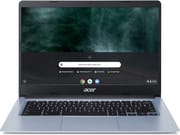 Acer Chromebook 314 | Acer Chromebook 314 | Acer Chromebook 314 | Acer Chromebook 314 | Acer Chromebook 314 | |
| Price | List Price: $299.99 Amazon Prices: Loading prices... | List Price: $279.99 Amazon Prices: Loading prices... | List Price: $249.99 Amazon Prices: Loading prices... | List Price: $279.99 Amazon Prices: Loading prices... | List Price: $219 Amazon Prices: Loading prices... |
| Model number | CB314-1H-C17S / NX.ATFAA.001 | CB314-1H-C884 / NX.HKDAA.005 | CB314-1H-C34N / NX.HKDAA.003 | CB314-1HT-C7C0 / NX.HKEAA.003 | CB314-1HT-C3ET |
| Performance Rating | 3.1 | 3.1 | 3.1 | 3.1 | 3.1 |
| Chromebook Plus | No | No | No | No | No |
| Processor | Dual-core 1.10 Ghz (max 2.60 Ghz) Intel Celeron N4000 Processor | Dual-core 1.10 Ghz (max 2.60 Ghz) Intel Celeron N4000 Processor | Dual-core 1.10 Ghz (max 2.60 Ghz) Intel Celeron N4000 Processor | Dual-core 1.10 Ghz (max 2.60 Ghz) Intel Celeron N4000 Processor | Dual-core 1.10 Ghz (max 2.60 Ghz) Intel Celeron N4000 Processor |
| RAM | 4 GB | 4 GB | 4 GB | 4 GB | 4 GB |
| Internal Storage | 32 GB eMMC | 64 GB eMMC | 64 GB eMMC | 64 GB eMMC | 64 GB eMMC |
| Screen Size | 14" | 14" | 14" | 14" | 14" |
| Screen Resolution | 1920x1080 | 1920x1080 | 1920x1080 | 1920x1080 | 1920x1080 |
| Screen Type | IPS | IPS | IPS | IPS | IPS |
| Touch Screen | No | No | No | No | Yes |
| Stylus / Pen | No Stylus Support | No Stylus Support | No Stylus Support | No Stylus Support | No Stylus Support |
| Dimensions width x length x thickness | 12.8 x 9.1 x 0.78 inches (325.12 x 231.14 x 19.81 mm) | 12.8 x 9.1 x 0.78 inches (325.12 x 231.14 x 19.81 mm) | 12.8 x 9.1 x 0.78 inches (325.12 x 231.14 x 19.81 mm) | 12.8 x 9.1 x 0.78 inches (325.12 x 231.14 x 19.81 mm) | 12.8 x 9.1 x 0.78 inches (325.12 x 231.14 x 19.81 mm) |
| Weight | 3.75 lbs (1.7 kg) | 3.75 lbs (1.7 kg) | 3.75 lbs (1.7 kg) | 3.75 lbs (1.7 kg) | 3.75 lbs (1.7 kg) |
| Backlit Keyboard | No | No | No | No | No |
| Webcam | 1280x720 | 1280x720 | 1280x720 | 1280x720 | 1280x720 |
| WiFi | Wi-Fi 5 (802.11ac with 2x2 MU-MIMO) | Wi-Fi 5 (802.11ac with 2x2 MU-MIMO) | Wi-Fi 5 (802.11ac with 2x2 MU-MIMO) | Wi-Fi 5 (802.11ac with 2x2 MU-MIMO) | Wi-Fi 5 (802.11ac with 2x2 MU-MIMO) |
| Bluetooth | Bluetooth 5.0 | Bluetooth 5.0 | Bluetooth 5.0 | Bluetooth 5.0 | Bluetooth 5.0 |
| Ethernet | No | No | No | No | No |
| Cellular Modem | No | No | No | No | No |
| HDMI | No HDMI | No HDMI | No HDMI | No HDMI | No HDMI |
| USB Ports | 2 USB 3, 2 USB-C (USB-C supports DisplayPort and charging) | 2 USB 3, 2 USB-C (USB-C supports DisplayPort and charging) | 2 USB 3, 2 USB-C (USB-C supports DisplayPort and charging) | 2 USB 3, 2 USB-C (USB-C supports DisplayPort and charging) | 2 USB 3, 2 USB-C (USB-C supports DisplayPort and charging) |
| Thunderbolt Ports | No | No | No | No | No |
| Card Reader | microSD Card Reader | microSD Card Reader | microSD Card Reader | microSD Card Reader | microSD Card Reader |
| Battery | 3 cell, Lithium-ion | 3 cell, Lithium-ion | 3 cell, Lithium-ion | 3 cell, Lithium-ion | 3 cell, Lithium-ion |
| Battery Life | 12.5 hours | 12.5 hours | 12.5 hours | 12.5 hours | 12.5 hours |
| Fanless | Yes | Yes | Yes | Yes | Yes |
| Auto Update Expiration Date | June, 2027 | June, 2027 | June, 2027 | June, 2027 | June, 2027 |
Related Chromebooks
-
 Acer Chromebook 314The Acer Chromebook 314 combines a crisp 1920x1080 IPS display with a robust 12.5-hour battery life…
 -
 Acer Chromebook 314 (CB314-4H/4HT)A budget-friendly 14-inch Chromebook with Intel Alder Lake-N processors, WiFi 6E, and software…
 -
 HP Chromebook 14 G7The HP Chromebook 14 G7 packs a 14-inch anti-glare WLED screen, Wi-Fi 6, a 720p HD webcam, and…
 -
 HP Chromebook 14 G6The HP Chromebook 14 G6 offers a 14-inch anti-glare TN display, Wi-Fi 5 connectivity, and up to…
 -
 Samsung Galaxy Chromebook Go 14"The Samsung Galaxy Chromebook Go offers LTE connectivity, military-grade durability, and a…
 -
 ASUS Chromebook C425The ASUS Chromebook C425 boasts a crisp 14-inch 1080p IPS display, a backlit keyboard, and fanless…
Detailed Insights into the Acer Chromebook 314

The Acer Chromebook 314 showcases thoughtful engineering that prioritizes the needs of budget-conscious users without cutting corners on build quality. The all-aluminum chassis gives the device a premium feel that belies its affordable price tag, with Technical Magic noting that “it’s nice with the all-aluminum finish, it makes it almost look like a MacBook.” This attention to materials extends to the keyboard, which delivers a satisfying typing experience with good key travel and tactile feedback. TechRadar praised the keyboard as “satisfying with a good click and clack,” while the trackpad was found to interact well with all finger movements and commands. The 14-inch display provides ample screen real estate for productivity tasks, though models with the 1366x768 resolution may appear less sharp than the Full HD variants.
Performance on the Intel Celeron N4000 processor is designed for everyday Chrome OS tasks rather than demanding applications. Web browsing, document editing, email, and video streaming all run smoothly, but users should set appropriate expectations for multitasking with many tabs or running Android applications. Trusted Reviews benchmarked the device at 428 points single-core and 799 points multi-core on Geekbench 5, noting it’s significantly slower than laptops with more powerful processors. However, for the target use case of basic computing tasks, the performance is entirely adequate. The fanless design means the Chromebook operates in complete silence regardless of workload, a genuine advantage in classroom settings or quiet study environments where fan noise from other laptops can be distracting.
The port selection covers all essential connectivity needs without requiring a dongle bag. Two USB-C ports handle charging and video output, with both ports capable of accepting the power adapter - a thoughtful design that lets you plug in from either side of the device. Two USB-A 3.0 ports accommodate legacy peripherals like flash drives and external mice, while the microSD card reader provides expandable storage for media files. The 720p webcam handles video calls adequately, though don’t expect exceptional image quality in challenging lighting conditions. Wi-Fi 5 with 2x2 MU-MIMO ensures reliable wireless connectivity, and Bluetooth 5.0 supports wireless headphones, mice, and other accessories without issues. For wired networking, a USB Ethernet adapter can be connected through the USB-C or USB-A ports.
Reviewer Insights on the Acer Chromebook 314

TechRadar’s Perspective
TechRadar awarded the Chromebook 314 an impressive 4.5 out of 5 stars, calling it “a tremendous Chromebook harboring great performance and battery life.” Their reviewer Rob Dwiar highlighted how the device works “extremely within its limitations,” managing to balance performance, battery life, features, usability, and design for a well-rounded computing experience. They were particularly impressed by the crisp, clear, and bright screen with plenty of space to arrange apps, along with the roomy 14-inch display that makes productivity tasks more comfortable. The review noted that the keyboard provides a satisfying typing experience, while the touchpad responds well to gestures and commands. The main criticisms centered on the lack of external display ports requiring an adapter for monitor connections, and the absence of a touchscreen option on the base model.
Trusted Reviews’ Assessment
Trusted Reviews gave the Chromebook 314 a matching 4.5 out of 5 rating, emphasizing its “great value for money” as a budget device for basic computing tasks. Reviewer Reece Bithrey conducted hands-on battery testing that revealed impressive real-world endurance of 13.5 hours, exceeding their 10-hour benchmark and validating Acer’s battery life claims. The solid build quality with its distinctive steely blue finish drew praise, as did the comprehensive port selection featuring two USB-C and two USB-A ports plus a microSD card reader. However, the review was critical of the display on some variants, noting that the 1366x768 resolution creates a “fuzzy” appearance on the 14-inch screen, and the panel is “dim at maximum brightness with flat colors.” For students and budget-conscious users prioritizing affordability and battery longevity over visual quality or processing power, it earned a recommendation.
Technical Magic’s Hands-On Review
Technical Magic provided a detailed hands-on review, giving the Chromebook 314 a solid 4 out of 5 stars overall while awarding the build quality a perfect 5 out of 5 stars. Their reviewer was particularly impressed by the all-aluminum construction that gives the laptop a premium appearance despite its budget positioning. They highlighted the practical advantages of the dual USB-C charging capability, noting “you can charge from both sides so I can charge from this side or on the other side.” The fanless, passively-cooled design was praised for enabling completely silent operation. On the negative side, they pointed out the lack of keyboard backlighting as a significant drawback for evening use, and acknowledged that the Intel UHD 600 graphics won’t handle demanding games like Minecraft smoothly.
Paul’s Take Comparison
Paul’s Take offered a unique value-focused perspective by directly comparing the $200 Chromebook 314 against the $450 Acer Chromebook 315 touchscreen model. Their testing revealed a surprising finding: the cheaper Chromebook 314 actually delivers a brighter display than its more expensive touchscreen sibling. This discovery reinforced the Chromebook 314’s exceptional value proposition, demonstrating that the $250 price difference doesn’t always translate to a universally better experience. For users who don’t need touchscreen functionality, the CB314-1H offers the same 4GB RAM, same 14-inch screen size, and arguably better display brightness at less than half the price.
Professional reviewers consistently agree that the Acer Chromebook 314 excels as a budget-friendly option for basic computing needs. The consensus highlights exceptional battery life, premium-feeling build quality at an affordable price, and adequate performance for everyday Chrome OS tasks. The main criticisms focus on display limitations in some configurations and the expected performance constraints of the Intel Celeron processor.
Customer Reviews of the Acer Chromebook 314
Amazon customers have responded positively to the Acer Chromebook 314, with the device maintaining strong ratings across multiple variants. The CB314-1H-C884 model with 64GB storage holds a 4.4-star rating from over 1,300 reviews, while the newer CB314-1H-C17S variant earns 4.2 stars. Customers frequently praise the exceptional battery life as their favorite feature, with many reporting that it easily lasts through a full day of classes or work without needing to charge. Parents purchasing for students appreciate the durable construction and the value proposition of getting a reliable Chromebook under $300 that handles homework, research, and streaming without issues.
The most common complaints center on the expected limitations of budget hardware. Some users note that the display, while adequate, doesn’t match the vibrancy of more expensive laptops, and the lack of keyboard backlighting frustrates those who work or study in dimly lit environments. Performance-conscious users sometimes wish for more processing power when running multiple Android apps or keeping many browser tabs open simultaneously. However, the overwhelming sentiment is that for the price point, the Chromebook 314 delivers exactly what students and casual users need without unnecessary expense. Reviewers frequently recommend it as a gift for students starting school or as a secondary device for simple computing tasks.
Conclusion
The Acer Chromebook 314 earns its reputation as one of the best budget Chromebooks available for students and everyday users. Its combination of premium all-aluminum build quality, exceptional 12+ hour battery life, and reliable Chrome OS performance at prices starting around $200-$250 makes it an easy recommendation for anyone prioritizing value. While power users will find the Intel Celeron processor limiting and display enthusiasts may prefer higher-resolution panels, these trade-offs are expected and acceptable at this price point. The fanless design, dual-sided USB-C charging, and comprehensive port selection demonstrate thoughtful engineering that serves the needs of its target audience without unnecessary expense. For students heading to school, remote workers needing a secondary device, or anyone seeking an affordable, capable Chromebook for everyday tasks, the Acer Chromebook 314 delivers where it counts. The touch-enabled CB314-1HT variants offer additional versatility at a modest premium for those who prefer touchscreen interaction.
Frequently Asked Questions
How long does the Acer Chromebook 314 battery last?
Acer rates the Chromebook 314 at 12.5 hours of battery life, and real-world testing confirms this is achievable. Trusted Reviews measured 13.5 hours in their battery rundown test, exceeding even Acer’s advertised claims. For typical student or office use with web browsing, document editing, and occasional video streaming, expect all-day battery life without needing to charge.
Can the Acer Chromebook 314 run Android apps?
Yes, the Chromebook 314 supports Android apps from the Google Play Store. However, with the Intel Celeron N4000 processor and 4GB of RAM, you should limit yourself to lightweight Android apps. Productivity apps, streaming services, and casual games run fine, but demanding games or running many Android apps simultaneously may cause slowdowns.
Is the Acer Chromebook 314 good for students?
The Chromebook 314 is an excellent choice for students, which is why multiple reviewers specifically recommend it for school use. The all-day battery life means no hunting for outlets between classes, the durable aluminum build survives backpack transport, and the 14-inch display provides comfortable screen real estate for writing papers and research. Performance handles Google Docs, web research, and video calls easily. The lack of keyboard backlighting is the main drawback for late-night study sessions.
What’s the difference between CB314-1H and CB314-1HT?
The “T” suffix indicates a touchscreen variant. The CB314-1H models have a standard non-touch display, while CB314-1HT models include a touchscreen for tapping, swiping, and interacting directly with the screen. Both share the same Intel Celeron N4000 processor, 4GB RAM, and other specifications. The touchscreen variants typically cost $20-50 more but offer more intuitive interaction, especially useful for Android apps.
Can I connect an external monitor to the Chromebook 314?
Yes, though you’ll need a USB-C to HDMI or USB-C to DisplayPort adapter since the Chromebook 314 lacks dedicated video output ports. Both USB-C ports support video output via DisplayPort alternate mode, so you can connect external monitors using the appropriate adapter. This is a common design choice in thin laptops to minimize port count and thickness.
When does the Acer Chromebook 314 stop receiving updates?
The Acer Chromebook 314 (CB314-1H/CB314-1HT) receives Chrome OS automatic updates until June 2027. This Auto Update Expiration (AUE) date means you’ll continue getting security patches, new Chrome OS features, and Google Play Store access until then. After the AUE date, the Chromebook will still function but won’t receive further software updates.