
Acer Chromebook 14 for Work
Updated on

Note: The Acer Chromebook 14 for Work reached its Auto Update Expiration (AUE) in June 2023 and no longer receives Chrome OS updates. This page is preserved for historical reference, but we recommend looking at current Chromebook options for purchase.
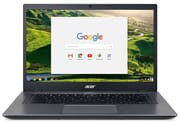
The Acer Chromebook 14 for Work (CP5-471) was Acer’s 2016 entry into the enterprise Chromebook market. It was built to MIL-STD 810G military durability standards and carried a Corning Gorilla Glass lid, aimed at corporate and educational fleets that valued durability and longevity over consumer styling. Processor options ran from the Intel Celeron 3855U to the Core i5-6200U, so a buyer could match the machine to a workload and a budget.
Related Videos
Acer Chromebook 14 for Work Comparison Chart
4 configurations
| Configuration | Processor | RAM | Storage | Screen | List price | Amazon price | Compare |
|---|---|---|---|---|---|---|---|
| CP5-471-581N / NX.GE8AA.003 | Core i5-6200U | 8 GB | 32 GB eMMC | 1920x1080 | $749.99 | Details
| |
| CP5-471-312N / NX.GDDAA.004 | Core i3-6100U | 8 GB | 32 GB eMMC | 1920x1080 | $599.99 | Details
| |
| CP5-471-C0EX / NX.GDDAA.001 | Celeron 3855U | 4 GB | 16 GB eMMC | 1366x768 | $349.99 | Details
| |
| CP5-471-35T4 / NX.GDDAA.002 | Core i3-6100U | 4 GB | 32 GB eMMC | 1366x768 | $499.99 | Details
|
Specs shared by every configuration
| Chromebook Plus | No |
|---|---|
| Screen Size | 14" |
| Touch Screen | No |
| Stylus / Pen | No Stylus Support |
| Dimensions width x length x thickness | 13 x 8.9 x 0.9 inches (330.2 x 226.06 x 22.86 mm) |
| Weight | 3.2 lbs (1.45 kg) |
| Backlit Keyboard | Yes |
| Webcam | HD |
| WiFi | 802.11 a/b/g/n/ac |
| Bluetooth | Bluetooth 4.0 |
| Ethernet | No |
| Cellular Modem | No |
| HDMI | Full-Size HDMI |
| USB Ports | 2 USB 3, 1 USB-C |
| Thunderbolt Ports | No |
| Card Reader | SD |
| Battery | 3 cell, 3920 mAh, Lithium Polymer |
| Battery Life | 10.0 hours |
| Fanless | No |
| Auto Update Expiration Date | June, 2023 |
Related Chromebooks
-
 Acer Chromebook 314 (CB314-4H/4HT)A budget-friendly 14-inch Chromebook with Intel Alder Lake-N processors, WiFi 6E, and software…
 -
 Acer Chromebook 311 (AMD)The Acer Chromebook 311 (CB311-10H) is an 11.6-inch ChromeOS laptop on an AMD A4-9120C with 4GB of…
 -
 ASUS Chromebook C423The ASUS Chromebook C423 pairs a 14-inch 1366x768 display with a dual-core Celeron N3350, 4GB of…
 -
 HP Chromebook 14 (AMD)The HP Chromebook 14 (AMD) is a fanless 14-inch Chromebook built on the AMD A4-9120C APU with…
 -
 ASUS Chromebook C424The ASUS Chromebook C424 boasts a crisp 14-inch FHD anti-glare display, durable spill-resistant…
 -
 HP Chromebook 14a (ne Series)The HP Chromebook 14a (ne series) is a 14-inch ChromeOS laptop on an Intel Celeron N4500 with 4GB…
A Gorilla Glass shell over an ordinary screen
The Corning Vibrant Gorilla Glass lid resisted scratches, and it let a company print a logo or other branding directly beneath the glass surface, which mattered to buyers deploying a branded fleet. The glass felt sturdy in the hand, though it was a fingerprint magnet that required frequent cleaning.
NotebookCheck’s testing found solid construction with good hinges and minimal flex, while Computerworld noted that meeting the U.S. military standard meant it “can survive drops of 48 in., 132 lbs. of downward force, high and low temperatures, rain, sand and dust.” The spill-resistant keyboard included drainage holes to protect internal components from liquid accidents, a practical feature for busy office environments. Although no built-in Ethernet was included, users could connect a USB Ethernet adapter through the USB-A port for wired networking.
The base Celeron 3855U models handled everyday web browsing and productivity tasks adequately, while the Core i5-6200U variants delivered snappy performance. Computerworld reported the unit “booted in about six seconds” and noted the system “still snapped even with 25 browser windows open.” NotebookCheck’s testing found quiet thermals, with fan noise maxing out at only 34 dB(A) even under load. The 45Wh battery delivered approximately 9-10 hours of real-world usage, meeting Acer’s claims.
Lower-end configurations shipped with a 1366x768 TN panel that drew criticism for poor viewing angles and limited brightness. Higher-end models featured a 1920x1080 IPS display with a matte anti-glare finish that proved more suitable for professional work, though NotebookCheck measured brightness at only 213 nits, making outdoor use challenging. The narrow bezels around the display allowed Acer to fit a 14-inch screen into a form factor comparable to many 13.3-inch laptops.
Reviewer Insights
Miguel Chavez’s Perspective
Miguel Chavez from Chavez DIY spent 14 minutes with the machine on camera. He was struck by the Gorilla Glass lid, stating “the top looks absolutely gorgeous. I love it.” He compared the design favorably to Acer’s C720, calling it “a reincarnated C720 with thinner bezels, a better keyboard design, and this nice gloss on the outside.”
Chavez covered the durability features as well, including the spill-resistant keyboard with drainage holes and the ability to survive drops and downward pressure. He was disappointed by the low-resolution TN display on his unit and found the bottom-firing speakers average, but he concluded, “I think that you’re getting a lot of bang for your buck overall with this Chromebook.”
Brad Linder’s Perspective
Brad Linder from Liliputing focused on the enterprise-specific features that set this Chromebook apart from consumer models. He explained that the Gorilla Glass lid was designed so “companies can put their corporate logos or something else underneath the screen,” enabling branded fleet deployments.
Linder appreciated the range of processor options available, from Celeron to Core i5, giving IT departments flexibility in their deployments. He noted the device was “not too bad” at three and a half pounds for a 14-inch laptop, though the 0.9-inch thickness made it bulkier than some consumer alternatives. His overall assessment positioned it as a practical choice for corporate and educational environments where durability trumps portability.
Reviewers rated the build highly and the display poorly
TechRadar awarded it 3.5 out of 5 stars, praising the backlit keyboard, diverse port selection, and strong performance, while criticizing the dim screen and inconsistent trackpad feedback. They noted the high-end i5 model’s $750 price point was steep for a Chrome OS device, though it competed with premium options like the Chromebook Pixel.
NotebookCheck’s comprehensive testing earned it an 83% rating; the review highlighted excellent thermal management and build quality while noting the display brightness limitations and slow SD card reader speeds. Computerworld was more enthusiastic, declaring it “proof that Chromebooks have survived and are ready for the adult world” and recommending it for enterprise consideration.
Android Central’s pre-launch hands-on centered on the Gorilla Glass lid, which lets Acer print a pattern directly onto the glass, along with the spill-resistant keyboard and a military-standard drop rating of up to 48 inches. The presenter expected a price of around $400 at launch.
The 2016 push to put Chromebooks in offices
By 2016, Chrome OS had moved past its early reputation as an education-only platform and was attracting interest from corporate buyers who wanted a thin-client experience without the management overhead of Windows. The CP5-471 arrived in the middle of that transition, alongside other enterprise-targeted machines like the Dell Chromebook 13 7310 and the HP Chromebook 13 G1. Each manufacturer was testing whether a Chromebook could replace a business laptop for knowledge workers rather than merely supplement a Windows desktop.
Acer staked its answer on durability and manageability rather than raw performance. Acer’s marketing leaned heavily on the MIL-STD 810G certification, the spill-resistant keyboard, and the Gorilla Glass lid because those features mattered to IT departments shopping for fleets that would be handed to sales reps, field technicians, and frontline workers. The product was sold primarily through Acer’s commercial channel rather than retail electronics aisles, with model numbers like NX.GE8AA.003 and NX.GDDAA.001 telling resellers which CPU, RAM, and storage configuration they were ordering.
Chrome management licenses (around $150 per device for enterprise at the time, sold separately from the hardware) were the connective tissue that made these deployments viable. An IT administrator could enroll a fleet of these machines into the Google Admin console, push policies, restrict apps, manage updates, and wipe a lost device remotely. That model anticipated by several years what eventually became Chrome Enterprise Upgrade, and this was one of the first generation of devices specifically built to fit that workflow. Acer also positioned the device against the consumer-oriented Chromebook 14 (CB3-431) by giving the Work variant a metal-and-glass chassis, a higher-resolution display option, and a backlit keyboard, all of which the consumer line lacked.
What an owner can still do after the update cutoff
The CP5-471’s Auto Update Expiration arrived in June 2023, roughly seven years after launch. After that date, Google stopped shipping security patches, browser updates, and component driver fixes. The device still boots, the browser still works, and most cloud applications still load, but the operating system is now a frozen target. Each month adds browser-engine vulnerabilities the machine will never be patched against.
The safest move for an owner with a working unit in a drawer is to retire it from any task that touches sensitive accounts. Online banking, primary email, password managers, and admin consoles should not run on an out-of-update browser. Repurposing the machine for low-risk, single-purpose work (a kitchen recipe screen, a guest browsing terminal, a kid’s offline media player) keeps the hardware useful without putting accounts at risk.
The more ambitious option is to replace the firmware and install a current Linux distribution. Community projects such as the Mr Chromebox firmware utility cover most Skylake-era Chromebooks, letting owners flash a UEFI-compatible firmware in place of the original Chrome OS firmware. From there, lightweight distributions such as Linux Mint, Xubuntu, or Debian XFCE install with normal installers rather than the developer-mode workarounds that plagued earlier Chromebook Linux setups. The i5-6200U and 8GB RAM variants in particular have enough headroom to run a modern Linux desktop comfortably for another several years; the Celeron 3855U / 4GB configurations will feel sluggish but still serve for browsing and document editing.
Owners who prefer to stay inside Chrome OS should at minimum stop signing into Google accounts that have access to corporate or financial data, and treat the device as a sandboxed appliance. Disabling extensions, clearing site data on close, and running browsing sessions in guest mode narrow the attack surface. None of this restores security updates, but it does limit the damage if the browser is exploited.
What held up well and what did not
Strengths
- Premium chassis with the Gorilla Glass lid and the option to brand the surface for fleet deployments.
- MIL-STD 810G durability certification, which Computerworld reported meant the device “can survive drops of 48 in., 132 lbs. of downward force, high and low temperatures, rain, sand and dust.”
- Spill-resistant keyboard with drainage holes plus a comfortable backlit layout.
- Wide processor ladder, from Celeron 3855U through Core i3-6100U up to Core i5-6200U, spanning roughly $350 to $750 at launch.
- Battery life around 9 to 10 hours of workday usage, matching Acer’s published claim per NotebookCheck.
- Quiet thermals, with fan noise NotebookCheck capped at only 34 dB(A) even under load.
Weaknesses
- Display brightness NotebookCheck measured at only 213 nits, which limits outdoor and bright-office usability.
- Lower-tier configurations shipped with a 1366x768 TN panel that aged poorly compared to the 1920x1080 IPS option.
- No built-in Ethernet; users had to rely on a USB-to-Ethernet adapter for wired networking.
- Bottom-firing speakers, which Chavez rated as average.
- At 0.9 inches thick and roughly 3.2 pounds, the chassis sat on the heavy side of the 14-inch class.
- AUE arrived in June 2023, ending official Chrome OS updates and removing the device from the supported-fleet list for any organization that runs a current Chrome management policy.
A tough fleet machine that outlived its updates
The Acer Chromebook 14 for Work showed that a Chromebook could be built to survive corporate and educational deployments without giving up the simplicity and managed security of Chrome OS. The Gorilla Glass lid, MIL-STD 810G durability certification, and spill-resistant keyboard made that case.
An organization shopping for a Chrome OS fleet today will find that same durability in current enterprise models, paired with updated hardware and longer support timelines.
If you are evaluating current options, the Chromebook Comparison Chart puts today’s models side by side to help you find the right fit.
Frequently Asked Questions
Is the Acer Chromebook 14 for Work still receiving Chrome OS updates?
No. The CP5-471 reached its Auto Update Expiration in June 2023 and no longer receives Chrome OS security patches, browser updates, or driver fixes from Google. The device still boots and runs, but the browser engine is frozen at its last update, so it should not be used for accounts with access to sensitive data.
What processor options shipped in the CP5-471?
Three Skylake-era processors were offered: the Intel Celeron 3855U (entry tier, around $349 to $499), the Intel Core i3-6100U (mid tier, around $599), and the Intel Core i5-6200U (top tier, around $749). All three used Intel HD Graphics 510 or 520 and shared the same 14-inch chassis; the differences showed up under sustained workloads and during multi-tab browsing.
Can the CP5-471 run Linux after AUE?
Yes. The Mr Chromebox firmware utility covers most Skylake-era Chromebooks, so an owner can flash UEFI-compatible firmware and then install Linux Mint, Xubuntu, or Debian XFCE with a normal installer. The 8GB / Core i5 variants handle a modern desktop comfortably; the 4GB Celeron variants suit browsing and document work.
Was the RAM or storage upgradeable on the CP5-471?
No. Both RAM and the eMMC storage were soldered to the mainboard. The CP5-471 shipped in fixed 4GB / 16GB, 4GB / 32GB, and 8GB / 32GB configurations depending on the SKU, and owners had to choose the right tier at purchase. External storage was supported through USB-A, USB-C, and the SD card reader.
What was the difference between the consumer Chromebook 14 (CB3-431) and the Chromebook 14 for Work (CP5-471)?
Despite sharing the “Chromebook 14” name, these were two different product lines. The consumer CB3-431 used an Intel Celeron N3060 or N3160 (Braswell), shipped without a backlit keyboard, and was sold through retail at lower price points. The CP5-471 stepped up to Skylake U-series processors, added the backlit keyboard, used a metal-and-Gorilla-Glass chassis, carried the MIL-STD 810G durability certification, and was sold primarily through commercial channels for managed business deployments.
Does the Acer Chromebook 14 for Work have a touchscreen?
No. The CP5-471 is a traditional clamshell laptop with a non-touch display across every variant. Acer did not ship a touchscreen or convertible version of this specific model. Buyers who wanted touch input in a business-class Chromebook in this era typically looked at the Asus Chromebook Flip C302 or the convertible HP Chromebook x360 11 G1 EE instead.